


Market order, limit order and stop order: A complete comparison guide

The early stages of your cryptocurrency trading career are crucial, and there’s nothing more important for a novice trader than knowing the key differences between the basic order types. Market orders, limit orders and stop orders are the three basic order types used in crypto trading. Each one works differently, and depends upon your trading goals: entering or exiting a position immediately, waiting for a better price orprotecting yourself from losses.
The type of order you choose determines whether your trade takes place immediately, executes only at a specific price, or is triggered under certain conditions. Using the incorrect order can lead to missed opportunities or unexpected outcomes, especially in fast-moving or volatile markets such as cryptocurrency.
In this article, we break down each basic order type with clear examples to help you understand when and why each one should be used.
Key Takeaways:
There are three basic order types used in crypto trading — market, limit and stop.
A market order buys or sells immediately at the current price; a limit order buys or sells only at a specified price or better; and a stop order triggers a request to buy or sell once the price reaches a set level.
Choosing the right order type helps you manage risk, control trade execution and avoid unwanted price slippage.

What is a market order?
A market order is the most straightforward type of crypto order. It tells the exchange to buy or sell a coin immediately at the best available price. You're not setting any conditions or waiting for a specific price. Basically, you’re saying “just get it done now at the current best available rate.:
Market orders are useful when speed matters more than price. For example, if the market is moving fast and you don't want to miss your chance, or if you need to exit a position urgently, a market order gets you in or out without delay. It's also useful when trading large, liquid coins, such as Bitcoin (BTC) or Ether (ETH), because price depth is high and spreads are tighter.
The biggest downside of market orders is the lack of price control. You don't know exactly what price you'll get in advance; you only know that the order will fill. If the order book is thin or market volatility is high, the trade may execute at a different price than what you’ve seen just a moment earlier. This is called slippage, and it can be substantial within volatile or low-volume markets. Slippage occurs when there aren't enough orders at your expected price to fill your market order, so your order goes through the order book and fills at a (potentially) worse price than you’d hoped. The larger your order or the thinner the market, the larger the slippage can be. Slippage can also be positive, delivering you a better price than the one at which you placed your order.
How market orders work
Another factor to consider is that market orders always fill against the existing limit orders in the book. This means that you're paying the spread, and often crossing multiple price levels if the order size is large — a consideration that can make market orders more expensive than limit orders in terms of execution.
A market order gives you certainty of execution, but not certainty of crypto or stock price. That trade-off is essential to understand: if precision is more important than speed — or if you're trading illiquid pairs — market orders can backfire.
Let's say BTC is currently showing $115,000 on the chart. You place a market order to buy 1 BTC. But only a small amount is available at $115,000 — and the rest gets filled at higher prices, such as $115,100 or $115,200. In the end, you pay a bit more than $115,000. That extra cost is due to slippage. In this example, the slippage is bound to be small, since we used BTC — the second-most liquid asset on most exchanges after Tether (USDT). However, slippage can be substantial for smaller-cap altcoins, particularly on less liquid exchanges.
So while market orders are simple and fast, they work best when the coin is liquid, your order size is small relative to market depth and a specific price isn't your top priority.
How to place a market order
To place a market order, first visit Bybit’s homepage and click on Trade in the top menu to open the main trading interface. If you haven’t registered for a Bybit account, you can easily do so by visiting the exchange’s registration page.
Once you’re on the trading page, select Market for the order type in the right panel.
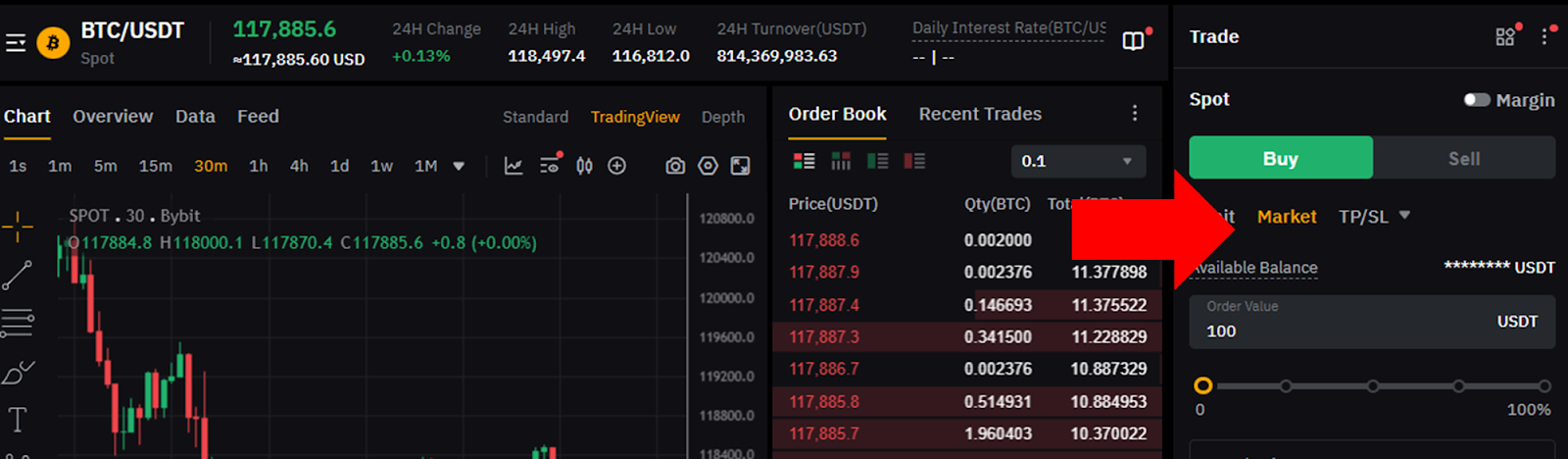
In the same right panel, specify other order details — e.g., Buy or Sell, order value and amount to borrow — if using margin trading.
What is a limit order?
A limit order is an instruction to buy or sell a cryptocurrency at a specific price or better. Unlike a market order, which executes immediately at the best available price, a limit order will only execute if the market price reaches the price you’ve set (or improves upon it). This means that your order may sit open for some time, waiting for the price to move to your target level.
Limit orders give you precise control over the price you pay or receive. For example, if you want to buy BTC at a lower price than the current market, you place a buy limit order at that price. Similarly, if you want to sell BTC to lock in profits when it reaches a higher price, you place a sell limit order at your desired profit level. This ability to specify exact entry or exit prices makes limit orders valuable for planned trading strategies.
The primary advantage of limit orders is that of price control: you avoid the risk of paying more than you want or selling for less than your target price. However, the downside is the uncertainty of execution. If the market never reaches your limit price, your order remains unfilled — and you could miss trading opportunities.
Another point to consider is that limit orders add liquidity to the market, because they sit in the order book, waiting for other orders to match them. Depending upon their fee structures, this can sometimes earn you lower trading fees (or even rebates) on certain exchanges.
How limit orders work
Limit orders are best used when price matters more than speed. For example: Suppose you want to buy BTC only if it drops to a certain level, or sell only if it reaches a specified profit target. In this case, limit orders allow you to set those conditions, without your having to constantly monitor the market.
For example, suppose BTC is currently trading at $115,000 and you want to take profits if the price hits $120,000. You place a sell limit order at $120,000. This means your order will execute only when BTC reaches $120,000 or higher. In this scenario, there's no maximum purchase price, so any price over $120,000 will trigger an order. If the price climbs to $120,000, your order fills, and you lock in profits. If the market price fails to reach $120,000 and falls instead, your order stays open, and you keep holding your BTC.
Similarly, if you want to buy BTC, but only if it drops to $110,000, you place a buy limit order for the minimum sale price of $110,000. If the market price falls to $110,000 or below, your order executes, and you purchase BTC at that price or better. If the price stays above $110,000, however, your order remains unfilled.
Limit orders are useful tools for traders who want to plan their entries and exits ahead of time, avoid chasing prices and maintain control over their trade execution prices. The trade-off is that you sacrifice immediacy, since there's no guarantee your order will fill if the market doesn't reach your set price.
How to place a limit order
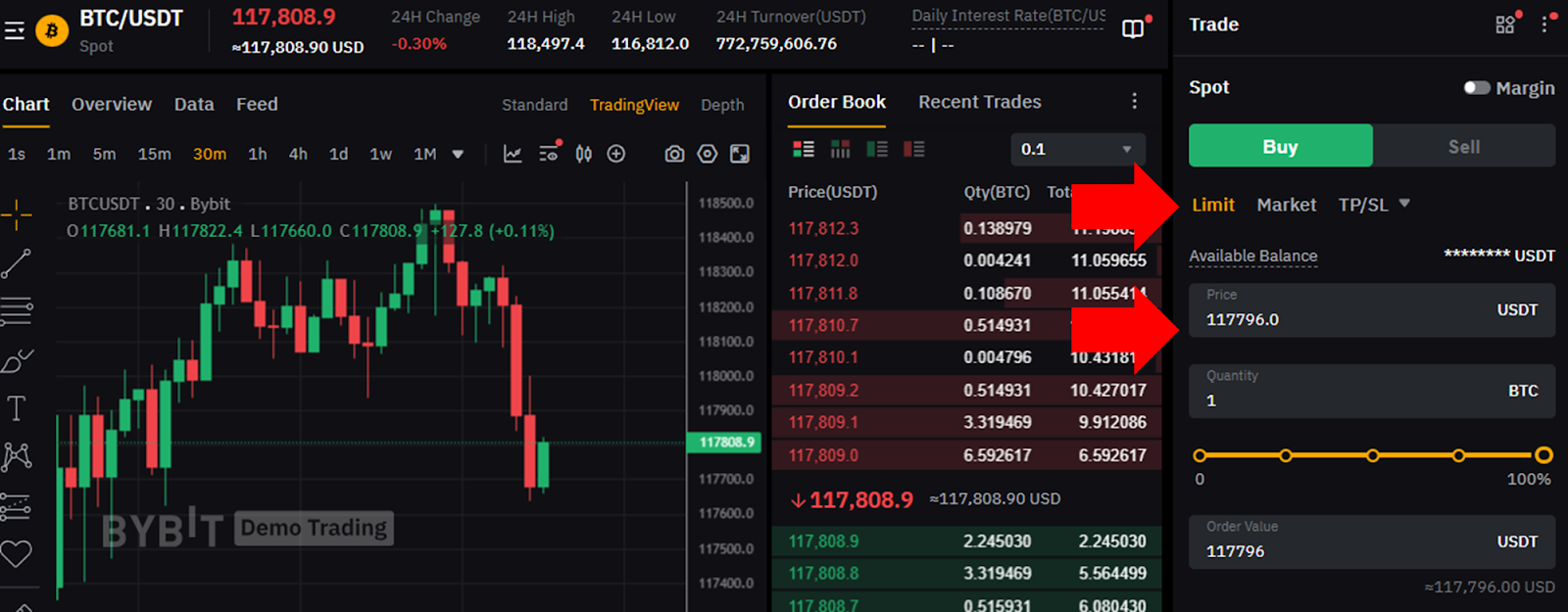
To place a limit order, first visit Bybit’s homepage and click on Trade in the top menu to open the main trading interface. In the right panel, select Limit as the order type. Unlike with a market order, you’ll also need to provide a specified limit price at which you wish to buy the asset (if you’ve selected the green Buy button) or sell it (if you’ve selected the red Sell button).
What is a stop order?
A stop order, or a stop-entry order, is an instruction to buy or sell an asset once its price reaches a specific level called the stop price. When the price hits that level, the stop order triggers and turns into either a market order or a limit order, depending upon how you’ve set it. The key point is that stop orders remain inactive and hidden until the stop price is reached.
Stop orders are mainly used for risk management and to protect your investments. For example, if you’ve bought BTC at $115,000 and want to avoid losing too much if its price drops, you can place a sell stop order at $113,000. If BTC's price falls to $113,000, your stop order triggers — and automatically sells your BTC. This helps you limit your losses without having to constantly watch the market. You can also use stop buy orders to enter trades after the price moves past a certain point, thus confirming momentum.
There are two main types of stop orders. A stop market order converts to a standard market order once triggered, meaning that it fills immediately at the best available price — which may differ slightly from the stop price, depending upon market conditions. Meanwhile, a stop-limit order converts to a limit order, filling at the stop price or better. This gives you price control, but comes with the risk that the order might not fill if the price moves quickly past your limit.
How stop orders work
At first glance, stop orders and limit orders may look alike, as both types of order involve specific price levels, but they work very differently:
A limit order sets the exact price at which you want to buy or sell, and then waits open in the order book until the market reaches that price or better. It gives you control over the price you pay or receive, and is mainly used to buy low or sell high for profit. However, if the market never hits your limit price, your order won’t execute.
A stop order remains inactive and hidden until the market hits your stop price. Once triggered, it becomes an active order, designed mostly to protect you from losses or to allow you to enter a trade after a price breaks a key level.
In short, the key difference between stop and limit orders lies in their purpose and execution behavior. A stop order is designed primarily to protect your investment, or to allow you to enter a trade when the price moves past a critical point. It triggers only when the market hits your stop price, and then executes immediately (stop market) or place a limit order (stop limit). A limit order, on the other hand, lets you specify the exact price you wish, and then wait for the market to reach it, usually when you’re aiming to buy low or sell high.
How to place a stop order
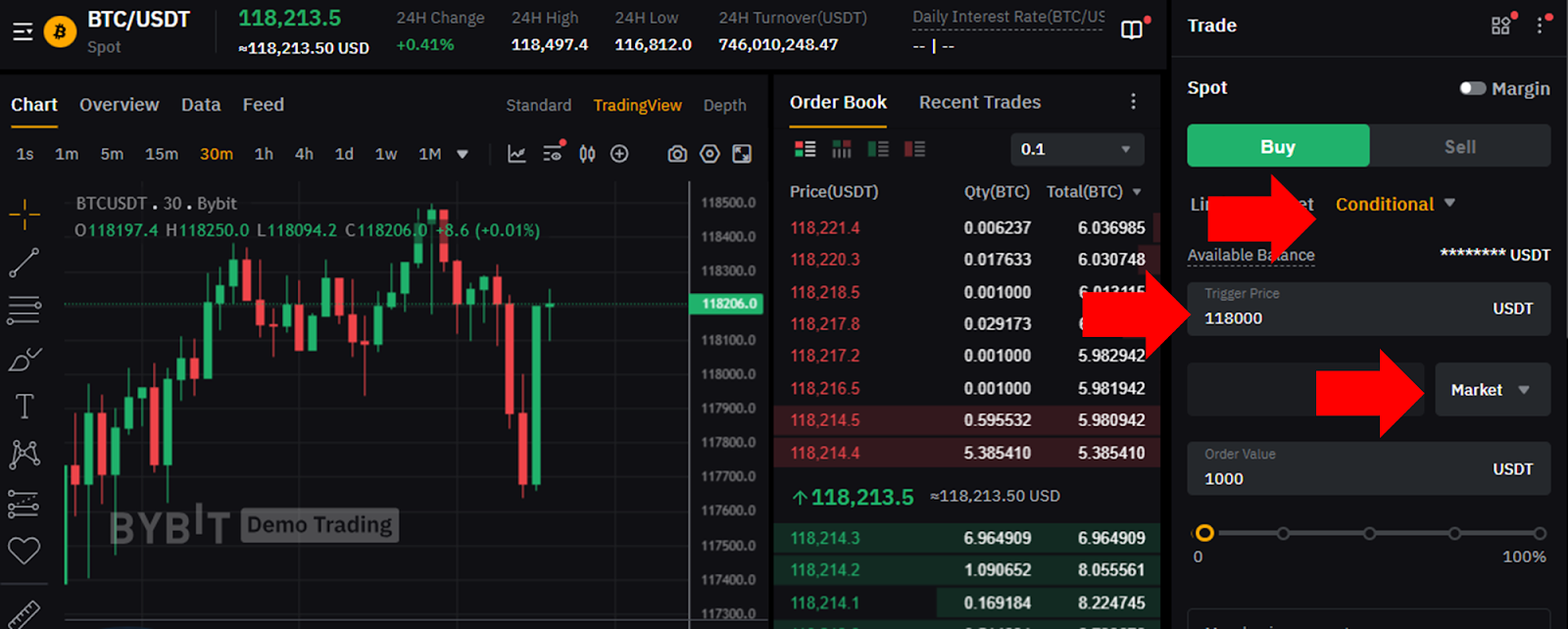
To place a stop order, visit Bybit's homepage and click on Trade in the top menu to open the main trading interface. In the right panel, select Conditional as the order type. Then, specify the trigger price at which your stop order is activated. Underneath the trigger price box, select either Market or Limit for the order type that will be activated if your trigger price is reached. Additionally, you’ll need to provide the other basic order details, such as Buy or Sell and your order quantity.
Below, we present a comparison table for the three basic order types we've covered in terms of their key purpose, execution speed, price control and risk of slippage.
Order type | Purpose | Execution speed | Price control | Risk of slippage |
Market | Immediate execution | Fastest — executes right away | None — accepts current market price | High — price can move during execution |
Limit | Buy low or sell high (take profit) | Can be slow — waits for target price | Full — you set the exact price or better | Low — only executes at your price or better |
Stop | Protect losses or enter on momentum | Is triggered when the stop price is hit, then executes quickly (if set to turn into a market order) | Somewhat limited — triggers at stop price, but execution price varies | Medium to high — especially if the stop triggers a market order |
Closing thoughts
The three basic order types used in crypto trading — market order, limit order and stop order — serve distinct purposes.
Market orders prioritize immediate execution, but sacrifice control over price, which can lead to slippage.
Limit orders give you control over the exact price at which you buy or sell, making them ideal for setting profit targets or entering at preferred prices. However, a limit order may not execute if the market doesn’t reach your set price.
Finally, stop orders act as triggers to protect your position or enter a trade once the price moves beyond a certain point. Stop orders can turn into market or limit orders upon activation, balancing risk management with potential slippage or non-execution.
Knowing when and how to use each order type is critical for managing risk and optimizing your cryptocurrency trading outcomes.
#LearnWithBybit
