


How to trade stocks like Apple, Tesla and NVIDIA on Bybit TradFi

Disclaimer: Please note that Bybit Gold & FX has been renamed to Bybit TradFi as of June 2025. Bybit TradFi is powered by Infra Capital (Mauritius FSC licensed).
In May 2025, Bybit expanded its Bybit TradFi platform by launching real-time USDT-based stock contract for difference (CFD) trading. This innovation allows traders to access a wide range of global equities — including Apple (AAPL), Tesla (TSLA) and NVIDIA (NVDA) — without needing to own the underlying shares.
With stock CFDs, traders can speculate on price movements with up to 5x leverage, using USDT collateral while benefiting from competitive fees. The flexibility of long and short positions enables participants to profit from both rising and falling markets.
This article will guide you through the fundamentals of stock CFD trading and how it differs from spot trading. We will look at what Bybit’s stock CFD offerings are, including key contracts and trading conditions. Finally, we provide a step-by-step guide for setting up and executing trades on the Bybit TradFi platform.
Key Takeaways:
Bybit TradFi now offers over 100 global stocks, including Apple, Tesla and NVIDIA.
Trade real-time stock CFDs with USDT collateral, 5x leverage and no ownership required.
Access advanced trading tools, competitive fees and real-time market execution.
Understanding stock CFDs trading on Bybit
Bybit’s stock CFDs open new opportunities for traders, offering a flexible alternative to traditional stock trading. Here are some of the key benefits:
No ownership required: Unlike spot trading, stock CFDs let you trade based on price movements without owning the shares.
Global stock access: Trade 101 major stocks — including AAPL, TSLA and NVDA — using USDT collateral.
Leverage: Amplify exposure with up to 5x leverage.
Two-way trading: Profit from rising or falling markets with long or short positions.
Spot vs. CFD trading
Spot trading: Buy and own shares, entitling you to dividends and voting rights.
CFD trading: Trade based on price changes without ownership or shareholder rights.
For a detailed explanation of stock CFDs and how they work on Bybit’s TradFi platform, check out the Bybit Help Center.
What are stock CFDs?
Contract for differences are financial instruments that allow traders to participate in stock price movements without owning the underlying asset. When you open a CFD position, you’re essentially entering into a contract with the platform to settle the difference between the stock’s price at the time you open and close the trade.
Here’s what makes Bybit’s stock CFDs an attractive option for traders:
Leverage up to 5x: Amplify your trading exposure with a smaller initial investment. With leverage, you can control larger positions, magnifying both potential profits and risks.
USDT collateral: Instead of purchasing shares outright, traders use USDT as collateral to open and manage positions. On Bybit TradFi, traders’ USDT balances are displayed in USDx, an internal display unit reflecting the representative value of users’ USDT holdings at a 1:1 ratio.
Low fees: Bybit’s stock CFDs feature competitive pricing and tight spreads, with traders enjoying tailored fees on the platform.
Profit from rising or falling prices: Whether the market is bullish or bearish, stock CFDs allow you to open long or short positions. This flexibility provides opportunities in various market conditions.
USDT-based stock trading: On Bybit TradFi, you place all your stock CFD trades using USDT. For traders, this means no fiat currency, bank accounts or delays — so you can start trading immediately without leaving the platform.
With stock CFDs on Bybit’s TradFi platform, traders can engage with top global equities like Apple, Tesla and NVIDIA in a streamlined, flexible and cost-effective manner.
What is Bybit’s TradFi platform?
Bybit’s TradFi platform is a robust multi-asset trading environment that enables traders to access global financial markets with a single account. Combining the advanced features of MetaTrader 5 (MT5) with Bybit’s powerful infrastructure, the platform allows various assets to be traded seamlessly, with deep liquidity and competitive pricing.
On top of that, due to the full integration of MT5 into Bybit TradFi, you don’t have to open an MT5 account or use third-party tools to trade stocks. Instead, everything is available within the same familiar ecosystem via Bybit’s web platform or the Bybit App, connecting crypto traders seamlessly with the traditional finance market.
With Bybit TradFi, traders can access:
101 global stocks, including major names like Apple (AAPL), Tesla (TSLA), NVIDIA (NVDA), Amazon (AMZN), Microsoft (MSFT) and Alphabet (GOOG), all using USDT collateral
Forex pairs, including majors, minors and exotics
Gold, oil and other commodities
Indices, such as the S&P 500 and Nasdaq
The platform features real-time price feeds, over 90 built-in indicators, flexible order types and support for expert advisors (EAs), making it suitable for both novice and experienced traders. Whether trading manually or through automation, Bybit’s TradFi offers an intuitive, hassle-free experience.
For a full list of available stocks and details, visit the official Bybit TradFi platform. Explore Bybit’s Learn Articles on TradFi for additional insights.
Strategies for trading stocks
When trading stock CFDs on Bybit’s TradFi platform, traders benefit from a combination of market, fundamental and technical analysis to improve decision-making and manage risk.
1. Market analysis: Watching the bigger picture
Macroeconomic trends often set the tone for stock performance. Key factors like interest rates, inflation reports and central bank decisions can drive broad market sentiment, especially in growth-sensitive sectors like technology. They also help anticipate price movements in stocks like AAPL or TSLA.
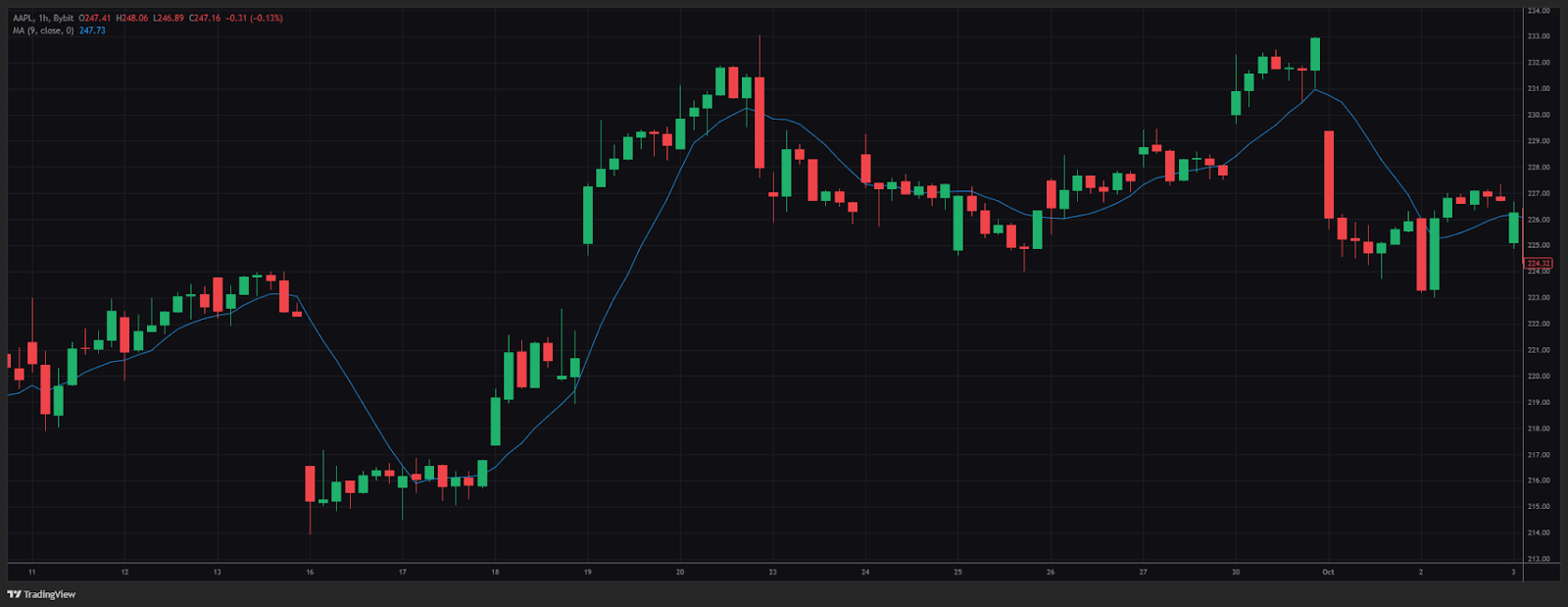
Example: As seen in the screenshot, AAPL stock surged following the US Federal Reserve’s 50 basis point rate cut in September 2024. The decision was aimed at supporting the economy by moving rates toward neutral territory amid rising recession concerns.
Impact: AAPL rallied over 6%, jumping from $219 to $233 within a few sessions. This move was driven by renewed investor optimism and confidence in Fed policy support — highlighting how macro catalysts directly influence equity price action.
2. Company fundamentals: Understanding the business
Evaluating a company’s financial health is essential when trading its stock CFDs. Traders should assess:
Quarterly earnings and revenue trends
Margins, debt ratios and forward guidance
Sector-specific news (e.g., AI chip demand for NVIDIA or consumer trends for Amazon)
This analysis helps differentiate between short-term price noise and sustained business performance.
3. Technical analysis: Decoding price behavior
Bybit TradFi offers comprehensive tools for analyzing price charts.
Traders can:
Interpret candlestick patterns (e.g., pin bars and hammers) to identify potential trend reversals or continuations.
Draw trendlines to visualize support and resistance levels, clarifying potential breakout or breakdown points.
Monitor volume data, which often confirms price direction and highlights periods of increased trading activity.
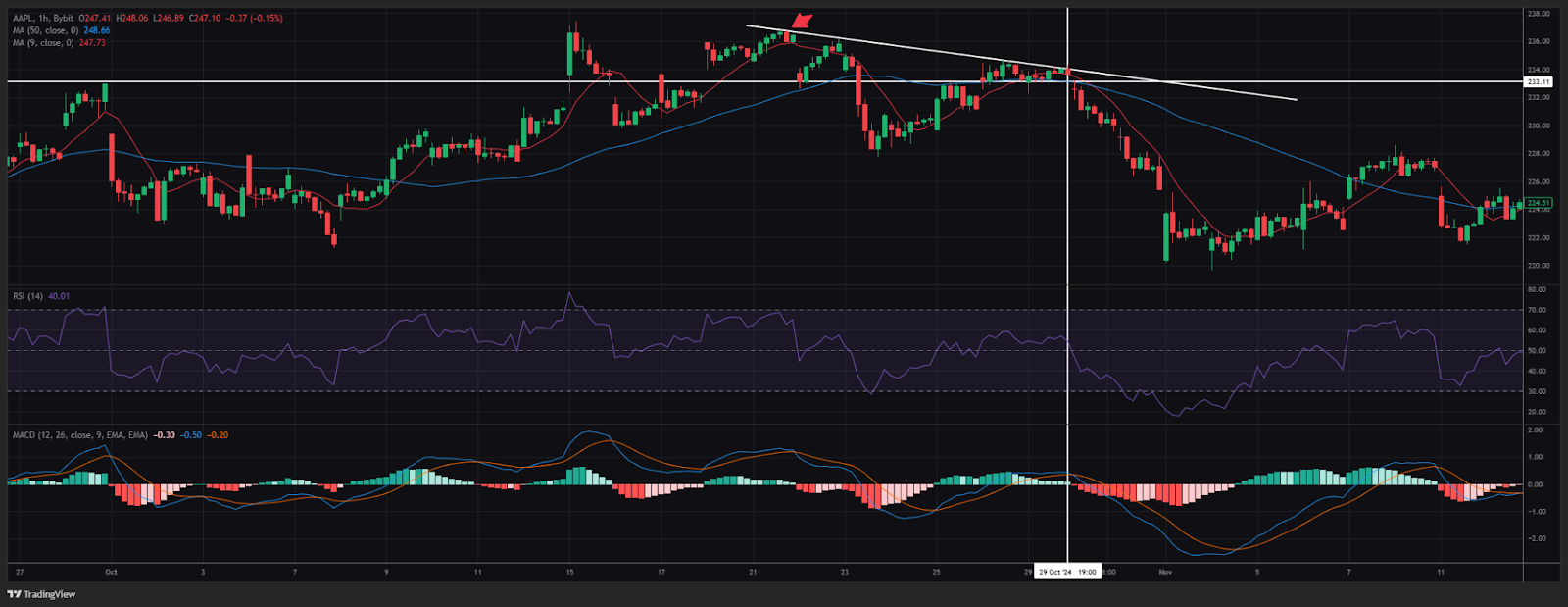
Let’s break down a real chart setup (above) from October 2024 involving AAPL:
Trendline resistance: The price repeatedly tested a descending resistance near $233, suggesting bearish pressure.
RSI bearish crossover: The RSI (14) dropped below 50, indicating declining momentum.
MACD bearish crossover: The MACD line crossed below the signal line, indicating a potential downside shift.
Death cross formation: The short-term moving average (e.g., 50 EMA) crossed below the long-term (e.g., 200 EMA), a textbook bearish signal.
Outcome: Traders acting on these signals could have captured a 6% drop, as AAPL declined from $233 to $219 over several sessions.
Step-by-step guide to trading stock CFDs on Bybit TradFi
Trading stocks on Bybit TradFi Web
Trading stock CFDs like AAPL on Bybit’s TradFi platform is straightforward. Follow these steps to fund your account, open trades and manage positions on the web version of Bybit TradFi:
1. Log in to Bybit and transfer funds
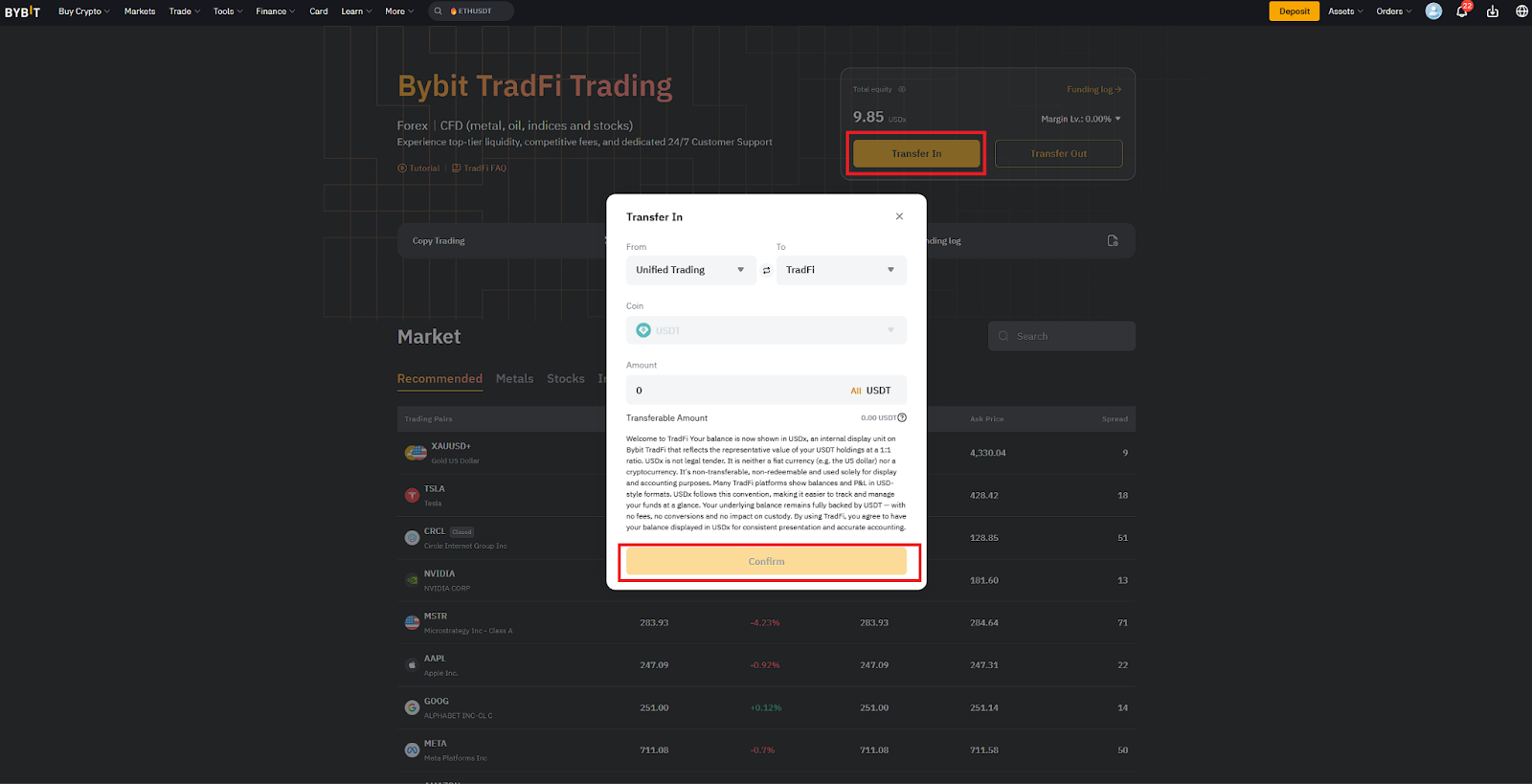
Log in to your Bybit account and navigate to the TradFi Trading page (you can find this inside the Tools menu).
Select Transfer In, then input the amount of USDT you wish to move from your Funding Account or Unified Trading Account to your TradFi Account.
Confirm the transfer. Funds typically update within minutes, ready for trading.
2. Select a stock to trade
Once the USDT transfer to your TradFi Account is complete, you can start trading.
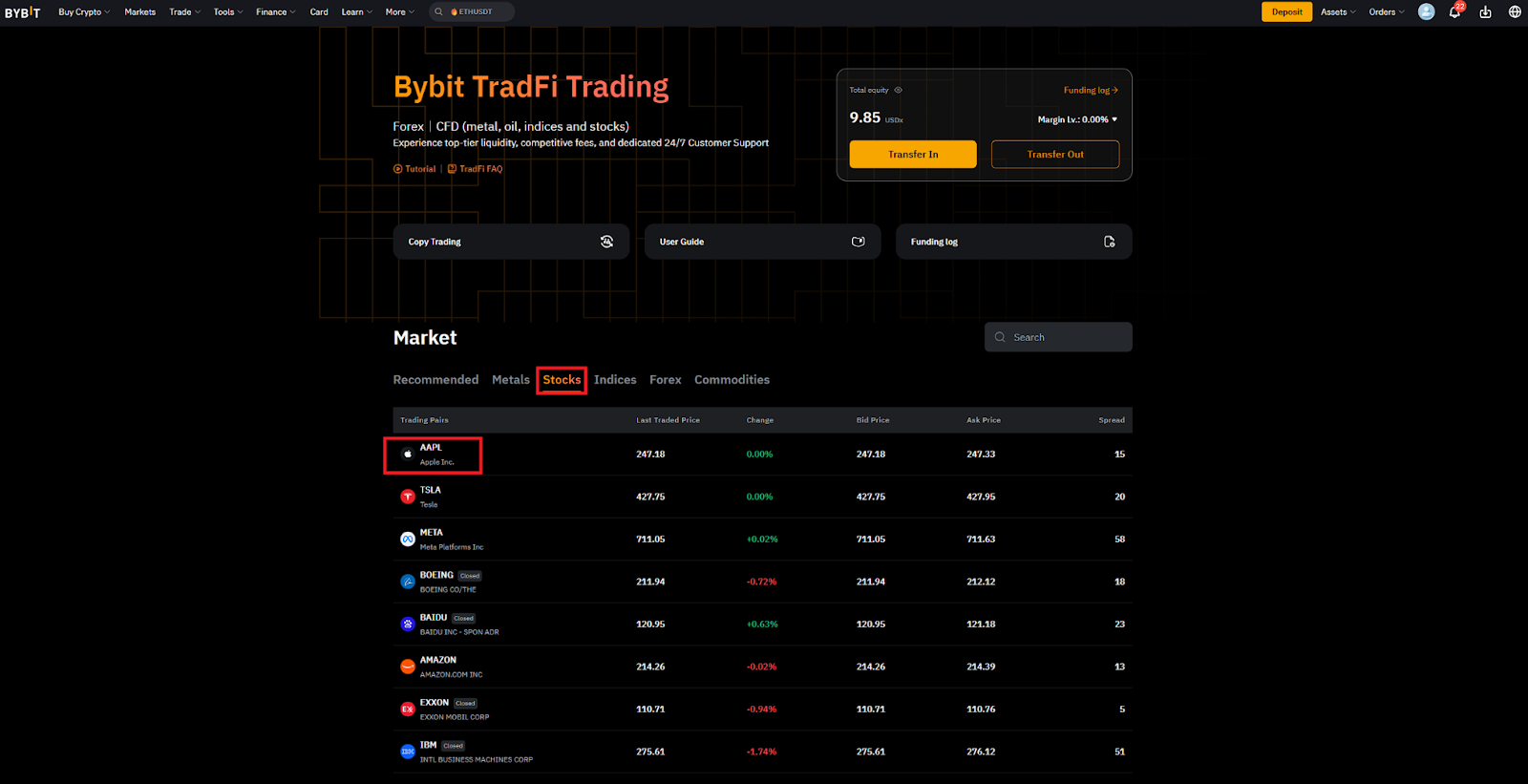
Click on the Stocks tab to display the stocks that can be traded on the platform.
Choose your desired stock and click on its ticker to open the trading page.
3. Place your order
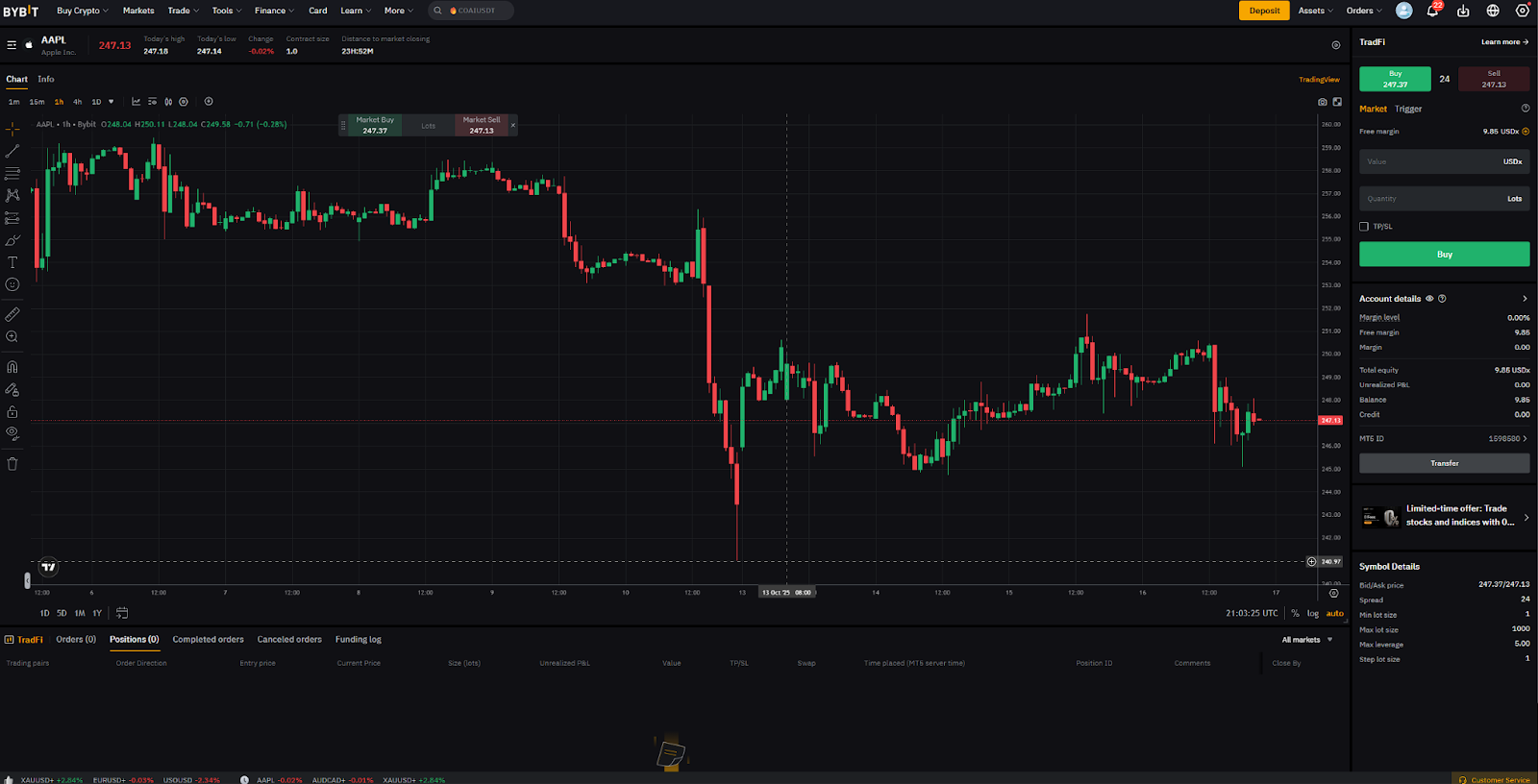
On the trading page, you can see the stock’s ticker (AAPL) near the top, along with the price, the price change and the distance to market closing. You can find the chart at the center and the order placement window at the right.
To place an order, select the Order Direction (Buy or Sell), whether to set a Trigger price and the Order Quantity.
Optionally, set a Stop Loss and Take Profit (TP/SL) level to manage risk automatically.
Click on Buy or Sell to submit the order.
4. Monitor and close the trade
Use the Positions tab near the bottom of the page to track your position.
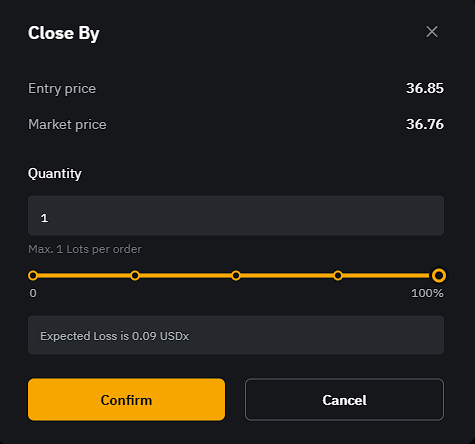
To close a trade, click on Close By (next to your open position).
On the next window, select the quantity to close and click on Confirm.
Trading stocks in the Bybit App
You can also trade Bybit TradFi stocks via the Bybit App. To get started, follow these steps:
1. Open the Bybit App
Download the Bybit App and install it on your device.
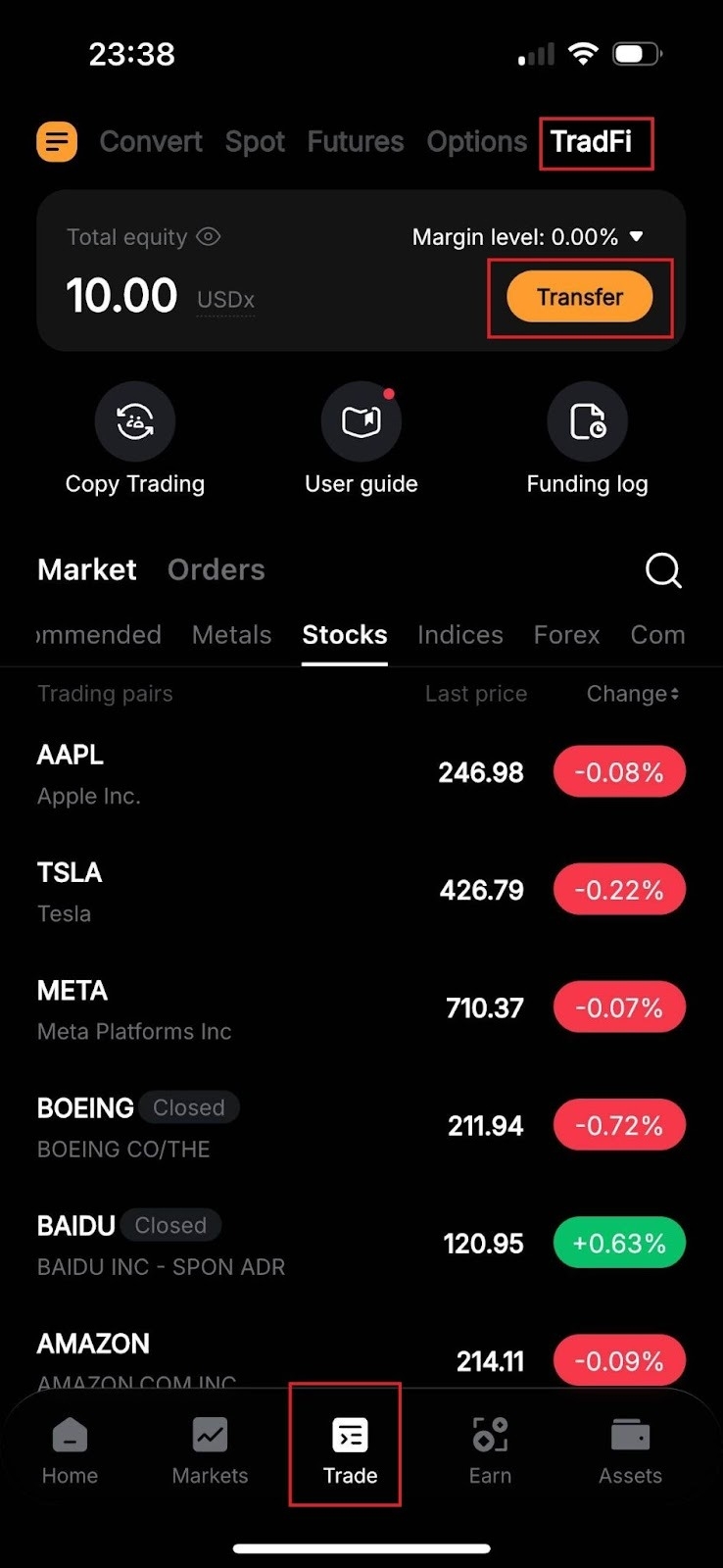
Open the application, log in to your account and select TradFi from the Trade menu.
If you haven’t already done so, you can fund your TradFi Account by tapping on the Transfer button, selecting the source wallet (Funding or Unified Trading Account) and the Transfer Amount, and hitting Confirm.
2. Pick a stock
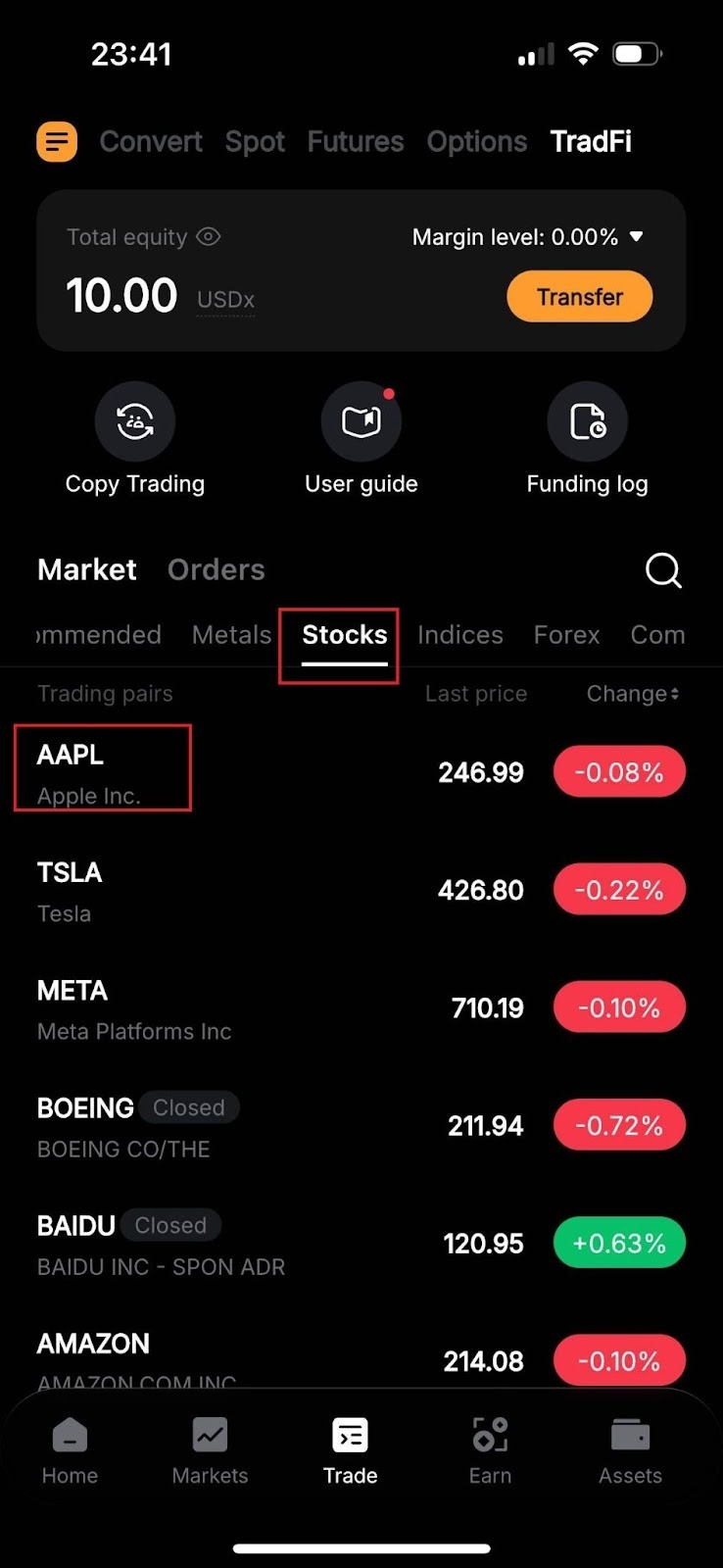
On the TradFi page, tap on Stocks, pick your desired stock and tap on its ticker to open the trading page.
3. Place your order
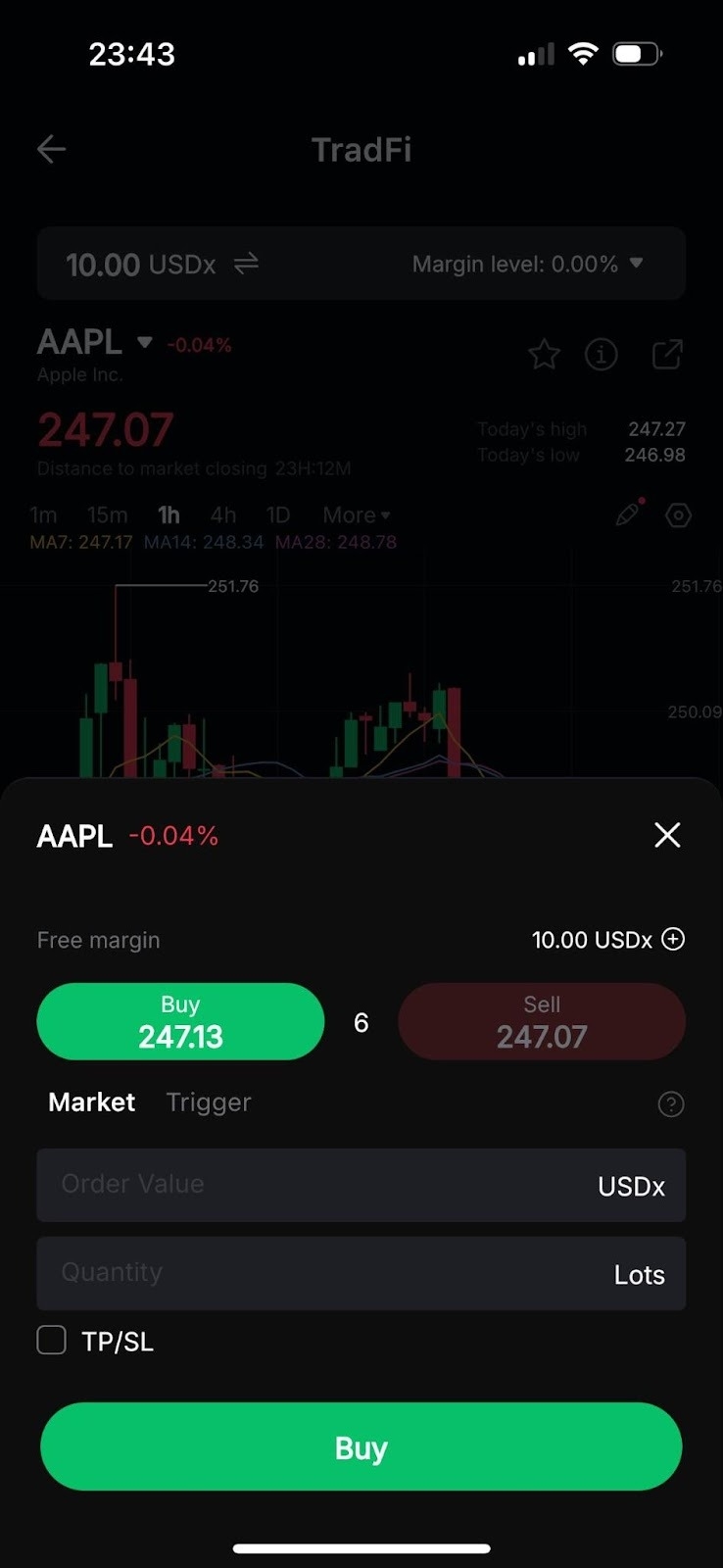
Next, tap on Buy to open a long position or Sell to open a short position.
In the order placement window, after choosing the Order Direction, set the Quantity, and (optionally) a Trigger and a TP/SL.
Once you’re ready, tap on Buy or Sell to place your order.
4. Monitor and close the trade
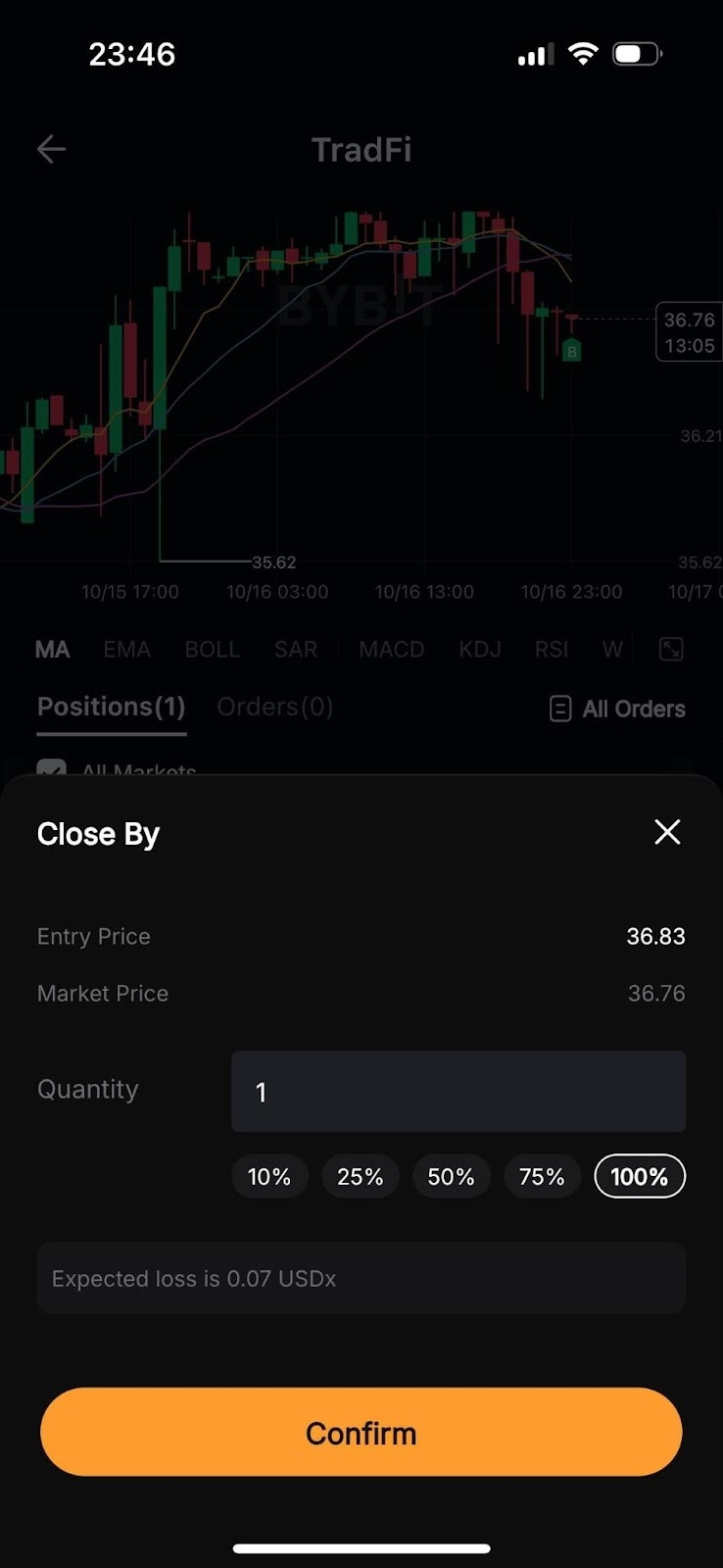
Near the bottom of the page, you can monitor your open positions under the Positions tab.
If you wish to close an open position, tap on Close By, select the quantity to close and tap on Confirm.
What stock CFDs can I trade on Bybit TradFi?
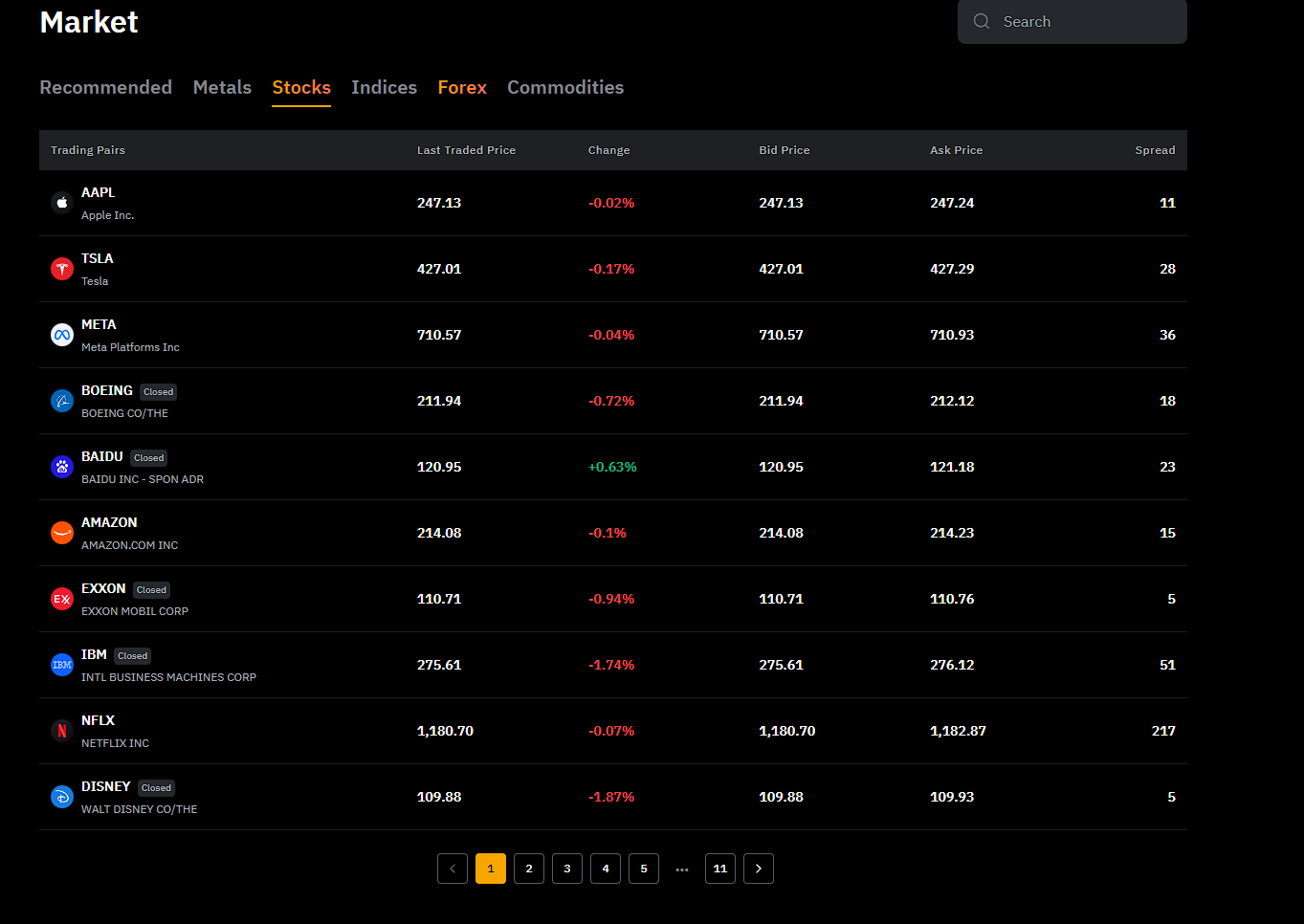
Bybit’s TradFi platform offers access to a diverse selection of 101 global stocks via CFD trading. This lineup includes some of the world’s most actively traded companies, enabling you to diversify your strategy with both technology giants and established market leaders.
Some of the top stock CFDs available include:
Apple Inc. (AAPL)
Tesla Inc. (TSLA)
NVIDIA Corporation (NVDA)
Amazon.com, Inc. (AMZN)
Microsoft Corporation (MSFT)
Alphabet Inc. (GOOG)
To view and trade these stocks on Bybit’s TradFi platform:
Select the Stocks category, and click on your desired stock’s ticker.
Place your order on the trading page via the order placement window.
For a complete list of available stock CFDs, visit Bybit TradFi’s official page.
Fees for trading stock CFDs on Bybit
Bybit TradFi offers highly competitive fee structures for trading stock CFDs, ensuring that traders can maximize their returns without excessive costs. Key fee details include:
Tailored, competitive fees
Top-tier liquidity
Tight spreads to maximize your potential returns
Risks of stock CFD trading
While trading stock CFDs on Bybit’s TradFi platform offers flexibility and potential for amplified returns, it also carries inherent risks:
Leverage of up to 5x can magnify gains and losses.
Market volatility can trigger rapid price swings.
Margin calls and holding costs may impact account balances.
Adopt responsible trading, use stop-losses and limit leverage for sustainable performance.
Trade stock CFDs on Bybit now
Bybit’s TradFi platform provides an excellent opportunity to trade 101 global stocks, including giants like Apple, Tesla and Microsoft, with flexible leverage, competitive fees and robust trading tools.
Key benefits include:
the ability to use USDT as collateral for trading
access to a wide variety of assets beyond stocks, including forex, gold, oil and indices
leverage of up to 5x, with tight spreads and competitive fees
Ready to elevate your trading? Start trading stock CFDs on Bybit TradFi today!
#LearnWithBybit
