


How to get started with Bybit Options Trading

Crypto options are derivatives contracts that give traders the right to buy or sell an underlying crypto asset at a specified price on a predetermined date. They offer flexibility without requiring holders to own the underlying asset. Bybit offers various expirations, USDC- and USDT-settled contracts, making crypto options trading accessible and straightforward.
Please note that Bybit has discontinued issuing new USDC-settled options as of Feb 26, 2025. You can continue trading existing USDC-settled contracts until expiration. However, only USDT-settled options are available for new issuances, offering traders a wider selection of contracts.
Key Takeaways:
Crypto call options let you buy a cryptocurrency if the price rises, while put options let you sell if the price drops.
Strategies like the covered call, protective put, straddle and strangle help traders navigate different market conditions, whether aiming for profits or hedging risks.
Bybit’s platform provides features to set up options trades with ease for both beginning and advanced traders.
What are crypto options?
Crypto options are contracts that give you the right, but not the obligation, to buy or sell a cryptocurrency, such as Bitcoin (BTC) or Ether (ETH), at a specific price in the future.
People use crypto options for two main reasons: to make money if the price goes the way they predict, or to protect their positions if the price goes against them.
Since traders aren’t buying the actual crypto itself, crypto options are seen as a flexible way to take advantage of market ups and downs. That’s why many traders use them to manage risks or gain exposure using leverage.
How do crypto options work?
To understand how crypto options work, let’s go over some basics.
Strike price and key terms: ITM, ATM and OTM
The strike price is the price at which you can choose to buy a call option or sell a put option when its contract expires.
There are three terms used to describe a strike price’s relationship to an asset’s current market price:
In-the-money (ITM): For a call option, ITM means the coin is currently worth more than your strike price. With a put option, ITM means the coin is worth less than your strike price.
At-the-money (ATM): The coin’s current price and the strike price are the same.
Out-of-the-money (OTM): This classification occurs when the coin’s price isn’t favorable right now. For a call option, OTM means the coin is worth less than the strike price, and for a put option, the coin is worth more than the strike price.
Call and put options
Options come in two basic types: calls and puts.
Call options: These give you the right to buy a cryptocurrency. If you think the price of a coin will increase above the strike price by the option contract’s expiration date, you might decide to buy a call option.
Put options: These give you the right to sell a cryptocurrency if its price drops below the strike price by the contract’s expiration date. You’d consider a put if you expect the coin’s price to fall.
In addition to buying call and put options, traders can also sell them. Briefly, here’s how it works.
Selling call options: In this case, sellers expect the underlying coin to remain flat or decrease in value. If the coin trades above the strike price, the option may be exercised, meaning traders will have to deliver the underlying asset.
Selling put options: Here, sellers expect the underlying coin to remain flat or increase. If the coin trades below the strike price, the option might be exercised, in which case traders will have to deliver the underlying asset.
Why do traders use crypto options?
Crypto traders use options to leverage their market positions while managing risk in the volatile cryptocurrency market. Options provide traders with the ability to speculate on price movements without the need to own the underlying asset directly. They also serve as an essential tool for hedging, as traders can protect their portfolios against adverse price movements. For instance, if a trader holds a significant amount of Bitcoin (BTC), they might buy put options to guard against a potential price drop.
Additionally, options allow traders to use less capital as compared to buying cryptocurrencies outright, providing leverage that can amplify gains. Moreover, options strategies such as writing covered calls (see below) can generate income on one’s crypto portfolio.
Which crypto options can you trade on Bybit?
Bybit offers crypto options for Bitcoin (BTC), Ethereum (ETH) and Solana (SOL). With options, you can get exposure to these assets without buying them directly.
How Bybit’s options stand out
Bybit’s options are settled in either USDC or USDT. This means any profit or loss is calculated in USDC or USDT (both USDC and USDT are top stablecoins pegged to the U.S. dollar), making transactions simpler and obviating the need for actual crypto transfers.
Any gains or losses directly affect your account balance without the hassle of holding the underlying asset. You can focus on your trading strategy while enjoying a straightforward settlement process.
Bybit offers a variety of expirations to suit different trading styles, from short-term plays to long-term positions. You can choose from daily, bi-daily, tri-daily, weekly, bi-weekly, tri-weekly, monthly, bi-monthly and quarterly expirations. This allows each trader to adapt to market conditions, as well as their personal trading strategy, whether they’re after quick gains or looking to hold out for larger trends over time.
Disclaimer: As of Feb 26, 2025, Bybit has discontinued issuing new USDC-settled options. Existing USDC-settled contracts remain unchanged, and will operate as usual. This means that you can continue trading them until their expiration, but with a limited selection (BTC-USDC and ETH-USDC options are available only with a Dec 26, 2025 expiration date), as new issuances are only available in USDT. For the best experience, improved liquidity and a wider range of expiration dates, we recommend switching to USDT-settled options on Bybit.
How to trade crypto options on Bybit
Trading options on Bybit Web
Getting started with crypto options trading on Bybit is simple and intuitive, whether you’re a beginning trader exploring options for the first time or an experienced trader looking to refine your strategies.
Step 1: Set up your Bybit account
Before you begin, make sure your Bybit account is set up and funded.
Once your Unified Trading Account is ready, the next step is to fund it with crypto or fiat currency. Head to the Assets page, select the Unified Trading menu and click on Deposit.
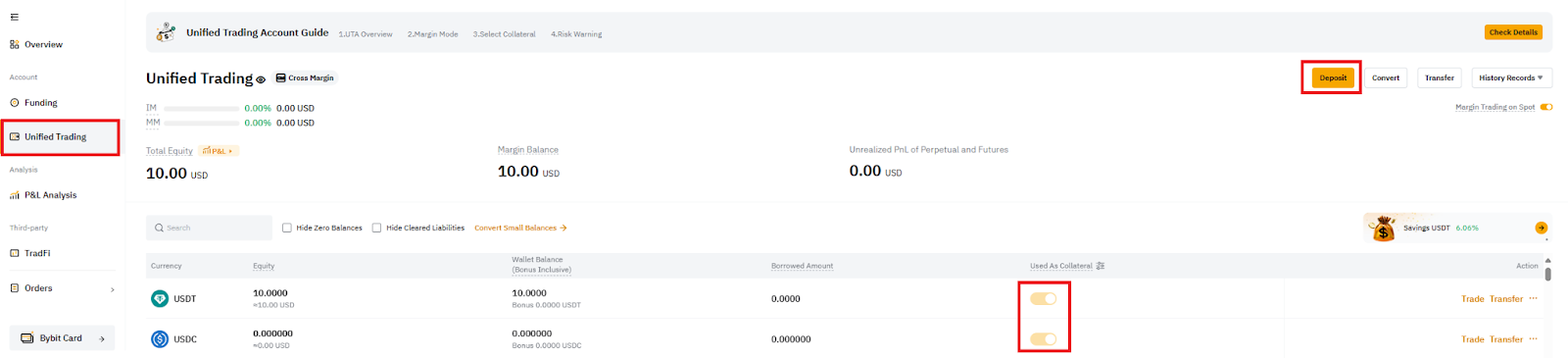
Note that as Bybit’s options contracts are settled in USDT and USDC, you have to transfer USDT or USDC as margin to trade options. After depositing USDT or USDC into your Unified Trading Account, make sure to turn on the Used As Collateral setting.
Step 2: Access the options trading platform
In this guide, we’ll show you how to trade Bitcoin options.
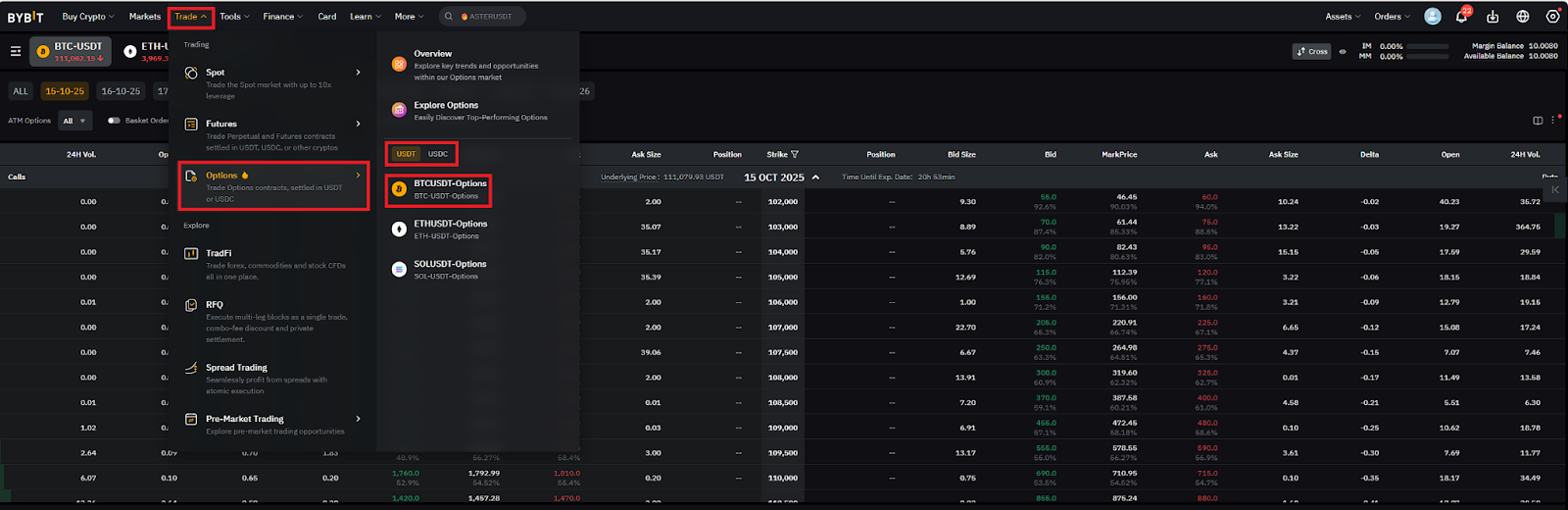
On your desktop, navigate to Bybit’s options trading platform by selecting Trade, then select Options and their settlement currency (USDT or USDC) and choose BTCUSDT-Options (or BTCUSDC-Options for USDC-settled contracts).
Step 3: Explore the options chain
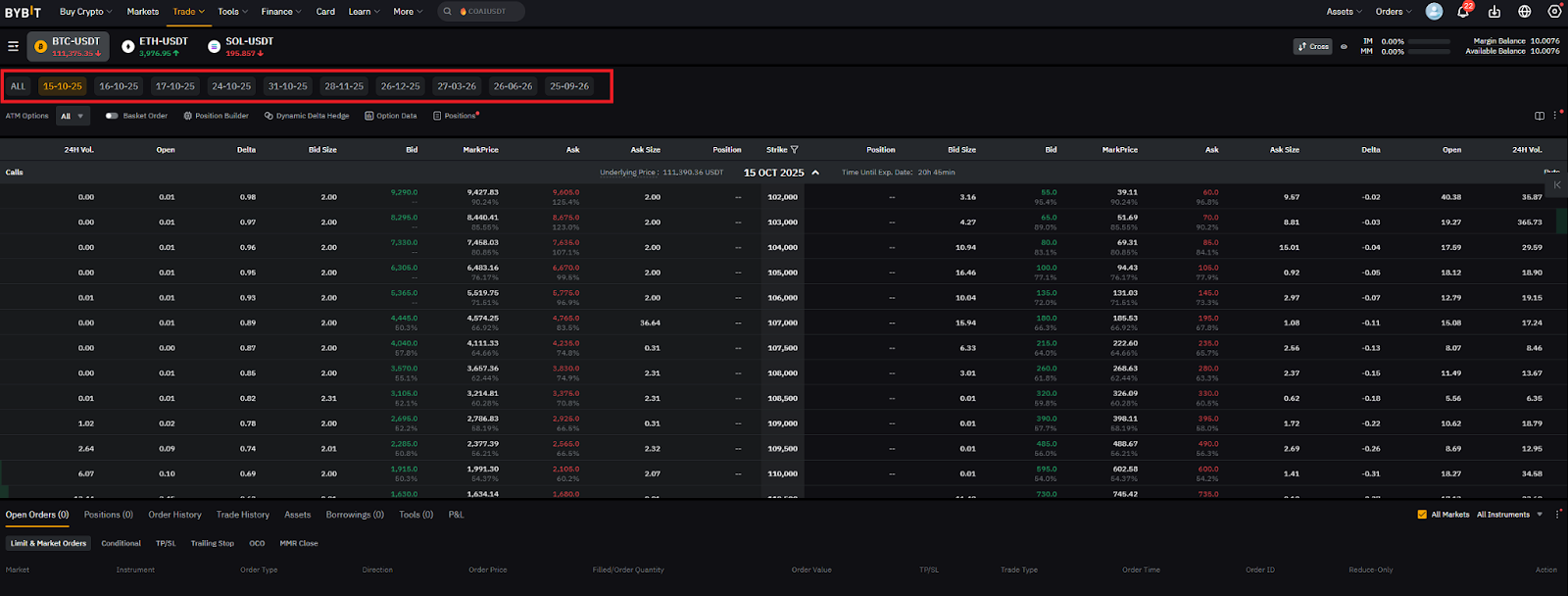
The options chain is a central feature where you’ll find available contracts, categorized by expiration dates and strike prices. You can choose from a wide range of expiration dates, including daily, bi-daily, tri-daily, weekly, bi-weekly, tri-weekly, monthly, bi-monthly and quarterly expirations.
Step 4: Select your option type
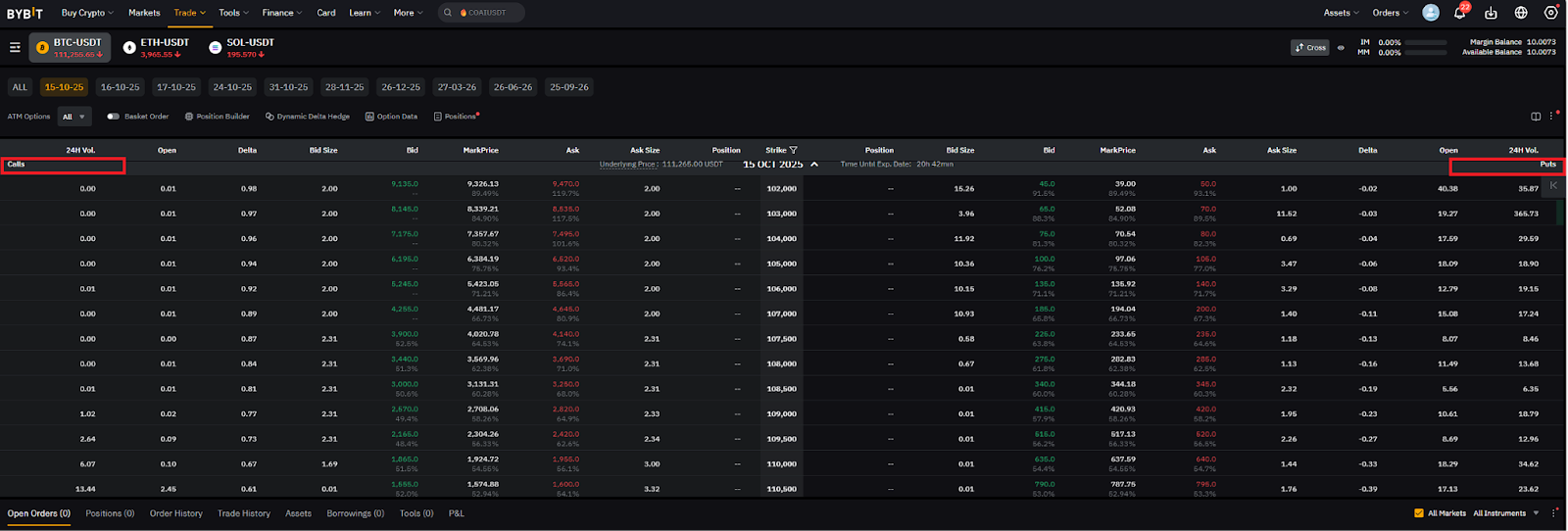
Bybit offers two types of options: calls and puts. Select a call option if you expect Bitcoin’s price to rise, or a put option if you anticipate a price drop.
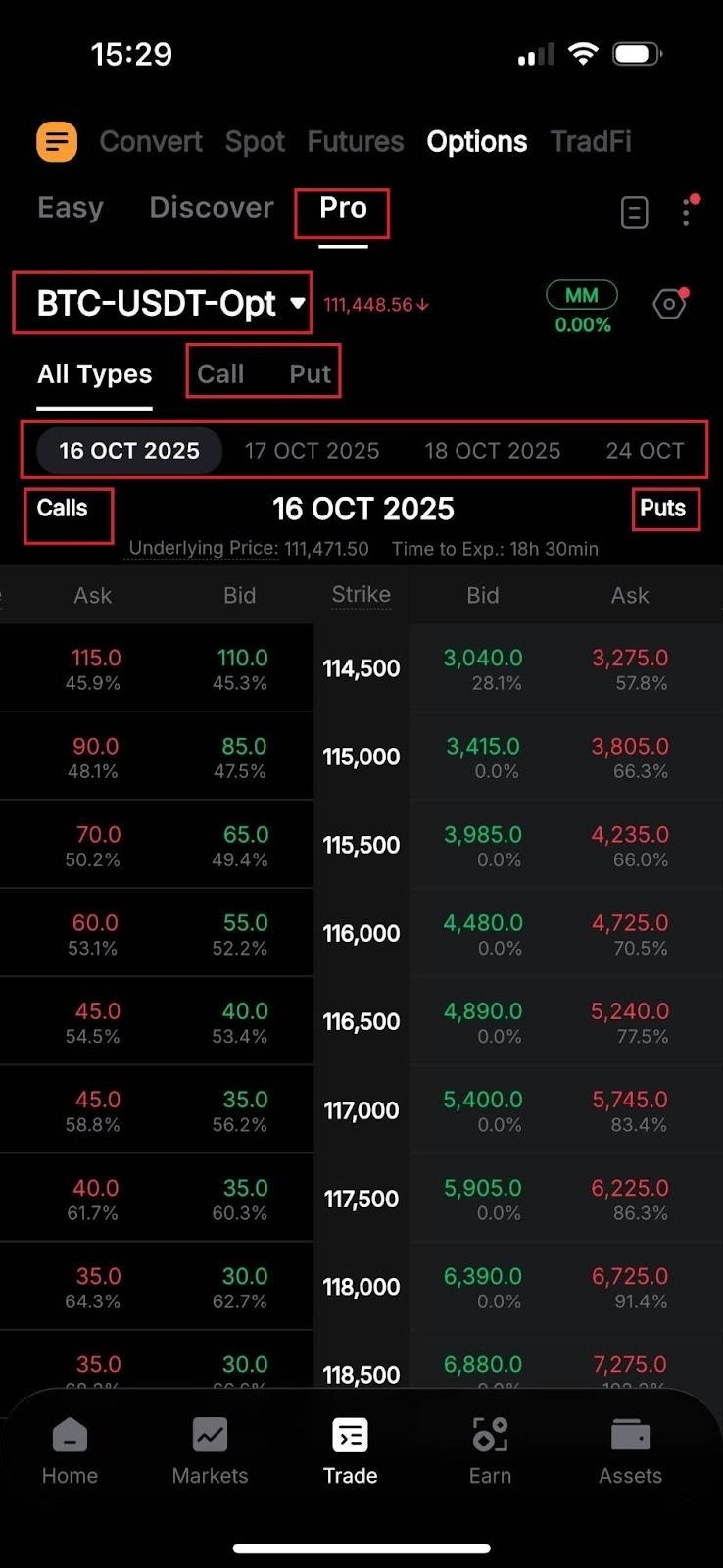
Calls are displayed on the left side of the options chain, while puts are on the right side, with strike prices listed down the middle.
Step 5: Choose your strike price and expiration date
Pick the strike price and expiration date that best match your trading strategy. For example, if you believe BTC’s price will increase over the next week, you might select a weekly call option at a strike price near its current market value.
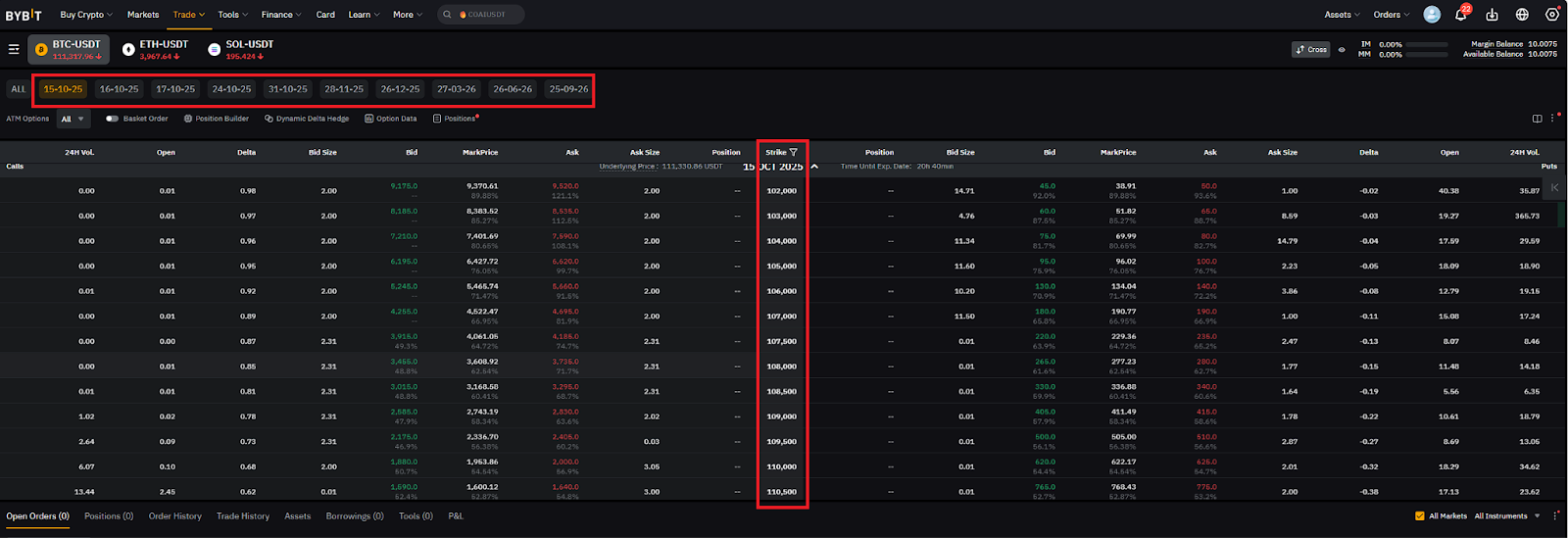
Step 6: Place your options order
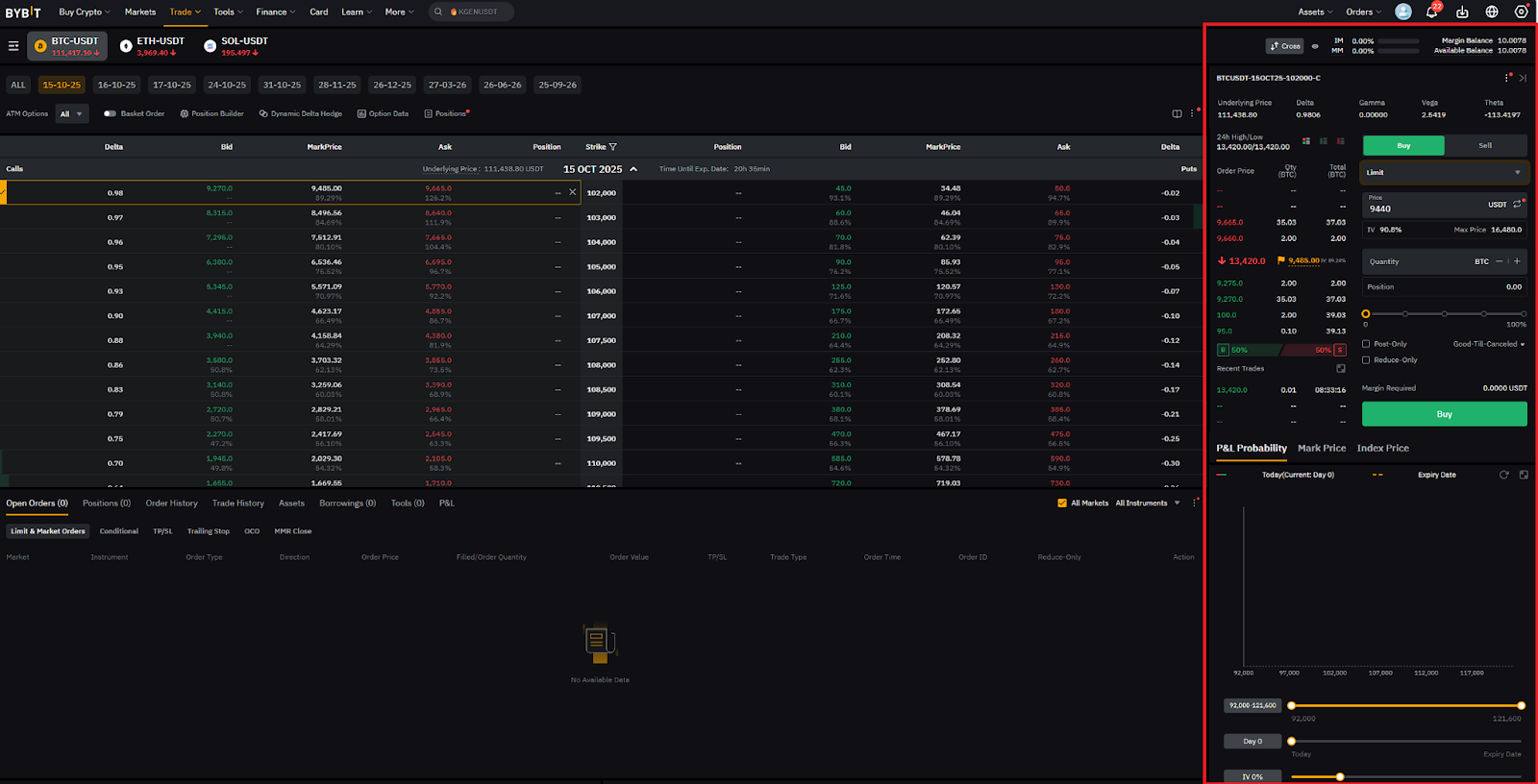
Once you’ve selected a contract, choose your desired strike price. This will open an order placement window in which you can enter key trade details like the following:
Trade direction: Choose whether you want to buy or sell the option.
Order type: Decide between a Market order (executed immediately at the best available price) or a Limit order (executed at a specific price).
Quantity: Enter the number of contracts you want to trade.
Optional parameters: You can set parameters such as Post-Only or Reduce-Only for more control over your trade.
If you’re trading Bitcoin options, you’ll see additional details, such as implied volatility and Greeks (delta, gamma, etc.), which can help you evaluate potential risks and rewards.
You can also view charts with P&L Probability, Mark Price, and Index Price near the bottom of the order placement window. Use this to gain additional insights to support your trading decision.
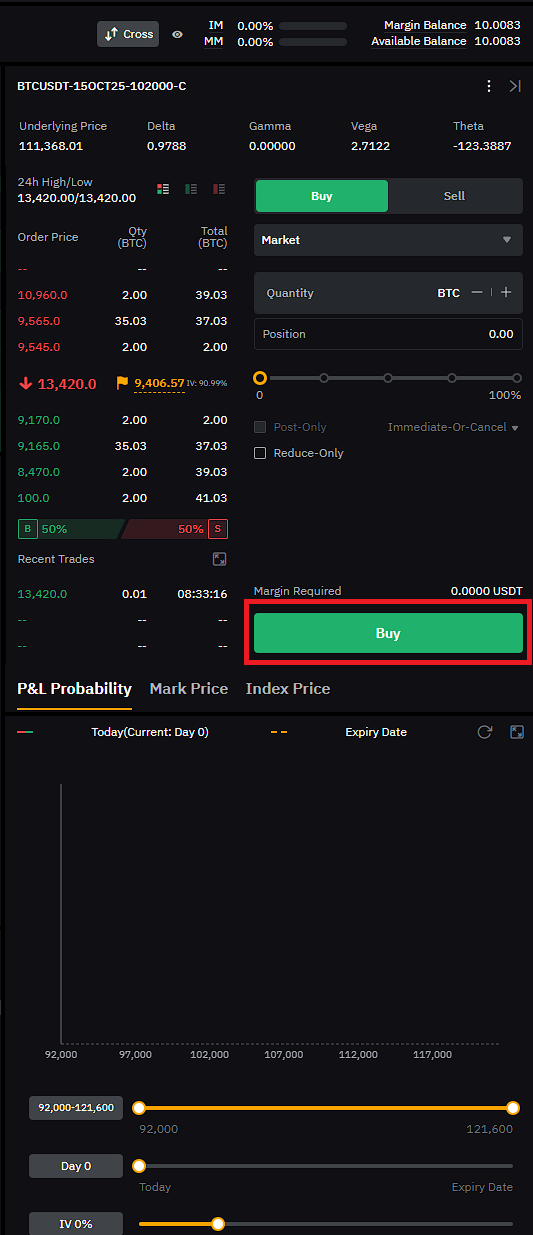
Step 7: Confirm and place your order
After you’ve reviewed your order details, click on Buy (for long positions) or Sell (for short positions).
A confirmation window will appear, showing a summary of your trade. Click on Confirm, and your options order will be submitted.
Trading options in the Bybit App
In addition to the Bybit website, you can also trade USDC and USDT options via the Bybit App. This way, you can even trade and monitor your positions on the go in a user-friendly application.
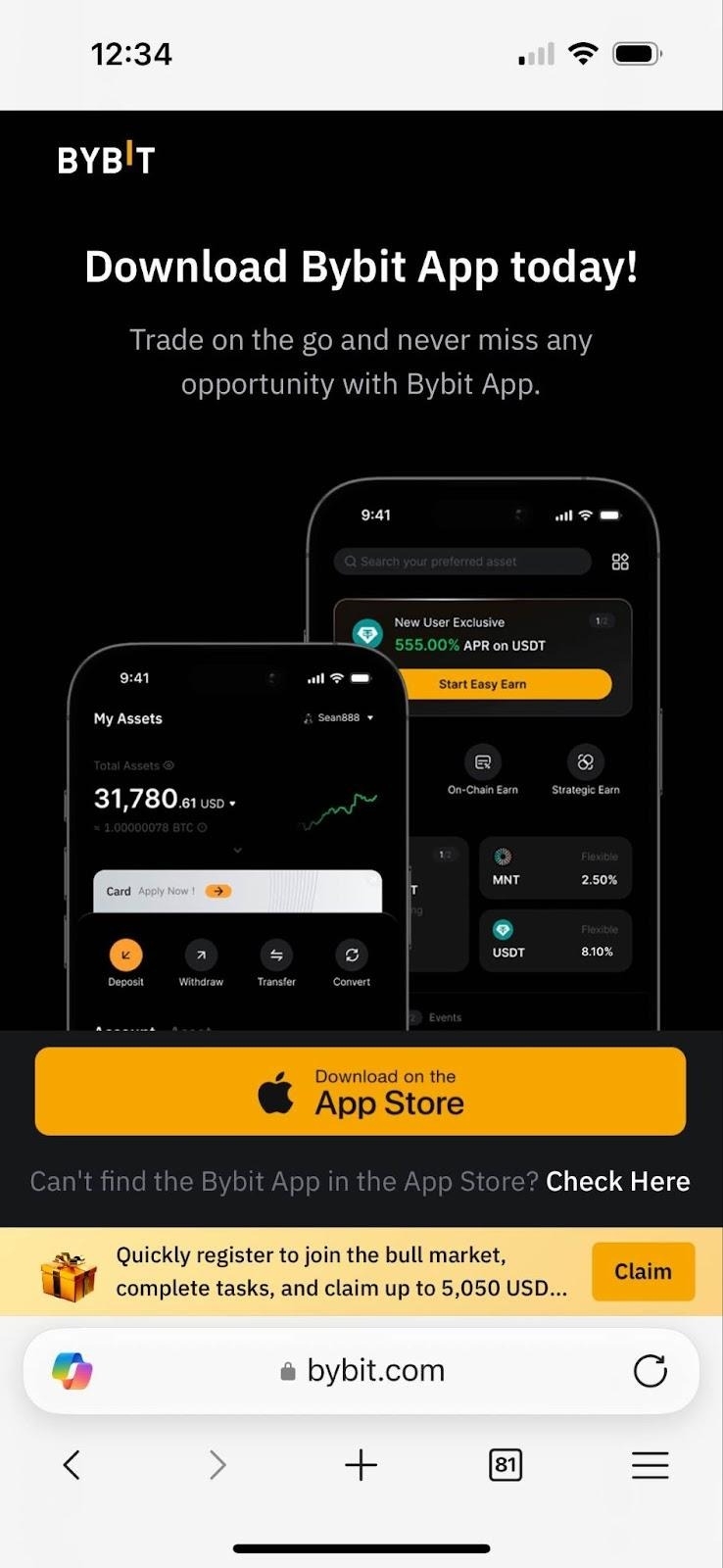
Step 1: Download the Bybit App
Download and install the Bybit App on your smartphone or tablet device to get started. The Bybit App is available on iOS via the App Store, and on Android via Google Play or as an APK file.
Once the Bybit App is installed on your device, log in to your existing account or register for a new one.
Inside the Bybit App, tap on Pro at the top of the page to unlock all of the advanced features and functionalities.
Step 2: Deposit funds
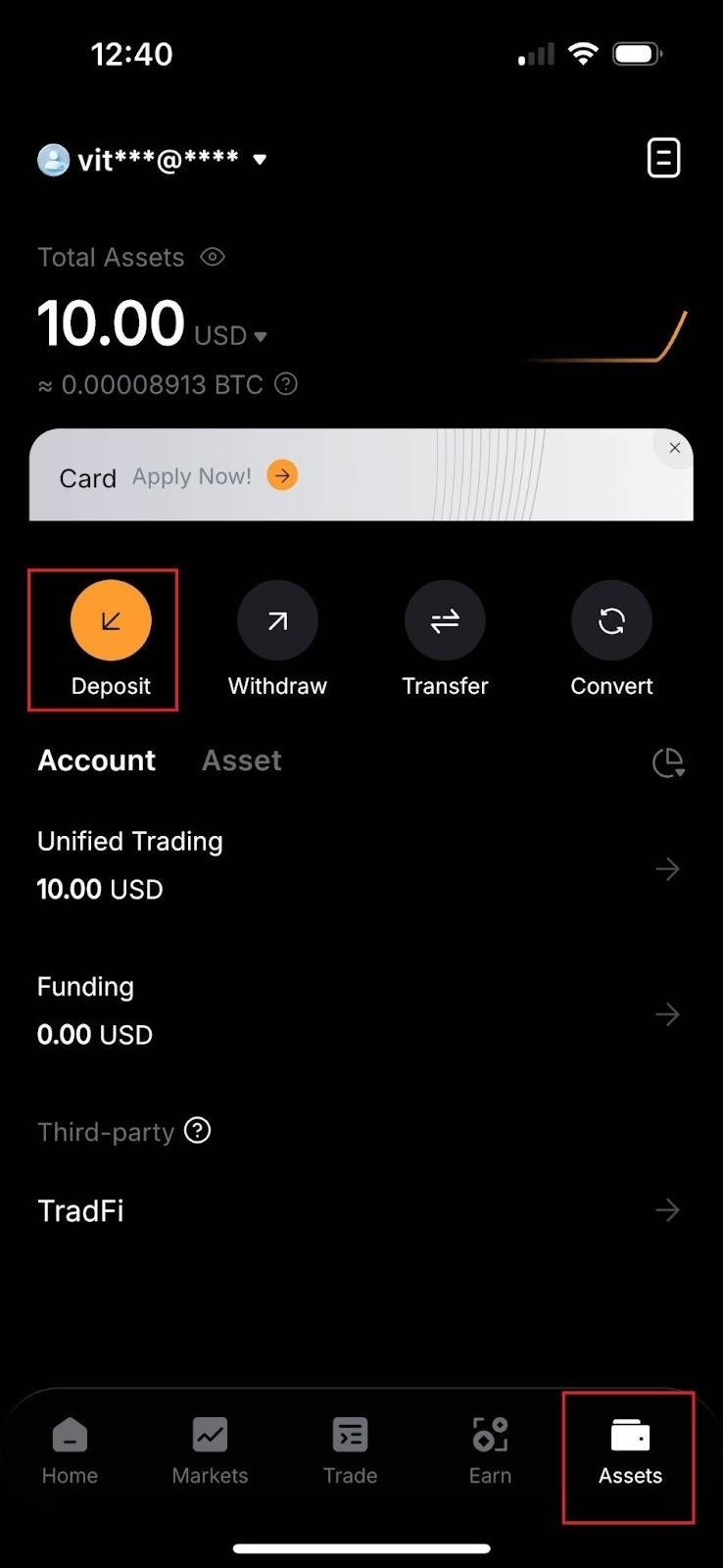
The next step is to fund your Unified Trading Account with either fiat or cryptocurrency. You can do this by tapping on Deposit inside the Assets menu.
After your deposit, if you haven’t already done so, exchange your funds into USDT or USDC for options trading. In the Assets menu, tap on USDT and USDC and verify that the Use As Collateral option is turned on.
Step 3: Head to the Options trading page
You can use the USDT or USDC in your Unified Trading Account to start trading options in the Bybit App.
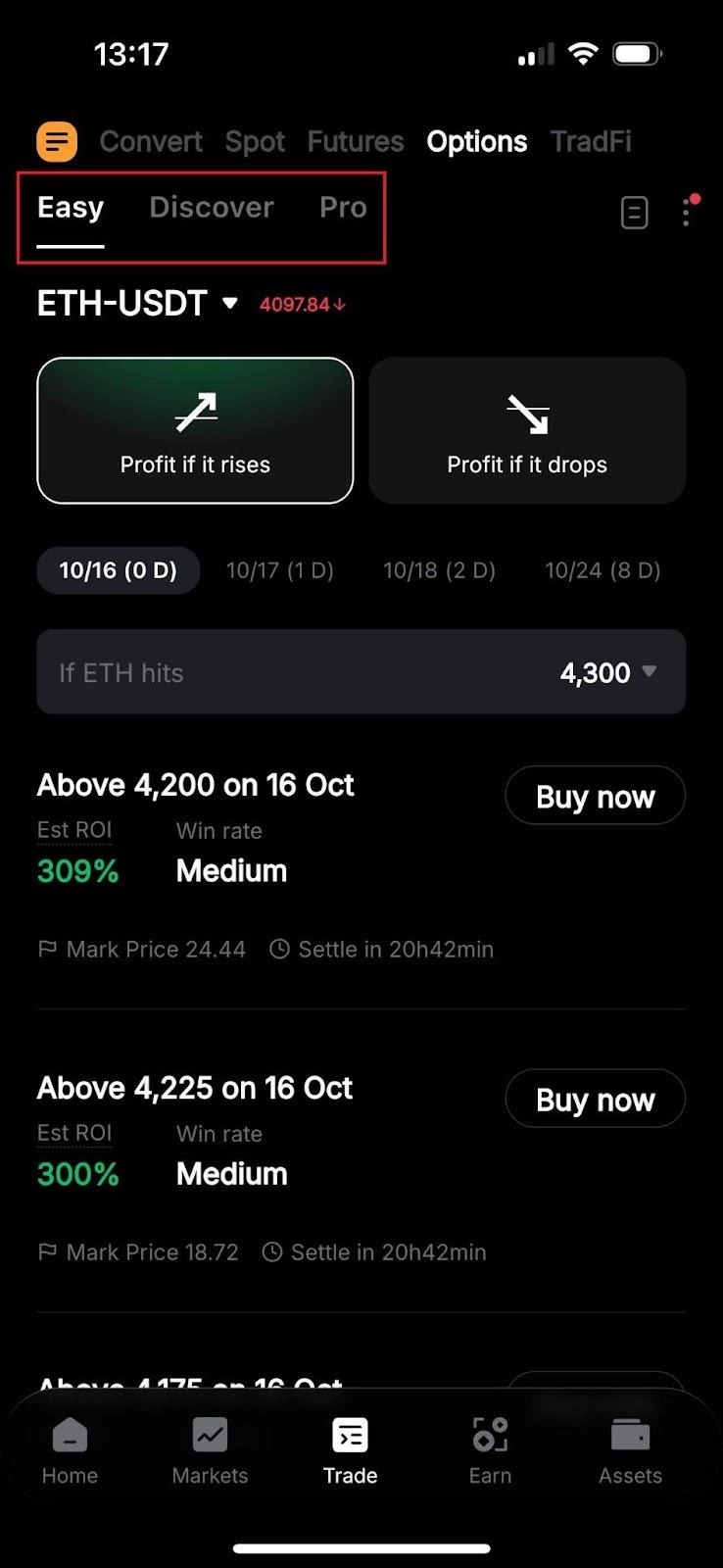
The application allows you to trade options in three different ways: Easy, Discover and Pro. Each tool provides a different level of control, complexity, interface and features.
Easy and Discover serve as introductory tools. They feature a user-friendly interface, and are tailored for novice options traders and users who seek to monitor the activities of other traders.
On the other hand, Pro is basically the mobile version of the options trading interface on Bybit’s website. It includes all of the advanced features and functionalities that experienced traders can leverage to enhance their trading strategies and capabilities.
Next, we’ll show you the exact steps for trading options in the Bybit App using all three tools.
Step 4: Select your option type
Regardless of the trading tool, you can access the same call and put options in the Bybit App as on the web platform. Place a call option order if you anticipate a rise in your selected cryptocurrency’s price, or a put option if you believe its price will fall until expiration.
Easy mode
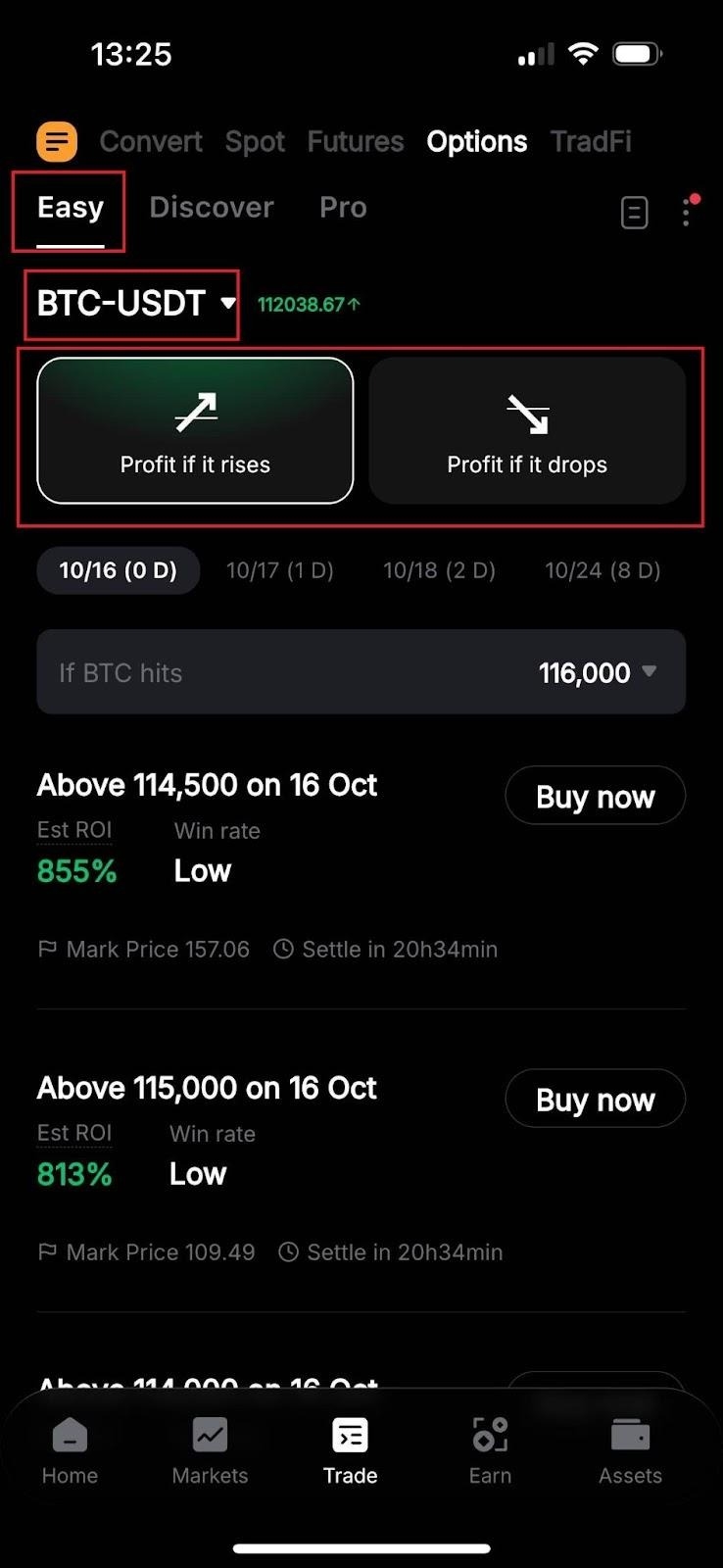
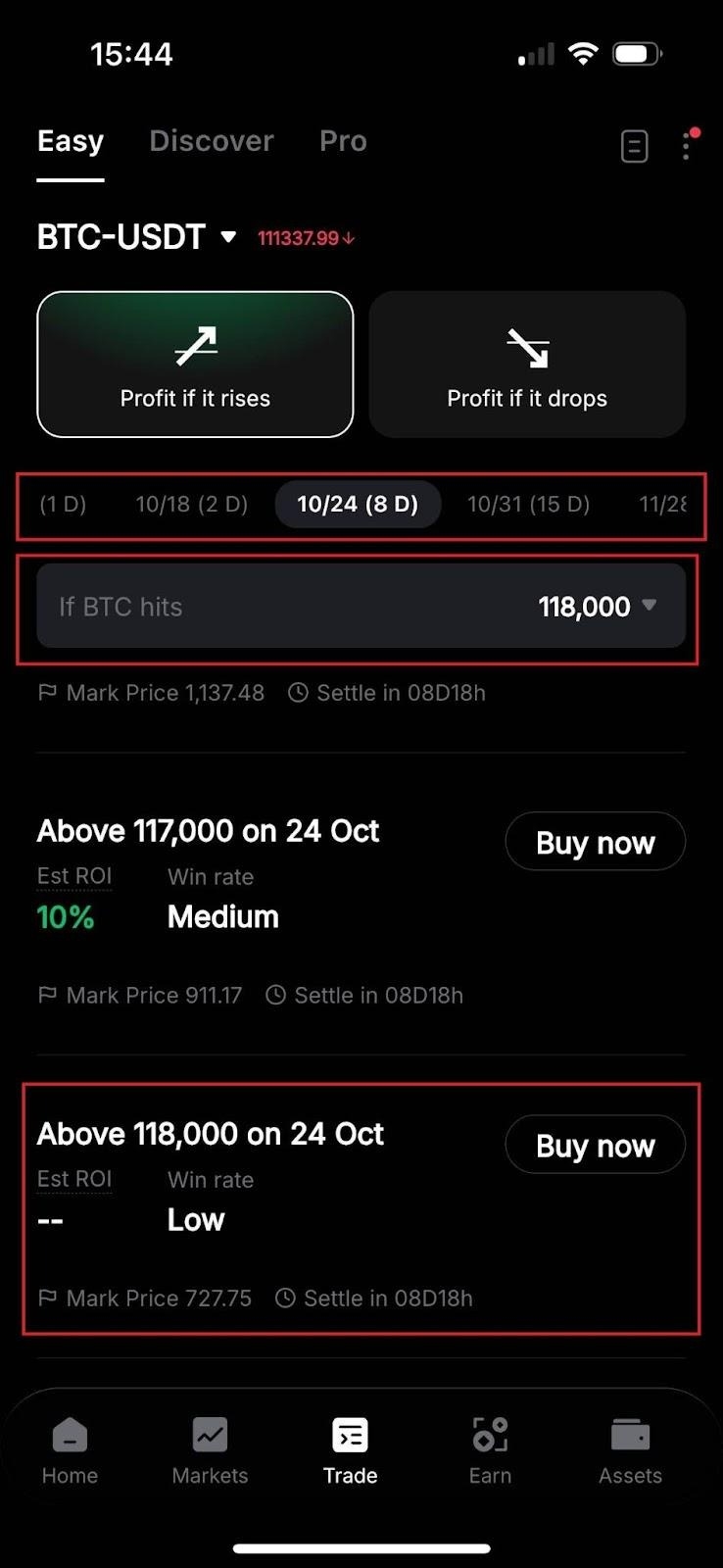
Select Easy in the top-left corner of the Trade menu to see the options trading dashboard for the Easy tool. Below that, select your desired options (e.g., BTC, ETH, SOL) and their settlement currency (USDT or USDC) by choosing a ticker (e.g., BTC-USDT) from the drop-down menu.
If you’re bullish on BTC, choose Profit if it rises — this is the equivalent of a call option. If you’re bearish about its future price, pick Profit if it drops (put option).
Discover mode
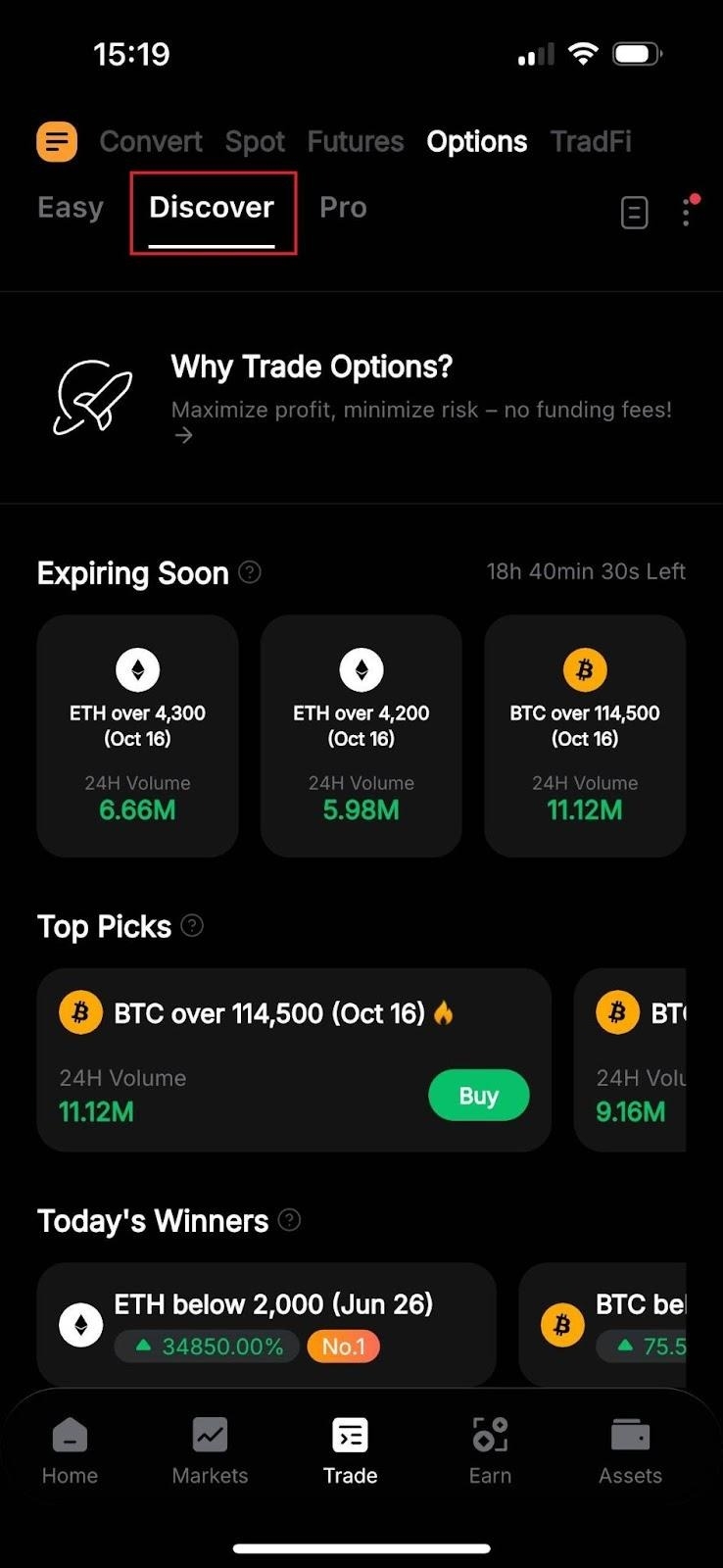
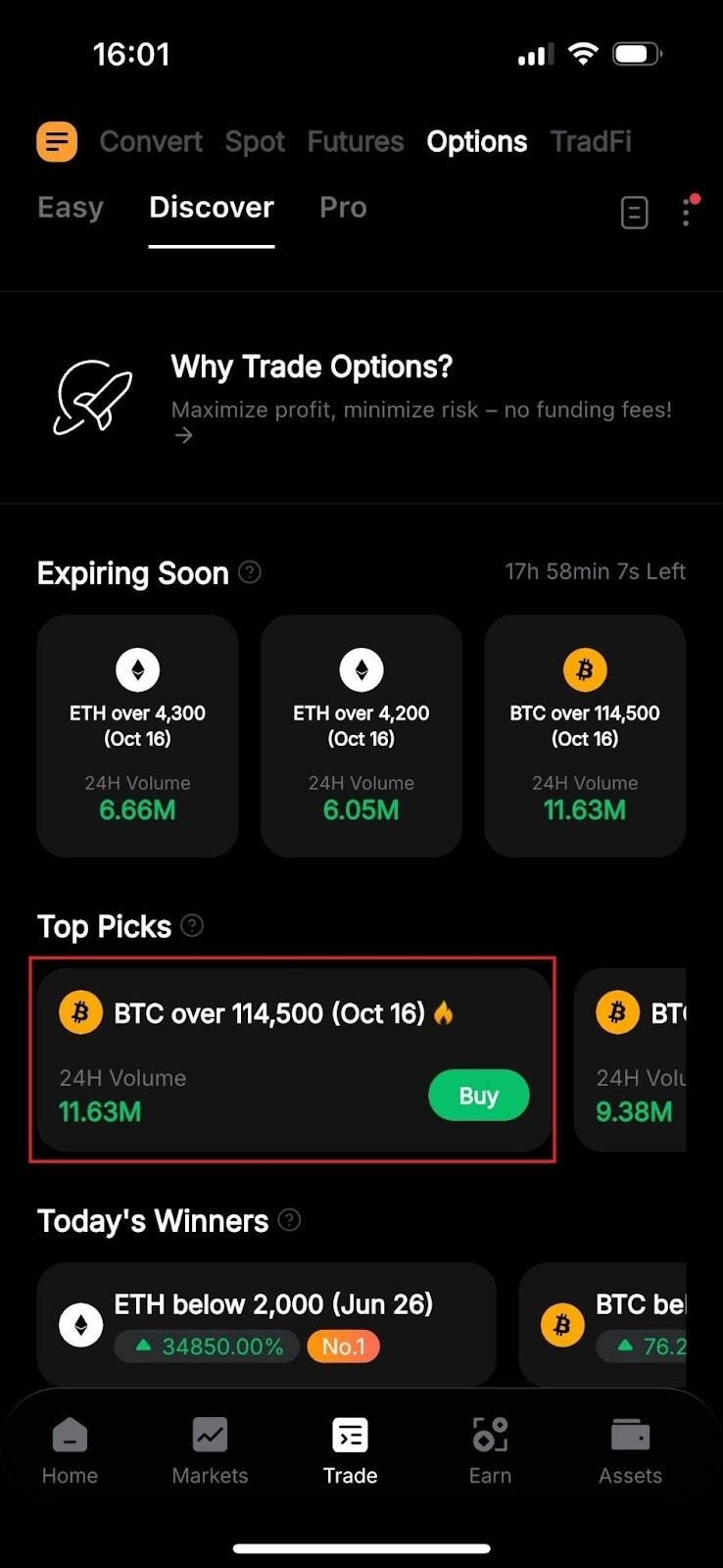
Choosing Discover at the top categorizes options based on their expiration dates, top picks, winners of the day, top holdings and large trades. With this tool, traders can gain valuable insights into options trends, see key highlights and place orders on the same page.
In Discover mode, you can only trade these recommended options, offering a limited selection of contracts that make the tool easy to use — even for beginning traders.
Pro mode
Heading into the Pro menu provides all of the advanced features and functionalities you can access on Bybit Web as part of a mobile-optimized interface, so you can even trade on the go.
Select your desired ticker (e.g., BTC-USDT-Opt) from the top. You can explore the options chain below All Types, with Calls listed on the left and Puts on the right. Optionally, tapping Call or Put will display only call or put options (respectively) on the page.
Step 5: Choose your options contract
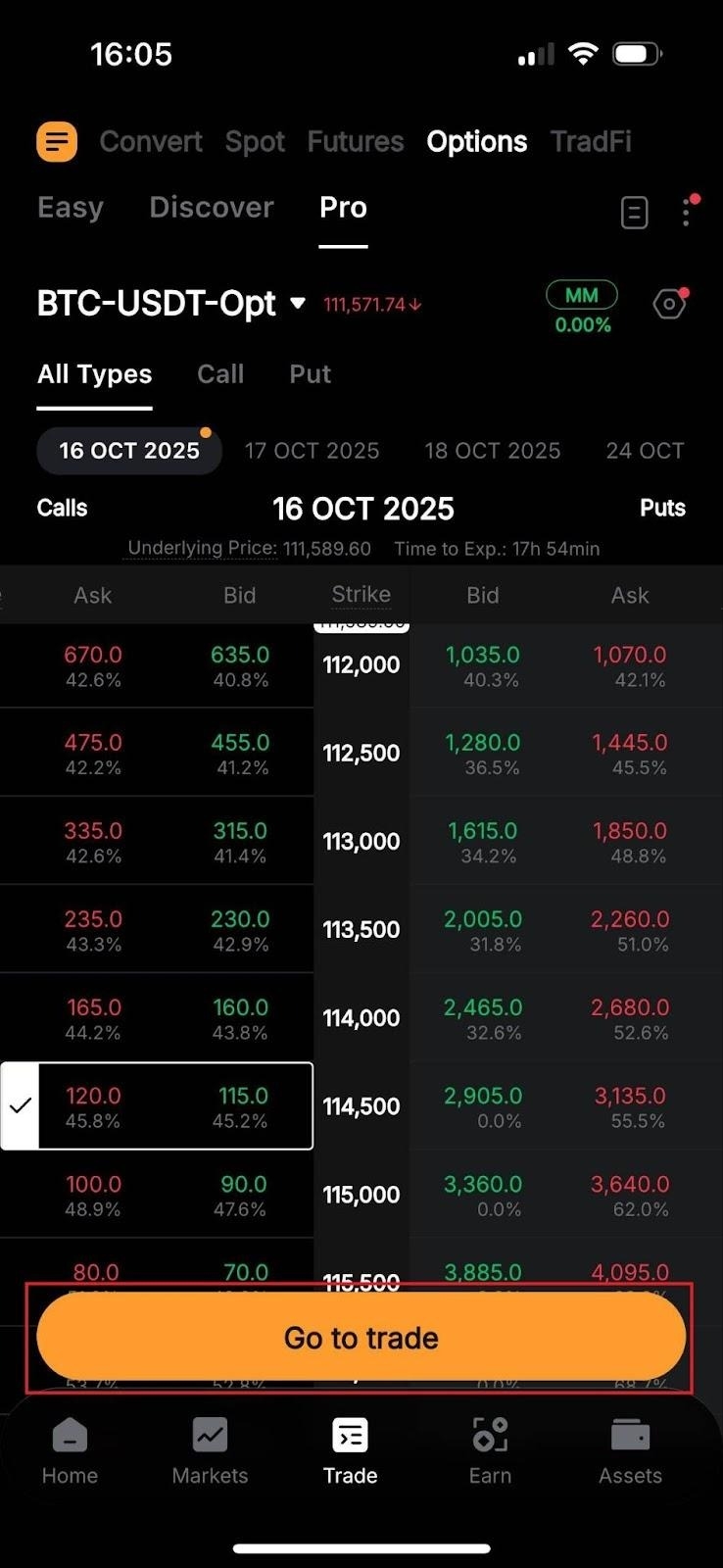
Next, it’s time to choose the options contract(s) to buy or sell. Please note that you can only use the Pro tool to short options in the Bybit App.
Easy mode
After selecting either Profit if it rises (call) or Profit if it drops (put) in Easy mode, choose your desired expiration date and strike price. Regarding the latter, use the drop-down menu next to If BTC hits to pick your projected price, then click Buy now next to the contract that most closely fits your strategy.
Discover mode
In Discover mode, choose a contract from the recommended list with a strike price and expiration date that match your strategy. A tap on the contract or the Buy button next to its name will take you to the order placement window.
Pro mode
In Pro mode, choose an expiration date and a strike price (displayed in the middle), tap on your desired contract and tap on Go to trade to head to the order placement window.
Step 6: Place your options order
Once inside the order placement window, you can set up, place and confirm your trade.
Easy and Discover modes
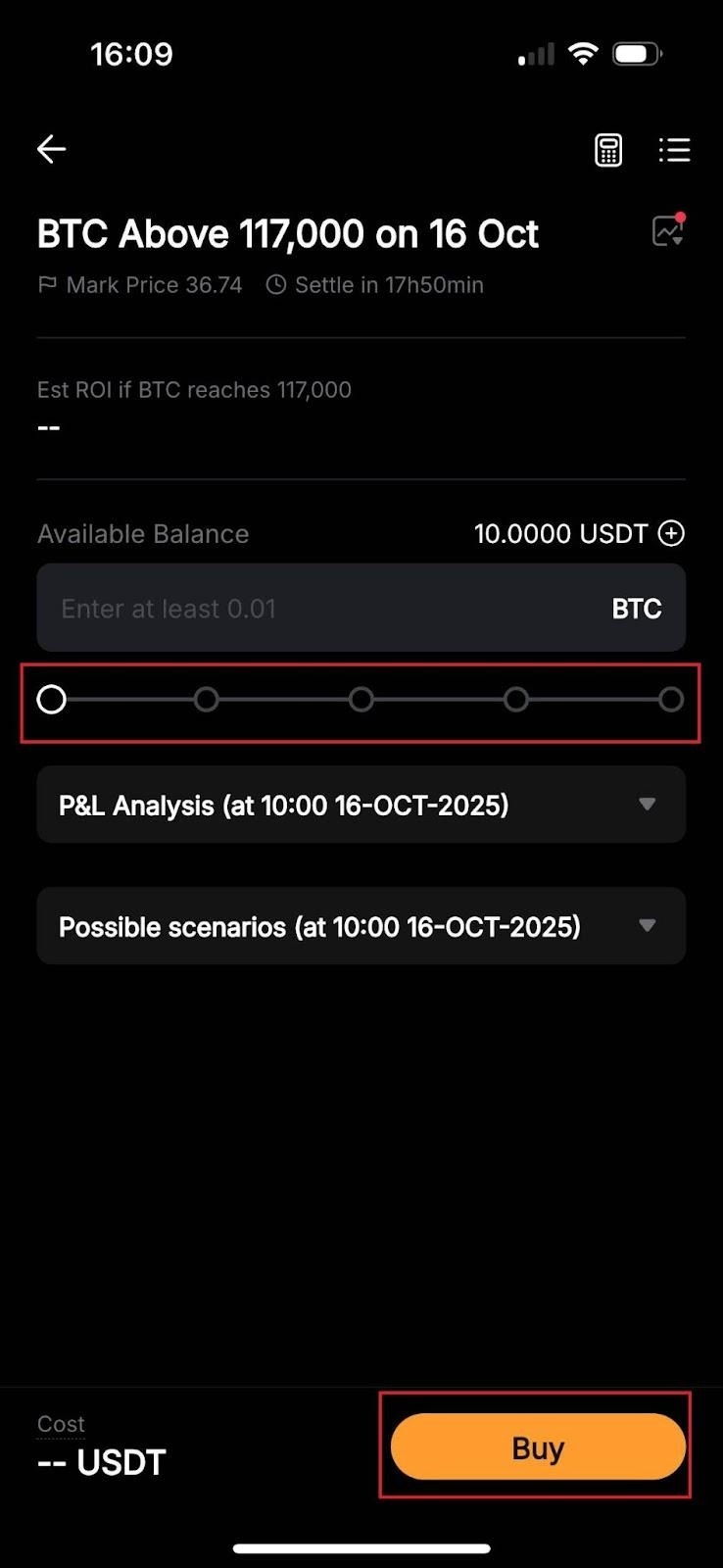
The order placement window in Easy and Discover modes is straightforward. Here, you only need to set the contract amount via the slider. You can also estimate your potential return on investment (ROI) and check the P&L analysis and possible scenarios for the contract.
When you’re ready, tap on Buy to place your order, which you can finalize on the next page by clicking on the Confirm button.
Pro mode
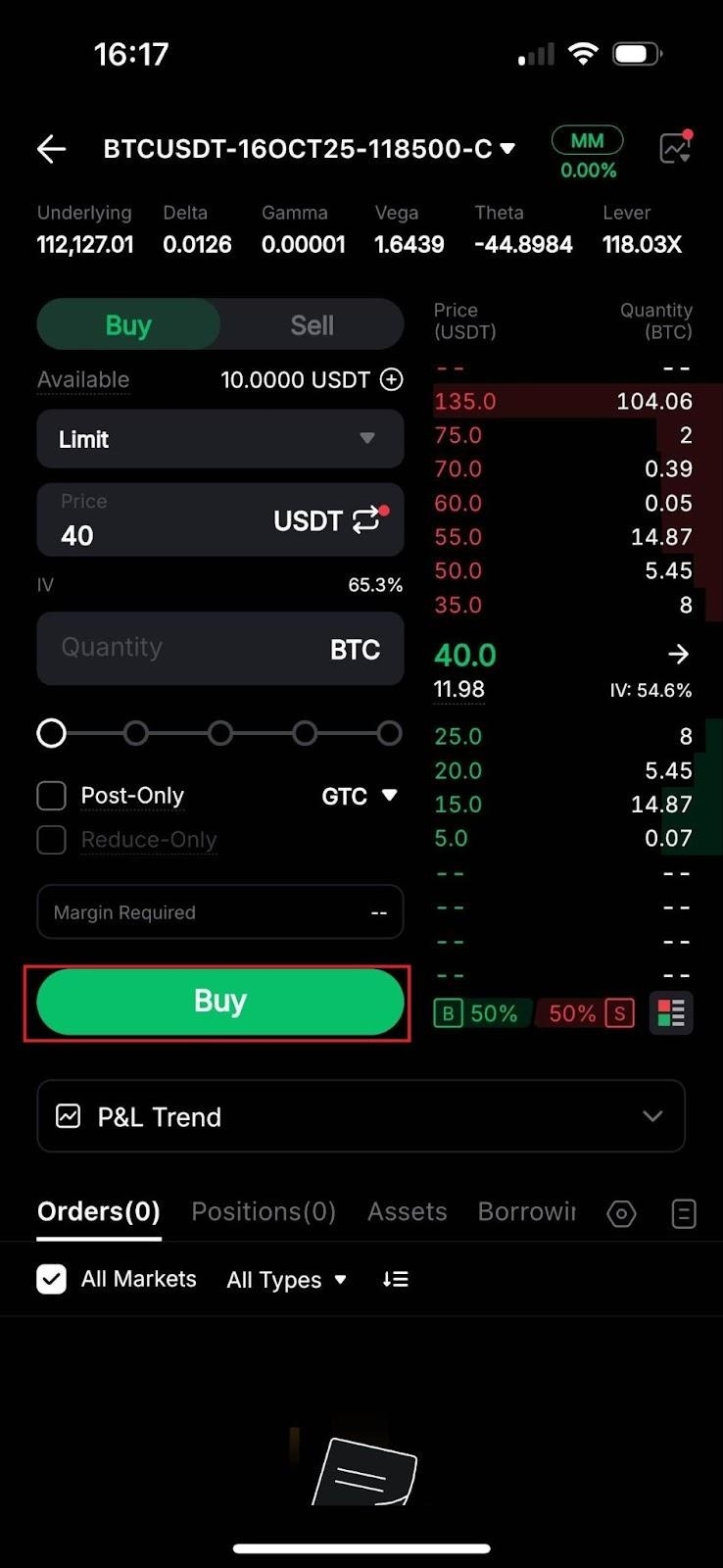
In Pro mode, you can access the same settings in the order placement window as on Bybit Web. These include the trade direction (to buy or sell options), order type (Limit or Market), quantity (the number of contracts to trade) and optional parameters like Post-Only or Reduce-Only. You can also check out the P&L Trend chart near the bottom of the page.
Once everything is set, tap on Buy (for long positions) or Sell (for short positions) and Buy or Sell again on the next window to confirm your order.
Trading Strategies for crypto options
When it comes to crypto options trading, it’s essential to have a strategy. Here, we’ll briefly go over a few beginner-friendly strategies that are popular among traders.
Covered Call strategy
How it works: With a covered call, you own the underlying asset (say, Bitcoin) and sell a call option on that asset at an OTM strike price.
Goal: You’re betting that the asset’s price will stay close to the strike price. If it does, you keep the premium (the fee), earning income. If BTC’s price goes above the strike price, the buyer may choose to exercise the option, and you would sell the asset at the strike price, still profiting from the premium.
Direction: Mildly bullish or neutral.
Protective Put strategy
How it works: This strategy is suitable when you own the underlying asset and want to hedge your holdings. Buying a put option gives you the right to sell the asset at a predetermined strike price, even if the market price falls below that level.
Goal: This strategy acts as a way to protect your investments if you’re worried about a potential drop in the crypto market. If the asset’s price drops, the put option offsets the loss. If the price rises or remains stable, you lose only the premium that you paid for the option.
Direction: Bullish long-term, bearish short-term or neutral.
Straddle strategy
How it works: A straddle involves buying both a call and a put option on the same asset, with the same strike price and expiration date.
Goal: The idea is to profit from high volatility. If the asset’s price rises significantly, your call option gains value. If it falls sharply, the put option gains value. You’ll make a profit as long as the price moves enough to cover the combined cost of both options.
Direction: Neutral, anticipating high market volatility.
Strangle strategy
How it works: With a strangle, you buy a call and a put option, but each one has a different strike price — typically, one slightly above the current market price and one slightly below it.
Goal: As with the straddle, a strangle profits from large price swings in either direction. The main difference is that since the strike prices are further from the current price, you’ll pay less for the options, though you’ll need a bigger move to see profits.
Direction: Neutral, anticipating high market volatility.
How to use Bybit's Option Strategies feature
Bybit's Option Strategies feature makes it easy to execute various options strategies in just a few steps.
Step 1: Access the Options Strategies feature
Open the Bybit App and log in to your account.
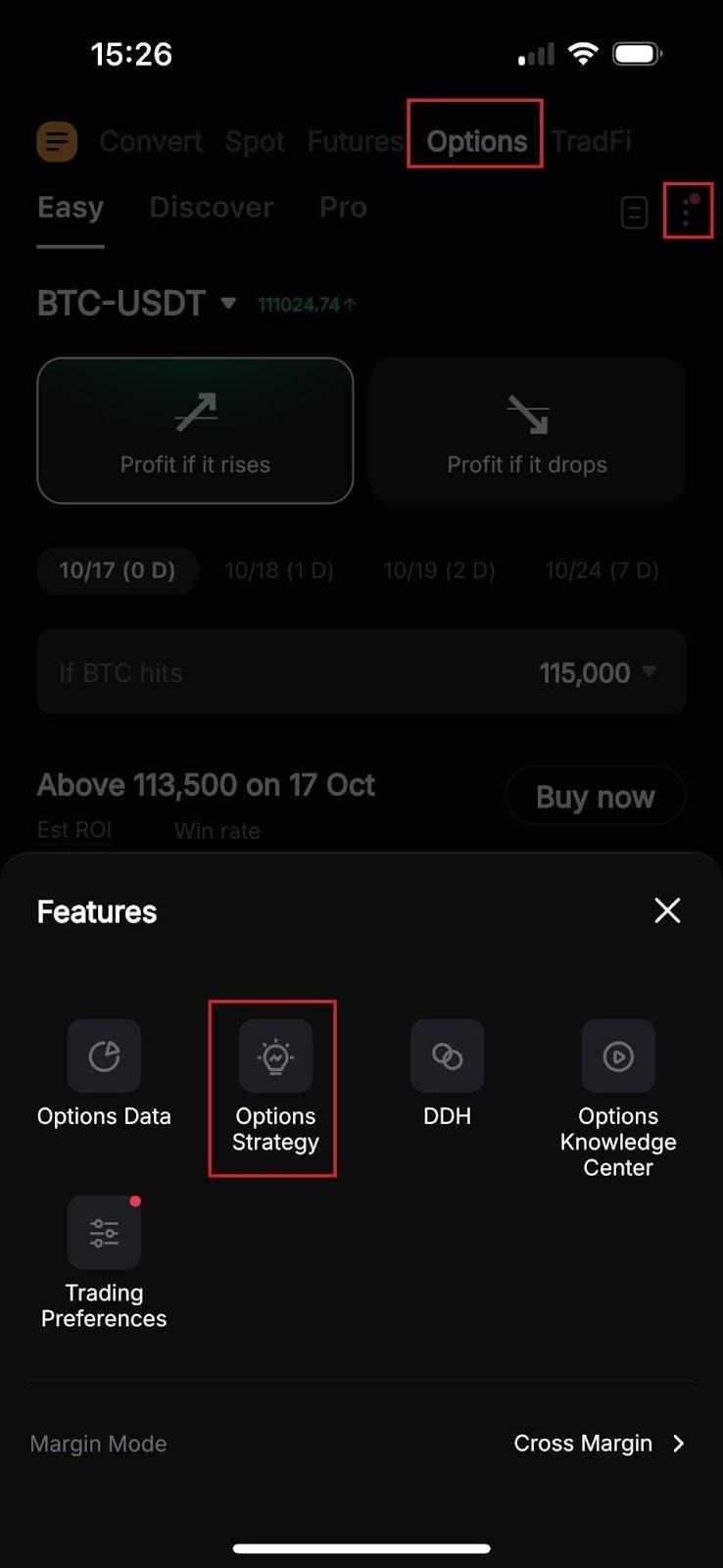
Tap on Trade at the bottom of the screen, then select Options at the top.
On the Options page, click on the horizontal three dots icon near the top right corner and select Options Strategies.
Step 2: Choose your strategy
Bybit offers four preset strategies: Bull Call Spread, Bull Put Spread, Bear Call Spread and Bear Put Spread. Here’s a quick overview.
Bull Call Spread: Suitable for moderately bull markets where you expect a moderate rise. Consists of one long call with a lower strike price and one short call with a higher strike price.
Bull Put Spread: Ideal for neutral to moderately bullish markets where you believe the price will stay above the short strike. Includes one long put with a lower strike price and one short put with a higher strike price.
Bear Call Spread: Works well in bearish markets where you expect the price will stay below the short strike. Here, the strategy involves one short call with a lower strike price and one long call with a higher strike price.
Bear Put Spread: Suitable for moderately bearish markets where a moderate decline is anticipated. Consists of one short put with a lower strike price and one long put with a higher strike price.
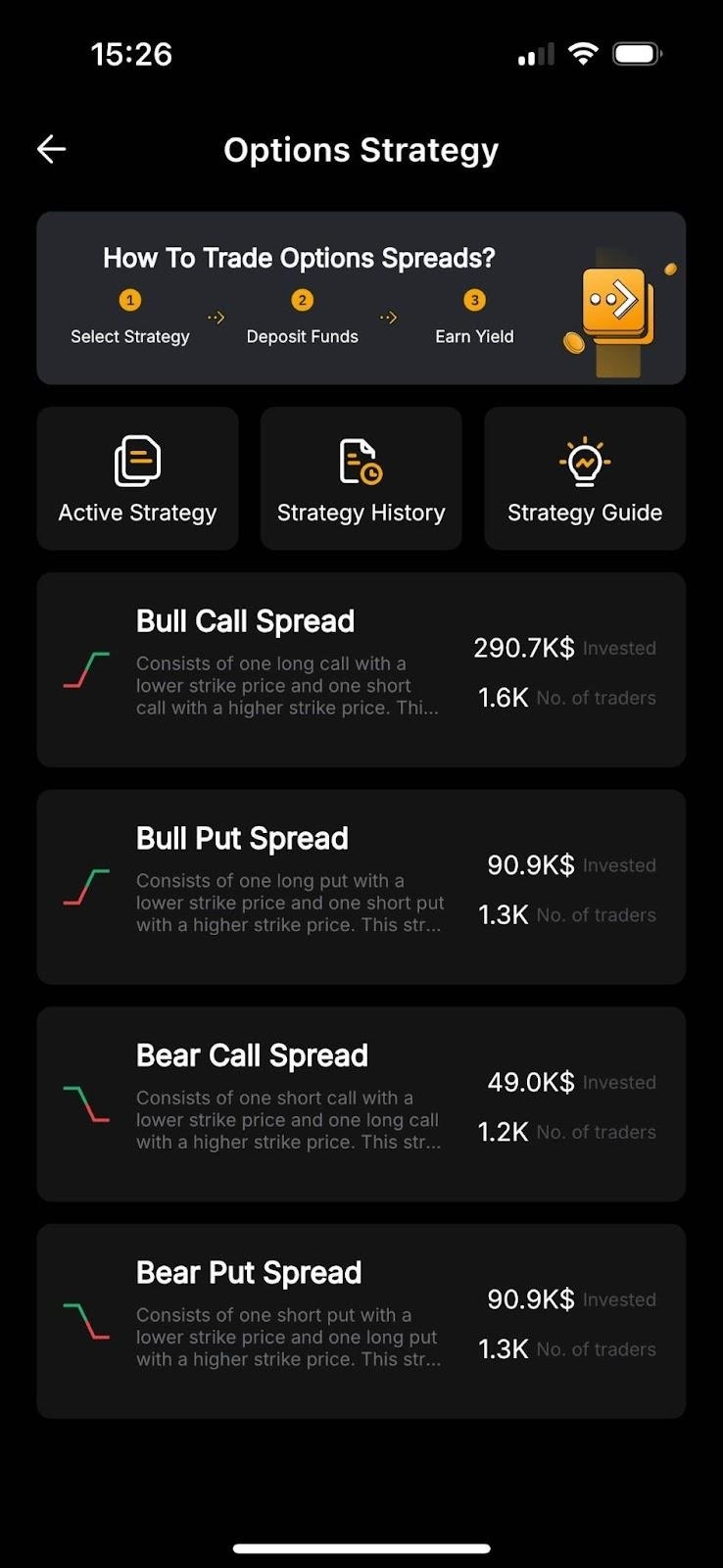
Each strategy card has an introduction, a profit and loss (P&L) graph and key metrics, such as maximum profit and margin requirements.
Step 3: Create your strategy
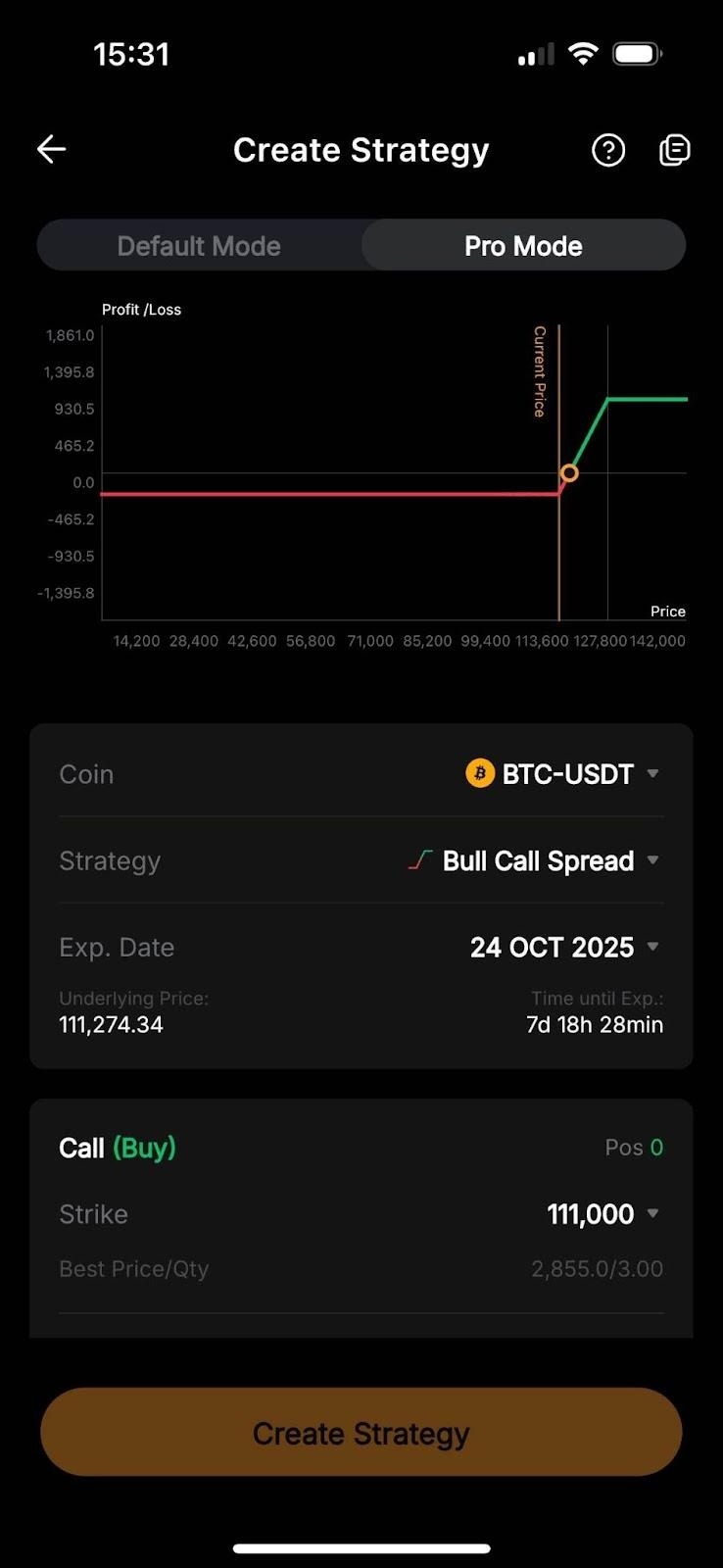
Bybit provides two modes to set up your options strategy: Default Mode and Pro Mode.
Default Mode (Recommended for beginning traders)
In Default Mode, Bybit automatically selects the coin, strike price and expiration date, based on current market conditions.
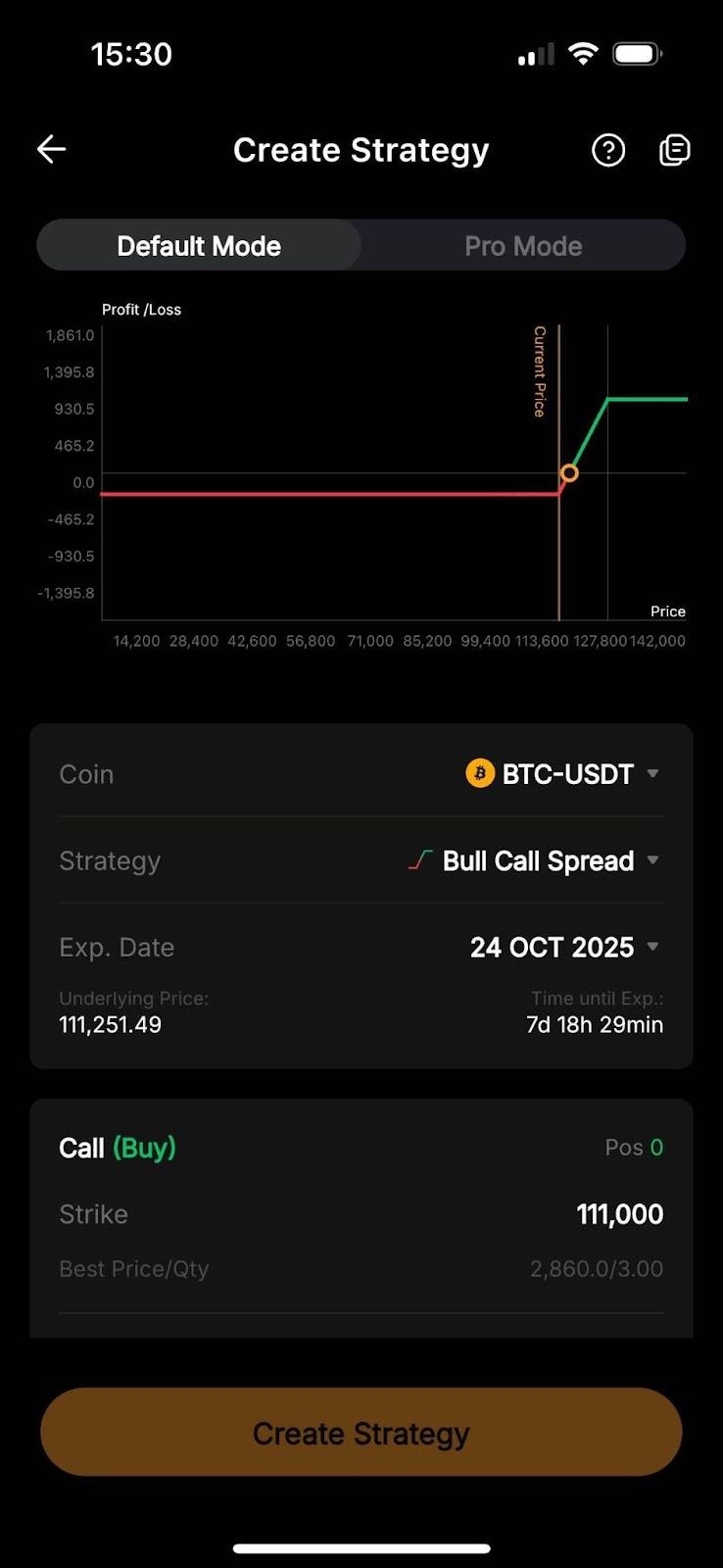
Note: In Default Mode, parameters such as strike price and expiration date are automatically set, and cannot be changed.
Pro Mode (for experienced traders)
Pro Mode offers greater flexibility, allowing you to customize your strategy parameters.
Coin: Choose the underlying asset (e.g., BTC or ETH).
Strategy: Select your preferred strategy type.
Expiration Date: Set the date when the options contract will expire.
Strike Price: Enter strike prices for each option in the strategy.
Size: Enter the quantity of contracts to buy or sell.
Once your strategy is configured, click on Create Strategy to execute it as a market order.
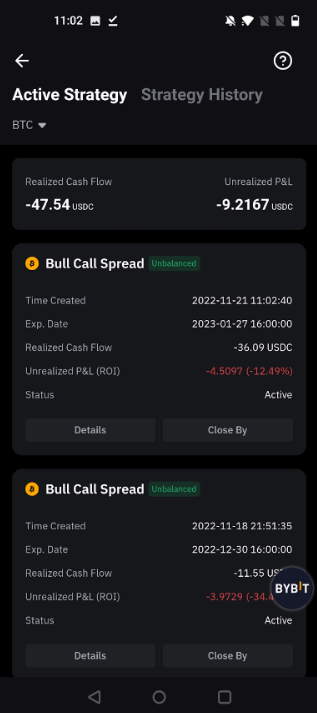
Step 4: View your active strategies
After creating a strategy, you can track it under Active Strategy. This page displays the Realized Cash Flow, Unrealized P&L and Details.
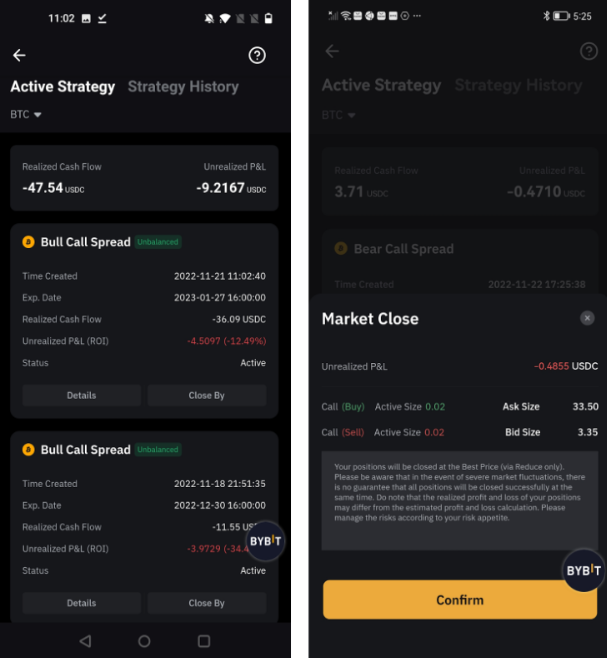
Step 5: Close your strategy
To exit an active strategy, go to Active Strategy and select Close By.
Confirm the strategy information, then click on Confirm to close it. The strategy will close as a market order.
In cases of extreme market conditions, lack of liquidity may impact the ability to close the strategy, so be mindful of market conditions when exiting.
Fees and maintenance margin
When trading crypto options on Bybit, it's essential to understand the various fees and margin requirements involved.
There are three types of fees: trading, delivery and liquidation fees.
Trading fee Bybit charges a trading fee whenever you open or close an options position, calculated in USDT or USDC. This fee applies to maker orders at a rate of 0.02%, and to taker orders at a rate of 0.03% on Bybit’s platform for non-VIP (VIP 0) users. Based on their VIP level, traders pay lower fees for both maker and taker orders. For example, Bybit only charges Supreme VIPs 0.005% for maker orders and 0.015% for taker orders. You can learn more about the trading fee structure here.
Example: Suppose you trade a BTC call option with a size of 0.3 BTC and an index price of $110,000, a strike price of $113,000 and an option price of $3,000. In this case, Bybit charges a 2.52 USDT trading fee for the order (0.0002 × $42,000 × 0.3). Please note that in this case, the trading fee for a single contract is capped at 7% of the option’s price ($210).
Delivery fee A delivery fee is charged if the option reaches its expiration and is exercised. This fee only applies to options that finish "in-the-money" (ITM), meaning they expire at a profit for the buyer. For Bybit options, the delivery fee rate is 0.015%. Keep in mind that daily options do not incur a delivery fee, thus adding flexibility for short-term trades.
Example: Suppose you hold a call option on BTC with a strike price of $110,000 and a size of 0.3 BTC. If BTC’s index price at expiration is $111,000, this option finishes ITM, triggering a delivery fee of 2.07 USDT ($1,000 x 0.00015 x 0.3). The delivery fee for a single contract can’t be higher than 12.5% of the option’s value ($125).
Liquidation fee For short options, a liquidation fee may be applied if your account balance falls below the required margin, leading to the automatic liquidation of your position. Bybit charges a liquidation fee of 0.2% based on the order size and the index price, helping protect your account from excessive losses.
Example: If you are the seller of a call option and the BTC index price rises beyond your margin capacity, your position may be liquidated, and a 0.2% liquidation fee will be deducted from your account balance.
Maintenance margin requirements
One key difference between long and short options is in the maintenance margin.
Long options: No maintenance margin is required for long options. As a buyer, your maximum loss is the premium you’ve paid for the option, which gives you the right (but not the obligation) to exercise the option.
Short options: Maintenance margin is required for short options in order to cover potential losses if the option is exercised. This margin generally occupies 10% to 15% of the underlying asset's value, ensuring that the seller can fulfill their obligation if the option moves against them.
How to calculate profit & loss for options trading
When buying options (long position)
When you buy an option, your P&L depends upon the difference between the underlying asset’s market price and the option’s strike price, minus any premium you paid for the option.
For call options:
Formula: Profit = (Market Price − Strike Price) − Premium Paid
Example: If you buy a BTC call option with a strike price of $110,000 for a premium of $500, and BTC’s price rises to $112,000, your profit would be as follows: Profit = ($112,000 − $110,000) − $500 = $1,500
For put options:
Formula: Profit = (Strike Price − Market Price) − Premium Paid
Example: If you buy an ETH put option with a strike price of $4,000 for a premium of $100, and ETH’s price drops to $3,700, your profit would be as follows: Profit = ($4,000 − $3,700) − $100 = $200
When selling options (short position)
When you sell an option, you receive the premium up front, which is your maximum profit if the option expires out-of-the-money (meaning it doesn’t reach the strike price).
However, selling options comes with more risk, as your potential loss can be significant if the market moves against you. Here’s how it works.
For call options:
Formula: Profit = Premium Received − (Market Price − Strike Price)
Example: Suppose you sell a BTC call option with a strike price of $110,000 for a premium of $300. If BTC’s price rises to $111,000, your loss would be as follows: Loss = $300 − ($111,000 − $110,000) = −$700
For put options:
Formula: Profit = Premium Received − (Strike Price − Market Price)
Example: If you sell an ETH put option with a strike price of $4,000 for a premium of $50, and ETH’s price drops to $3,800, your loss would be as follows: Loss = $50 − ($4,000 − $3,800) = −$150
Conclusion
Crypto options trading can be a powerful tool for traders looking to profit from market shifts, or to manage risks without holding the actual crypto.
Bybit’s USDT- and USDC-settled contracts and broad expiration choices can help traders to adopt different strategies. Whether you’re bullish, bearish or neutral, options offer the flexibility to align with your market outlook.
Remember, while options can amplify gains, they come with risks, so always use proper risk management techniques to protect your investments. Learn more with our crypto options course.
Trade crypto options on Bybit now!
#LearnWithBybit