


How to trade fiat pairs on Bybit

Bybit lets you trade a supported fiat currency directly against a selected digital asset on the exchange’s Spot market without first converting your funds to a stablecoin. This guide explains what fiat pairs are, how they differ from a card purchase or P2P trade, and how to place your first fiat pair order with Bybit Spot.
Key Takeaways:
Fiat trading allows you to use a supported fiat currency directly against select digital assets on Bybit's Spot market.
Card purchases and P2P trades settle instantly at one quoted rate. A fiat pair lets you choose between an instant Market order or a target-priced Limit order.
What are fiat trading pairs?
A fiat trading pair on Bybit is a fiat-to-crypto or crypto-to-fiat pair in which a supported fiat currency trades directly against a selected cryptocurrency asset. One example would be EUR/USDT or GBP/BTC. In this instance, EUR/USDT pairs fiat currency (the euro) against a stablecoin (Tether, or USDC), while GBP/BTC pairs fiat (the Pound sterling) against a non-stablecoin cryptocurrency, in this case Bitcoin (BTC). Both types of pairs are defined as fiat pairs on Bybit's Spot market.
A card purchase (or P2P trade) in which you use fiat to buy crypto is a one-time conversion at a quoted rate. In contrast, a fiat trading pair is part of a continuous market with a live order book, a bid/ask spread and multiple order types.
Card purchase/P2P | Fiat trading pair |
One-time conversion at quoted rate | Continuous market with live order book |
Single transaction type | Market and Limit order types |
Why trade fiat pairs?
Trading a fiat pair skips the stablecoin conversion step when you want direct exposure to fiat. This can reduce the friction of running two separate trades (a fiat-to-stablecoin conversion followed by a crypto trade).
In addition, fiat pairs run on a live order book. You can see the bid and ask prices before you trade, leading to a more transparent trading experience.
Note that fiat pairs aren’t always cheaper or more liquid than a card purchase, P2P trade or stablecoin route. Liquidity and pricing depend upon the specific pair and market conditions.
Which fiat currencies and pairs are available?
Bybit supports multiple fiat currencies for direct trading, though the specific currencies and pairs available to you depend upon your jurisdiction and account verification level. Fiat deposit availability and fiat trading-pair availability can differ. Therefore, a currency you can deposit may not have pairs listed against it. Check the Spot market section on your trading interface to see which fiat pairs your account can currently trade.
How to place your first fiat pair trade on Bybit
The steps and screenshots below are based on the Bybit App mobile application. The mobile app and web platform follow the same workflow, but may have somewhat different navigation labels.
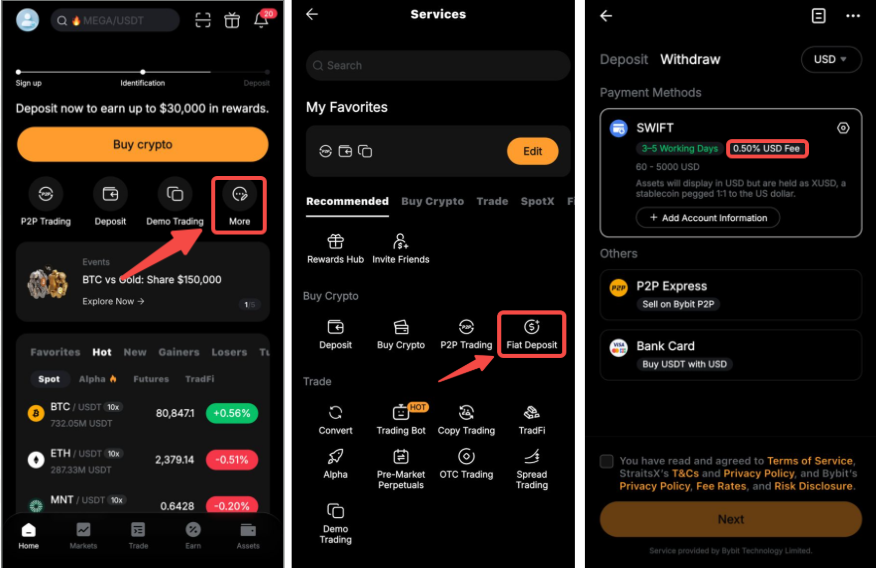
Step 1: Deposit fiat. Go to Home in the bottom menu, then More → Fiat Deposit. Select your deposit method (e.g., SWIFT), then specify the currency and amount and confirm.
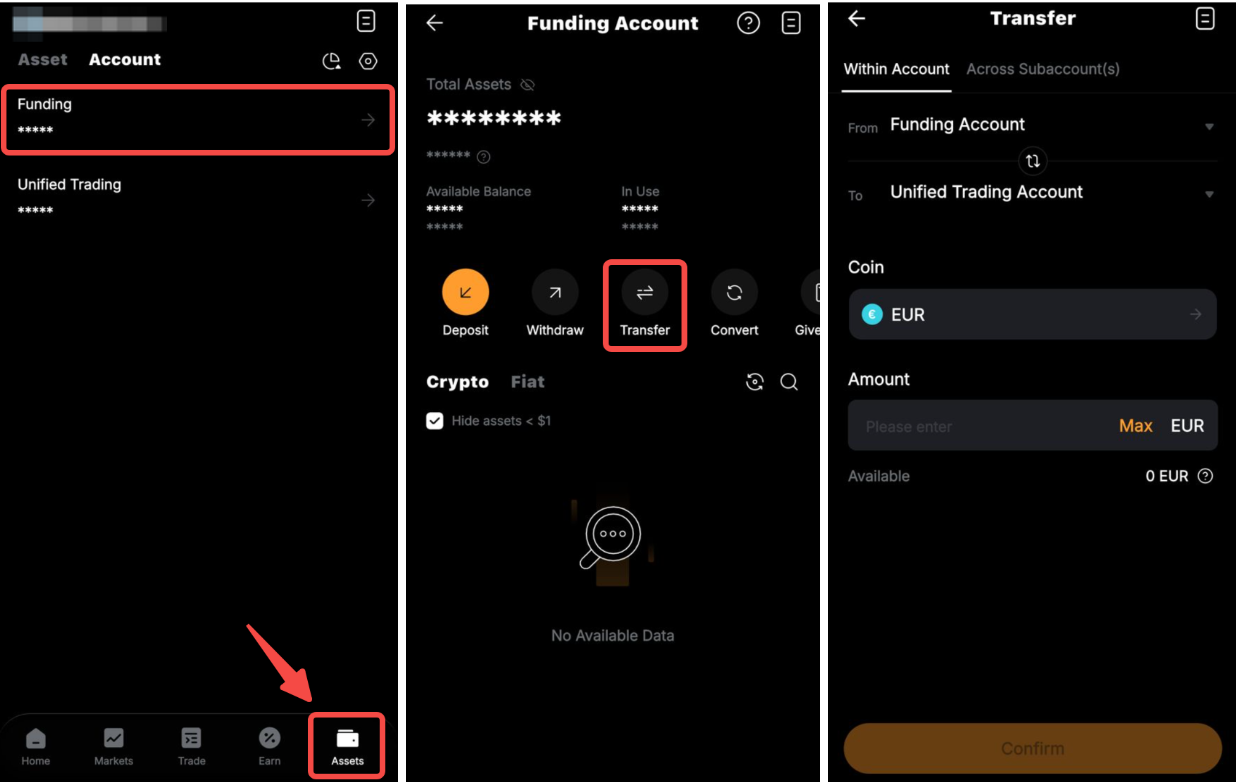
Step 2: Transfer fiat to UTA. Go to Assets in the bottom menu, then Transfer, and move the funds from your Funding Account to your Unified Trading Account (UTA). Note: If your deposited fiat funds are already available in your UTA, this step may not be needed.
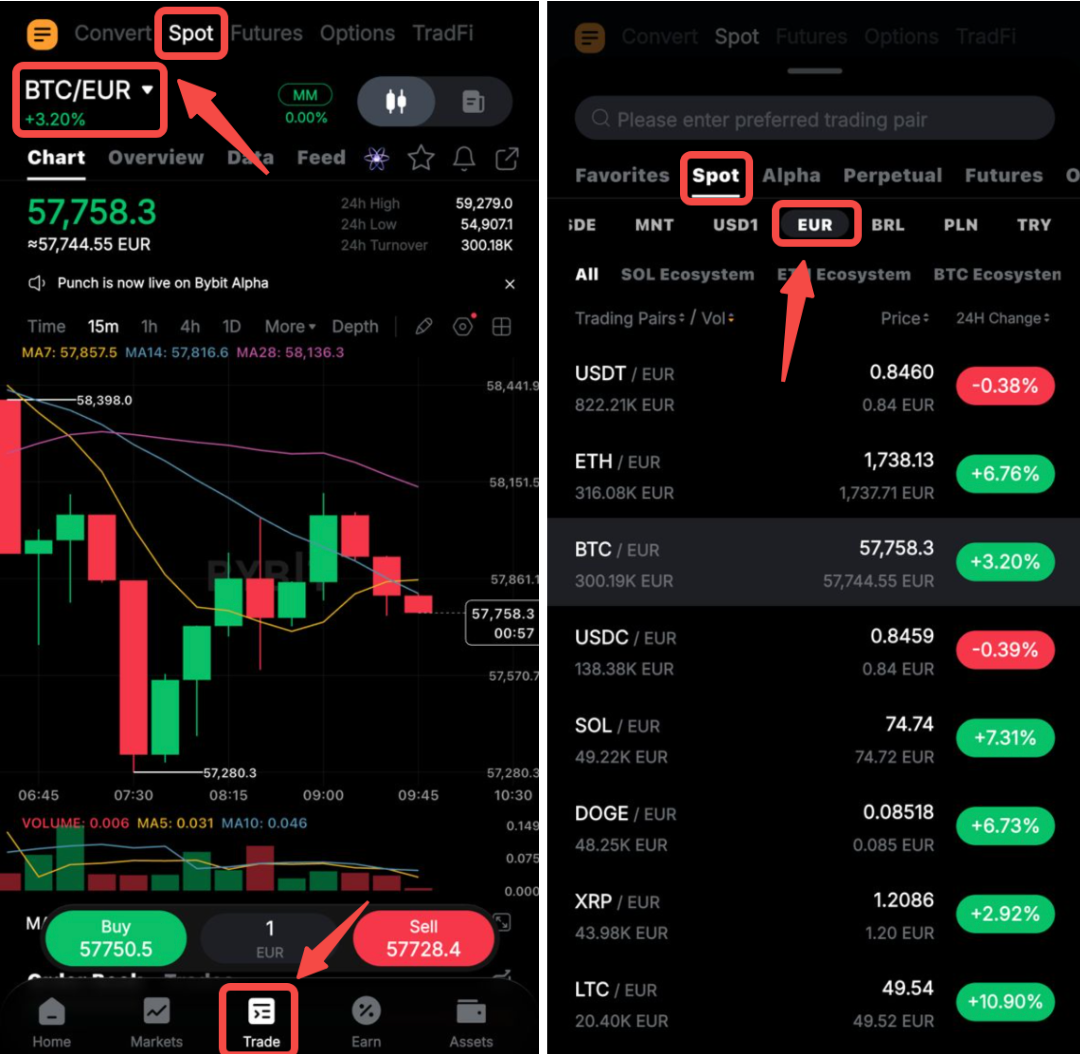
Step 3: Choose a fiat pair. Go to Trade in the bottom menu, then to Spot, and search for the fiat pair you want (such as BTC/EUR).
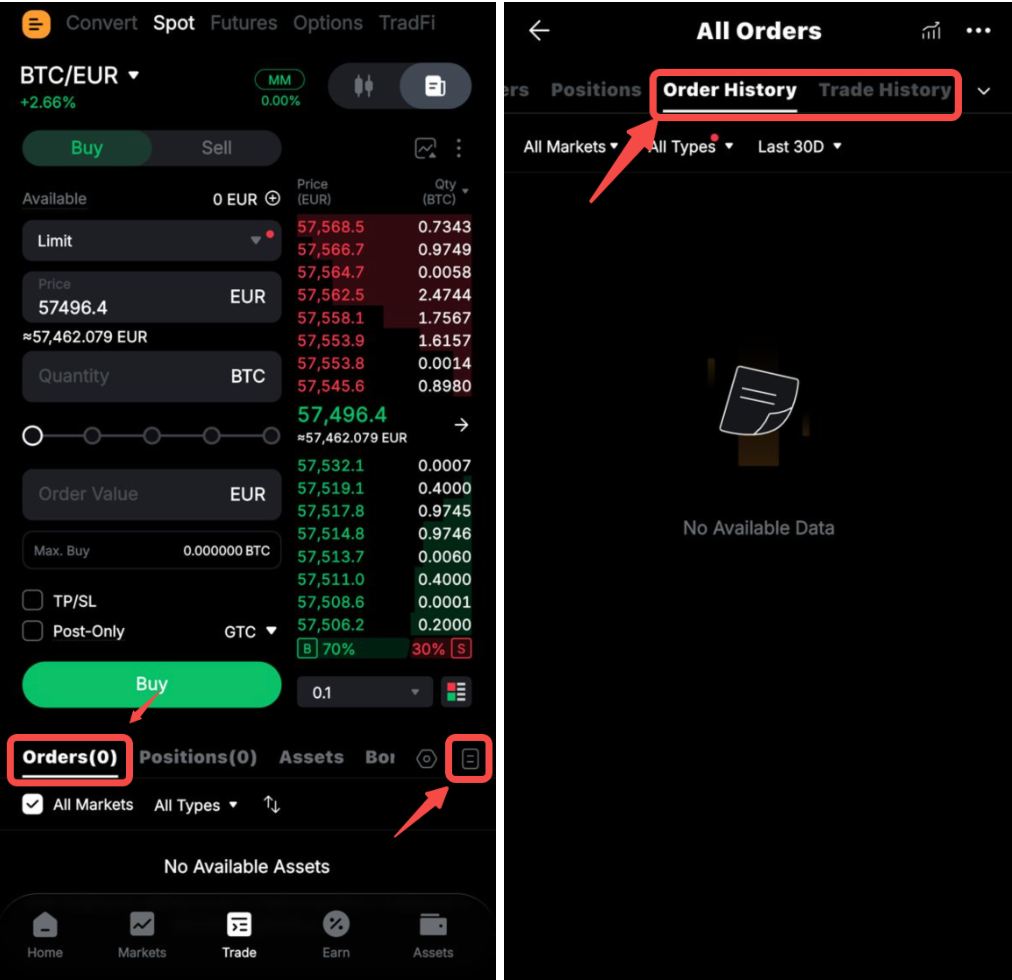
Step 4: Specify your order details and confirm. Select the order direction (Buy or Sell), order type (Market or Limit), the amount to trade and, for Limit orders only, the target price. A Market order executes immediately at the best available price. A Limit order lets you set your own target price, and is only executed if the asset reaches that price or better. Check the order details, and tap on Buy/Sell at the bottom part of the screen.
Any orders that are still open, such as unfilled Limit orders, will appear in the Orders tab. Filled orders will appear in the Order History tab.
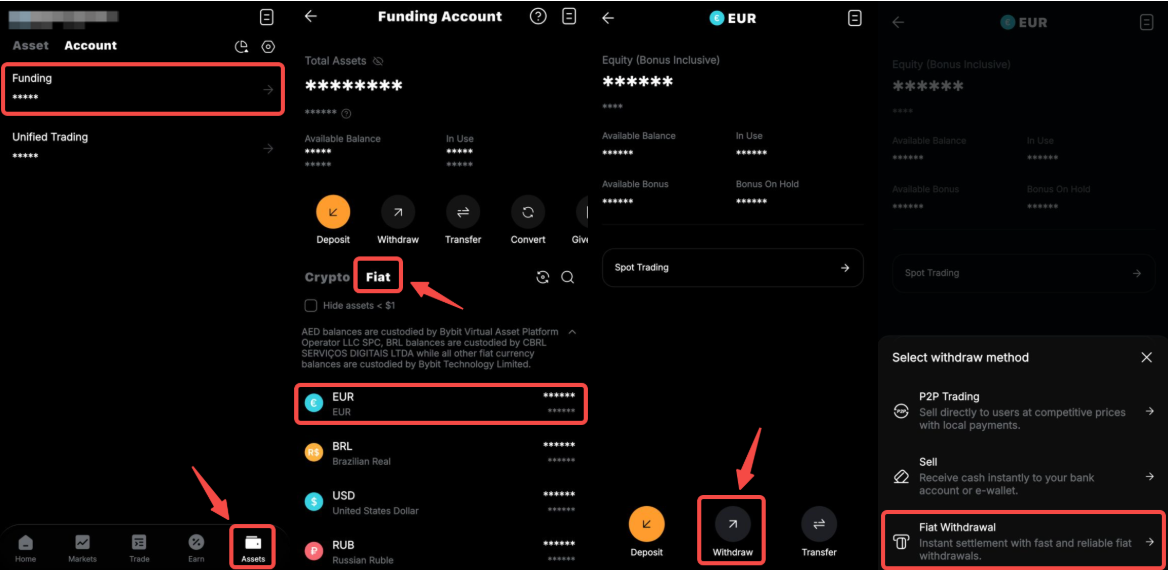
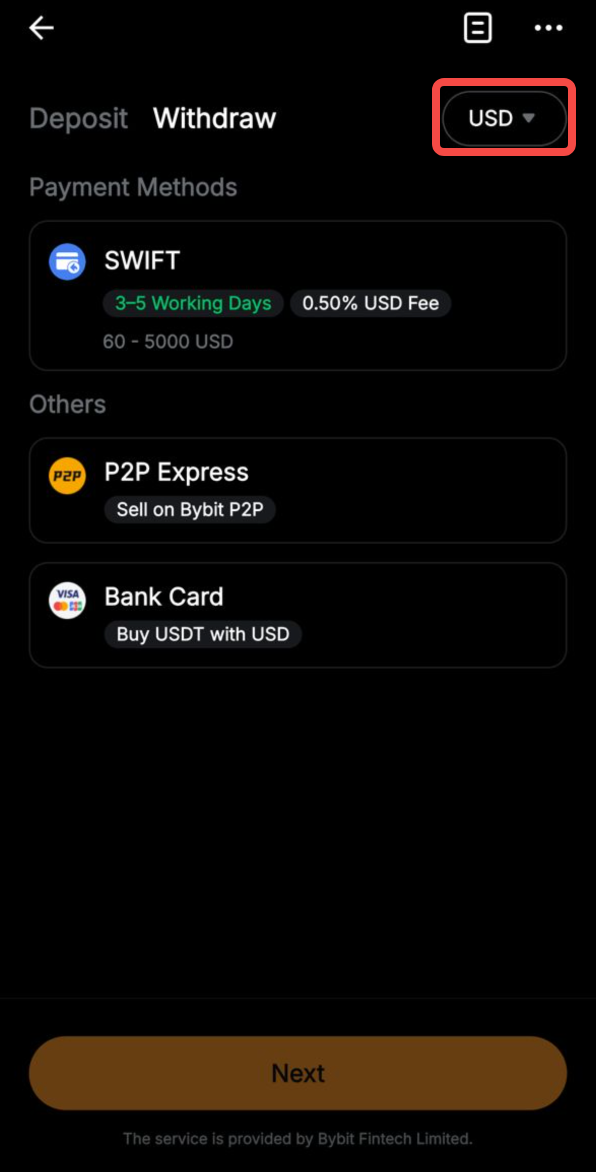
Step 5: Withdraw fiat (optional). Go to Assets → Account → Funding → Fiat and select your fiat currency. Then, go to Withdraw → Fiat Withdrawal (or Withdraw <asset_name>), then select your withdrawal method and amount and confirm.
What fees apply to fiat pair trading?
Fiat pair trading uses the same fee structure as standard Spot trading. Therefore, Maker and Taker fees apply in the same way. Deposit and withdrawal fees vary by fiat currency and method. Your bank or payment provider may also charge its own currency conversion or processing fee, separate from what Bybit charges. Check the Bybit fee schedule page for the current rates.
What should you check before trading fiat pairs?
Exchange rate fluctuation: The rate between your fiat currency and the digital asset can move before your order is filled.
Liquidity varies by pair: Major pairs tend to have deeper order books than less common pairs.
Bid/ask spread: The bid/ask spread can widen during volatile market conditions.
Fiat currency movement risk: If you trade using a fiat currency other than your local one, you carry exposure to that currency's exchange rate when you convert back to your local currency.
Standard crypto volatility: The underlying digital asset still moves independently of the fiat side of the pair.
Benefits of trading fiat pairs on Bybit
Fiat pairs trade through the same interface you already use for crypto Spot transactions, so there’s no new workflow to learn.
You also get access to both Market and Limit order types, along with full UTA integration.
Additionally, pricing is based on the live order book, rather than a single quoted rate.
Risk disclaimer: This article is for educational purposes only, and does not constitute financial or investment advice. Trading fiat pairs carries financial risk, including the potential loss of capital. |
Conclusion
Trading fiat pairs give you direct access to crypto assets using your own fiat currency through Bybit’s same familiar Spot interface. Check the available fiat pairs in the Spot market to see which ones are available for your account.
#LearnWithBybit