


How to deposit and trade USD on the Bybit App

Bybit supports direct USD deposits, letting you move from fiat to live crypto trades in a handful of steps, all within the Bybit App mobile application.
Whether you're funding via a SWIFT transfer or bank card, the process follows a straightforward path: deposit to your Funding Account, transfer to your Unified Trading Account (UTA) and place your order on the Spot market. Web access is also available, but this guide focuses on the App flow.
Key Takeaways:
Bybit allows you to deposit USD into your account via bank transfers or card payments.
With USD on Bybit, you can trade directly against three assets — Tether (USDT), Bitcoin (BTC) and Ether (ETH).
USD deposits require completed Identity Verification at the Standard level, and are available only to individual customers.
Why deposit USD on Bybit?
Usually, buying crypto with USD involves converting it to USDT first, incurring two sets of fees. Bybit lets you trade USD directly against USDT, BTC or ETH, removing that extra conversion step.
This is particularly relevant if you receive or hold funds in USD, and want to avoid the compounding cost of unnecessary conversions.The end-to-end flow covered in the sections below comprises four operations: depositing USD, transferring it to your UTA, executing a Spot trade and withdrawing USD when needed.
How to deposit USD (App)
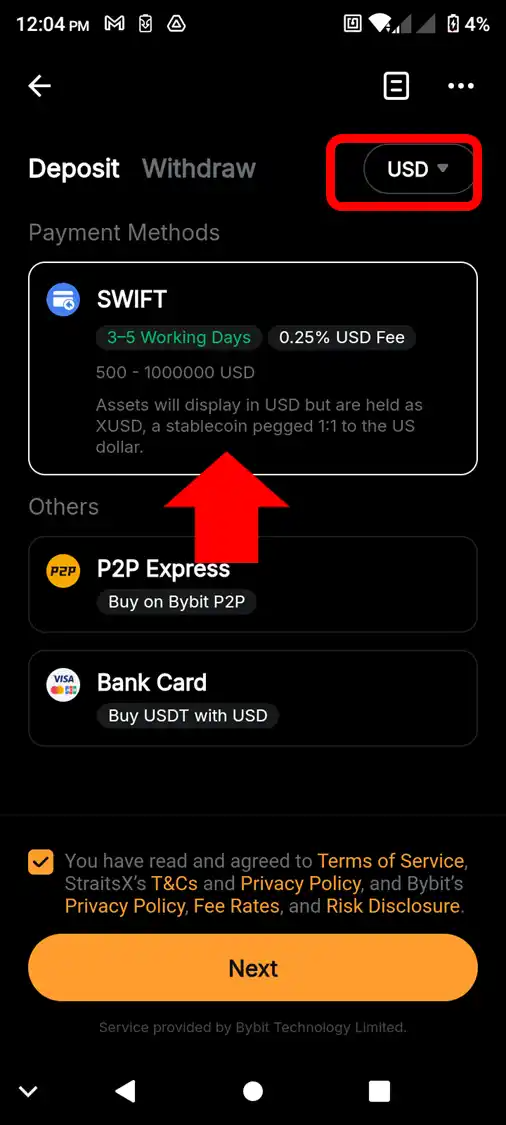
There are two main deposit methods for USD on Bybit — bank transfers and bank card payments. The methods available to you might differ depending upon your region. USD deposits are only available to Bybit’s individual customers who have completed Identity Verification at the Standard level. Please note that business customers aren’t eligible to deposit USD.
Fees and minimum/maximum transaction amounts
Bybit doesn’t charge transaction fees for SWIFT transfers routed via a US bank. Non-US bank SWIFT deposits incur a 0.25% fee. Intermediaries facilitating the transfers may also charge their own fees.
The minimum transaction amount for USD bank transfer deposits is $500, with a maximum of $1,000,000.
For card payments, the minimum and maximum amounts may vary, depending upon the card or payment processing provider. Typically, the minimum is $10–$30, and the maximum is $10,000–$20,000.
For a detailed breakdown of deposit methods, Identity Verification requirements, fees and compliance considerations, please refer to this article.
To deposit USD via the Bybit App, follow the steps below.
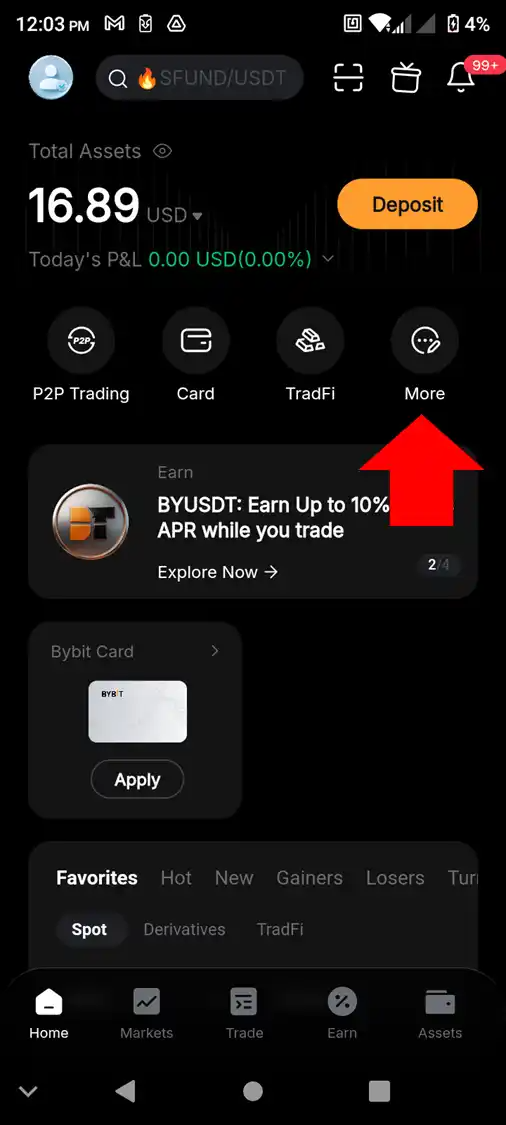
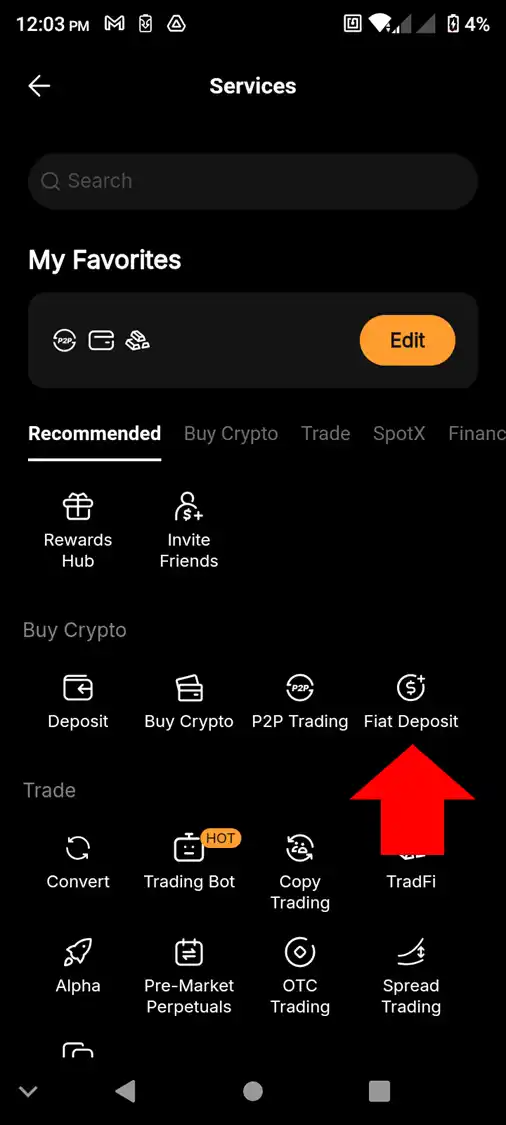
Step 2: On the Deposit screen, select USD as the currency at the top right. Choose a payment method from the list shown, tick the box at the bottom to acknowledge the service terms and tap on Next. You may be asked to complete Identity Verification if you haven’t already done so. Upon successful verification, you’ll be able to confirm and complete your deposit transaction.
How to transfer USD to your Trading Account (App)
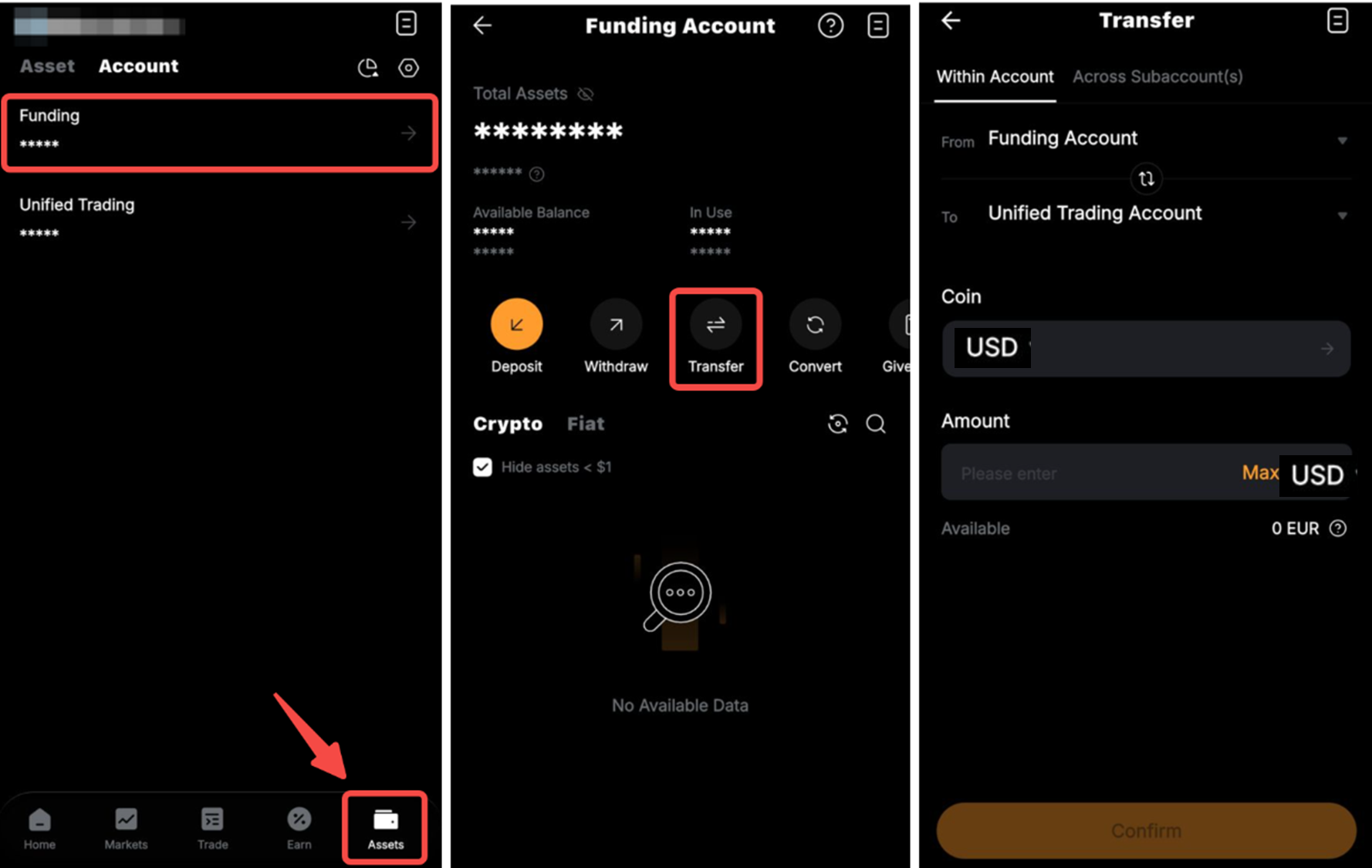
Your deposit will be credited to your Funding Account. To use the funds for trading, you will first need to transfer them to your UTA.
Step 1: Open the Bybit App and tap on Assets, then Funding to choose the account, and tap on Transfer.
Step 2: In the Transfer screen, ensure that the From field shows Funding Account, and the To field shows Unified Trading Account. Select USD as Coin, enter the transfer amount and tap on Confirm.
How to trade USD fiat pairs on Spot (App)
You can trade USD on Bybit’s Spot market against three cryptocurrencies: USDT, BTC and ETH.
To place a USD pair order on the Spot market via the Bybit App, follow the steps below.
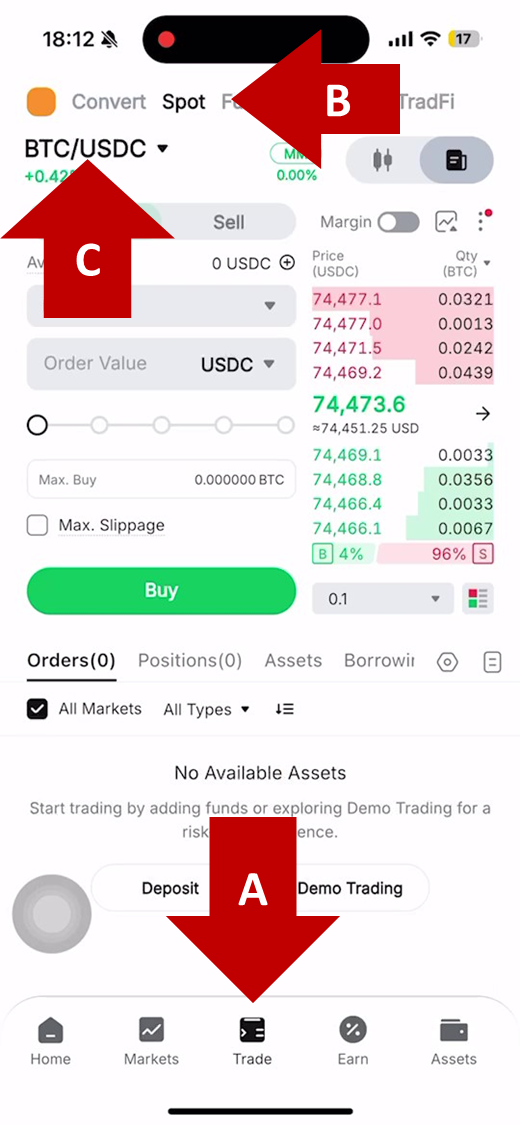
Step 1: Open the Bybit App, tap Trade in the bottom menu, then select Spot. Tap the current trading pair and switch it from the default pair, such as BTC/USDC, to the corresponding BTC/USD pair.
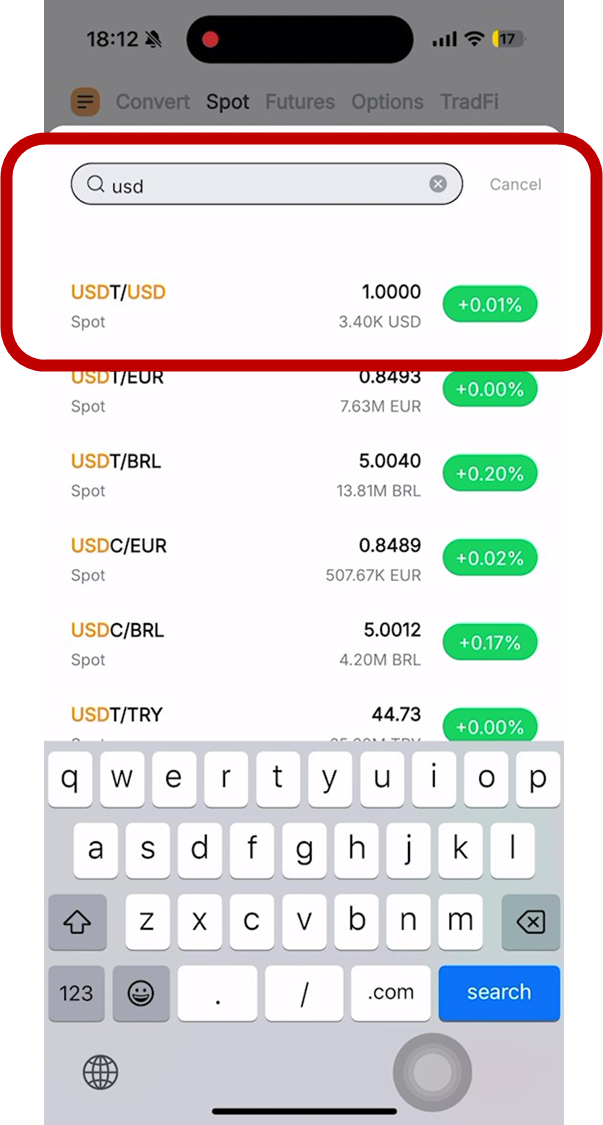
Step 2: Enter USD in the search box and then tap on your preferred USD trading pair, e.g., USDT/USD.
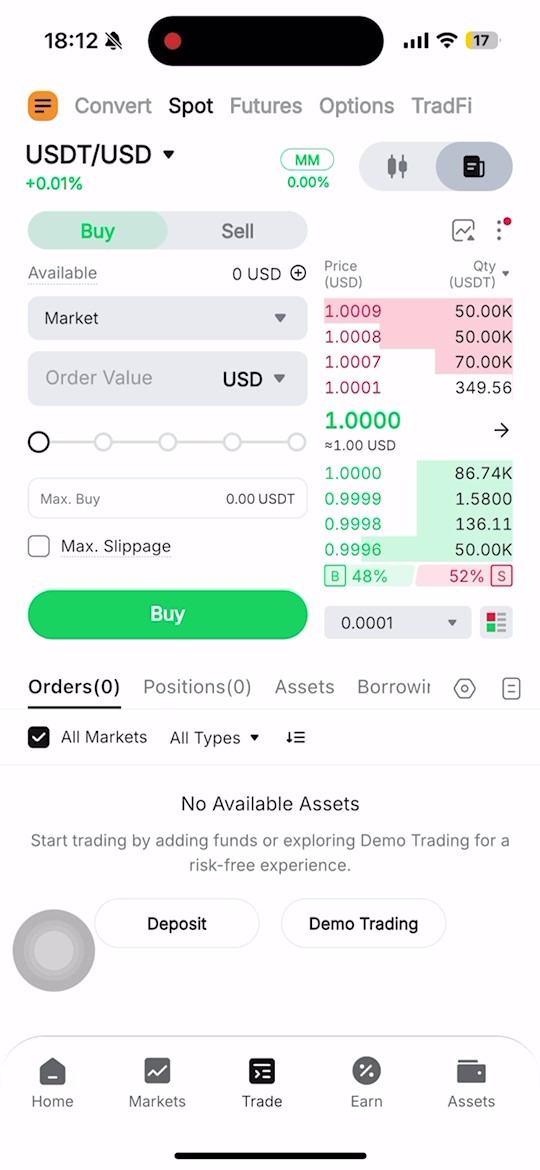
Step 3: Select your order direction (Buy or Sell), order type (e.g., Market), specify the order value in USD, and tap on the Buy (green) or Sell (red) button at the bottom to place your order.
How to withdraw USD (App)
Before withdrawing USD, transfer the funds to your Funding Account by following the same transfer process described above, but reverse the account direction: Set From to Unified Trading Account and To to Funding Account, then select USD, enter the amount, and tap Confirm.
After transferring the funds to your Funding Account, follow the steps below to withdraw your USD funds.
Step 1: Open the Bybit App, tap on Assets in the bottom menu, tap on Withdrawal, then tap on Fiat and select USD as your withdrawal currency.
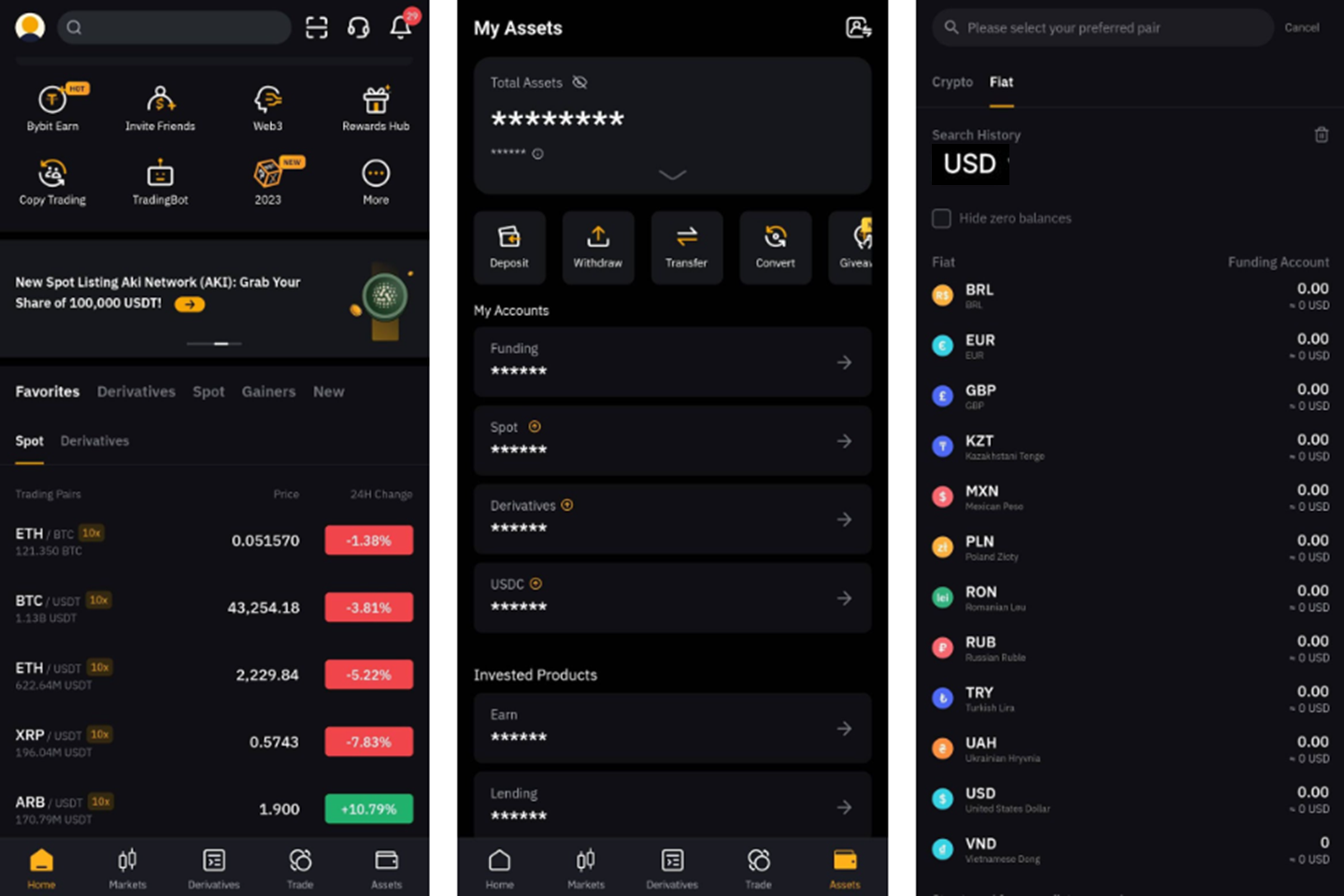
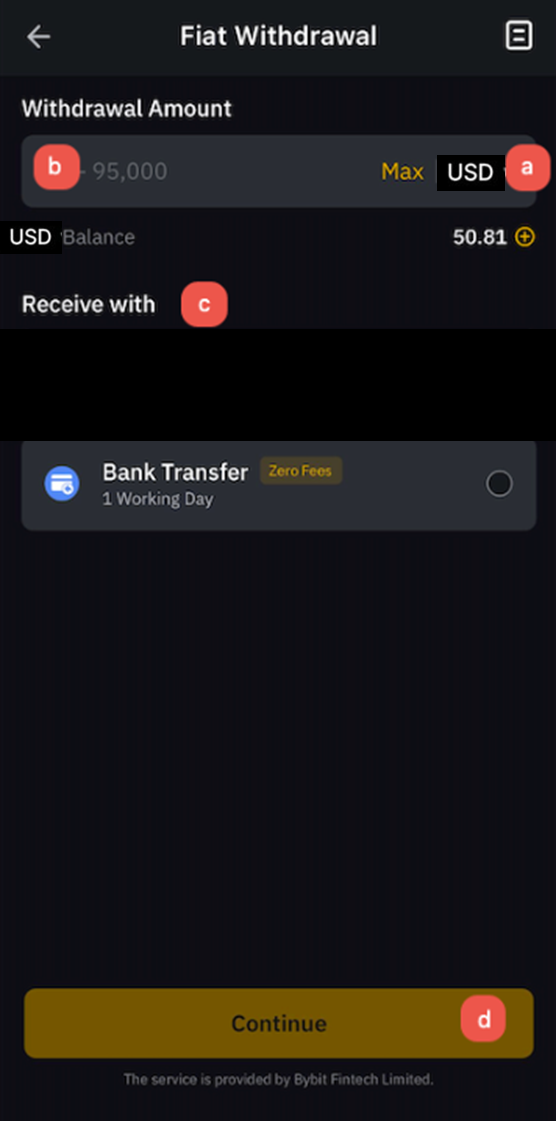
Step 2: Ensure USD is set as the withdrawal currency, specify your withdrawal amount, select your withdrawal method (e.g., bank transfer) and tap on Continue.
If you have previously withdrawn USD using this method, you can confirm and finalize your transaction. If this is the first time you’re using this withdrawal method, you’ll additionally need to register and confirm the withdrawal account details, after which you’ll be able to finalize your transaction.
Closing thoughts
Bybit's USD deposit flow covers four stages — depositing, transferring to your UTA, trading, and withdrawing when required. Each stage is handled within the Bybit App, following a consistent structure that becomes intuitive after the first run-through.
Once your account is funded, you can trade USD directly for USDT, BTC or ETH on the Spot market — with no conversion step or extra fees. If you hold USD and are looking for direct crypto exposure, Bybit's fiat pair setup removes the friction that usually comes with getting your capital into crypto markets.
#LearnWithBybit