


What are Bybit Trading Bots?

Bybit’s Trading Bot is an automated, no-code tool that executes trading rules on your behalf. Instead of monitoring charts or placing orders manually, you define a strategy and the bot runs it continuously in the background. This helps traders stay disciplined and react to market movements in a 24/7 environment.
Bybit offers several built-in bot types: Spot Grid, Futures Grid, DCA, Futures Martingale and Combo Bots. Each one serves a different purpose, from capturing price swings to building long-term positions or managing leveraged exposure. Because these bots run directly inside Bybit, the setup is simple and there’s no need for API keys or external software.

How do Bybit Grid Bots work?
Bybit Grid Bots automate buy-low, sell-high trading by placing limit orders across a price range that you define. When the price moves into a lower grid, the bot buys. When it rises into the next grid, the bot sells. Each completed cycle captures a small profit, and the bot continues operating as long as the market stays within your chosen range.
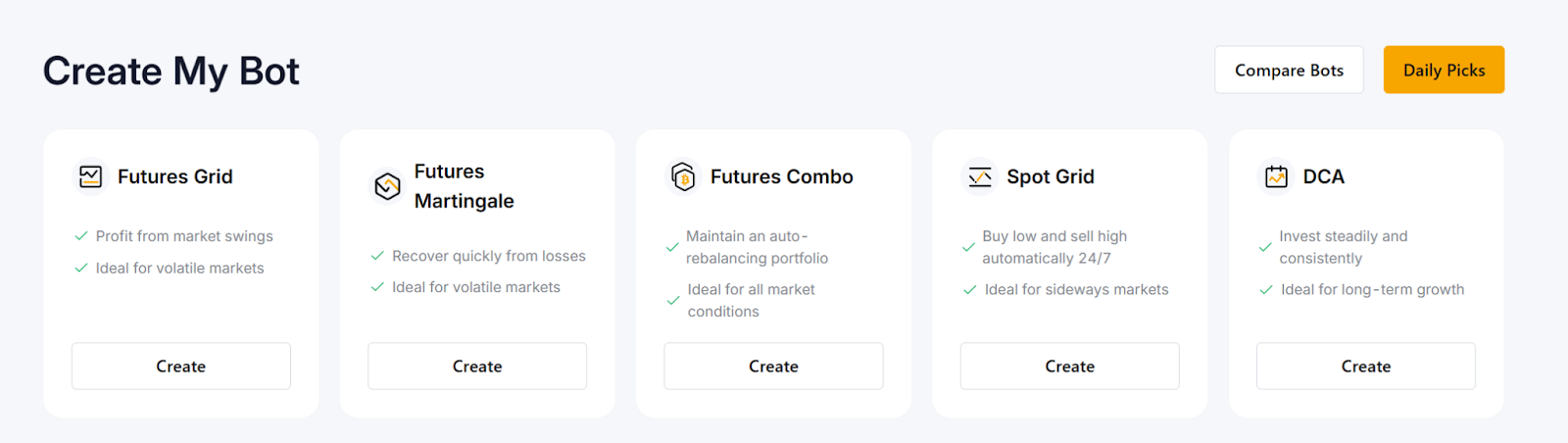
Bybit supports both Spot and Futures Grid Bots
Spot Grid trades the underlying asset, and is suited to sideways markets
The Futures Grid Bot uses leverage and supports long, short or neutral modes, allowing traders to capture swings in trending or volatile conditions.
Users can choose AI-recommended settings, or customize the range, grid count and risk controls. The logic stays the same: once the parameters are set, the bot executes consistently based on price movement, rather than emotion.
Types of bots on Bybit
Bybit offers several automated, no-code trading bots designed for different market conditions and trading styles. All bots run directly inside the exchange, which means fast execution, secure automation and simple setup.
1. Spot Grid Bot
The Spot Grid Bot automates buy-low, sell-high trading by placing orders across a price range that you define. It works best when the market moves sideways, allowing the bot to capture repeated price swings without manual timing. This bot trades the underlying asset, making the Spot Grid Bot suitable for users who want to accumulate or sell tokens while taking advantage of volatility.
Advanced options — such as stop loss, take profit, trailing up and entry price — allow users to manage risk and adapt as conditions change. Once the bot is activated, it runs 24/7.
2. Futures Grid Bot
The Futures Grid Bot applies similar logic as the Spot Grid Bot, but it uses USDT Perpetual contracts with leverage. Traders can run Long, Short or Neutral modes, depending upon the trend. Because the Futures Grid Bot doesn’t require holding the actual asset, it’s useful for directional strategies or markets with strong volatility. Leverage allows gains to accumulate faster, but it also increases risk, especially if the price moves outside the grid range.
3. Dollar-cost averaging (DCA) Bot
The DCA Bot buys a fixed amount of crypto at regular intervals, regardless of the market price. It’s designed for long-term investors who prefer consistent accumulation rather than timing entries. By spreading purchases over time, the bot helps smooth out volatility and reduce the impact of sudden swings.
4. Futures Martingale Bot
The Futures Martingale Bot increases position size when the market moves against you, aiming to improve the average entry price and accelerate recovery when the price reverses. Traders can set triggers, multipliers and maximum additions to control risk. This bot is best suited for users who expect mean-reversion scenarios, and want a systematic way to scale into positions.
5. Futures Combo Bot
The Futures Combo Bot creates a diversified long-short futures portfolio across 2–10 contracts. It automatically rebalances when allocations drift from your target ratios, keeping your strategy consistent even during fast market movements. This bot is useful for traders who want structured exposure without managing each contract manually.
Benefits of using crypto trading bots
Crypto trading bots offer fast, disciplined and automated execution in a market that never sleeps. They help traders of all levels operate more efficiently by removing emotionally based decisions, and ensuring strategies run exactly as intended.
Core benefits for all traders
24/7 automation: Bots monitor markets and execute instantly, even when you’re offline
Emotion-free decisions: Automated rules prevent fear, greed or hesitation from affecting trades
Consistent execution: Strategies run the same way every time, ideal for volatile or sideways markets
Multi-market operation: Bots can manage several pairs or strategies at once, something manual trading can’t match
Beginner-friendly investing: DCA and preset strategies simplify long-term accumulation
Advanced strategy support: Grid, Martingale and directional Futures bots allow experienced users to execute complex, structured setups automatically
Bybit-specific advantages
Code-free, fast setup: Users can deploy bots in minutes with AI recommendations or manual settings
Clean, intuitive UI: Each bot displays only the parameters you need, reducing setup errors
Secure, exchange-native execution: No API keys required — bots run directly inside Bybit’s infrastructure for safer automation
Built-in performance tracking: Real-time PnL, APR, grid metrics and bot history help users monitor and optimize results easily
Risks and limitations of trading bots
Trading bots automate execution, but they aren’t a guarantee of profit. Their performance depends entirely upon the strategy you choose, and how well your settings match current market conditions. If the market moves sharply outside your price range, a grid bot may stop generating profits or trigger losses.
Futures bots add leverage risk, and sudden volatility can accelerate drawdowns — or even lead to liquidation if the position isn’t managed properly. Bots also don’t adapt on their own, so a setup designed for sideways markets won’t hold up in a strong trend unless parameters are updated.
Automation improves consistency, but it still requires oversight. Monitoring performance, adjusting settings and using tools such as stop loss or position limits remain essential parts of responsible bot trading.
Bybit Trading Bots: How they work
Bybit’s Trading Bots automate your strategy directly inside the exchange, so you don’t deal with APIs or external tools. The bot dashboard lets you select a bot, set a few parameters and let the system handle execution.
You can choose from multiple strategies: Spot Grid, Futures Grid, DCA, Futures Martingale and Futures Combo. Each one is built for different objectives, such as range trading, leveraged setups or long-term accumulation. Once the bot is activated, it tracks live prices, places orders based on your rules and updates P&L in real time.
All controls stay accessible while the bot runs. You can pause, stop or adjust settings whenever market conditions change. Preset templates are available for beginners, while advanced users can fine-tune parameters for more tailored strategies. This structure keeps the process simple: you define the plan, and the bot maintains it with consistent, round-the-clock execution.
How to set up a crypto trading bot on Bybit
Setting up a trading bot on Bybit takes only a few steps. Everything is done inside the exchange, so no API keys or external tools are required.
1. Log in to your Bybit account
After logging in, you can access Trading Bots from two places:
Navigation bar: Tools → Trading Bot
Trading screen (Spot/Futures): Right-side panel → Tools → Trading Bot
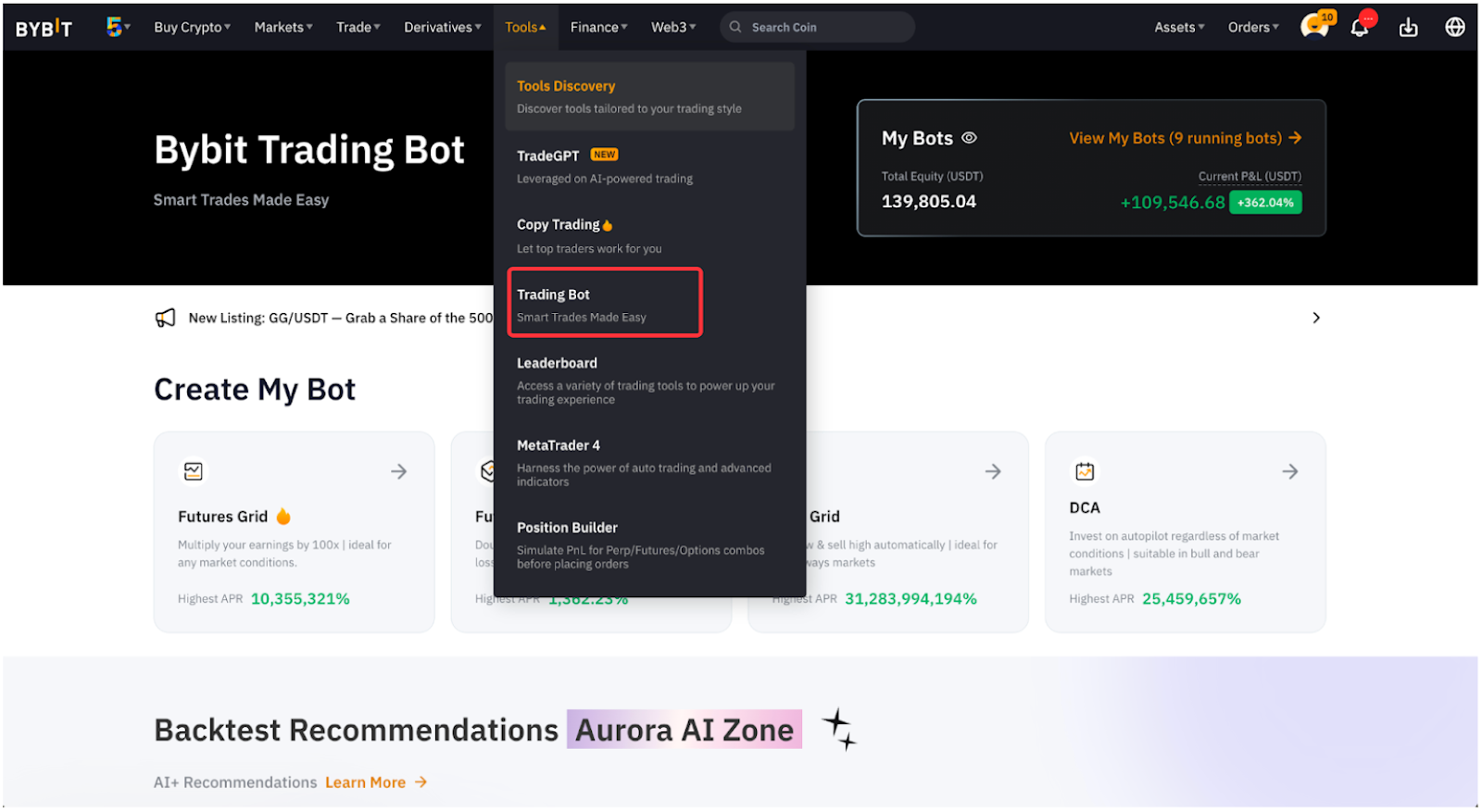
2. Choose how you want to start
Bybit gives you two setup options:
Option A: Try Easy Bot (beginner friendly)
This mode recommends parameters automatically. You simply:
Select the bot type (Spot Grid, Futures Grid, DCA, Martingale, Combo)
Enter your investment amount
Review the suggested parameters
Click on Start Now
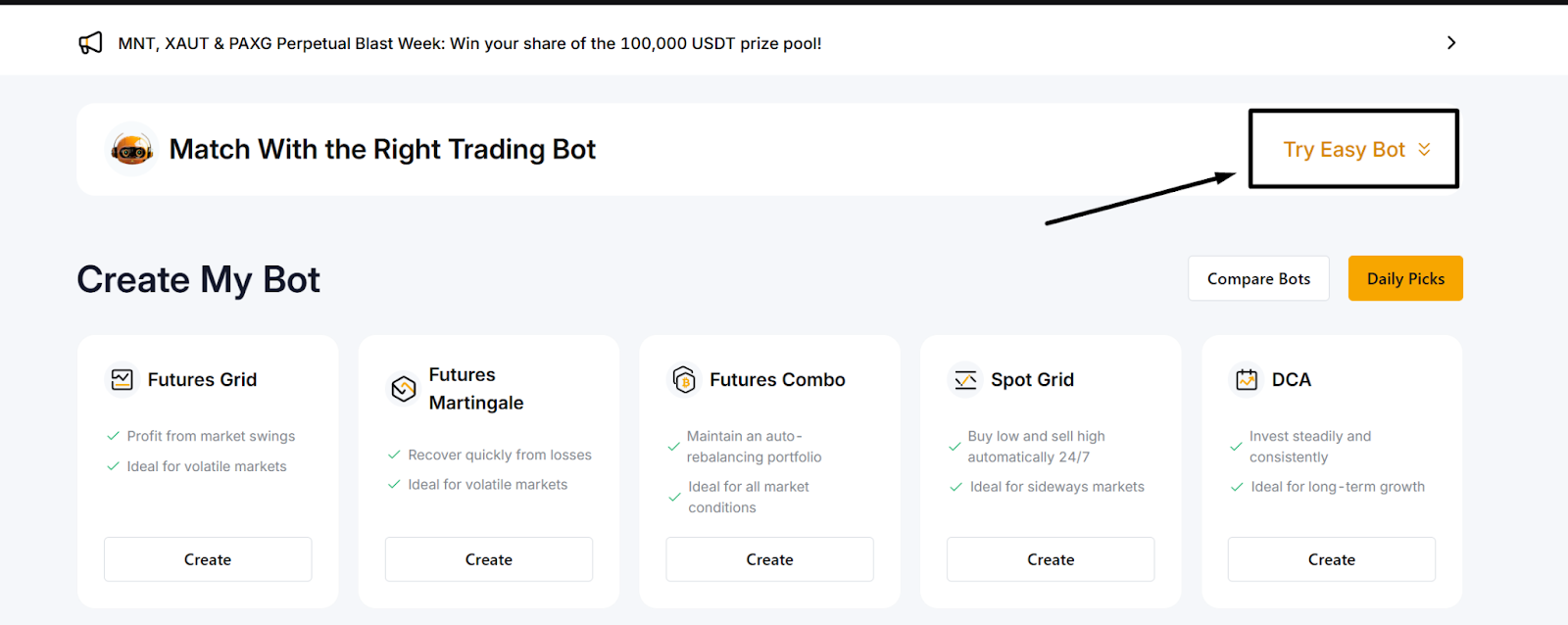
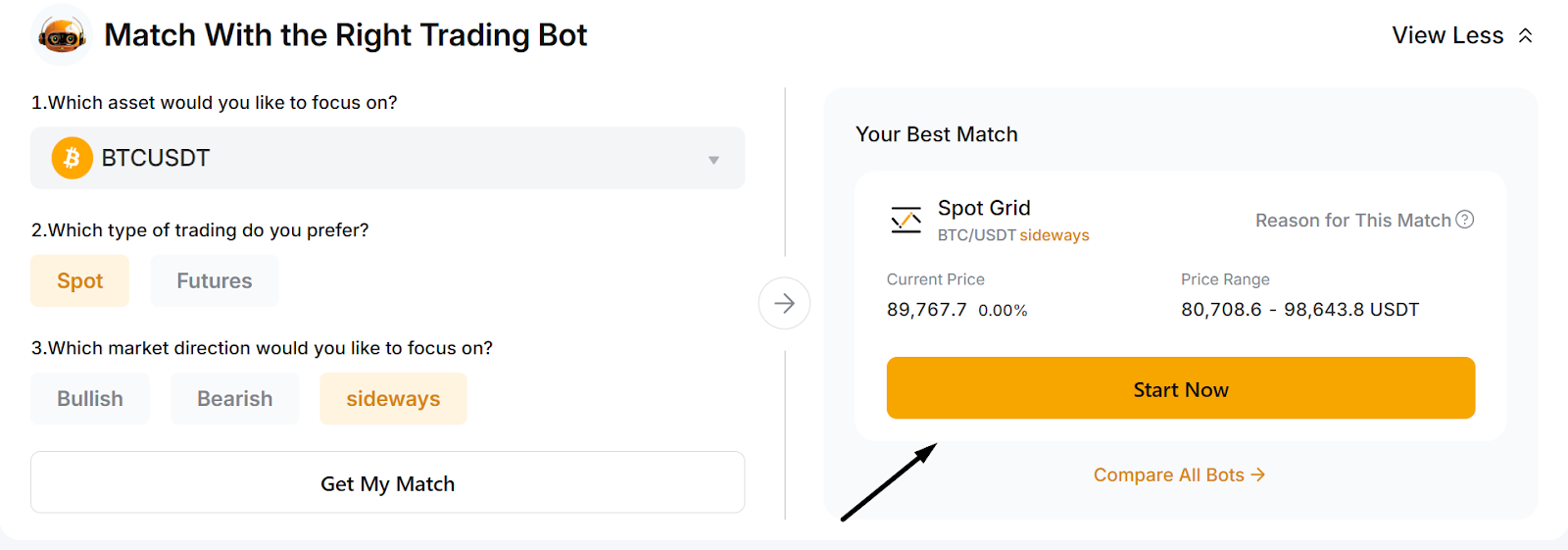
Easy Bot is ideal for users who want a quick, hands-off setup.
Option B: Select a bot manually (Advanced mode)
For users who want full control:
Choose the bot type you want to run
Set the required parameters (varies by bot):
Price range, grids (Spot/Futures Grid Bot)
Long/Short/Neutral direction
Leverage (for Futures bots)
Buy intervals (DCA Bot)
Price-decrease triggers, multipliers (Martingale Bot)
Portfolio ratios, rebalance rules (Combo Bot)
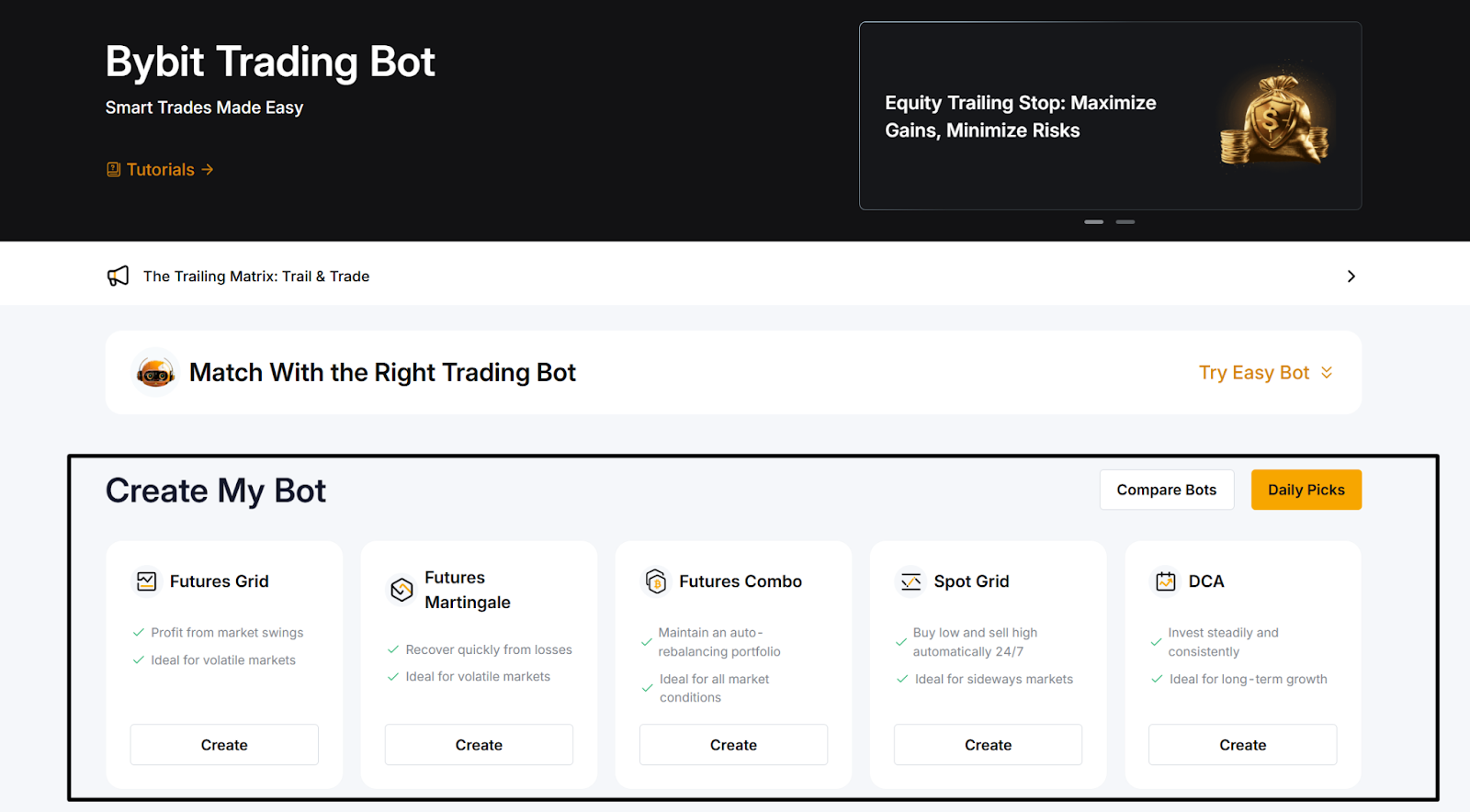
Add optional risk controls:
Stop loss
Take profit
Trailing features
Enter your investment amount
Click on Create Now
Funds will automatically be transferred from your Funding Account to the Trading Bot Account in order to activate the strategy.
3. Monitor your bot
Once your bot is live, it will appear under My Bots with the following real-time parameters:
P&L
Total equity
Active orders
Strategy status
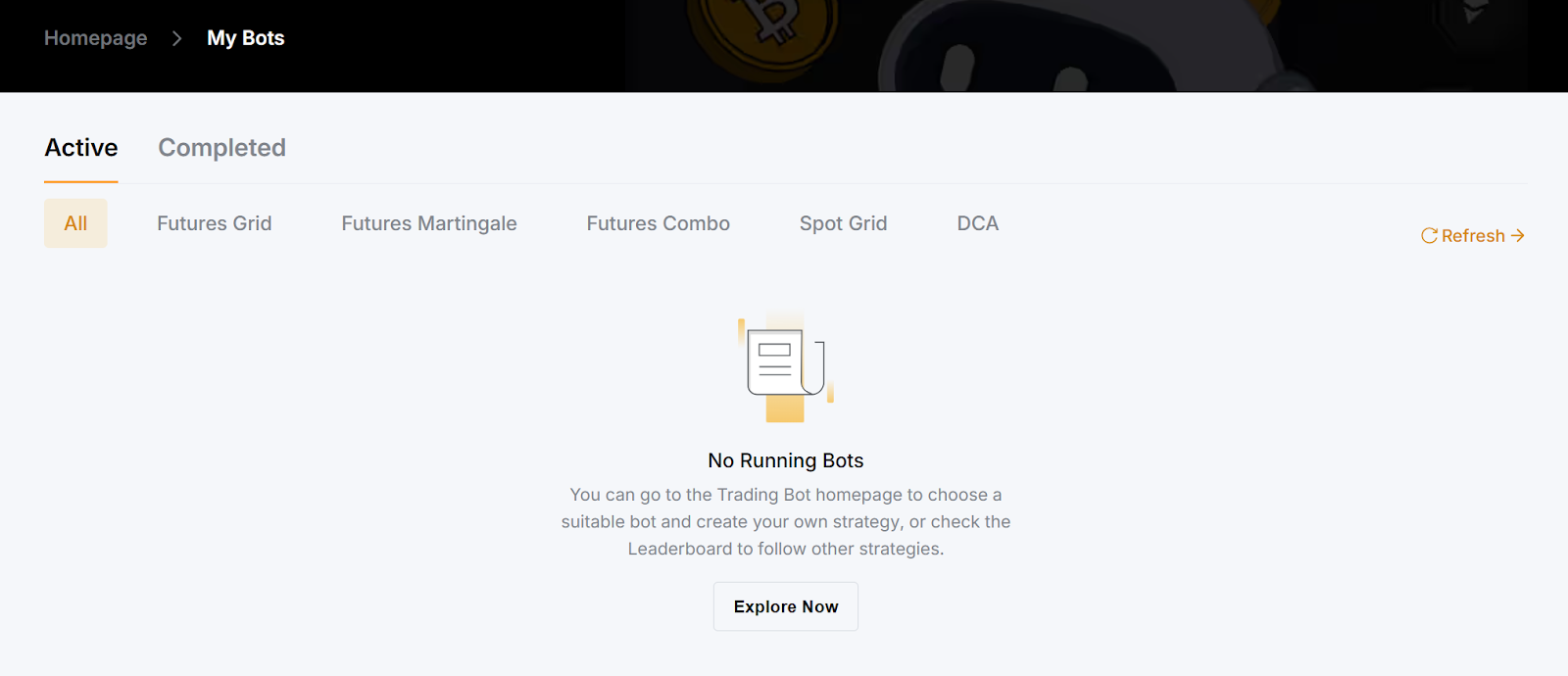
You can pause, stop or adjust supported settings at any time.
4. Manage or terminate the bot
If market conditions change, you can:
Pause the bot temporarily
Terminate the bot to close all open orders
Withdraw or reinvest funds (depending upon the bot type)
Once the bot is terminated, remaining funds return to your Funding Account instantly.
1. Spot Grid Bot example
Here’s a simple example of how a Spot Grid Bot works on Bybit. A trader sets up a BTC/USDT Spot Grid Bot with the following parameters:
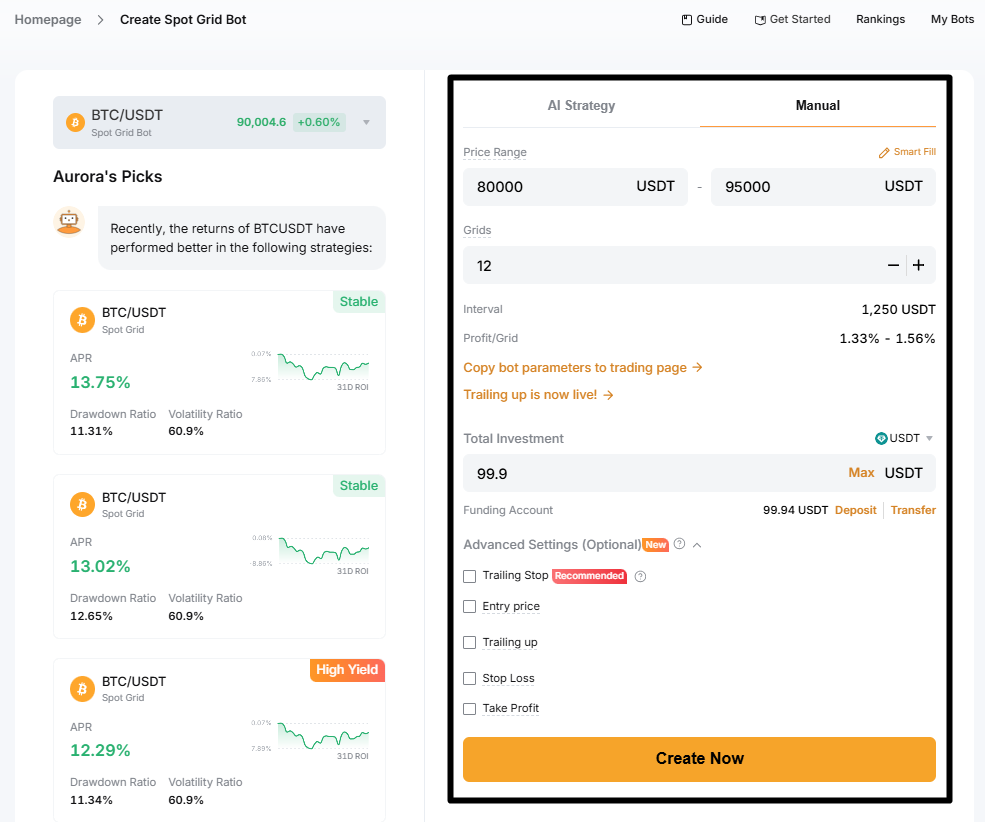
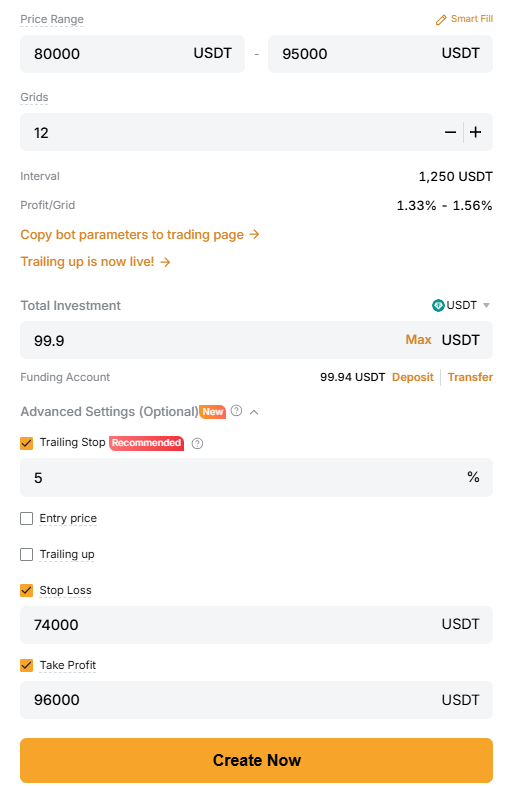
Spot pair: BTC/USDT
Price range: 80,000–95,000 USDT
Grid count: 12
Total investment: 99.9 USDT
Advanced settings:
Trailing stop: 5%
Stop loss: 74,000 USDT
Take profit: 96,000 USDT
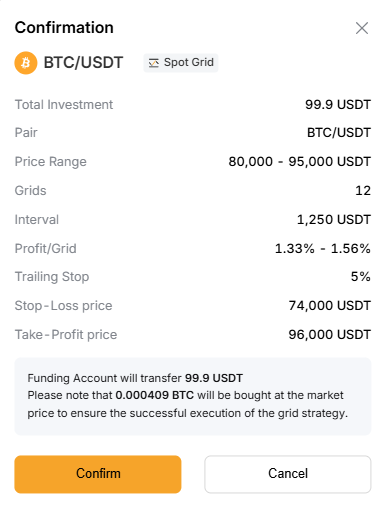
Once the bot has been created, Bybit buys a small amount of BTC at market price to activate the strategy. The bot then places a series of buy orders below the market price and sell orders above it, spaced evenly across the 12 grids.
Initial grid placement (example illustration)
Price | Type | Price | Type |
95,000 | Sell | 87,500 | Buy |
93,750 | Sell | 86,250 | Buy |
92,500 | Sell | 85,000 | Buy |
91,250 | Sell | 83,750 | Buy |
90,000 | Sell | 82,500 | Buy |
88,750 | Sell | 81,250 | Buy |
How the bot behaves
When BTC drops into a lower grid, the bot buys
When BTC moves up into a higher grid, the bot sells
Each completed buy-then-sell cycle locks in a small profit
The bot continues cycling trades as long as the price stays within 80,000–95,000 USDT
Risk controls in action
If BTC falls to 74,000 USDT, the stop-loss closes the bot to protect capital
If BTC rises to 96,000 USDT, take-profit ends the strategy and secures gains
The 5% trailing stop lets profits continue if BTC trends upward, while still providing an automated exit
Managing the bot
Once the bot is active, it appears under My Bots, where you can:
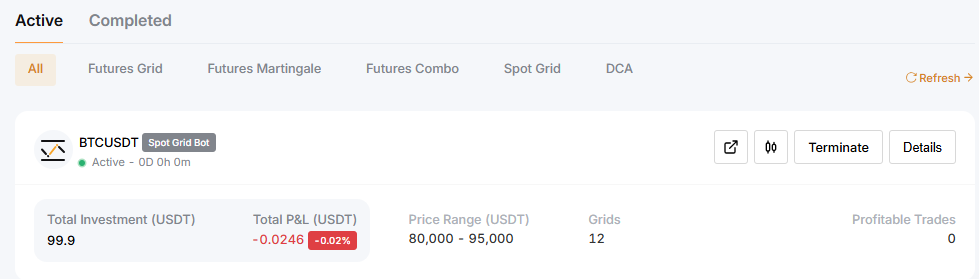
View total P&L and active grid range
Pause or terminate the bot
Choose how to settle your holdings at termination (USDT only, BTC only, or BTC + USDT mix)
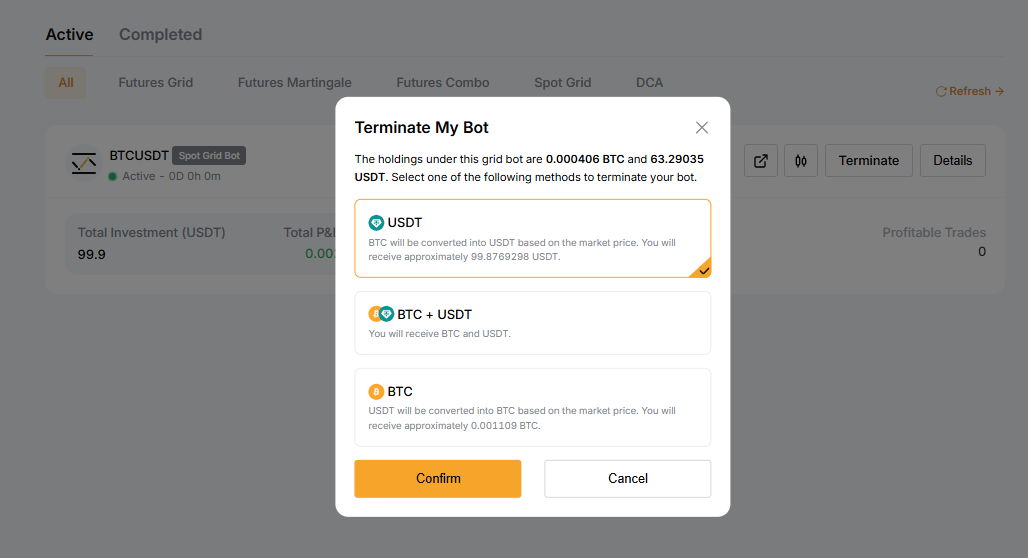
Once the bot is terminated, Bybit immediately returns the remaining funds to your Funding Account.
2. Futures Grid Bot example
A Futures Grid Bot works like a Spot Grid Bot, but adds leverage and lets you trade in Long, Short or Neutral mode. This means the bot can profit from both upward and downward swings, not just spot price oscillations.
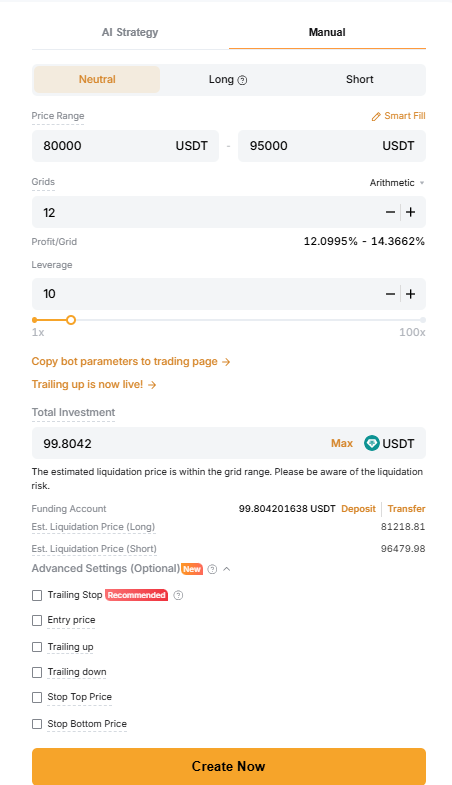
Here’s a simplified example using BTCUSDT:
Price range: 80,000–95,000 USDT
Grid count: 12
Direction: Neutral
Leverage: 10x
Investment: 100 USDT
Optional: Take profit at 96,000 USDT, stop loss at 74,000 USDT
Once the bot is activated, it opens a small futures position and distributes buy/sell grids across the range.
How the bot behaves (Futures specific)
As the price moves down, the bot adds to long exposure in lower grids
As the price moves up, the bot reduces exposure and locks in grid profits
Neutral mode keeps the position size balanced so the bot can trade swings in both directions
Because this is a Futures bot, PnL is based on contract value, not on holding the underlying asset
Compact grid preview
Price | Action | Price | Action |
95,000 | Sell grid | 87,500 | Buy grid |
93,750 | Sell grid | 86,250 | Buy grid |
92,500 | Sell grid | 85,000 | Buy grid |
91,250 | Sell grid | 83,750 | Buy grid |
90,000 | Sell grid | 82,500 | Buy grid |
88,750 | Sell grid | 81,250 | Buy grid |
How Futures Grid differs from Spot Grid
Spot Grid holds BTC, while Futures Grid adjusts leveraged exposure, introducing liquidation risk if the price breaks sharply outside the range.
3. DCA Bot example
Here’s a simple example of how a DCA Bot works on Bybit. A trader creates a BTC DCA Bot with the following settings:
Currency: USDT
Asset: BTC
Investment amount: 95 USDT
Frequency: 1 day (options include 10 minutes, 1 hour, 4 hours, 8 hours, 12 hours, 1 day, 1 week, 2 weeks or 4 weeks)
Maximum investment limit: 95 USDT
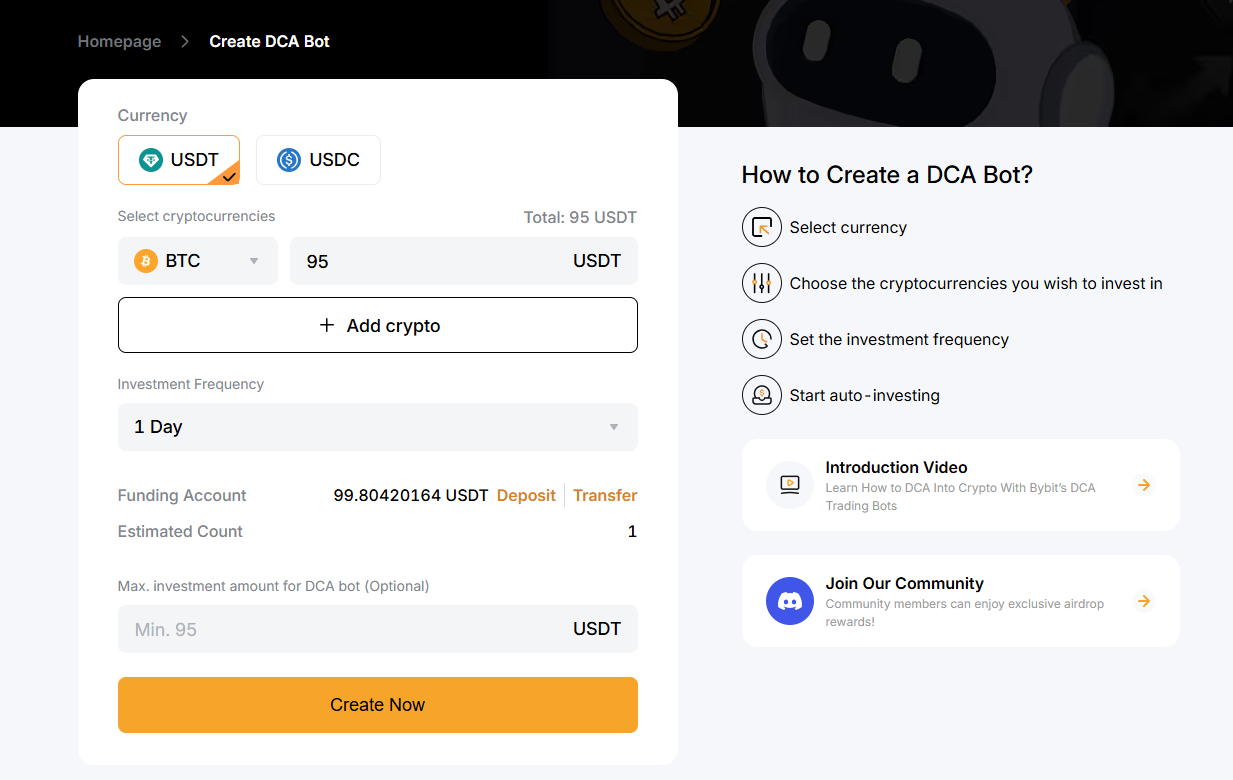
Once the trader clicks on Create Now, Bybit transfers the funds from the Funding Account and schedules the first recurring buy.
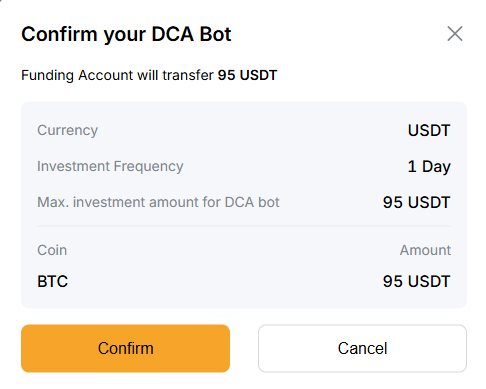
How the bot behaves
Buys BTC worth 95 USDT once per day
Updates the average buy price after each purchase
Tracks total investment, P&L and APR in real time
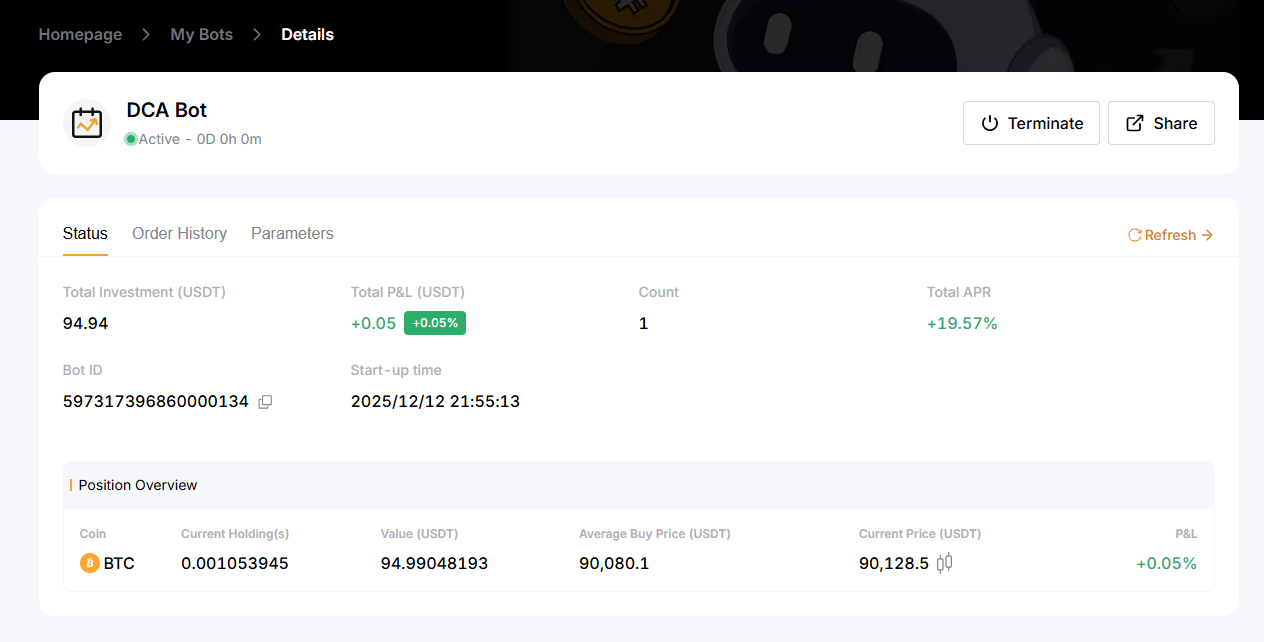
After the first cycle, the bot dashboard shows:
Current holdings: 0.001053945 BTC
Value: 94.99 USDT
Average buy price: 90,080.1 USDT
Current market price: 90,128.5 USDT
P&L: +0.05%
Managing or ending the bot
The trader can terminate the bot at any time. When it’s terminated, the system automatically transfers the purchased BTC back to the Funding Account.
Here’s an example:
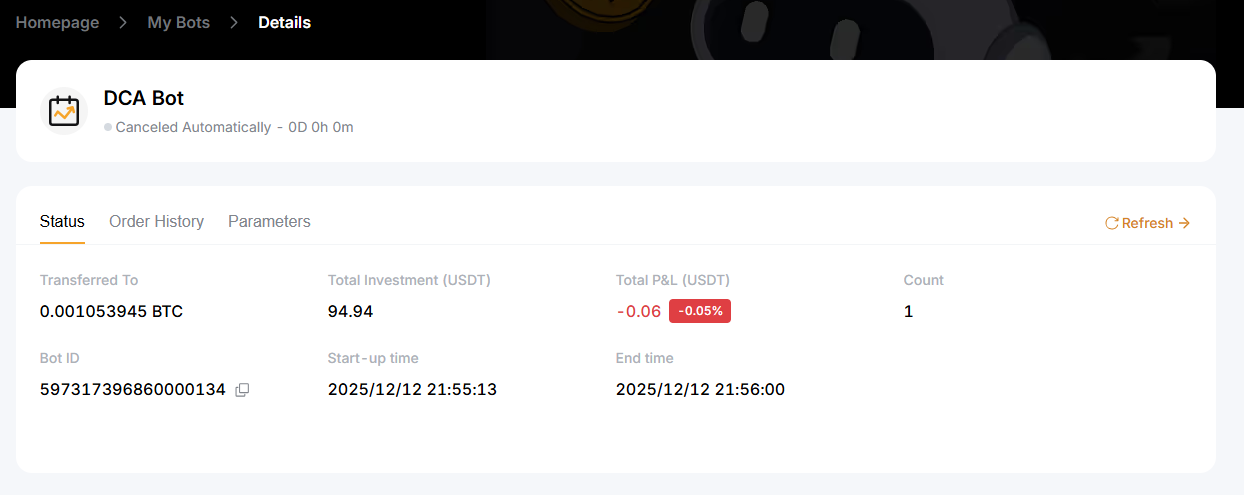
Transferred: 0.001053945 BTC
Final P&L: −0.06 USDT (−0.05%)
A DCA Bot keeps running until the user pauses or cancels it, making it ideal for long-term, hands-off accumulation.
4. Futures Martingale Bot example
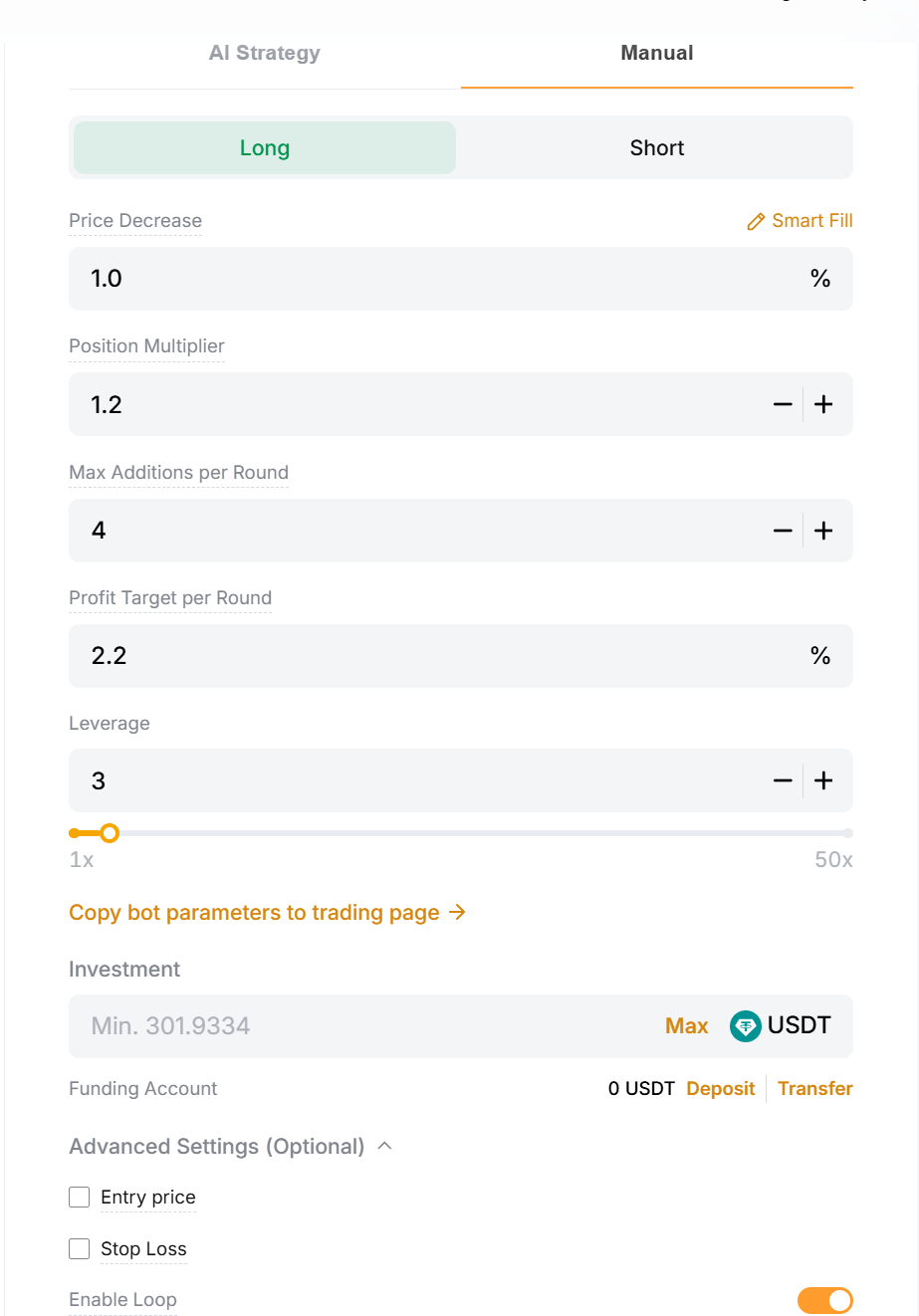
Here’s an example of how a Futures Martingale Bot works using the settings shown in the interface. A trader sets up a BTCUSDT Long Martingale Bot with the following parameters:
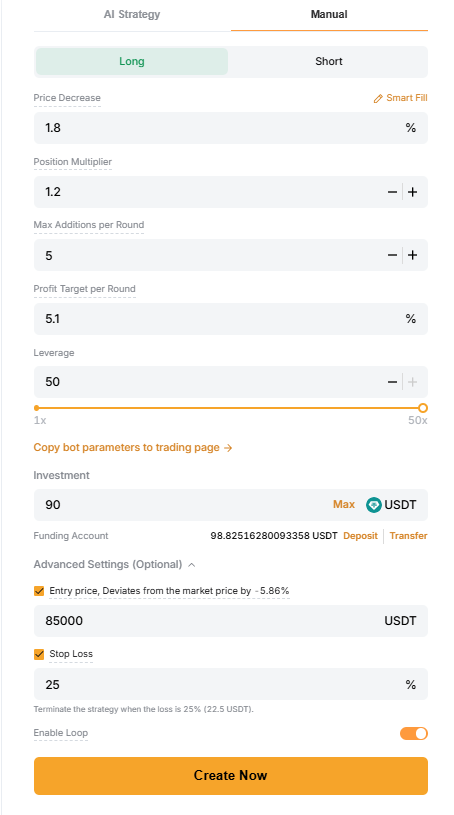
Price decrease: 1.8%
Position multiplier: 1.2x
Max additions per round: 5
Profit target per round: 5.1%
Leverage: 50x
Investment: 90 USDT
Entry price: 85,000 USDT
Stop loss: 25%
Loop mode: Enabled
Once the bot is launched, it waits for BTC to reach the 85,000 USDT entry level before opening the first position.
How the bot behaves
The bot opens the first position at 85,000 USDT and adds new positions every 1.8% drop, each one 1.2x larger. When the combined position hits 5.1% profit, the cycle closes and restarts. A 25% stop-loss protects from deeper losses, while 50x leverage increases both gains and liquidation risk. All activity appears under My Bots, where you can modify risk settings or terminate immediately.
5. Futures Combo Bot example
A Futures Combo Bot builds a balanced long-short futures portfolio and automatically rebalances it when allocations drift from your target mix. Here’s a simple example of how it works on Bybit:
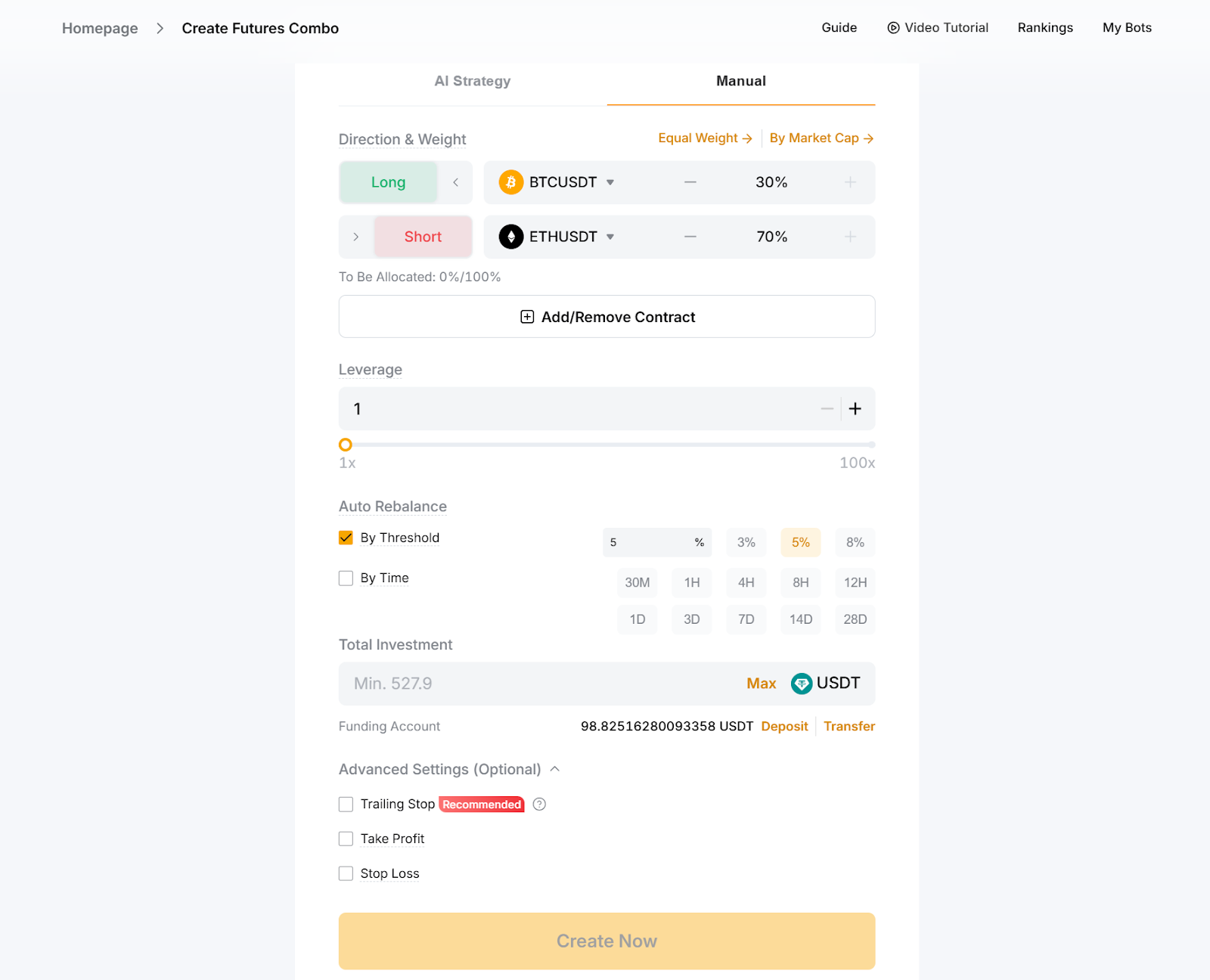
A trader creates a Combo Bot with two contracts:
BTCUSDT (Long): 30%
ETHUSDT (Short): 70%
Leverage: 1x
Rebalance trigger: 10% deviation
Investment: 100 USDT
Once the bot is created, it opens both positions according to the selected proportions. It then monitors market movements, and adjusts exposure whenever either contract moves too far away from the target allocation.
How the bot behaves
The Futures Combo Bot maintains your target allocations by automatically rebalancing whenever ratios drift beyond the threshold:
If BTC rises to 40% exposure, the bot sells BTC to restore 30%
If ETH short drops to 60%, it increases exposure back to 70%
Rebalancing can be triggered by deviation or time intervals
Because it runs under cross margin, liquidation of any contract closes the entire bot. Allocations can’t be edited later, making setup important. Users can track allocations and performance under My Bots, and can terminate anytime.
Understanding Grid Bot profit
A Spot Grid Bot earns profit each time it buys in a lower grid and sells in a higher one. These repeated cycles accumulate over time. Total P&L includes both grid profit and the change in value of the asset you hold.
Setting up your copy trade of Grid Trading
Copying a grid trader on Bybit is designed to be simple and intuitive. Whether you’re new to automation or want to follow proven performers, the platform gives you clear visibility into whom you're copying and how your funds are managed.
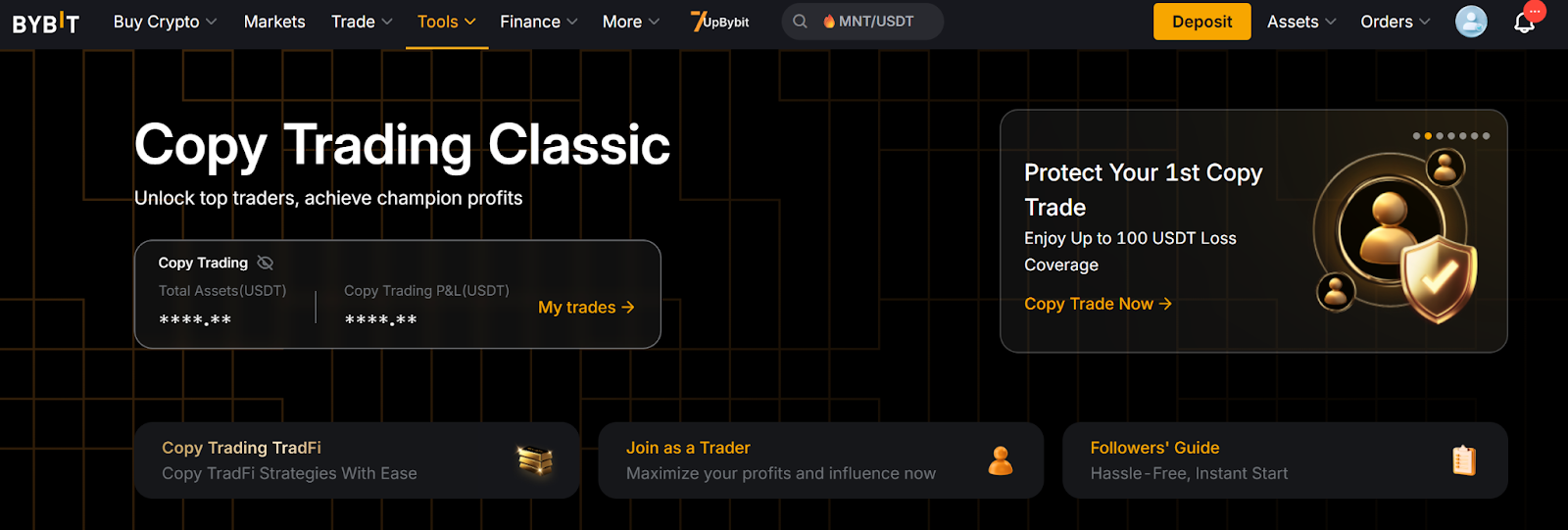
Start by opening the Copy Trading dashboard
The first step is to head to Tools → Copy Trading, where you’ll find the Copy Trading Classic dashboard.
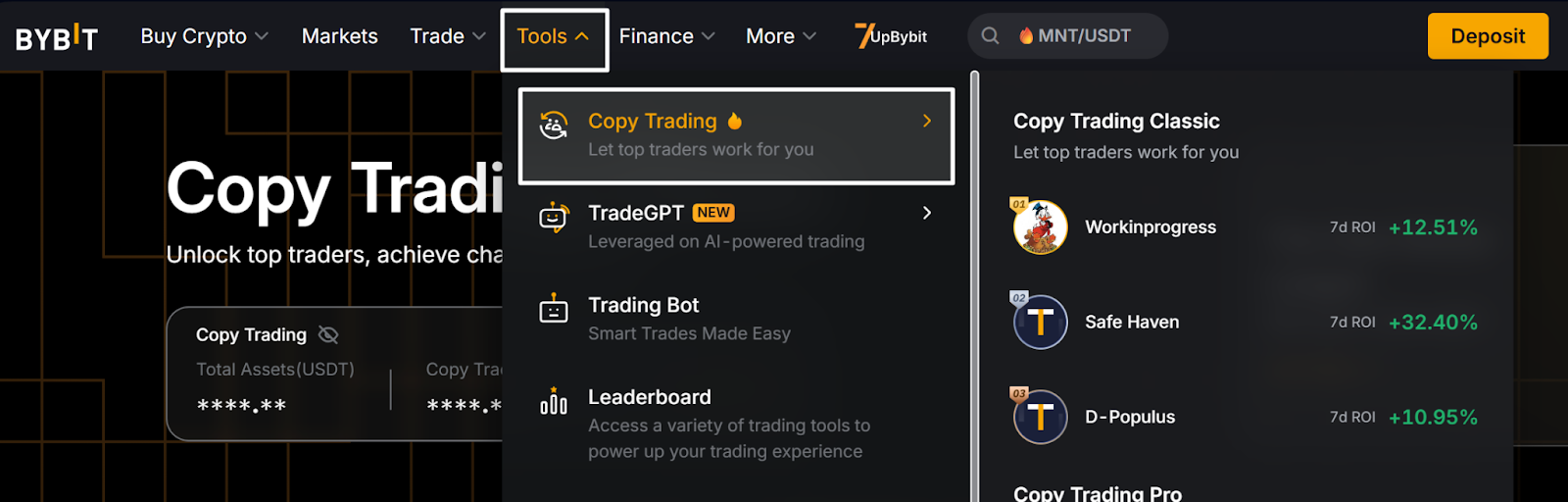
Scroll down to the Leaderboard, which showcases top-performing traders across multiple categories, such as:
Top Balanced Traders
Top ROI
Top Intra-Day Trader
Top New Talents
Boosted Traders
Highest Follower Profit
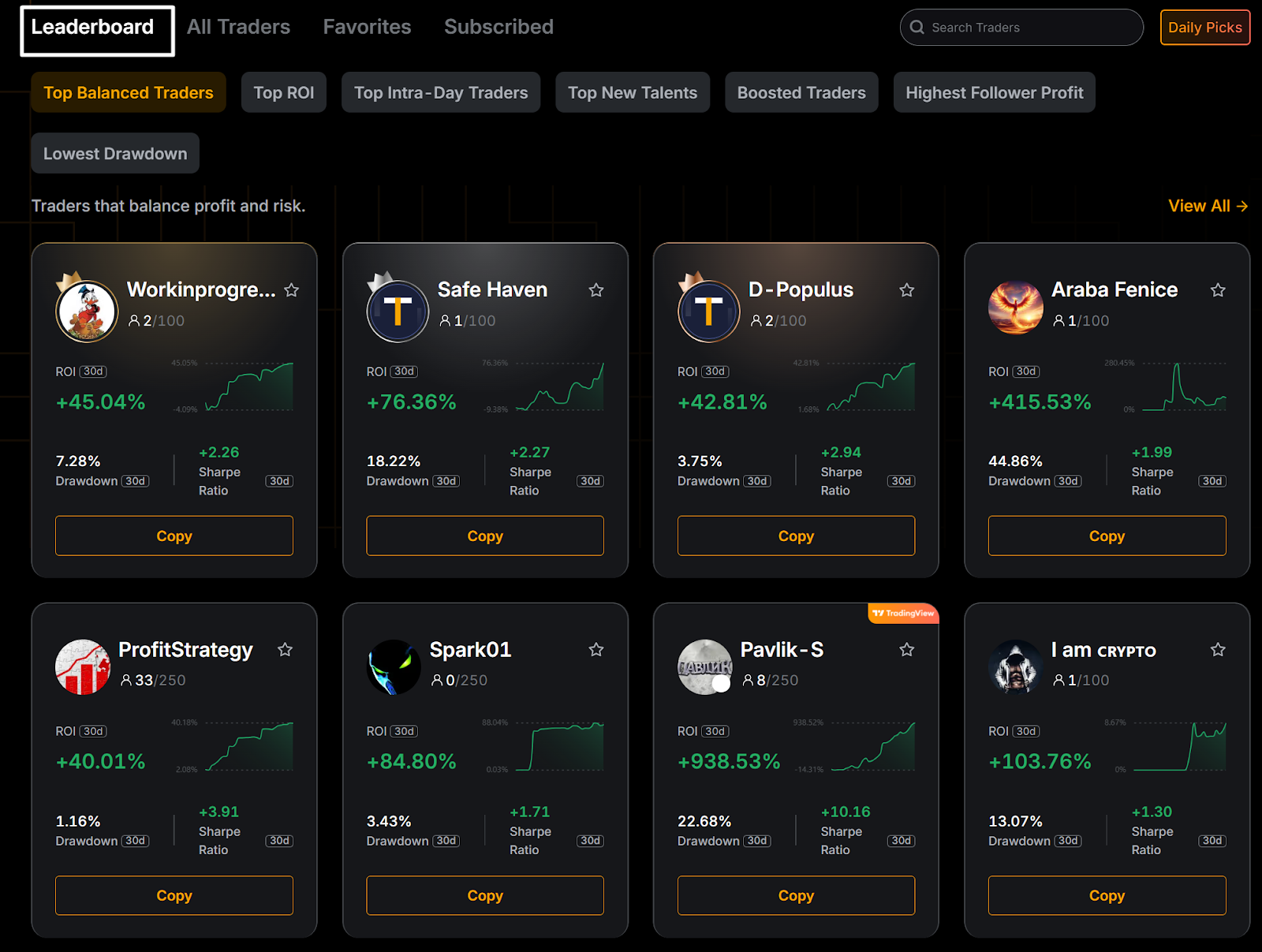
These rankings help you understand which traders have delivered consistent performance, what kind of strategies they use and how they manage risk. Each trader profile also shows key metrics, such as ROI, drawdown, Sharpe ratio and strategy tags, which are useful for deciding who aligns with your risk tolerance.
Choose a trader and customise your copy order
When you find a trader you want to follow, click on Copy on their profile card. A setup window will appear in which you can:
Enter your investment amount
Select what you want to copy (USDT Perpetual trades, Trading Bots or both)
Enable a recommended trailing stop to protect your capital
This step acts like your risk dashboard, as you decide how much to allocate and whether to let the system adjust exposure automatically.
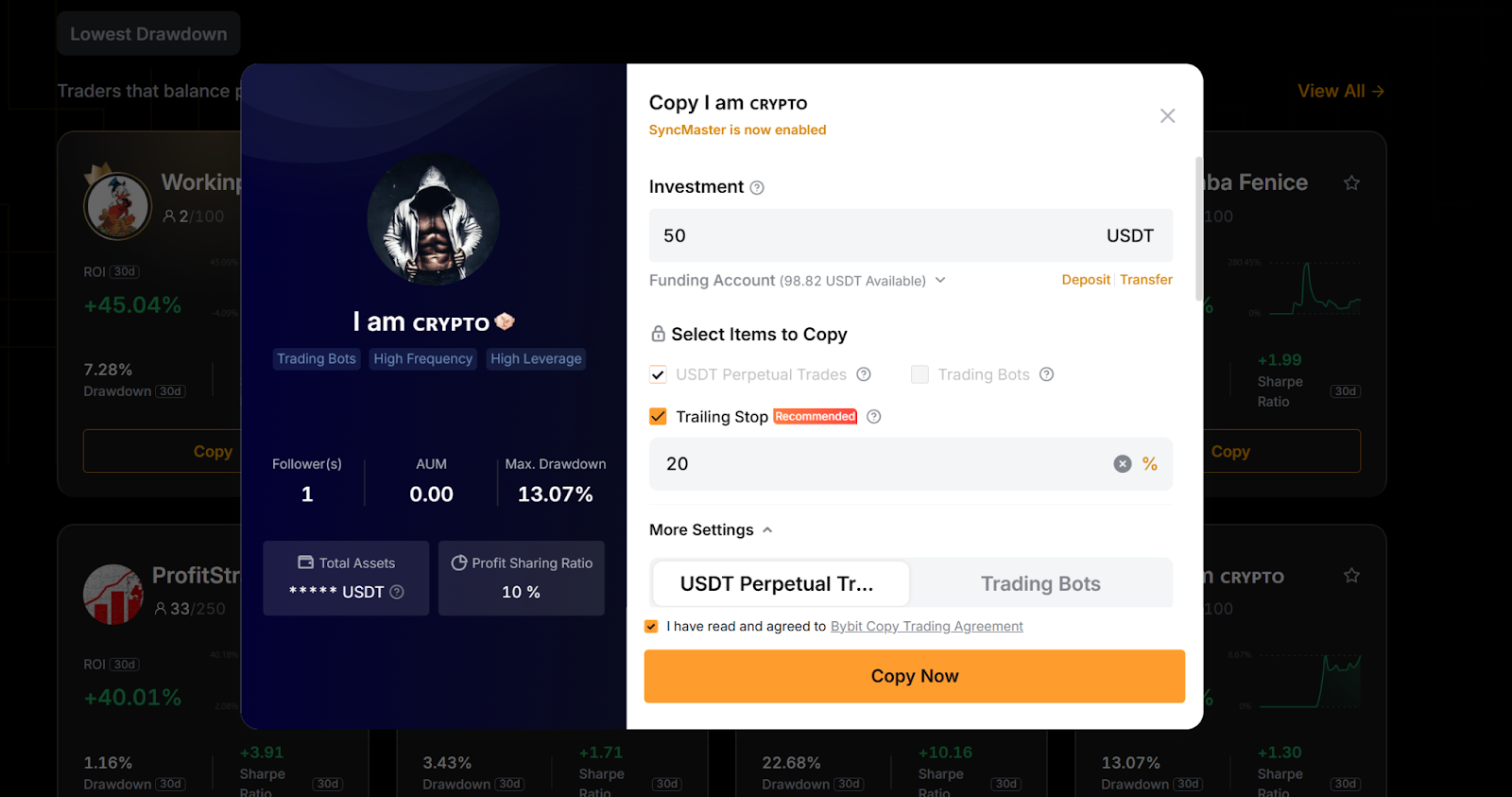
Once you’ve reviewed the settings, accept the Copy Trading Agreement and click on Copy Now. Your funds will be transferred from your Funding Account, and your copy relationship will begin immediately.
Track your copied strategies from the User Center
Bybit automatically redirects you to My trades. You can access the same panel anytime from the Copy Trading homepage.

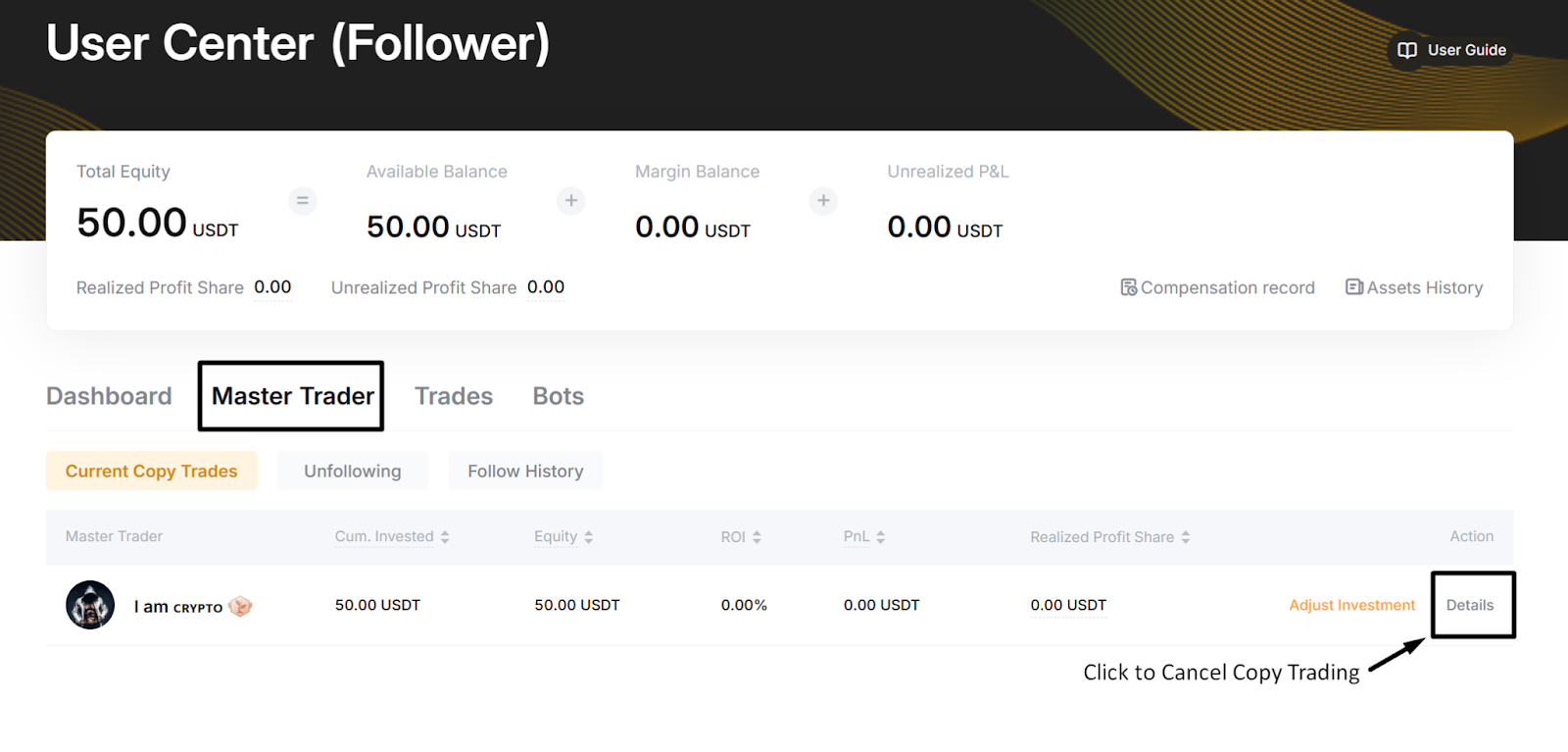
Inside the User Center (Follower), you’ll find four tabs:
Dashboard: Your overall equity, ROI and PnL
Master Trader: The traders you’re currently copying
Trades: Open positions and order history
Bots: Any grid or automated strategies running under your copy relationship
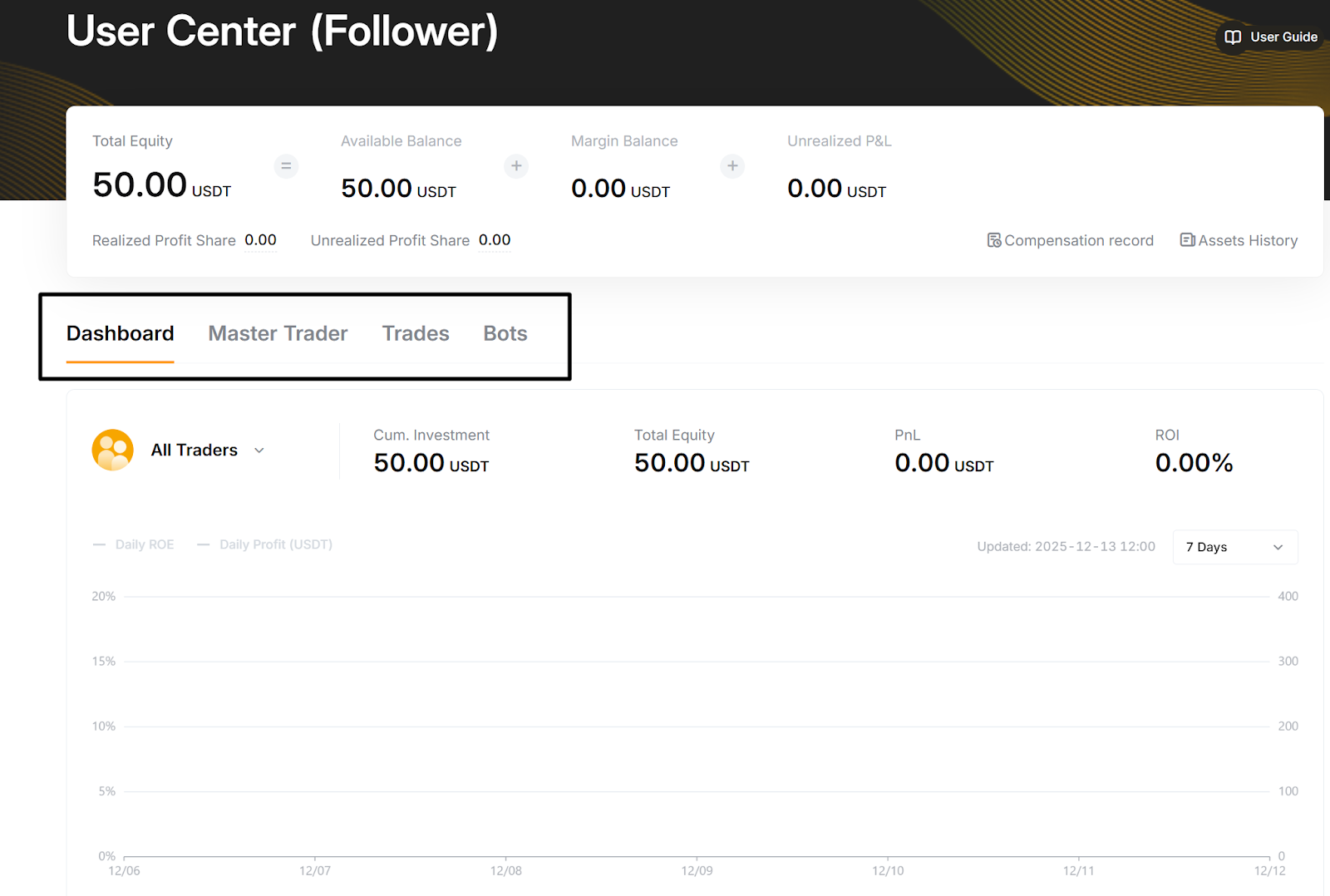
This area gives you a transparent overview of how your copy trades are performing, and what positions are open in real time.
Manage or cancel your copy trade whenever you need to
If you decide to stop copying a trader, go to: Master Trader → Details → Cancel Copy
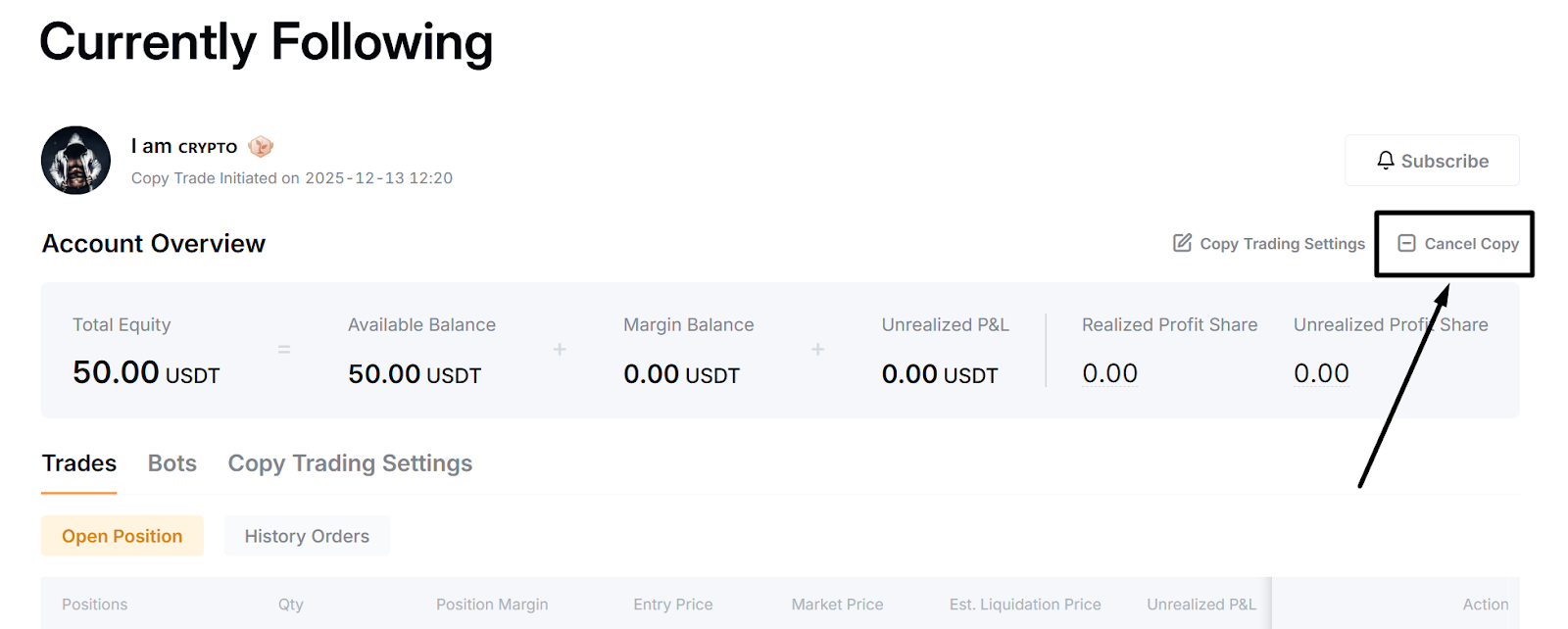
You’ll be asked how you want to handle open positions:
Exit immediately at market price, or
Continue copying until the trader closes the positions
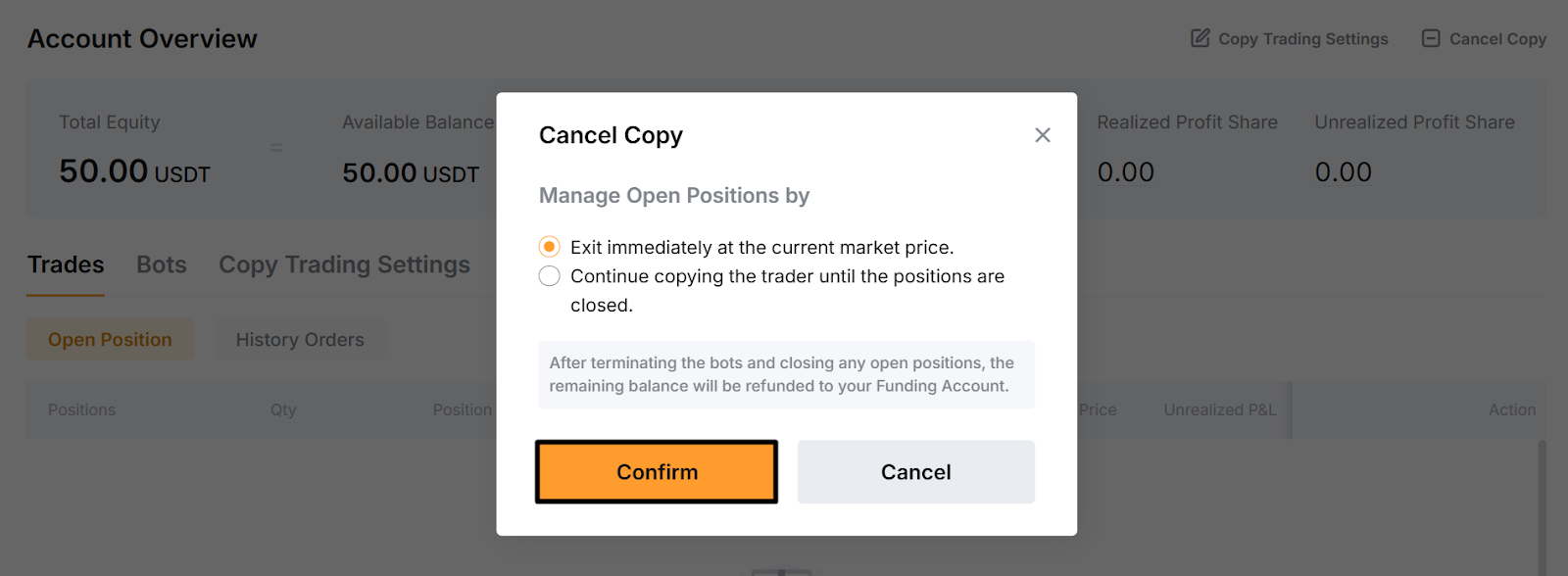
Once the process is complete and positions are settled, your remaining balance will automatically be returned to your Funding Account. You can review all past activity under Follow History.
Remember that results may vary
Although you’re copying another trader, your execution price may differ slightly based on timing and market liquidity. This means that your returns may not precisely match the trader’s performance, especially during volatile swings. You also remain responsible for managing your own risk, including deciding when to stop copying or adjust your allocation.
Are grid bots profitable?
Grid Bots generate profit by buying at lower grid levels and selling at higher ones, but total returns still depend upon market direction and trading fees. When the base token falls more than the strategy earns, overall P&L can turn negative. Grid Bots also incur Spot or Futures trading fees on every filled order, which can reduce net performance, especially in high-frequency setups.
The bottom line
Grid trading works best in volatile or sideways markets, where frequent price swings allow the bot to capture small, repeated gains. Bybit automatically adjusts the maximum number of grids, based on your chosen range, so that the strategy targets positive grid profits under normal conditions. You can also follow high-performing traders through the Copy Trade Leaderboard, or share your own bots if you prefer leading instead of copying.
If you’re ready to automate part of your trading strategy, creating your first Bybit Grid Bot takes only a few steps, and can help you build a structured, rules-based approach to trading.
#LearnWithBybit