


How to trade Constellation Energy Corp (CEG) stock CFDs on Bybit

Want exposure to Constellation Energy Corp (CEG) without buying shares on a traditional exchange? Bybit TradFi lets you trade CEG as a contract for difference (CFD), giving you the flexibility to go long or short with leverage — all from within your existing Bybit account.
This guide walks you through everything you need to get started, from setting up TradFi access to placing and managing your first CEG CFD trade.
Key takeaways:
Bybit TradFi lets you trade Constellation Energy Corp (CEG) CFDs with up to 5x leverage, directly from your Bybit account.
You can go long (buy) or short (sell) on CEG, so you can act on both rising and falling price expectations.
Always use stop-loss and take-profit orders — CFD trading with leverage can amplify both gains and losses.
What is Constellation Energy Corp?
Constellation Energy Corp is the largest producer of clean, emissions-free energy in the United States, traded under the ticker CEG. Headquartered in Baltimore, Maryland, the company generates approximately 55,000 megawatts of capacity through a diversified portfolio of nuclear, wind, solar, natural gas, and hydroelectric assets. As a publicly listed utilities stock, CEG is subject to price movements driven by earnings reports, energy policy developments, power demand trends and broader market sentiment. For traders, this makes it an asset worth watching — and now, worth trading on Bybit.
What is the Bybit TradFi platform?
Bybit's TradFi platform is a robust multi-asset trading environment that enables traders to access global financial markets with a single account. Combining the advanced features of MetaTrader 5 (MT5) with Bybit's powerful infrastructure, the platform allows various assets to be traded seamlessly, with deep liquidity and competitive pricing.
Due to the full integration of MT5 into Bybit TradFi, you don't have to open an MT5 account or use third-party tools to trade stocks. Instead, everything is available within the same familiar ecosystem via Bybit's web platform or the Bybit App, connecting crypto traders seamlessly with the traditional finance market.
With Bybit TradFi, traders can access:
Over 300 global assets, including stocks such as Constellation Energy Corp (CEG), BWX Technologies (BWXT), Cameco Corp (CCJ) and many more, all using USDT collateral
Forex pairs, including majors, minors and exotics
Gold, oil and other commodities
Indices, such as the S&P 500 and Nasdaq
The platform features real-time price feeds, over 90 built-in indicators, flexible order types and support for expert advisors (EAs), making it suitable for both novice and experienced traders. Whether trading manually or through automation, Bybit TradFi offers an intuitive, hassle-free experience.
For a full list of available stocks and details, visit the official Bybit TradFi platform. Explore Learn Articles on TradFi for additional insights.
What are CFDs?
A contract for difference (CFD) is a financial instrument that lets you speculate on the price movement of an asset without owning the underlying share. When you trade CEG CFDs on Bybit, you're agreeing to exchange the difference in CEG's price between the time you open and the time you close your position.
If you think CEG's price will rise, you open a long (buy) position. If you think it will fall, you open a short (sell) position. Because CFDs use leverage, your potential gains — and losses — are magnified relative to your initial margin. It's important to understand this before you trade.
Before you start
Make sure you have the following in place before trading on TradFi:
Completed Identity Verification — Standard level KYC is required. Go to your Bybit account settings to verify your identity if you haven't done so.
TradFi account access — TradFi requires a separate application. If you haven't applied yet, you'll be prompted to do so when you first navigate to TradFi. Approval is quick.
USDT in your Bybit account — You'll transfer this into your TradFi Account as margin. Your TradFi balance is displayed as USDx, Bybit's collateral unit for TradFi positions.
How to trade Constellation Energy Corp (CEG) CFDs on Bybit
On the web
Step 1: Access TradFi
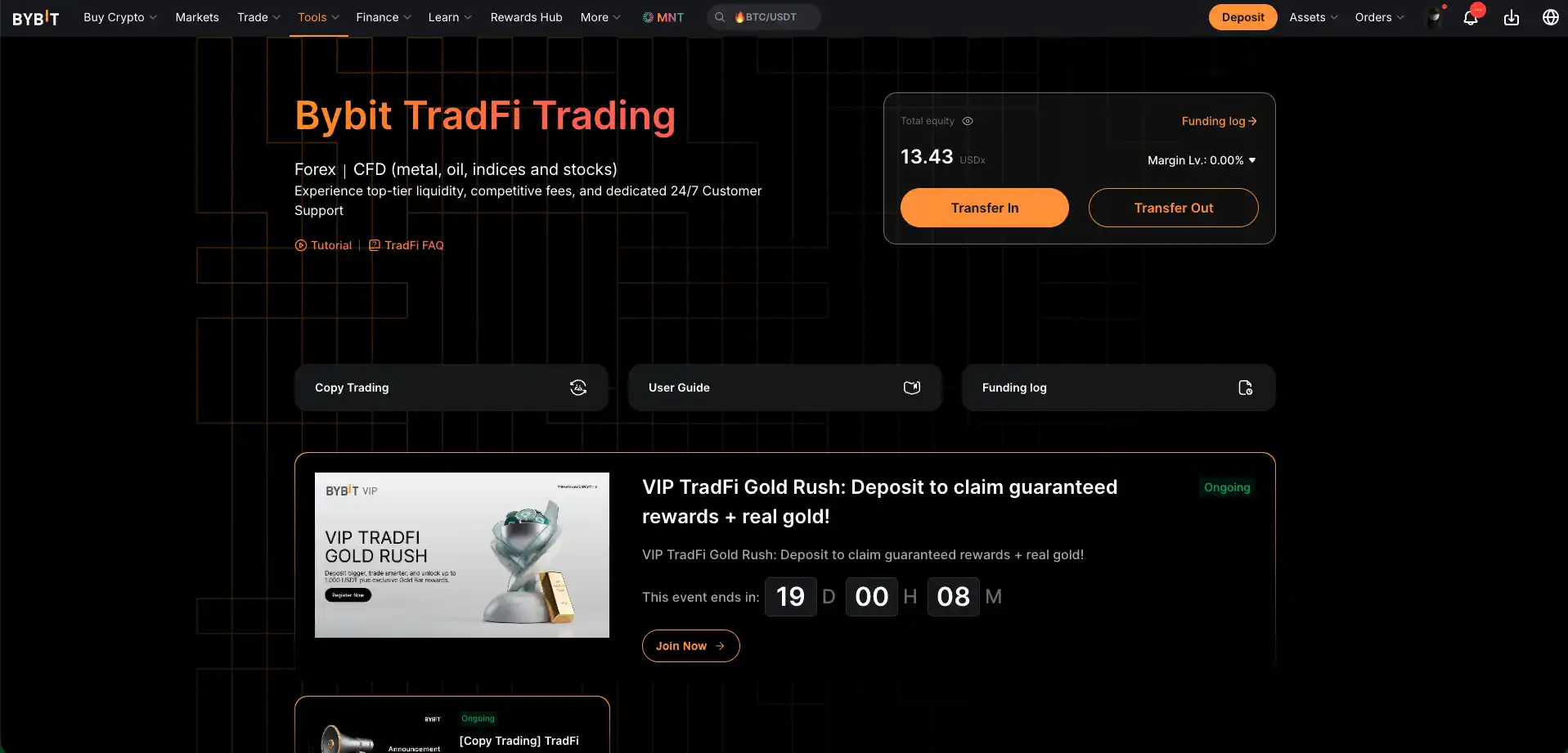
Log in to your Bybit account and go to the TradFi trading page.
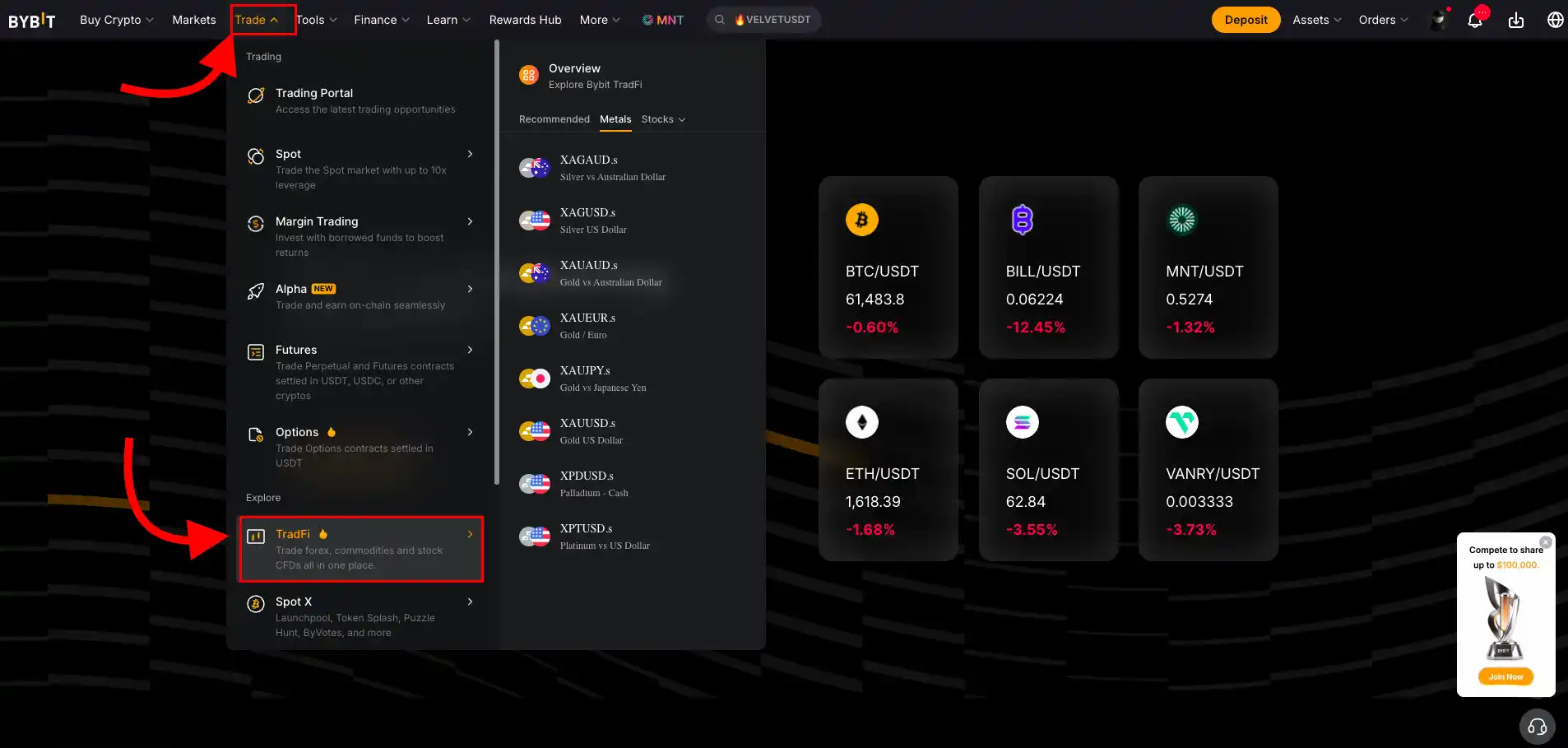
Alternatively, hover over Trade in the main navigation bar and select TradFi from the dropdown menu. If this is your first visit, you may be prompted to apply for TradFi access — complete the application before proceeding.
Step 2: Fund your account
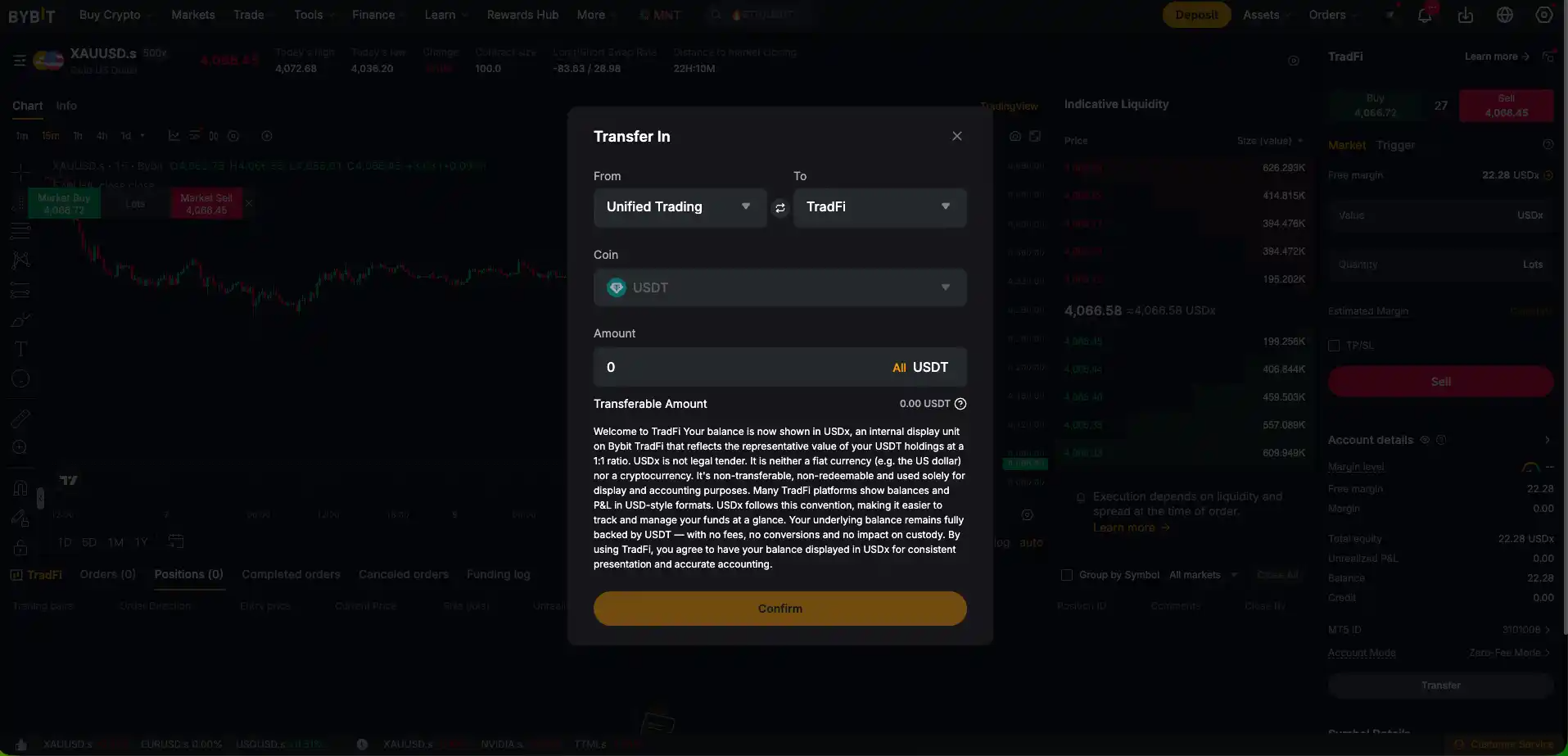
Before placing a trade, you need funds in your TradFi Account. Select Transfer and move USDT from your Funding Account or Unified Trading Account into your TradFi Account. The transfer is instant, and your balance will appear as USDx in TradFi.
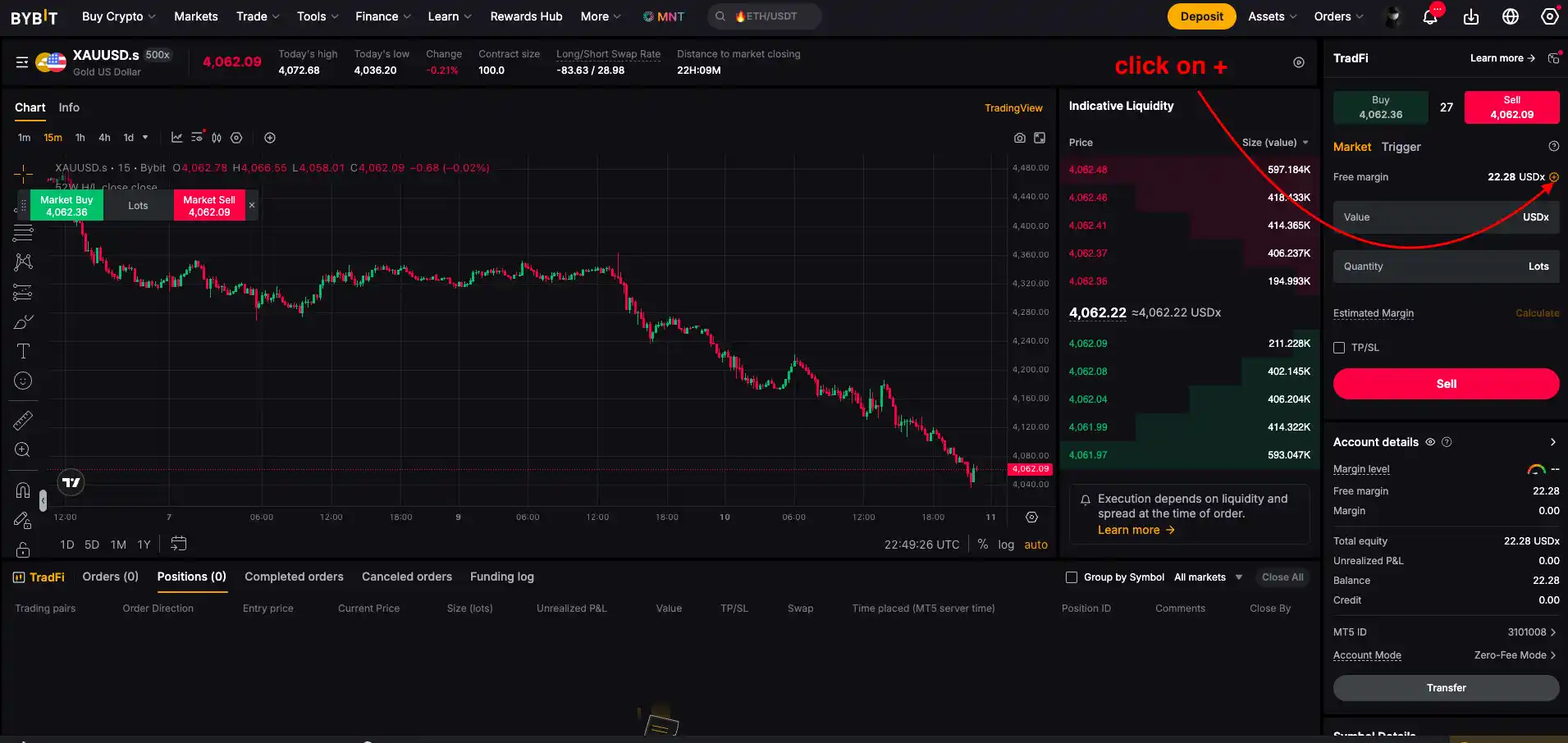
Alternative transfer In from TradFi trading page
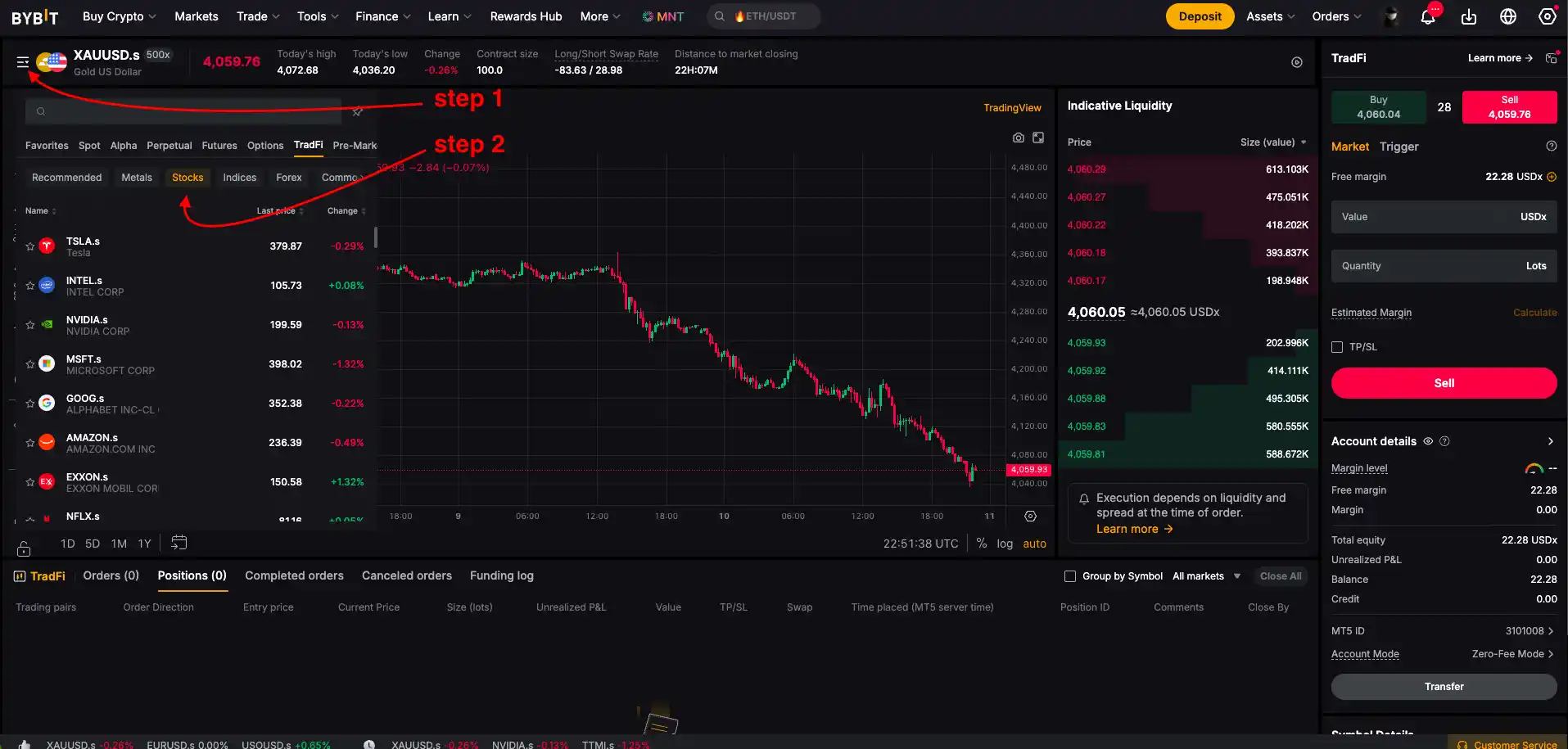
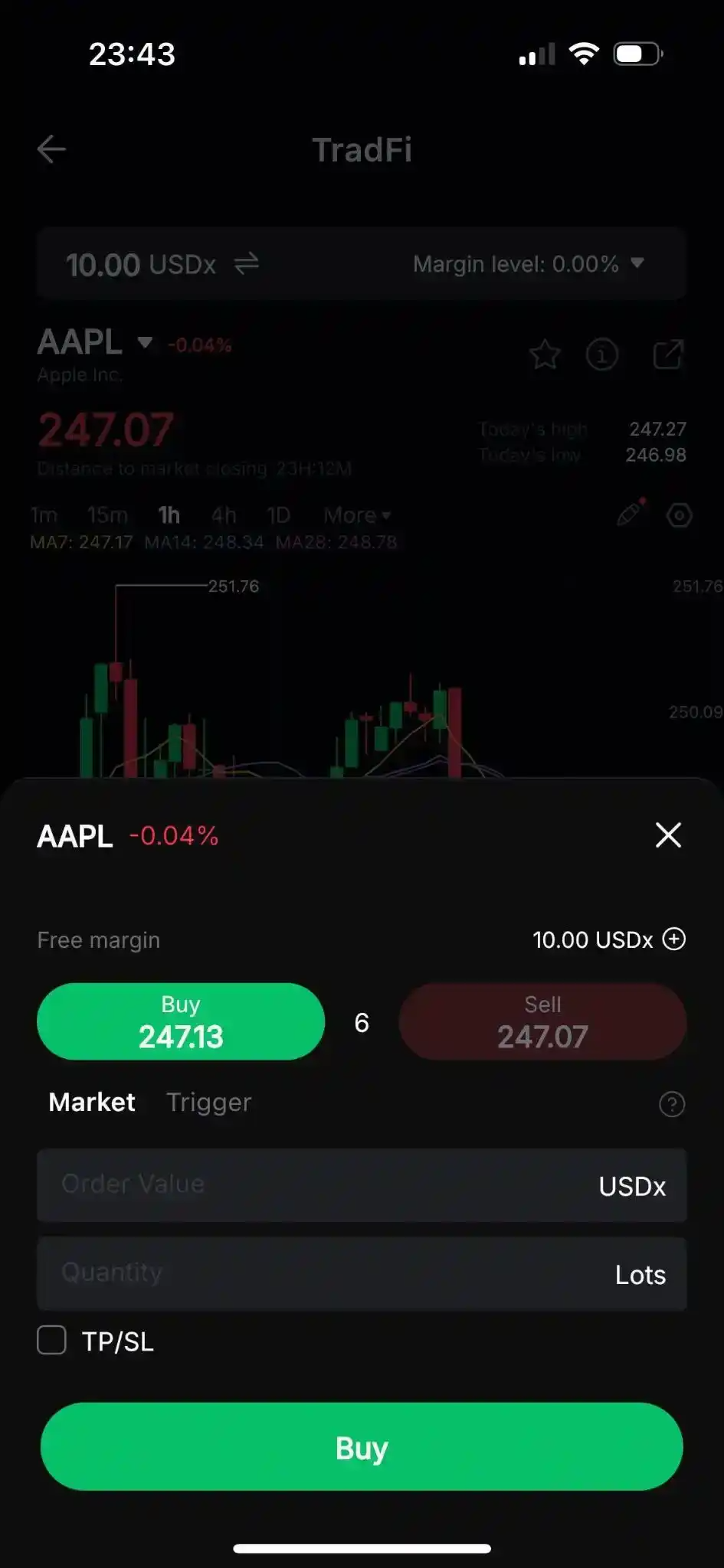
Step 3: Choose an asset
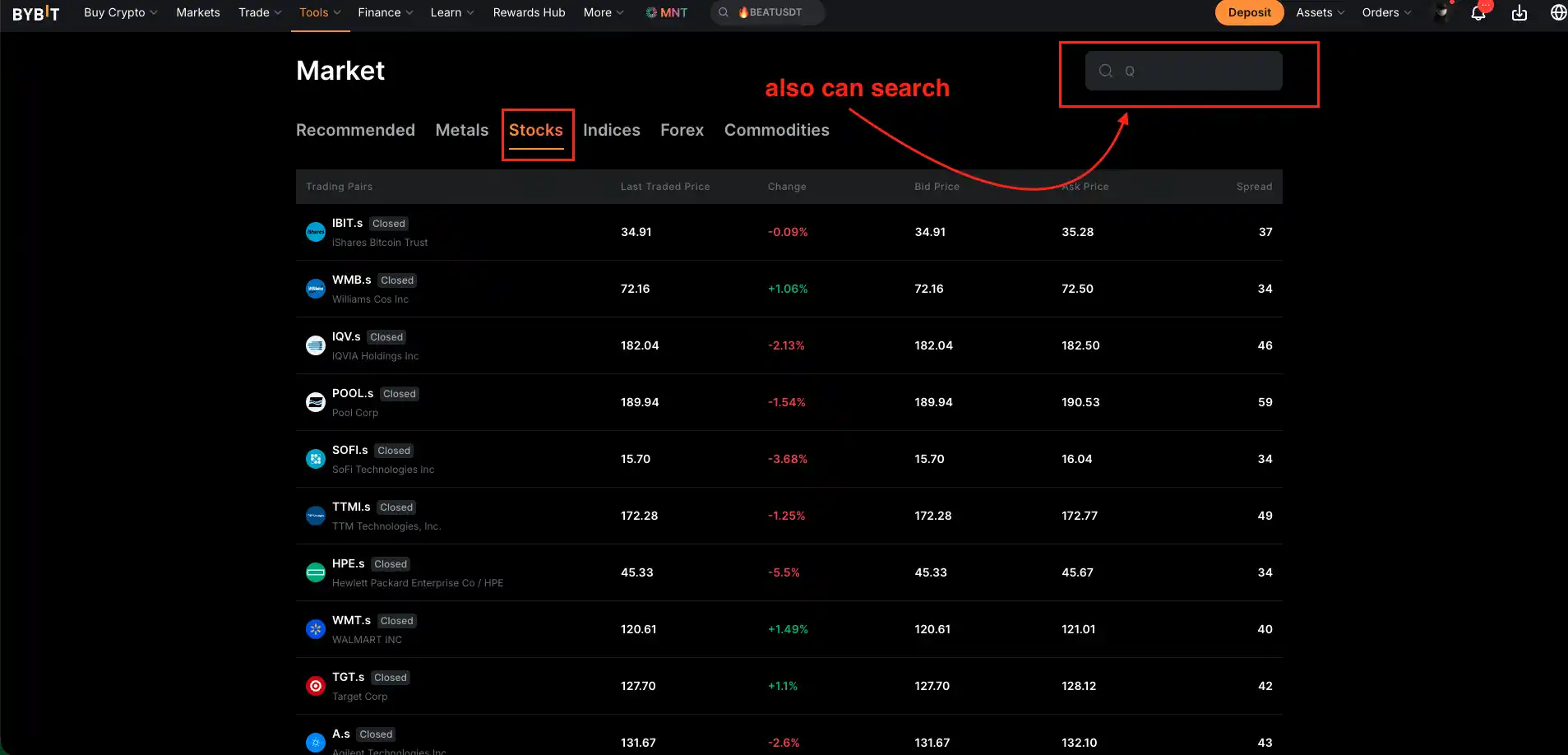
Navigate to the Markets tab. Browse the asset categories — Stocks, Metals, Indices or Forex — and select Stocks. Locate Constellation Energy Corp (CEG) from the list and click on it to open the trading view.
Alternative search from TradFi trading page
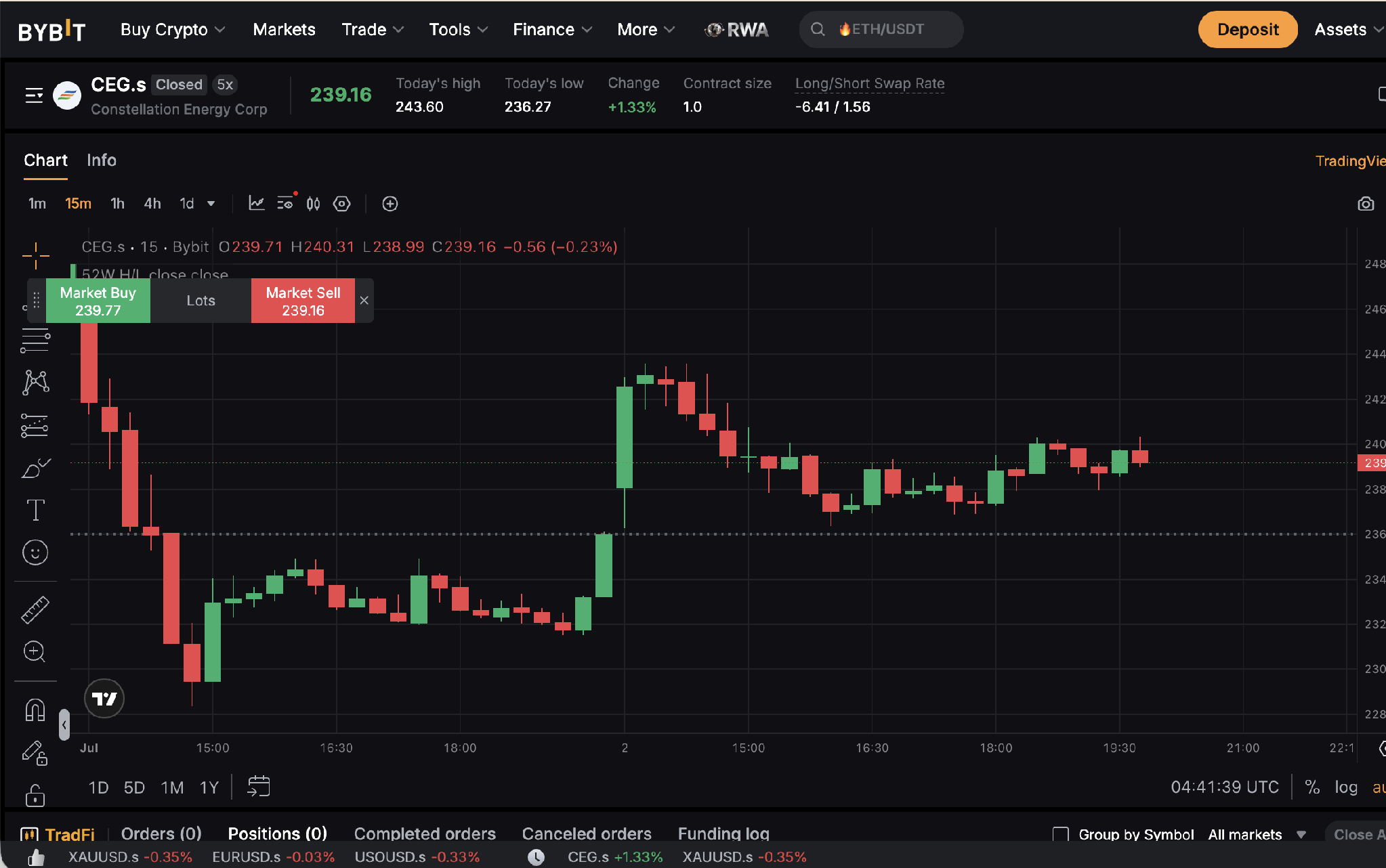
Step 4: Place your order
In the order placement window — or on the MetaTrader 5 terminal if you prefer advanced charting — choose your direction:
Buy (Long) — if you expect CEG's price to rise
Sell (Short) — if you expect CEG's price to fall
Enter your order quantity and set your leverage (stock CFDs on Bybit TradFi support up to 5x leverage). Before confirming, attach a Stop-Loss to cap your downside and a Take-Profit to lock in your target gain automatically. Review and confirm your order.
Step 5: Manage your position
Once your order is live, go to the Positions tab at the bottom of the TradFi dashboard to monitor your open trades. From here you can view your unrealized profit and loss in real time, adjust your stop-loss or take-profit levels, and close the position whenever you're ready.
On the Bybit app
Download the Bybit app if you haven't already, then follow these steps.
Step 1: Access TradFi
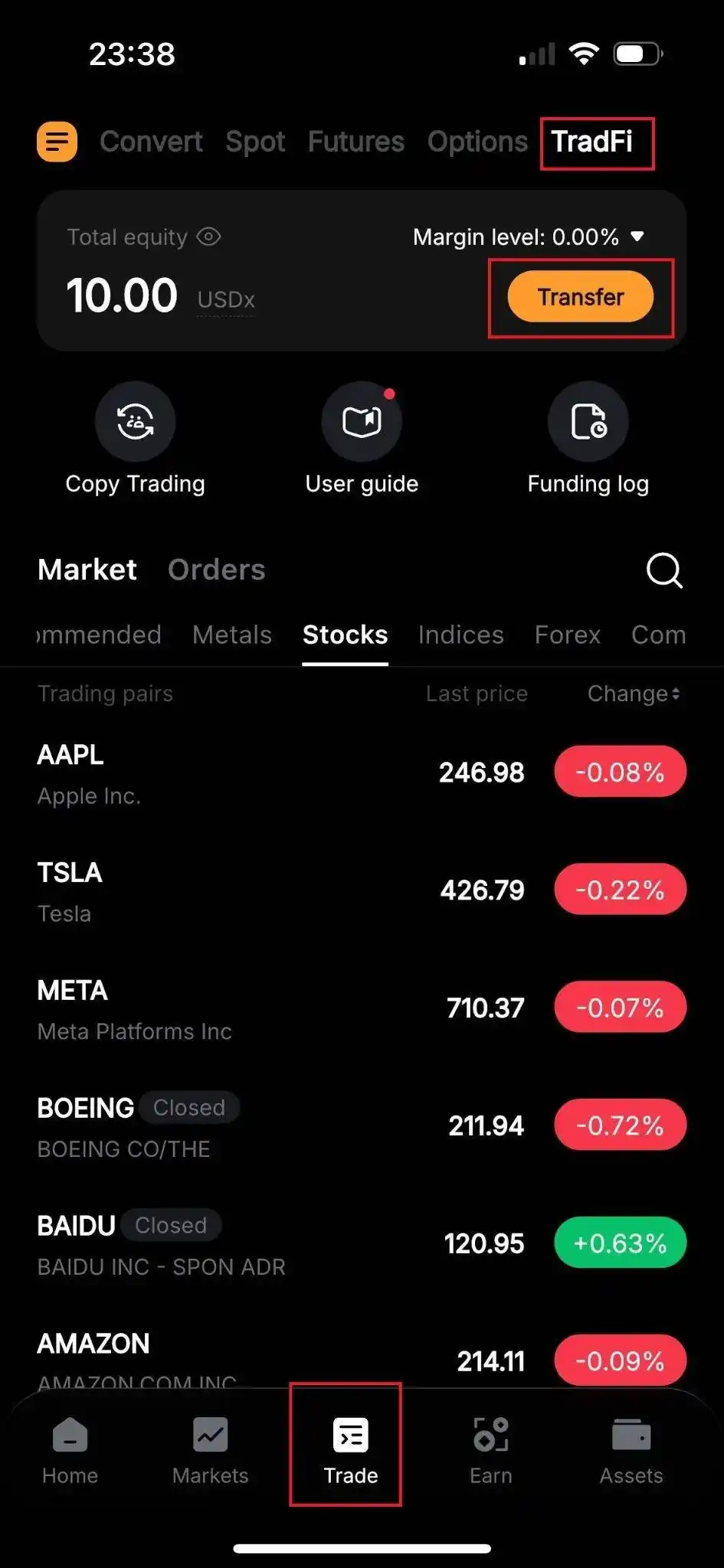
Log in to the Bybit app. Tap Trade in the bottom navigation bar and select TradFi. You can also go directly to the TradFi trading page from your mobile browser to get started.
Step 2: Fund your account
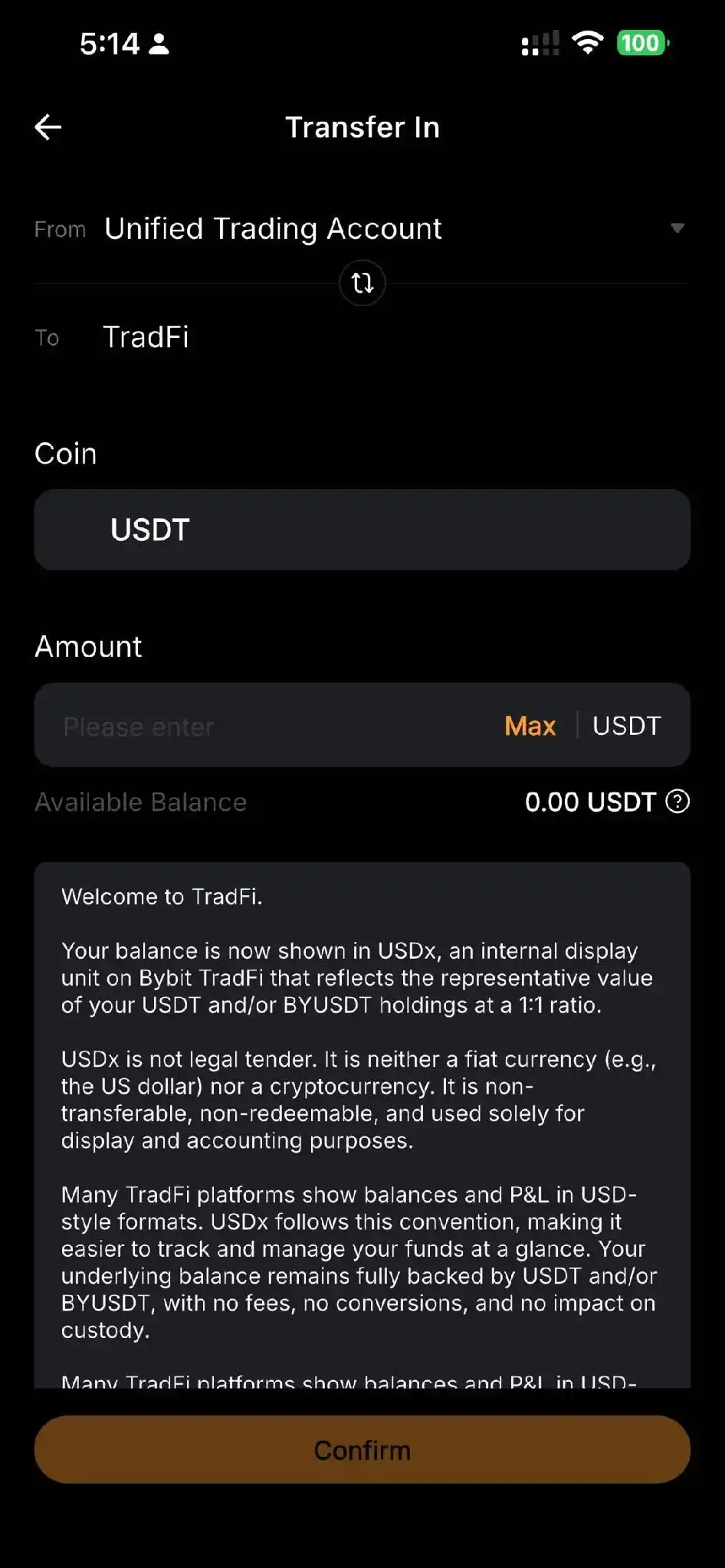
Tap Transfer to move USDT from your Funding Account or Unified Trading Account into your TradFi Account. Your balance will appear as USDx.
Step 3: Choose an asset
Tap the Stocks tab, browse the available CFDs and select Constellation Energy Corp (CEG) to open the trading screen.
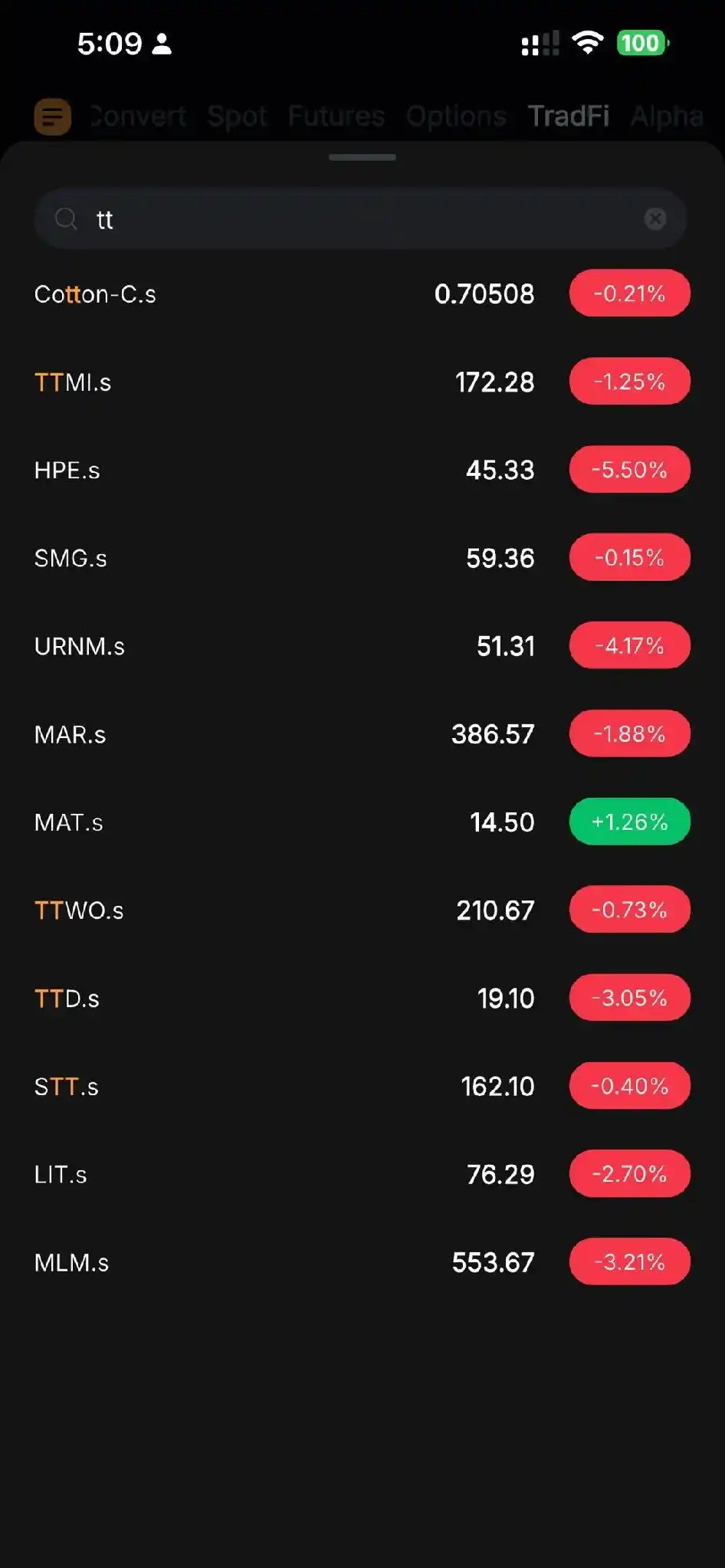
Step 4: Place your order
Next, tap on Buy to open a long position or Sell to open a short position.
In the order placement window, after choosing the Order Direction, set the Quantity, and (optionally) a Trigger and a TP/SL.
Once you're ready, tap on Buy or Sell to place your order.
Step 5: Monitor and close the trade
Near the bottom of the page, you can monitor your open positions under the Positions tab.
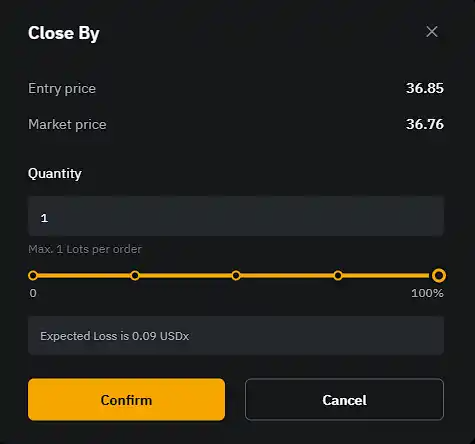
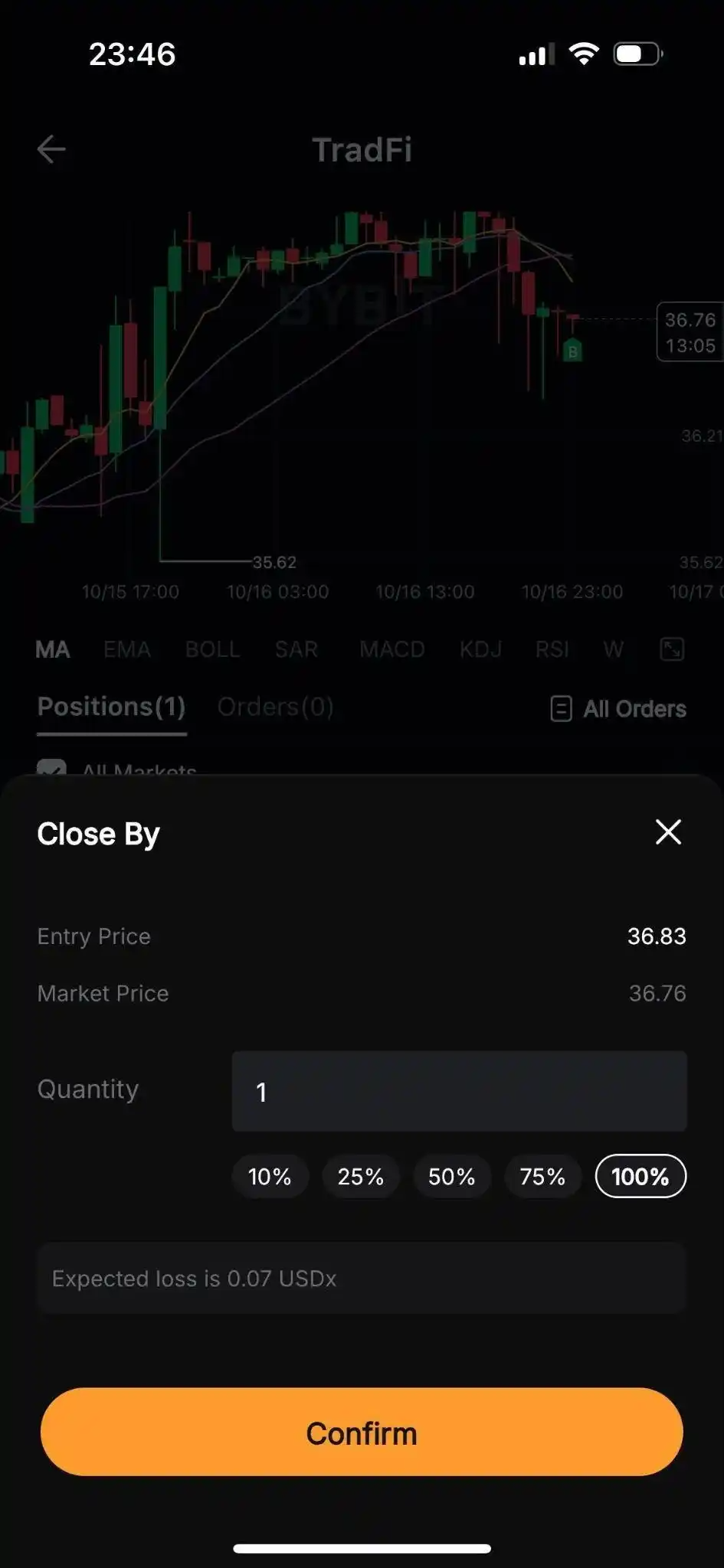
If you wish to close an open position, tap on Close By, select the quantity to close and tap on Confirm.
Fees
Bybit charges a commission of $0.02 per lot (minimum $0.20 per order) for US stock CFDs. Overnight swap fees may also apply if you hold a position past the daily settlement. For a full breakdown, see Bybit TradFi Fees Explained.
Tips for trading Constellation Energy Corp (CEG) CFDs
Always set a stop-loss. Leverage amplifies price movements in both directions. Setting a stop-loss before you confirm your order — not after — is the single most important habit you can build as a CFD trader.
Start with lower leverage. Stock CFDs on Bybit support up to 5x leverage. If you're new to CFD trading, start at lower levels until you understand how your position responds to price moves.
Watch for earnings and energy policy news. CEG's price can move sharply around earnings announcements, regulatory decisions on nuclear energy, power purchase agreements, or data center energy demand developments. Check the earnings calendar before opening a large position.
Use MetaTrader 5 for deeper analysis. Bybit TradFi integrates directly with MetaTrader 5, giving you access to advanced charting tools and automated strategies alongside your standard TradFi account.
The bottom line
Trading Constellation Energy Corp (CEG) CFDs on Bybit gives you flexible, leveraged access to the clean energy and utilities sector without the friction of a traditional brokerage. Whether you're going long on sector momentum or taking a short-term view, Bybit TradFi puts the tools in one place — on both the web platform and the Bybit app.
As with all leveraged products, risk management is essential. Use stop-losses, size your positions carefully and only trade with funds you can afford to lose.
Ready to start? Log in to Bybit and head to the TradFi trading page to find CEG under the Stocks category. For more guides, visit Learn Articles on TradFi.
CFD trading involves significant risk and may not be suitable for all investors. Leverage can work against you as well as for you. Past performance is not indicative of future results. |
#LearnWithBybit
