


Bybit TradFi Combo Bot: A guide to automated TradFi strategies

Manual trading across gold, equity indices and foreign exchange positions demands constant attention. The Bybit TradFi Combo Bot automates that process — it holds a portfolio of TradFi contracts, monitors allocation weights and rebalances positions automatically.
This guide explains how the bot works and how to configure it across different market conditions.
Key Takeaways:
The TradFi Combo Bot automates portfolio management across 2–10 TradFi contracts — commodities, forex, indices and stock CFDs — using target allocation weights and automatic rebalancing.
Three creation modes are available: AI Strategy (pre-built), Manual (full control) and Grid (structured rebalancing within a defined price range).
Rebalancing triggers when allocations are on a fixed time schedule or drift beyond a set threshold, or both. During market closures, rebalancing pauses and resumes once all contracts are tradable.
What is the Bybit TradFi Combo Bot?
The TradFi Combo Bot is an automated portfolio tool for traditional financial assets. It holds from two to ten TradFi contracts simultaneously. Each contract is assigned a direction (long or short) and a target weight. The bot monitors those weights and rebalances positions when they drift — buying into underperforming contracts and reducing outperforming ones.
Rebalancing triggers in two ways:
by threshold (when any weight deviates beyond a set percentage)
by time (at fixed intervals).
Both rebalancing mechanisms can run together. If a rebalancing event falls during market closure, the bot retries every minute until all contracts are tradable.
Funds come from the Bybit Funding Account on creation. Profits stay inside the bot as margin while it runs. On termination, positions close at market price and funds return to your Funding Account.
What strategies does the TradFi Combo Bot support?
The bot offers three creation modes. Each one suits a different level of experience and degree of control.
AI Strategy
AI Strategy presents pre-built portfolios based on historical data. Contracts, weights and rebalancing parameters are pre-configured. To get started:
Select your preferred strategy. Filter by Direction (Long, Short or Mix) and Category using the drop-down lists.
Enter your Investment Amount.
Optionally configure a Trailing Stop to set an automatic exit level.
Tap on Create Now to launch the bot.
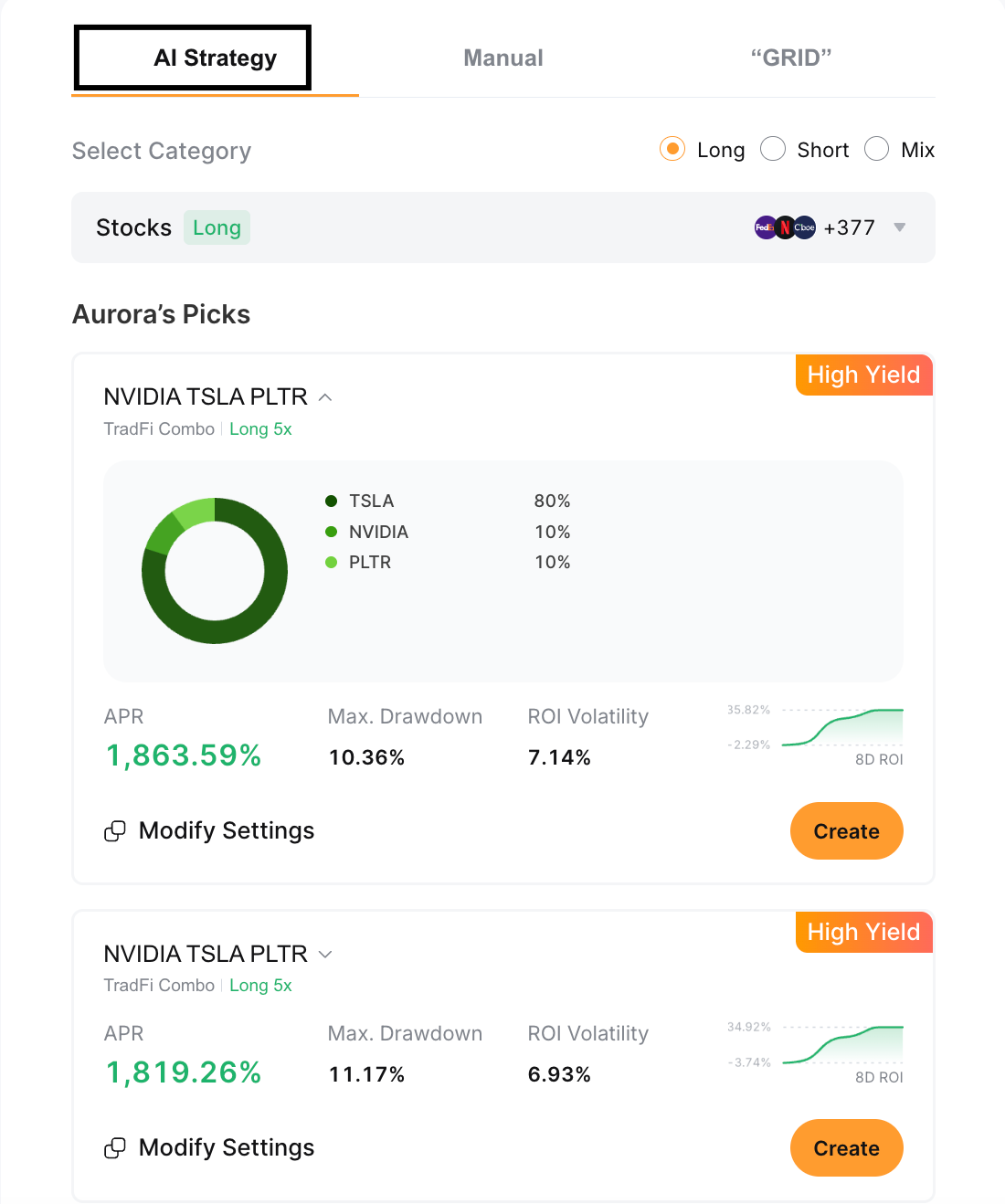
Bot settings — including Trading Pairs, Leverage and Auto Rebalance — can be adjusted at any time by tapping on Modify Settings.
Manual
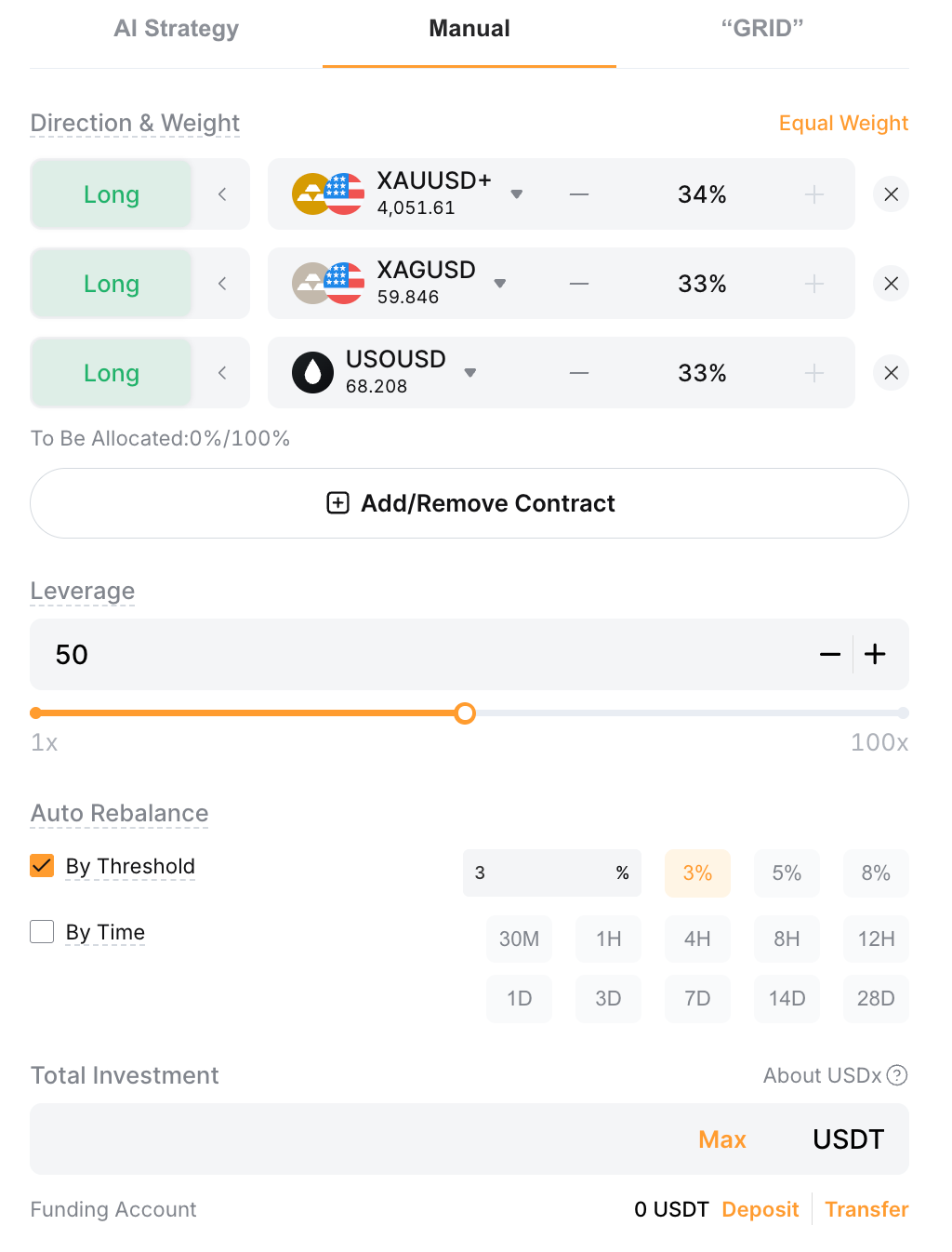
Manual mode gives full control over every parameter. Configure the following, then tap on Create:
Trading Pairs: Select 2–10 trading pairs from the drop-down lists. Mix across Commodities, Forex, Indices, Metals and Stocks.
Direction: Long or Short.
Weight: Total allocation must equal 100%. Tap on Equal Weight to split evenly.
Leverage: 1x–100x. The maximum that’s available is capped by the lowest maximum leverage across all selected contracts.
Auto Rebalance: Select By Threshold, By Time or both. At least one must be active.
Investment Amount: Funds are deducted from your Funding Account. Tap on Deposit or Transfer to add funds if needed.
Trailing Stop (optional): Set an automatic exit level based on equity retracement.
Grid
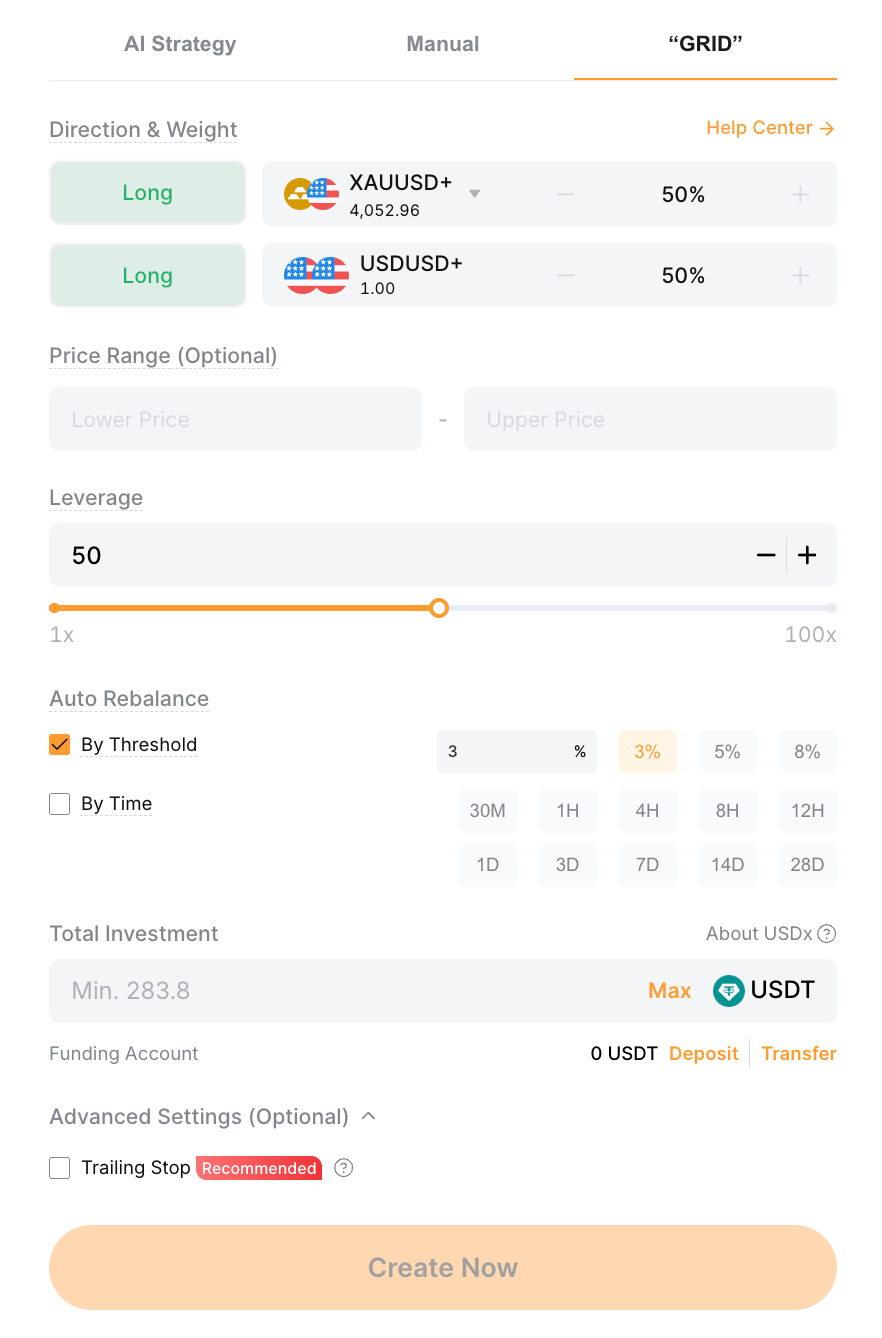
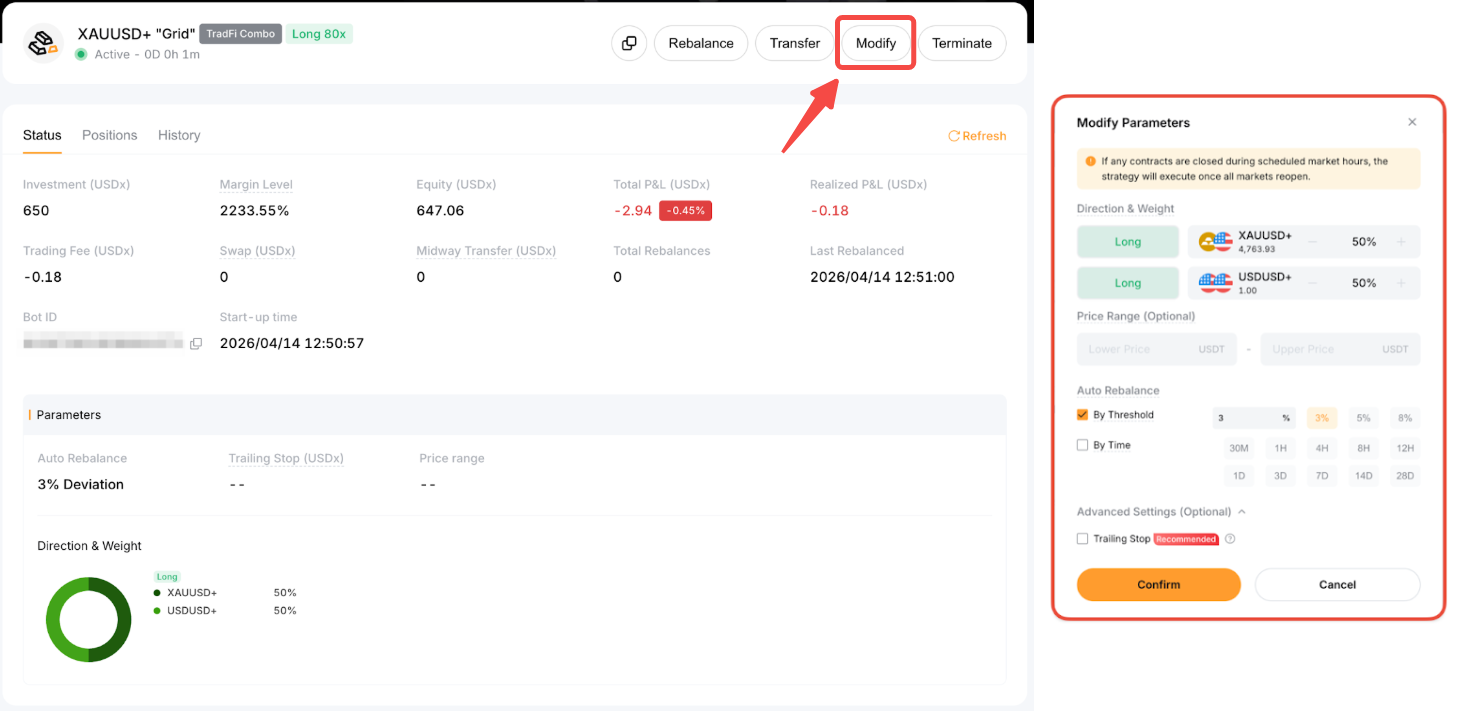
Grid mode is designed for range-bound conditions. The bot holds two equally weighted long positions at 50%, each one within a set price range — thus reducing outperforming positions and adding to underperforming ones as prices move. Outside this range, rebalancing pauses and weights follow market prices.
Set the following parameters:
Price Range (optional): Define the upper and lower bounds. The bot initializes and triggers rebalancing once the price enters this range.
Leverage: 1x–100x.
Auto Rebalance: By Threshold, By Time or both. At least one must be active.
Investment Amount: This is deducted from your Funding Account. Tap on Deposit or Transfer to add funds.
Trailing Stop (optional): Set an automatic exit level.
Mode | How it works | Best for |
AI Strategy | Prebuilt portfolio based on historical data; parameters are set automatically | Traders who want a guided starting point |
Manual | Choose 2–10 contracts, and set your weights, direction, leverage and rebalancing rules | Traders who want full parameter control |
Grid | Structured rebalancing within a price range; two equally weighted long positions at 50% each | Range-bound conditions; price expected to oscillate within a defined band |
What do you need before you start?
Verified Bybit account with KYC completed: Individual or business Identity Verification is required. The bot is unavailable in certain regions, so please check Bybit's Terms and Conditions.
Tight-Spread account mode: The TradFi Combo Bot only supports Tight-Spread mode. Zero-Fee mode is not available for this product.
Funded Bybit Funding Account: Investment funds are deducted from the Funding Account at bot creation. Ensure you have a sufficient balance before proceeding.
TradFi Bot Terms and Conditions accepted: A one-time acknowledgment is required on first access, displayed as a pop-up on the creation page.
How do you create a TradFi Combo Bot?
Steps below are for the Bybit App. On the web, navigate to Trade → Bot → TradFi Combo Bot and follow the same sequence.
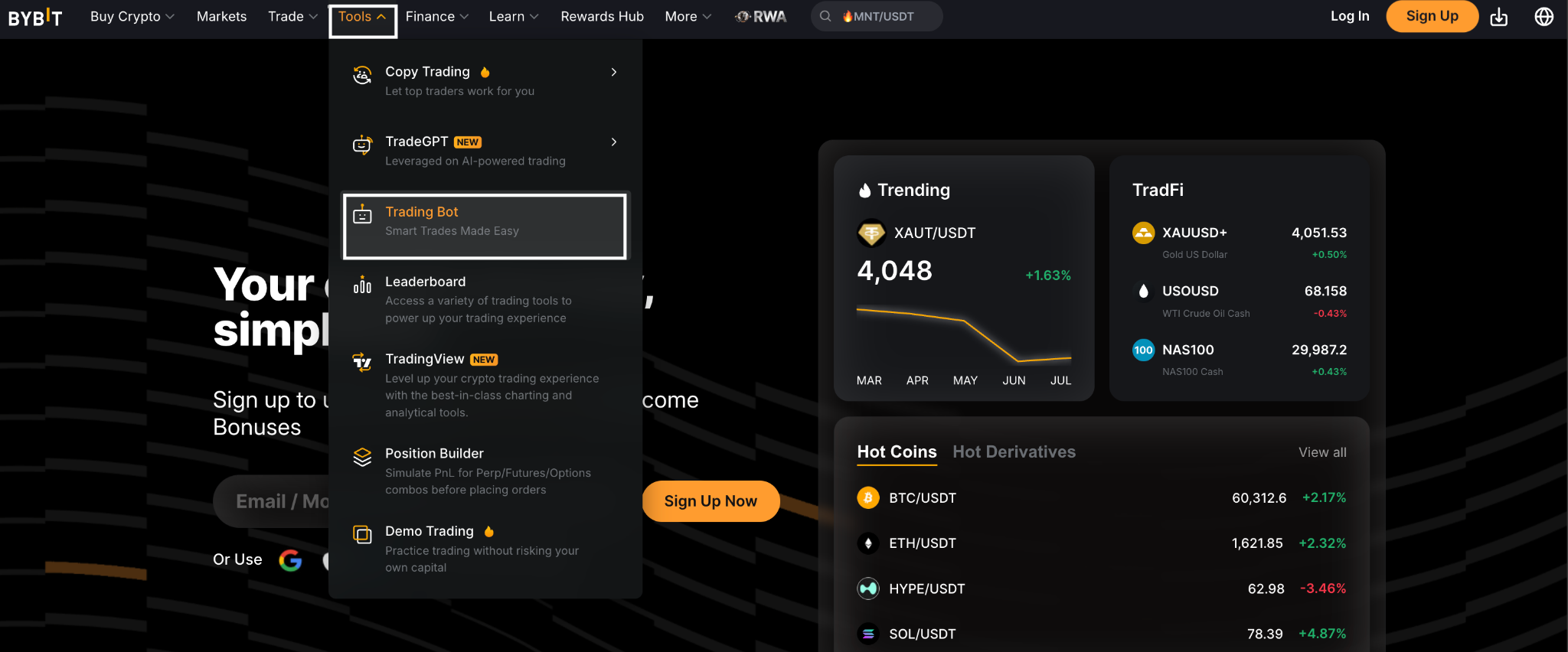
Tap on Tools, then select Trading Bot.
Select TradFi Combo Bot. Review and accept the TradFi Bot Terms and Conditions.
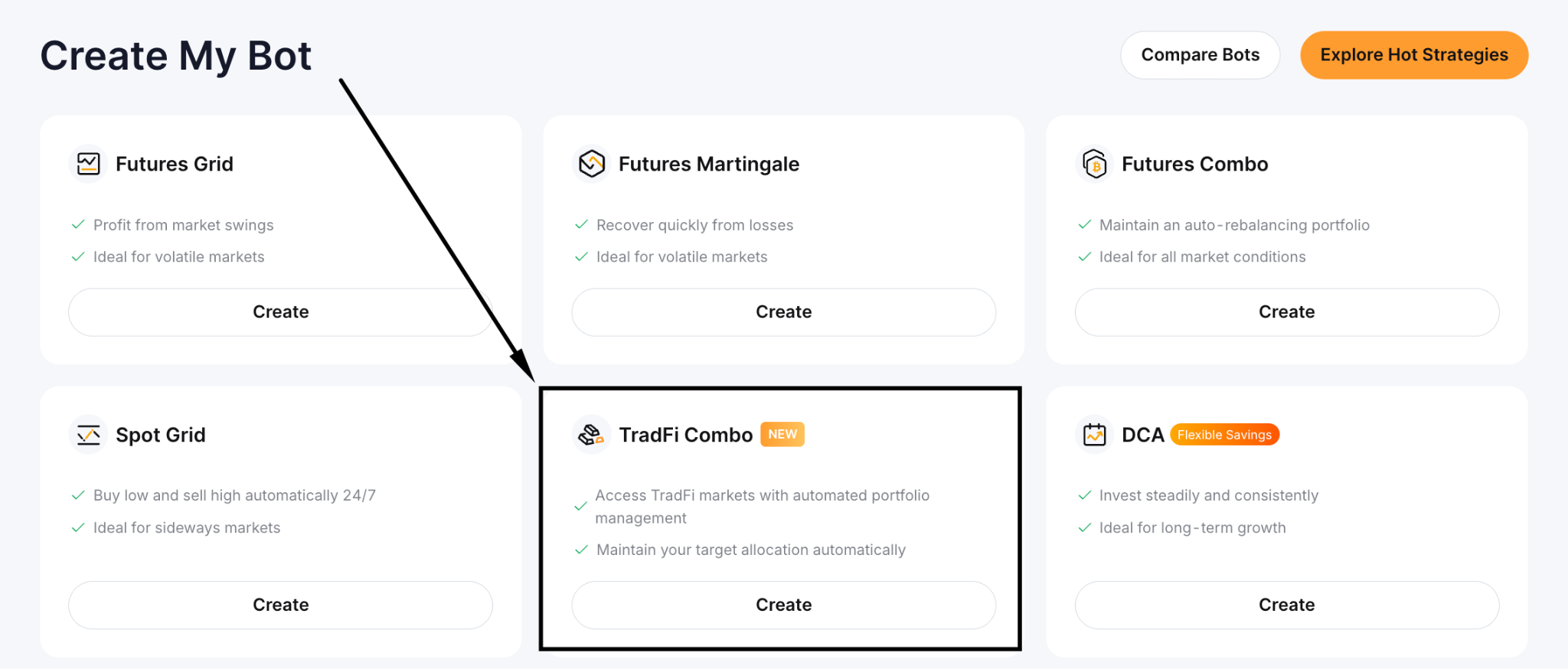
Choose your mode: AI Strategy, Manual or Grid.
Configure your parameters. For Manual and Grid modes, set at least one rebalancing condition.
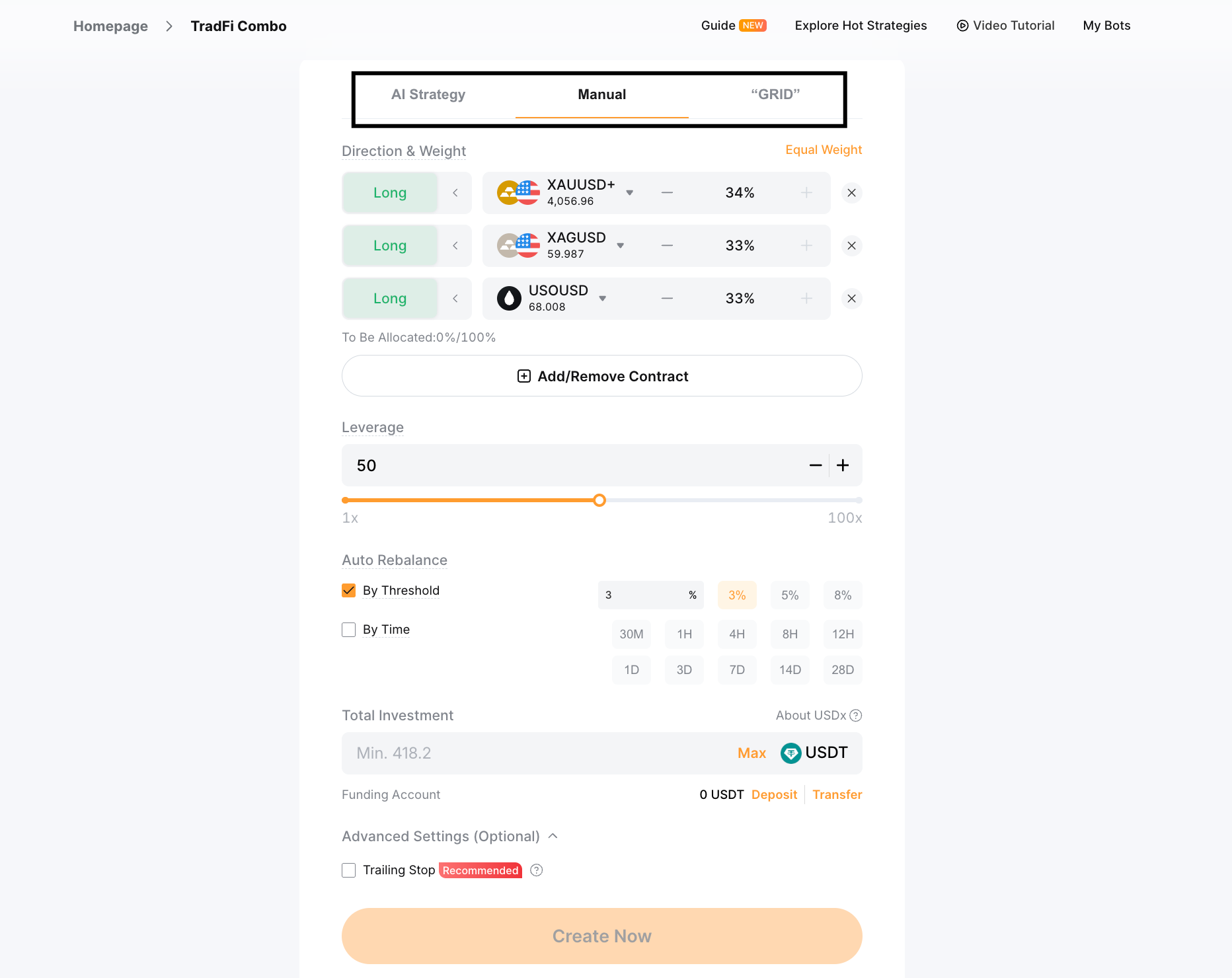
Enter your Investment Amount and (optionally) configure a Trailing Stop. Tap on Create.
Review the summary and tap on Confirm. The bot activates, and funds transfer from your Funding Account.
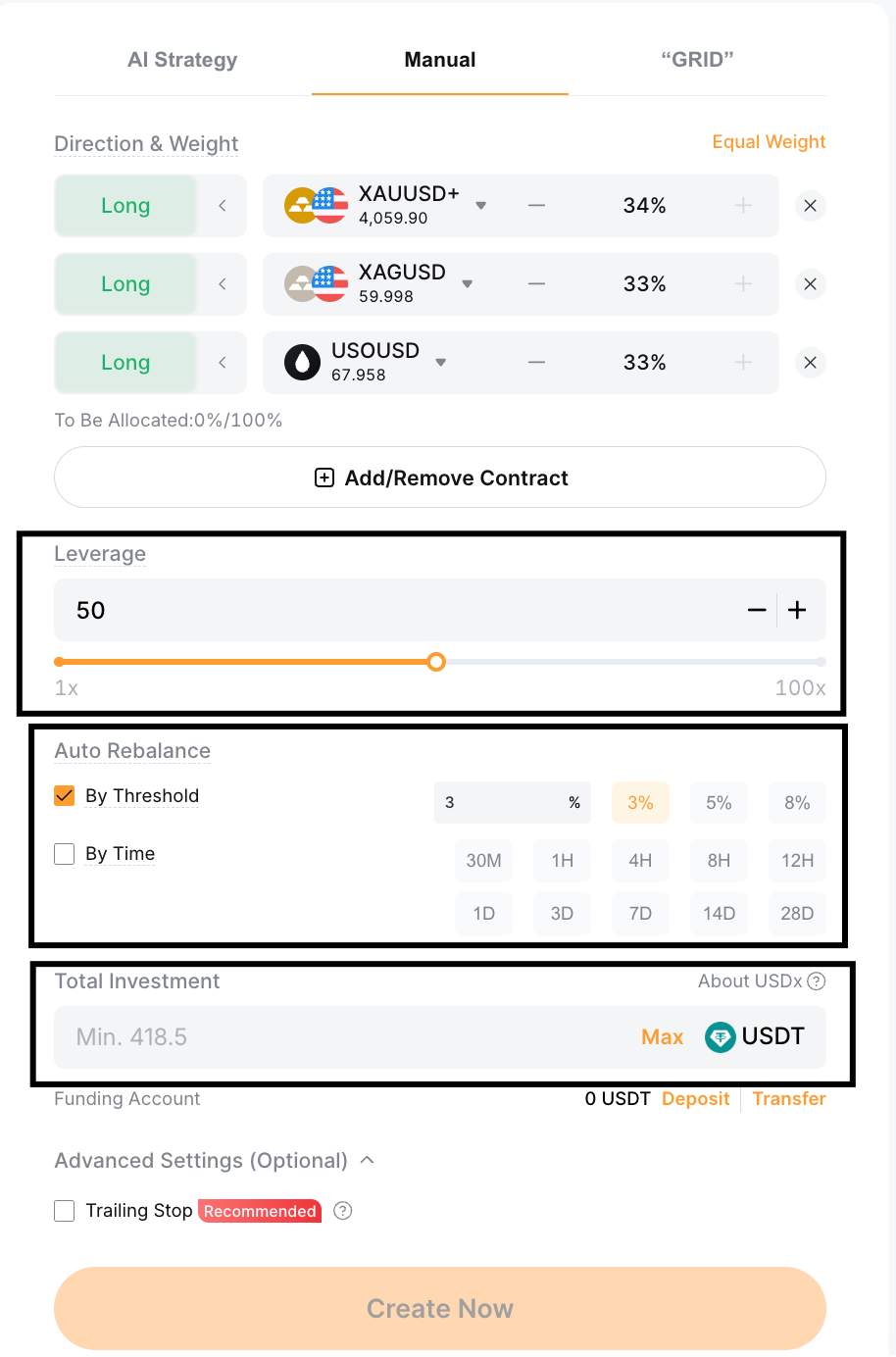
Three approaches to configuring the TradFi Combo Bot
Risk reminder: The configurations below describe mechanics only. Please note that no setting guarantees profit. Past bot performance is not indicative of future results.
Strategy 1: Trending market
Best for:
gold in a sustained macro-driven rally
an equity index in a directional bull or bear phase
Set a clear directional bias in Manual mode: Long for a bullish trend, Short for a bearish one. Use a tighter rebalancing threshold (around 5%) so the bot corrects quickly when weights drift. Moderate leverage of 2x–5x provides directional exposure without excessive amplification. A Trailing Stop is well suited here, since it adjusts the exit level upward as equity grows, locking in a floor before any reversal.
Strategy 2: Range-bound or consolidating market
Best for:
gold oscillating between support and resistance
an equity index coiling before earnings season
Grid mode is the natural fit. Define the price range using recent highs and lows. The bot will buy into weakness and reduce on strength inside that range. In Manual mode, set direction to a balanced long/short mix, a moderate threshold (around 10%), and combine time and threshold rebalancing. Keep leverage at 1x–2x, as a breakout beyond the range at higher leverage can produce rapid losses.
Strategy 3: High-volatility market with unclear direction
Best for: Post-event price action following Fed decisions or major economic data releases.
When direction is uncertain, limit leverage to 1x and use a balanced contract mix in Manual mode. Set a wider rebalancing threshold (15–20%) to avoid the bot triggering on every sharp move. Use threshold-only rebalancing, because timed intervals can fire during peak volatility (when execution conditions are least favorable). Set a tighter Trailing Stop to exit if equity drops materially.
Market condition | Rebalance trigger | Threshold | Leverage | Trailing stop |
Trending (bullish/bearish) | By threshold | Tighter (e.g., 5%) | Moderate (2x–5x) | Recommended — locks in gains |
Range-bound | By time or threshold | Moderate (e.g., 10%) | Lower (1x–2x) | Optional |
High volatility | By threshold only | Wider (e.g., 15–20%) | Minimum (1x) | Tighter — exit early if equity drops |
How do you monitor and manage an active bot?
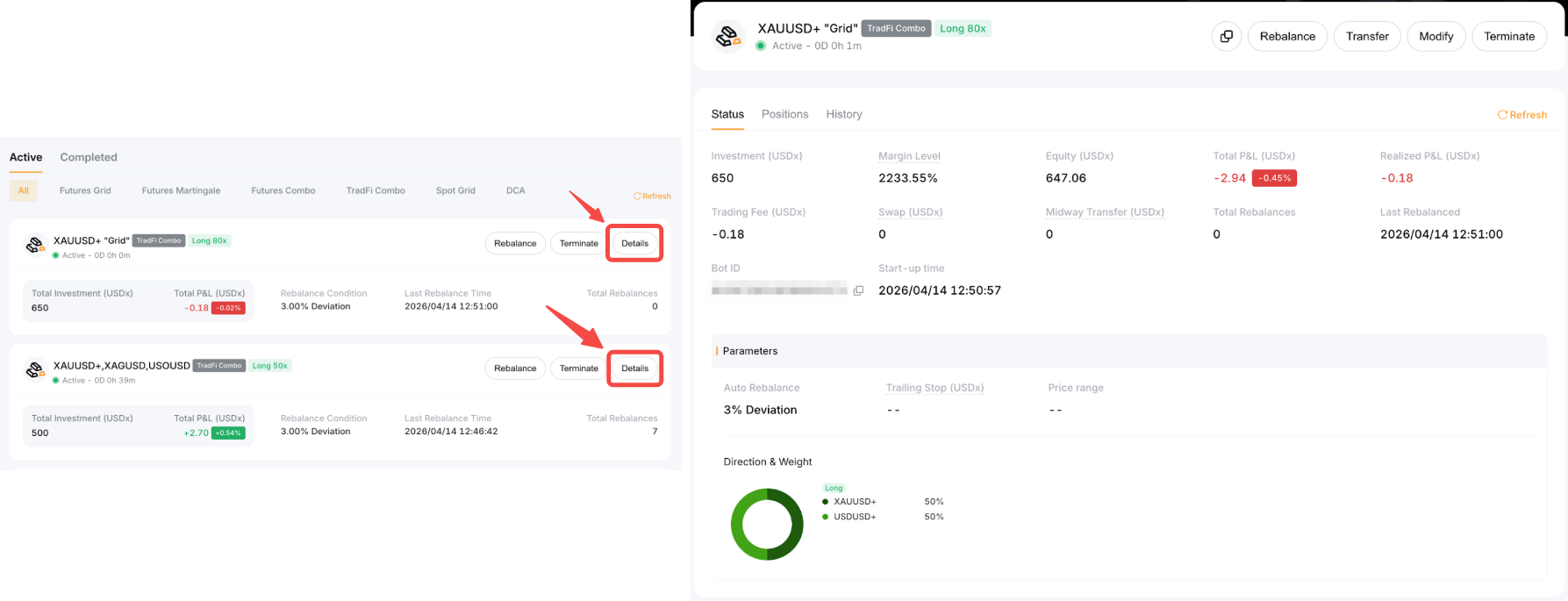
Active bots appear in My Bots → Active. Open the Details page to review:
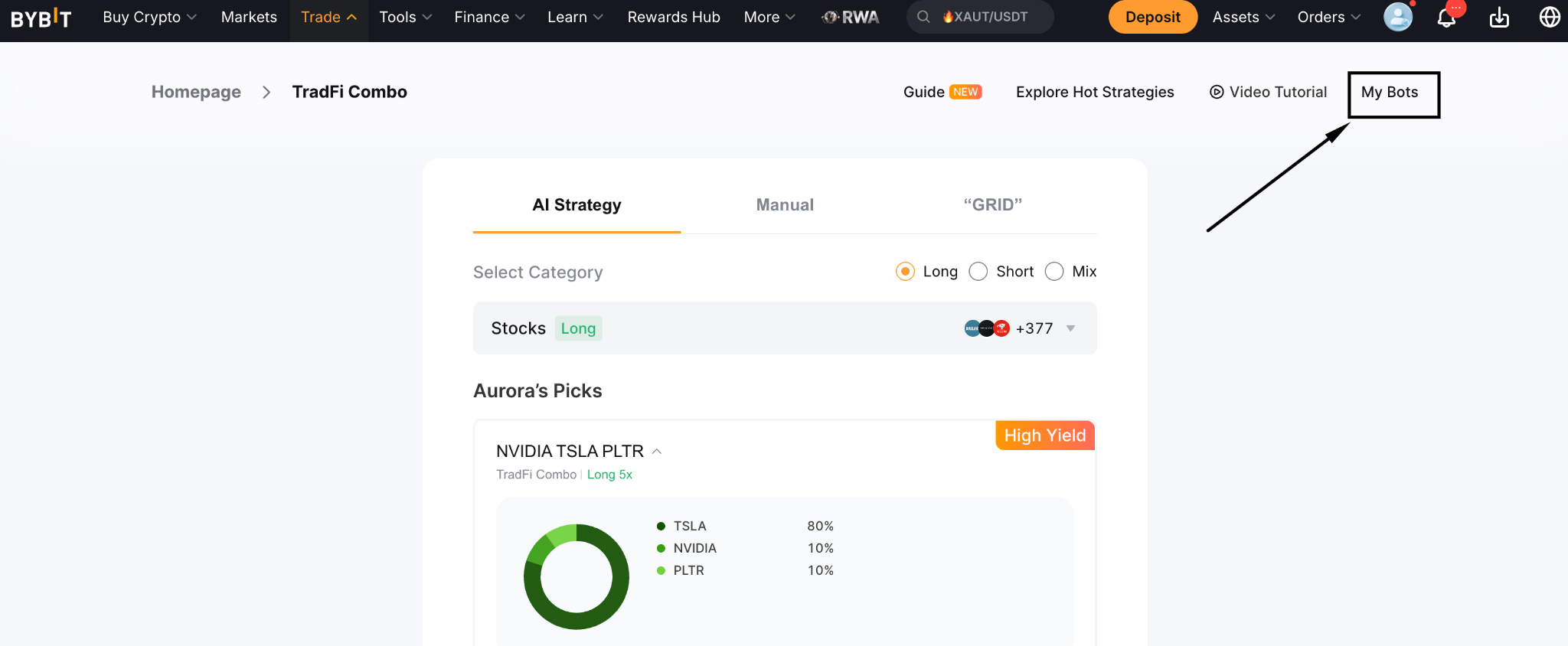
Current positions and weights, showing current drift from targets.
Rebalancing history, under the History tab.
Equity and unrealized P&L, updated in real time.
Trailing Stop status, showing the current exit level.
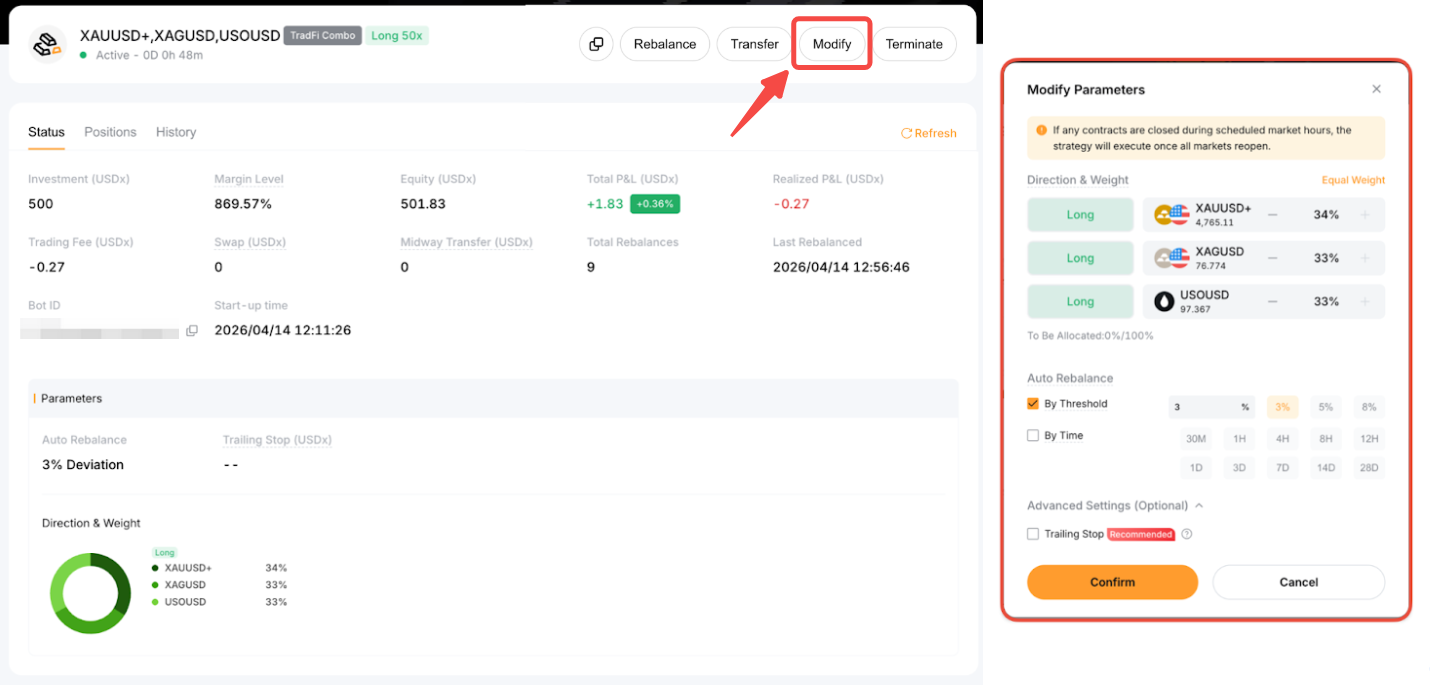
Tap on Modify on the Details page to adjust weights, rebalancing settings, Trailing Stop or price range (Grid only). Add funds via the Transfer button; withdrawals require terminating the bot first.
To terminate, tap on Terminate. Positions close at market price — or once the market reopens if it’s currently closed. Funds return to your Funding Account.
What are the risks?
The TradFi Combo Bot automates execution — but it does not eliminate market risk.
Rebalancing into a losing position: The bot systematically buys underperforming contracts. In a strong trend, this means adding repeatedly to a declining position.
Liquidation: If margin level falls to 50%, a margin closeout triggers. All positions close and the bot terminates. Higher leverage raises liquidation risk.
Market hours gaps: Trading is limited to underlying market hours. Rebalancing pauses during closures. Price gaps at open can move positions before the bot acts.
Grid range breakout: In Grid mode, rebalancing stops if price exits the defined range. Weights then shift with market prices until the bot is stopped or the price returns.
Leverage amplifies losses: All contracts run at the selected leverage. Adverse moves across multiple positions erode equity rapidly.
Contract delisting: If any contract in the portfolio is delisted, the bot terminates automatically.
The bottom line
The TradFi Combo Bot brings rule-based portfolio management to traditional assets. Set target weights, choose a rebalancing approach and let the bot maintain the strategy across gold, indices, forex or stock CFDs.
Automation removes the need for continual monitoring, but it does not remove risk. Rebalancing into falling positions, gap risk at market open, Grid range breakouts and leverage-amplified losses are all live possibilities. Traders who match configuration to actual market conditions and keep leverage conservative will find the TradFi Combo Bot a practical tool for systematic TradFi exposure.
#LearnWithBybit
