


How to buy crypto with P2P Express

Bybit’s P2P Trading platform provides opportunities to trade cryptocurrencies between the exchange’s registered users, in most cases with zero transaction fees. However, for some beginner crypto traders, the standard P2P listings on the platform might appear confusing, unclear or too varied to sift through. In order to make trading crypto via the P2P route more accessible, Bybit has introduced the P2P Express service, which lets you buy or sell crypto with fiat funds by automatically matching your desired trading amounts to existing offers.
In this article, we’ll cover how to buy crypto using fiat money via Bybit’s P2P Express service.
Key Takeaways:
Bybit P2P Express allows you to buy crypto with fiat via a streamlined, novice-friendly interface. With Bybit P2P Express, your desired purchase amounts are automatically matched with optimal offers from verified P2P sellers.
Bybit P2P Express is available only via the Bybit App.
With the exception of a small number of select national currencies, most P2P Express orders attract no maker or taker fees.
What is P2P Express on Bybit?
P2P Express is a simplified, beginner-friendly way to buy and sell crypto with fiat funds via Bybit’s P2P market. As of early February 2026, it’s available only on the Bybit App mobile application. P2P Express lets you specify your preferred buying amount, either in the fiat currency used to pay or in the crypto coin being bought. Then, it matches your requirements to the best offers from verified P2P traders on the platform. Simply confirm your preferred payment method and easily place your buy order.
How P2P Express works (simplified flow vs. standard P2P)
P2P Express features a simplified, automated mode of matching your buying requirements against the offers currently posted on the P2P platform by sellers. In standard P2P Trading, you need to sift through the numerous offers of sellers, review each offer, research the sellers’ on-platform reputations and verify that each sell ad fits within your desired limits. For novice traders who simply need an easy way to buy crypto with fiat funds, all this manual review of sell ads can be confusing, time-consuming or error-prone.
In contrast, P2P Express automatically matches your order requirements to the most suitable sell ads on the platform, saving you time — and the hassle of dealing with the manual P2P purchase process.
Eligibility and requirements (KYC level, region availability)
In order to buy and sell crypto via P2P Express, you’ll need to complete the Standard Level of Identity Verification on Bybit. This is the same requirement that’s applied to Bybit P2P Trading in general.
Users in most regions can take advantage of the P2P Express service. Note that this service isn’t available in jurisdictions not currently serviced by Bybit in general. You can view the list of service-restricted countries in this help center article. Additionally, P2P Express and the standard P2P Trading platform aren’t available to users in the European Economic Area (EEA).
Step-by-step: How to buy crypto with P2P Express
To buy crypto through Bybit P2P Express, simply follow the steps below.
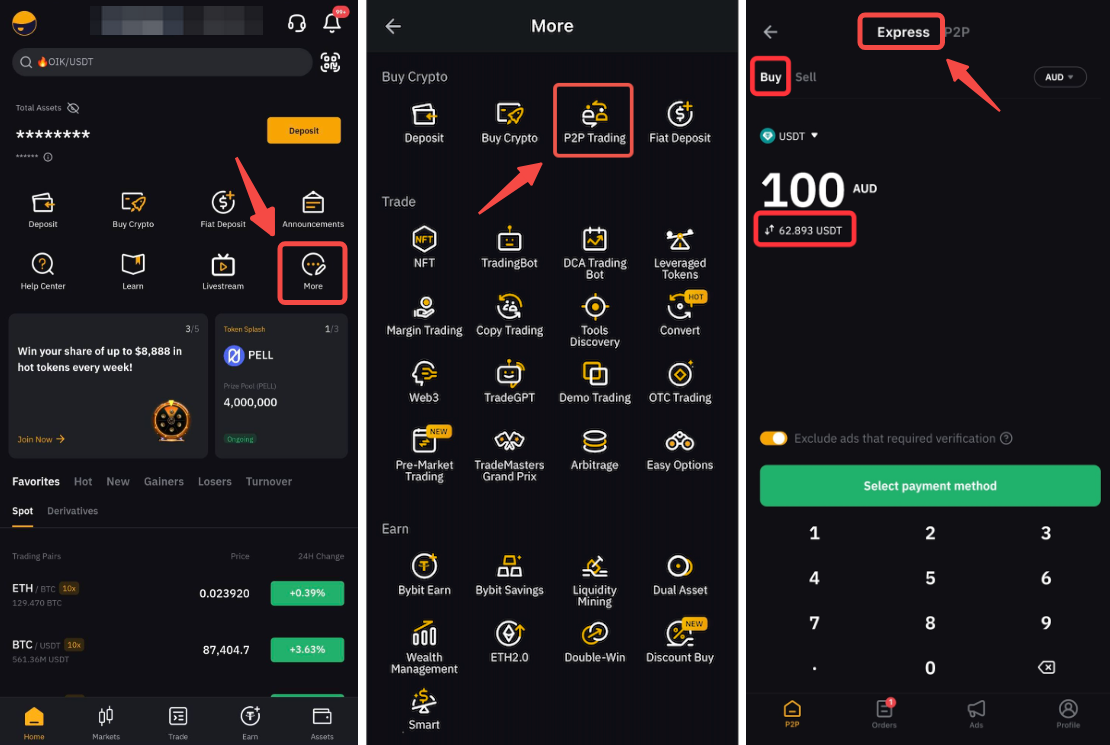
Step 1: Open the Bybit App on your mobile device. Tap on More in the home screen, then tap on P2P Trading. At the top of the P2P Trading page, tap on P2P Express.
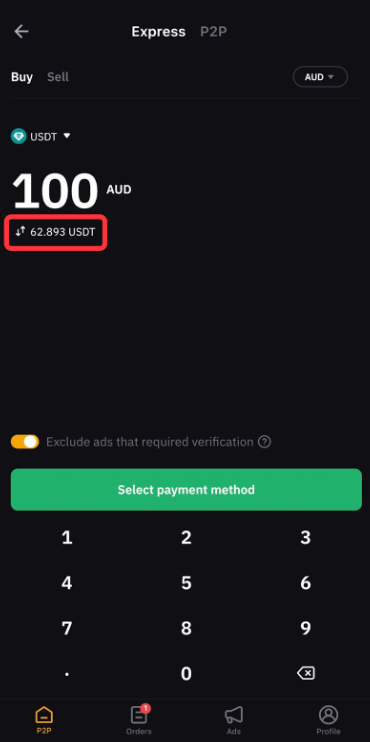
Step 2: On the P2P Express screen, enter the amount of fiat currency you want to pay, or the amount of crypto you want to buy. You can switch between the two options by tapping on the small swap icon (shown below). There’s also an option to Exclude ads that require additional verification. After providing the amount, tap on the green Select payment method button.
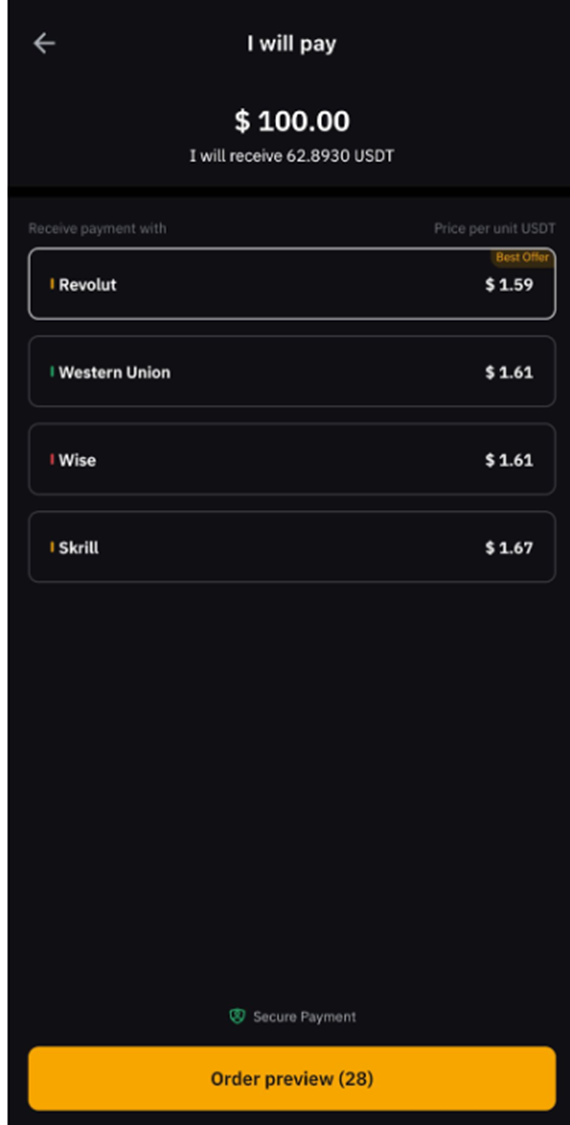
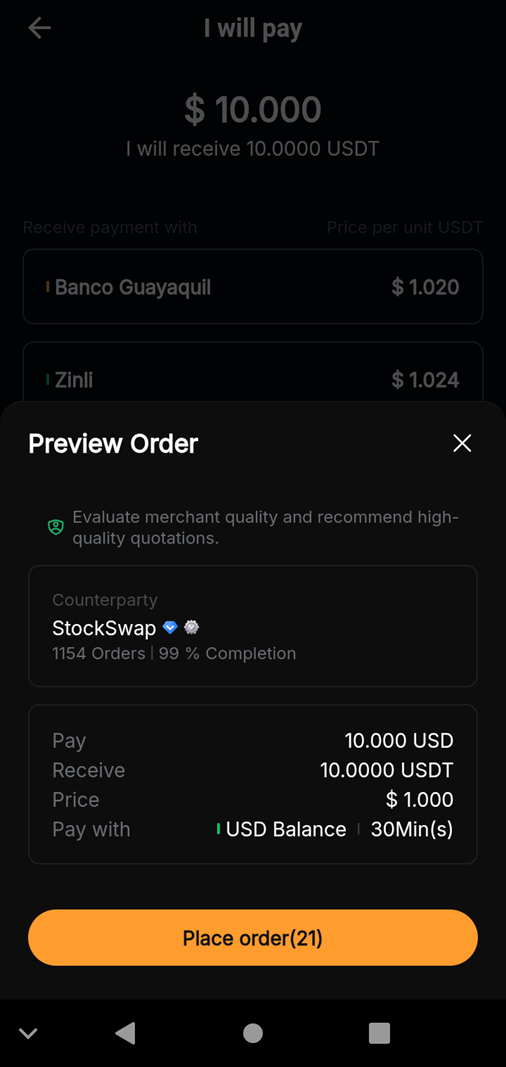
Step 3: The system will match your requirements to the best available offers. If there are suitable sell ads for your buy order, you’ll see a list of available payment methods to choose from. Tap on your preferred payment method. This information will be shown only for a limited period of time (as indicated by the seconds counter in Order preview at the bottom), since prices change on a regular basis.
Step 4: If the order requires additional verification, tap on Verify Now. Then, provide the necessary information in the chat box, and tap on Pay Now to execute your order.
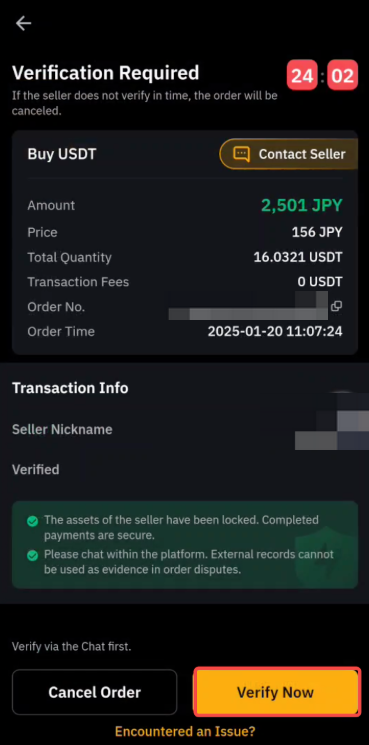
If there’s no additional verification required, tap on the Place order button to execute your trade.
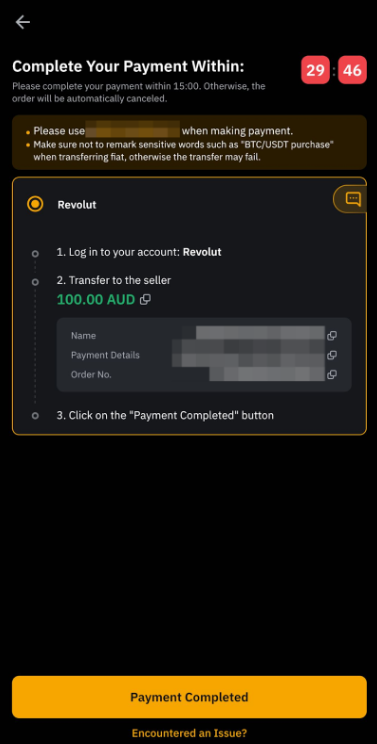
Step 5: After you’ve made your payment, ensure that you tap on the Payment Completed button in the final screen to notify the seller.
Order confirmation and settlement process
Once your payment is received by the seller, they’ll need to release the purchased funds to you. The timing will depend upon the payment method you’ve used. When you choose a specific payment method, you can always check your order details, including the timing estimate.
The funds sent by the seller will be reflected in your Funding Account, the main account used for deposits and withdrawals on Bybit. If you haven’t received your crypto soon after the typical timing estimates for your payment method, contact the seller via the order chat box to inquire. If the seller is unresponsive or continues to delay sending your purchased crypto, you can contact Bybit for a dispute resolution.
P2P Trading fees: Express vs. General
P2P Express charges different trading fees as compared to general P2P Trading.
P2P Express fees
P2P Express fees vary by region, and are shown up-front before you confirm your order.
MENA & South Asia: 0% fees
Africa: 0% fees for P2P Express (general P2P fees may still apply)
Other regions: Any applicable fees are displayed at checkout
General P2P Trading fees
General P2P Trading fees depend upon factors such as trading pair, region and advertiser level. In many cases, takers pay 0% fees, while advertisers may incur fees based on the ad.
Important tips for first-time buyers
First-time buyers using P2P Express are advised to follow basic precautions:
Verify your identity in order to be eligible for the service.
Use the P2P Express option in the Bybit App, rather than the standard P2P alternative.
Only confirm a payment to the seller after it’s been made.
Wait to receive your purchased crypto according to the time frame estimated by your preferred payment method.
Promptly contact the seller via the order chat box if your funds have not been received during the estimated time.
Raise a dispute with Bybit Customer Service if the seller is unresponsive, or refuses to transfer the funds.
Start with smaller orders in order to experiment and learn how P2P Express works.
#LearnWithBybit