


Bybit Bank Transfer +: What it is and how to get started

Crypto's mainstream adoption still faces a structural problem: moving money between bank accounts and digital asset platforms is slow, fragmented and expensive, largely because many exchanges still lack built-in fiat infrastructure. Without that exchange-level support, users are often pushed onto traditional banking rails that introduce extra fees and settlement delays.
Bank Transfer+ is a Bybit solution that closes this gap. This global fiat account solution lets you transfer large amounts of fiat currency directly into the Bybit ecosystem and convert stablecoins back into fiat for external withdrawals, all without third-party services.
Key Takeaways:
Bank Transfer+ is Bybit's dedicated fiat account solution that bridges traditional banking rails and the Bybit ecosystem, supporting both large-volume fiat deposits and stablecoin-to-fiat withdrawals via SWIFT.
Bank Transfer+ provides seamless, compliant conversion between fiat and crypto, enabling high-volume transactions without third-party delays. Currently available to VIP 1 and VIP 2 users, as well as eligible users in select regions, with access set to expand gradually to more users over time.
What is Bank Transfer +?
Bank Transfer + is a fiat account solution that bridges your personal bank account with your Bybit Funding Account. Instead of relying on slow, fragmented on-ramp services, you get a dedicated fiat account handling both directions of the fiat-to-crypto flow. Core benefits of the service include:
Fiat-crypto integration: A dedicated, seamless gateway to move funds swiftly between fiat and digital assets, all within Bybit's ecosystem.
Simplified fund management: Control fiat balances directly within Bybit without external platforms.
Compliant banking infrastructure: Secure, regulation-compliant fiat services are backed by a licensed banking partner.
This is a bridge service — no savings, lending or interest functionality exists. Transfers typically settle within five business days, and fees may be charged by sending or intermediary banks based on currency and route.
Who is Bank Transfer + for?
Bank Transfer + best serves the following users:
1) Active traders converting large crypto positions into fiat currency
2) High-volume traders who need frequent large-value transfers
3) Compliance-focused users who prioritize regulatory security when moving funds
You need a minimum of VIP 1 or VIP 2 status to use Bank Transfer +. The Bybit VIP program rewards high-volume Spot and Derivatives traders with reduced fees, dedicated account support and access to invitation-only events across multiple tiers. Holding the Mantle (MNT) token helps you to move up VIP tiers faster than by trading volume alone.
How Bank Transfer + works
To deposit, you transfer fiat from your bank account into your Bank Transfer + account. Bybit converts the received funds into your chosen stablecoin — Tether (USDT) or USDC (USDC) — and credits them to your Funding Account, where they immediately become available for trading or other activity.
On the withdrawal side, you can convert USDT or USDC from your Funding Account into fiat via Bank Transfer +, routing the funds directly to a chosen external bank account. You can also create third-party recipient accounts — broadening your payment options beyond personal withdrawals and enabling direct external payments.
Bank Transfer + use cases
When your capital is held in stablecoins and you need to act within the traditional financial system, Bank Transfer + removes the intermediary steps that typically slow that process down.
For instance, if you want to fund your account in order to trade, you can add your Bank Transfer + account as a recipient in your personal bank and initiate a USD transfer. Funds are converted to USDT or USDC upon arrival in your Funding Account, ready for trading within Bybit.
Another use case involves large purchases. If you're buying a car and funds are held as stablecoins, add the dealer's bank account as a payee under Bank Transfer +. The service converts your USDT or USDC to USD and transfers the funds directly to the dealer, skipping rerouting to your own bank.
How to get started with Bank Transfer +
Bank Transfer + is accessible only through the Bybit App. Please note that there is no desktop access. Download the App before proceeding with the steps below.
Step 1: Setting up Bank Transfer +
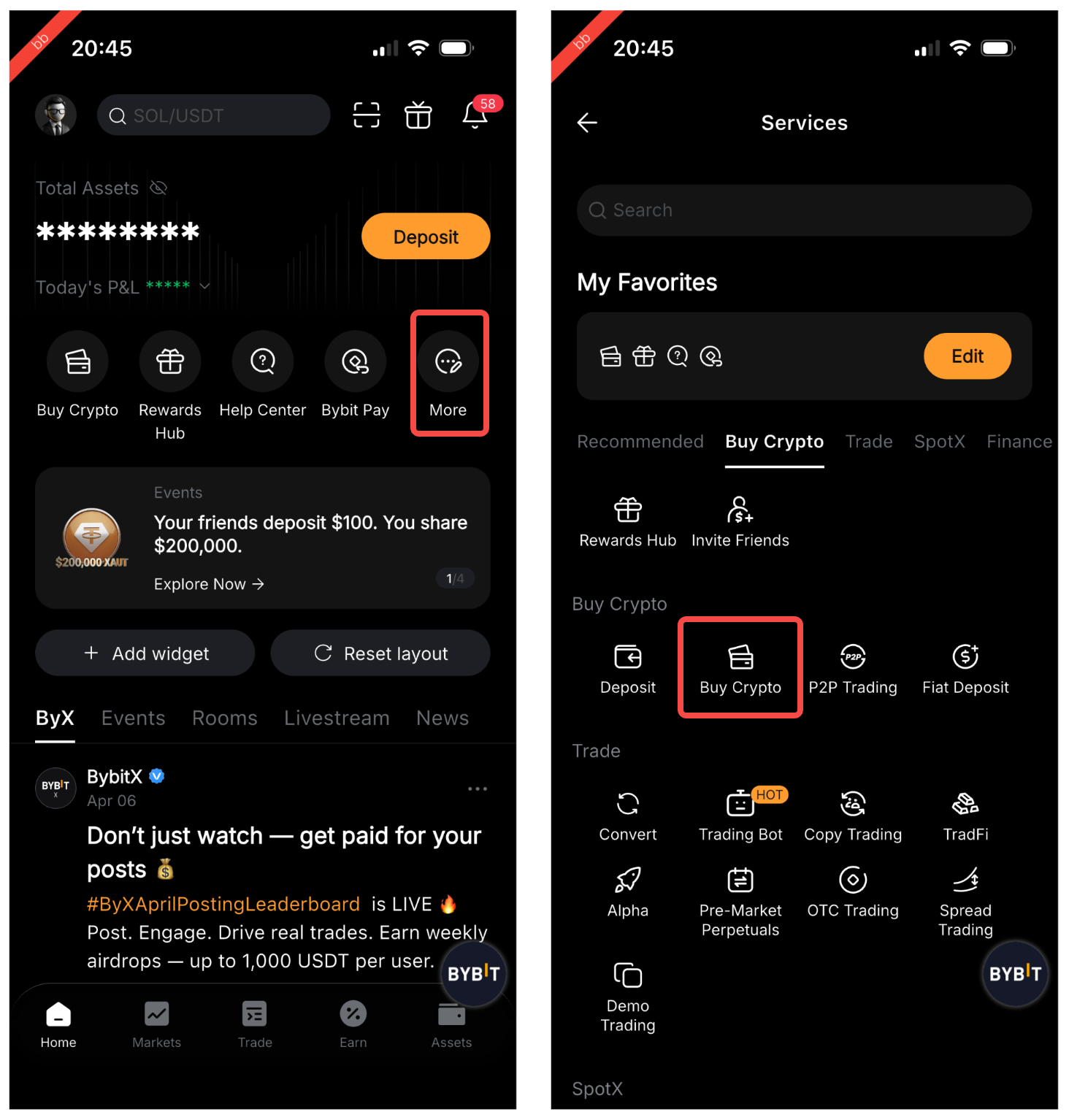
This feature is available only to VIP 1 and VIP 2 users. Tap on More on the home page of your Bybit App, then on Buy Crypto.
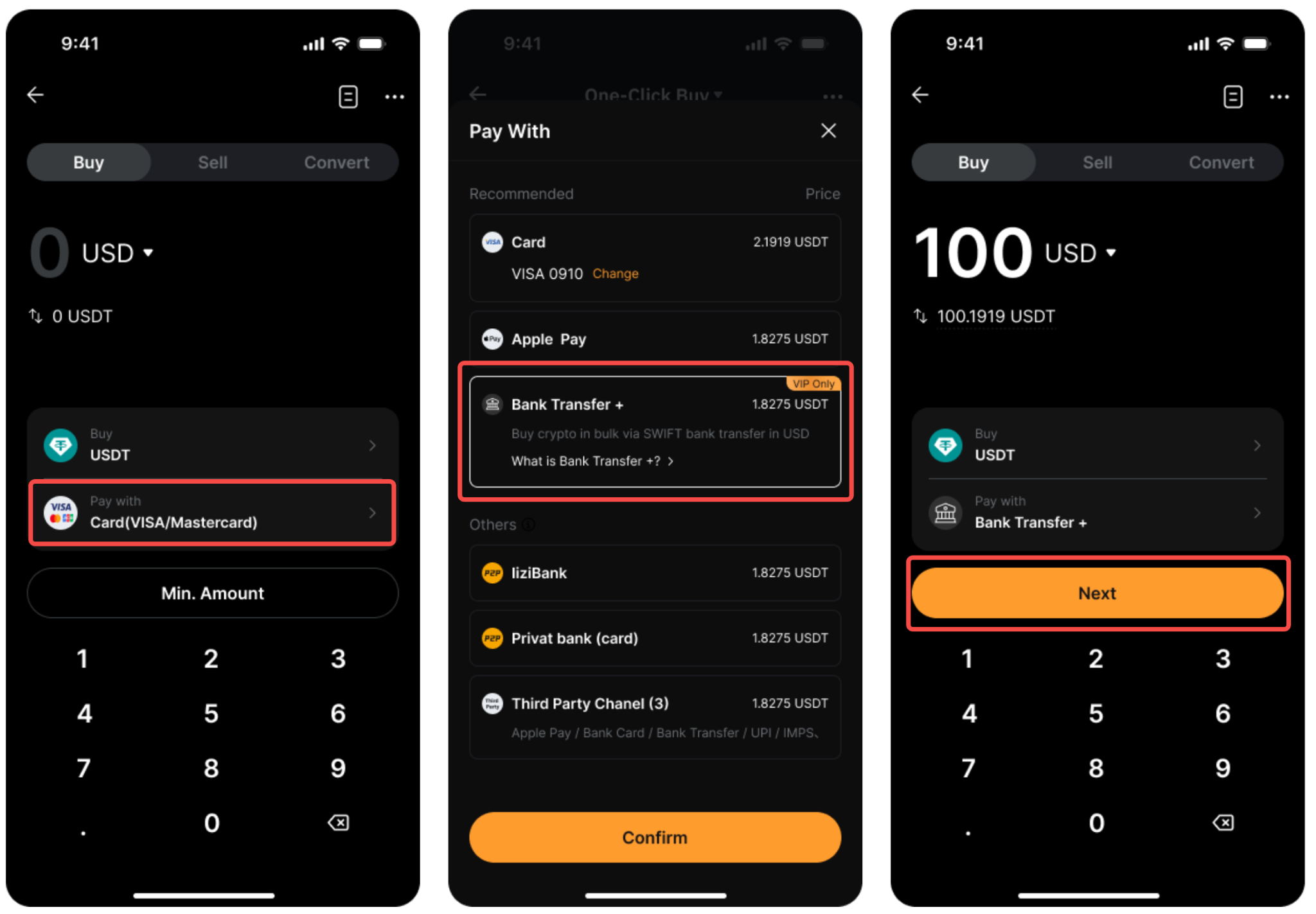
Select Bank Transfer + as your payment method, and tap on Next to continue.
Step 2: Complete verification and wait for approval
You’ll need to complete verification. The verification flow may require an ID card, passport, Proof of Address, a questionnaire covering your employment status, source of income and account purpose, and Enhanced Due Diligence information.
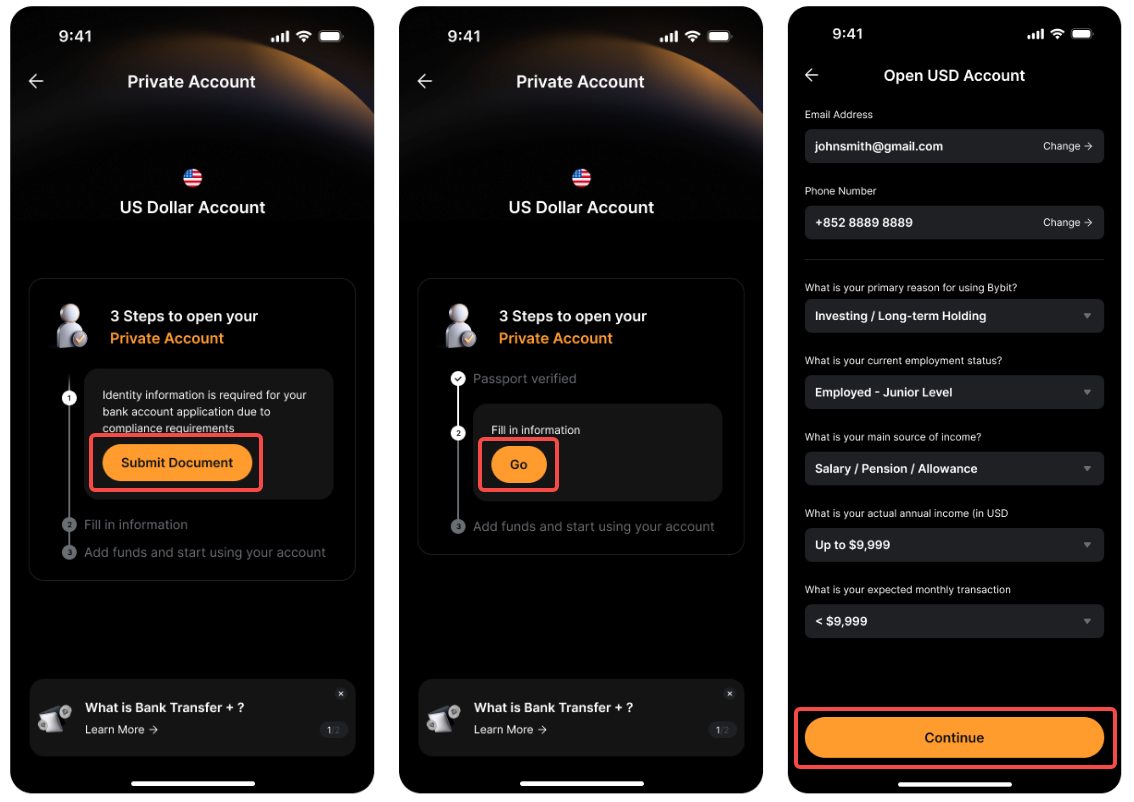
Once each stage clears, review and accept the applicable terms and conditions. Bybit reviews applications within seven business days, and upon approval will notify you by push notification and email.
Step 3: Deposit fiat to your Bank Transfer + account
On the Buy Crypto page, select Bank Transfer + as your payment method by tapping on Pay with, then tap on Next.
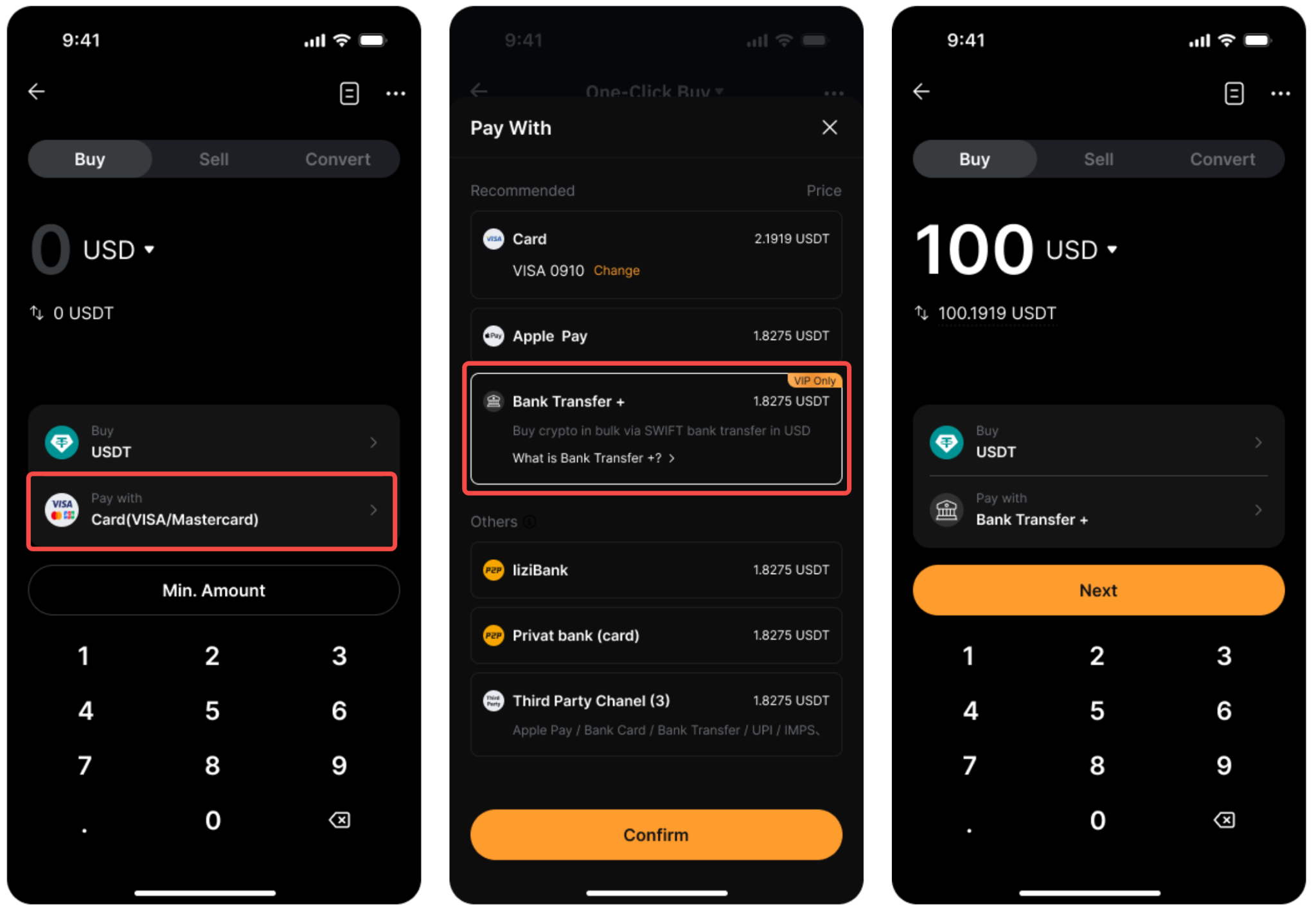
On the Add Funds page, select USDT or USDC from the drop-down menu. Enter your fiat amount in the fund calculator to view the estimated crypto amount you’ll receive after conversion and fees.
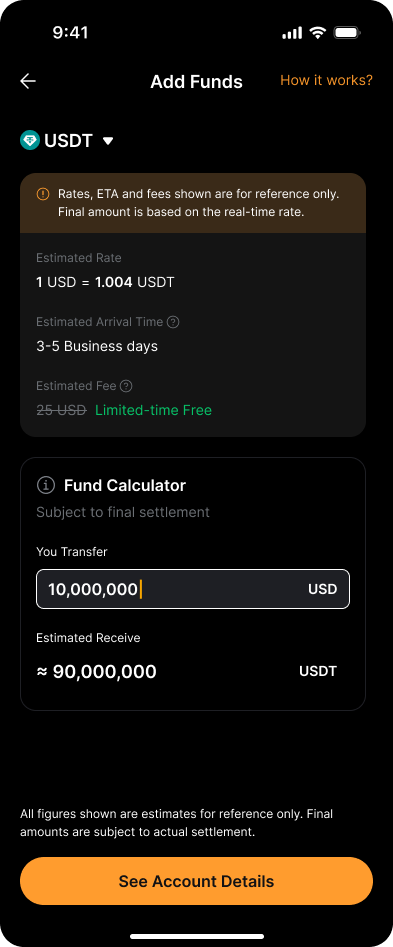
Tap on See Account Details, then on Copy All to copy your account details.
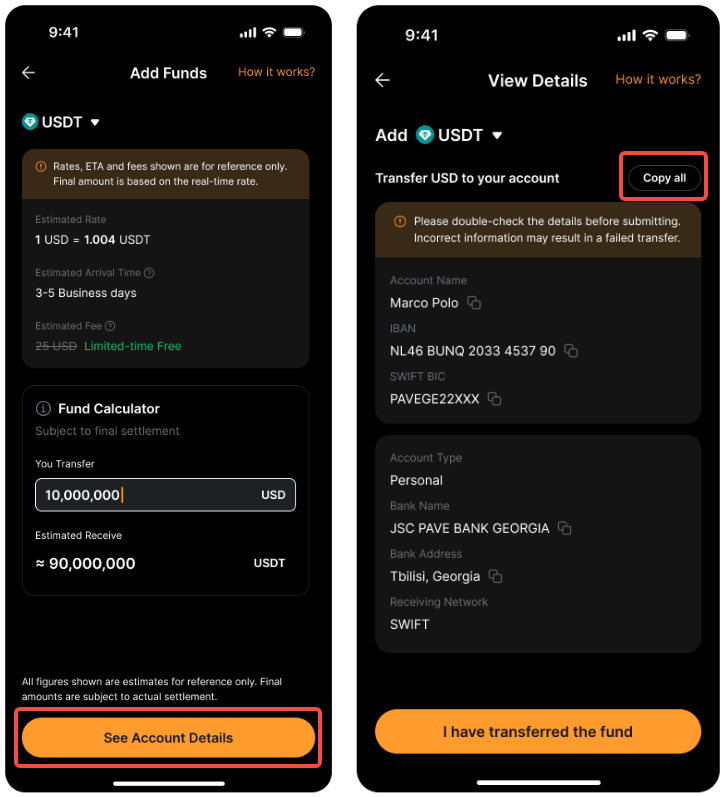
Log in to your bank account and add your Bank Transfer + details as a recipient. Paste the copied details, and initiate the transfer. Return to the App and tap on I have transferred the fund to begin tracking. Funds typically arrive within five business days, and are credited to your Funding Account post-conversion.
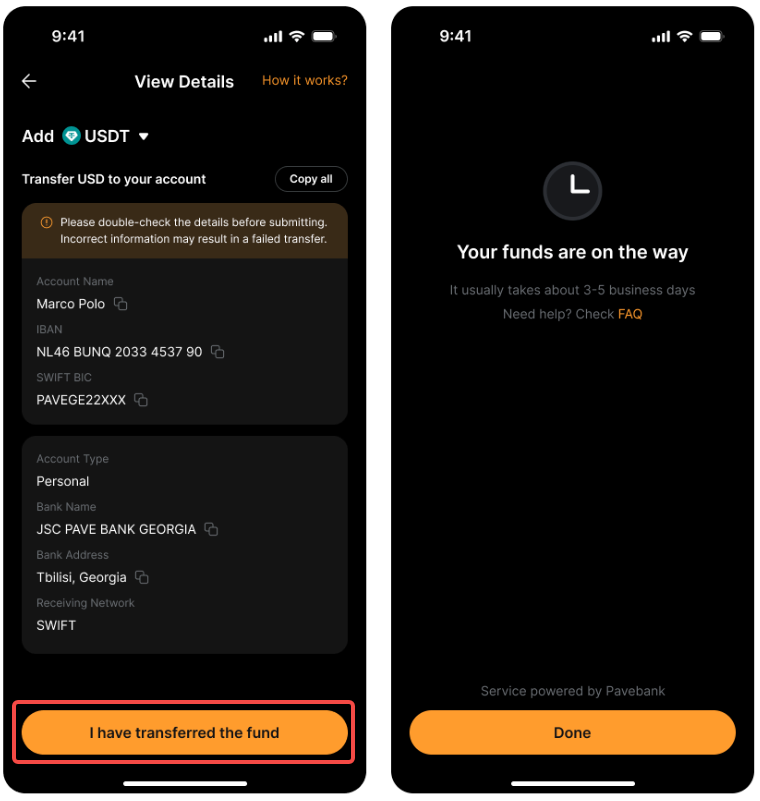
Note: A fixed fee of $25 applies to each transaction. All deposits run via SWIFT, so accuracy in the transfer details is critical. Bank fees may apply, and third-party sending accounts are supported.
Step 4: Withdraw to a bank account
Switch to the Sell tab on the Buy Crypto page, then set your receiving method to Bank Transfer +. Tap on Next.
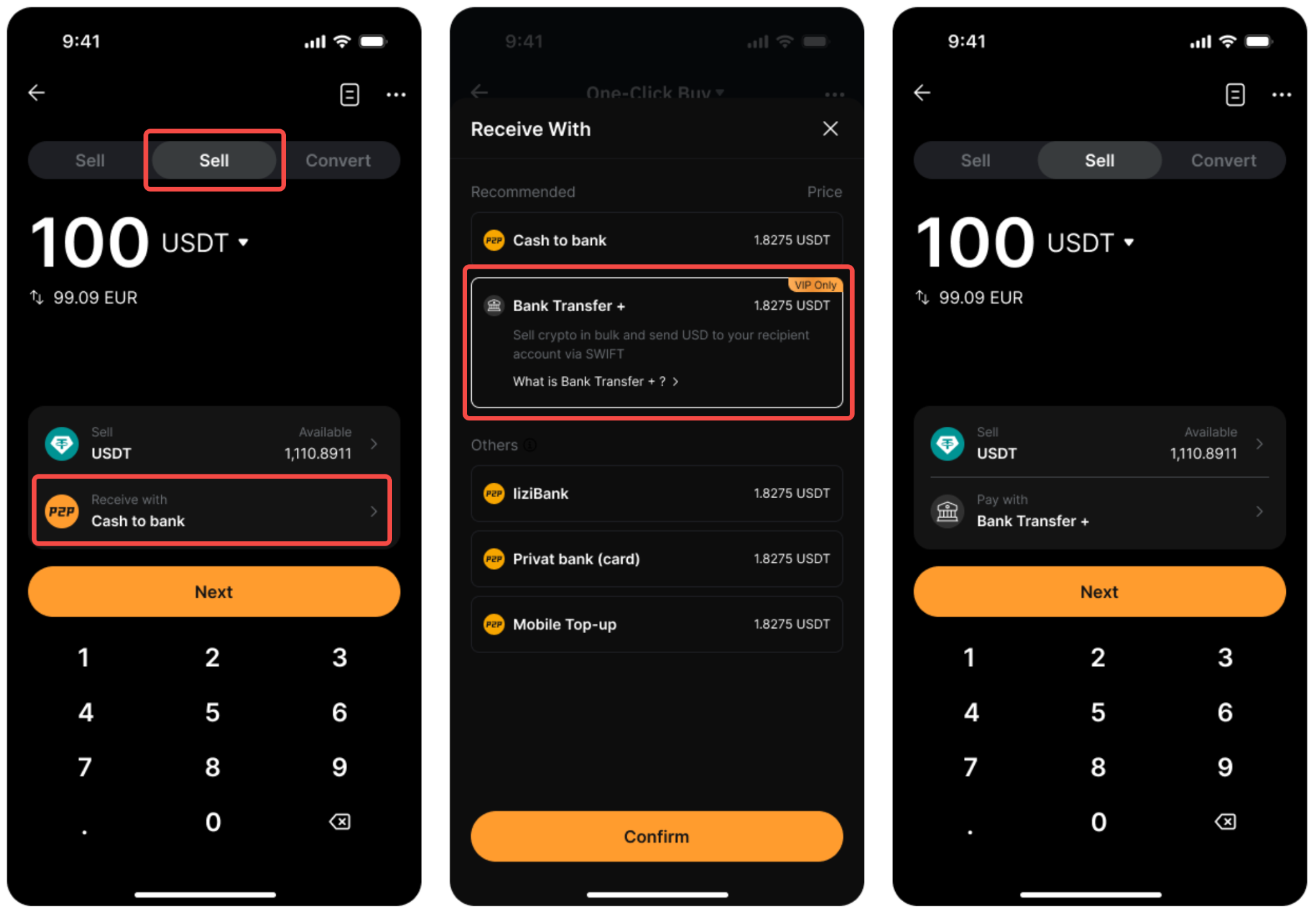
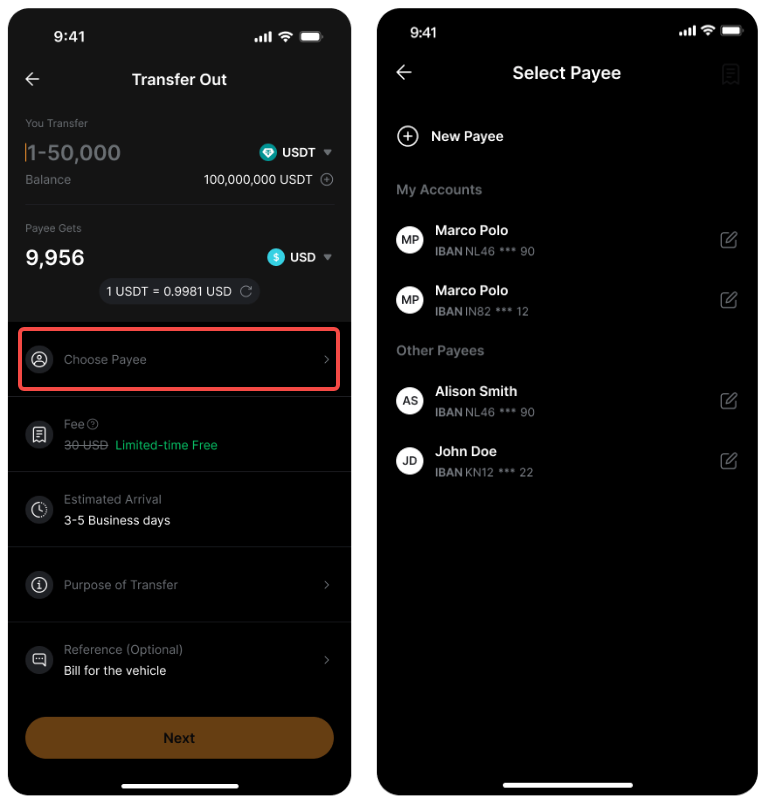
On the Transfer Out page, enter your USDT or USDC amount and select the target fiat currency. Then, choose an existing payee or add a new one using standard SWIFT bank details.
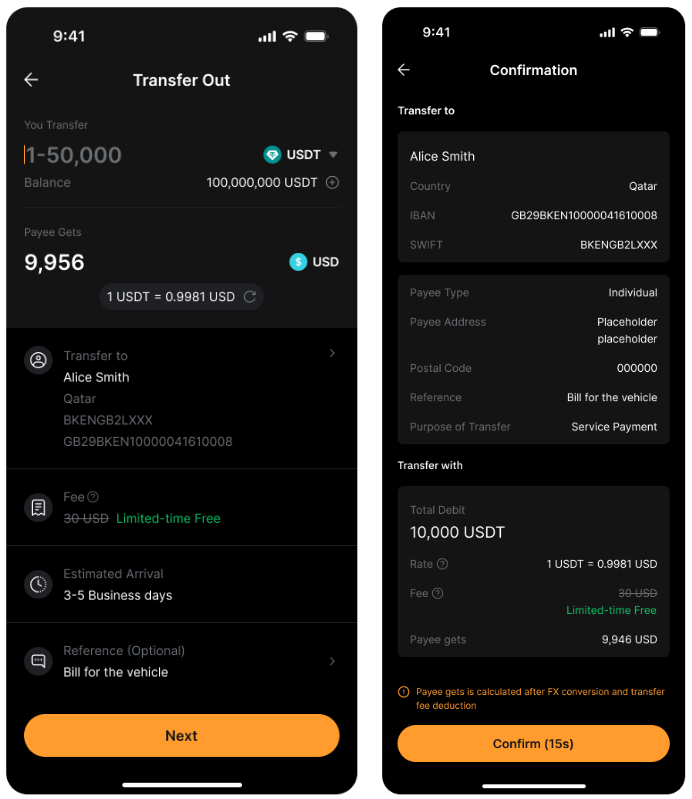
Tap on Next, review the details on the Confirmation page and tap on Confirm to proceed. You will receive a push notification and email once the transfer is complete. Settlement takes 3–5 business days.
Note: Per-transaction, daily and monthly limits apply based on your VIP level, and third-party payees are fully supported. Banking partner and intermediary fees may also apply to each withdrawal.
Step 5: View transaction history
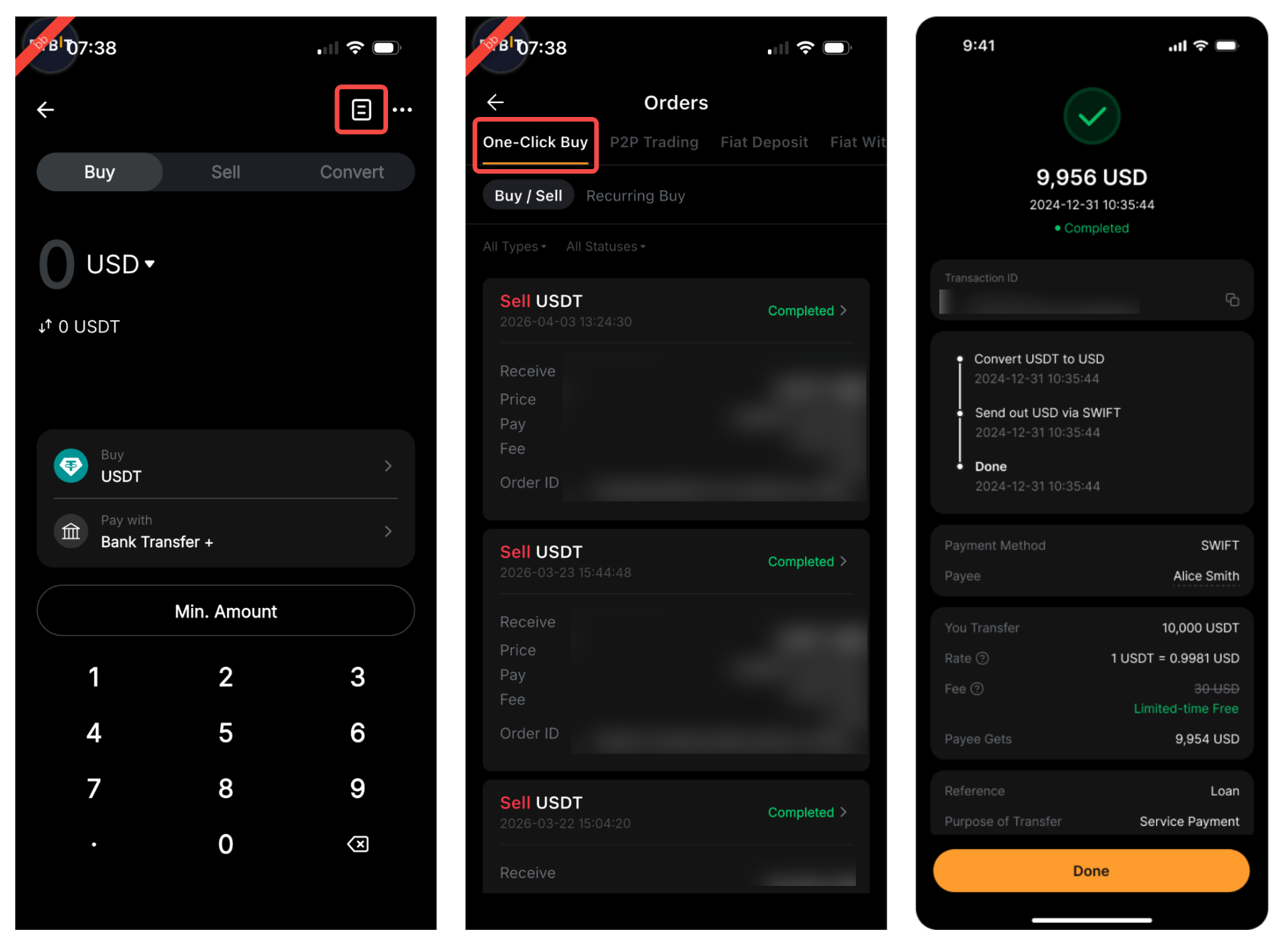
Tap on the History icon on the Buy Crypto page, then tap on the One-Click Buy tab to view all of your transactions. You can tap on an individual transaction in order to review its details.
Notes:
Bank Transfer + is not a traditional bank — no savings, lending or interest products are available.
Transfers typically settle within 3–5 business days; your bank's own processing time may extend this.
Fees vary by currency and institution, and may be charged by your sending bank or any intermediary banks involved.
Conclusion
Bank Transfer + provides VIP 1 and VIP 2 users with an exclusive, compliant and integrated route between traditional banking infrastructure and the Bybit ecosystem. Covering both on-ramp deposits and off-ramp withdrawals through a single dedicated fiat account, it uniquely streamlines high-volume, cross-system flows. For active participants, this direct, multi-currency capability is an essential tool that bridges crypto and traditional finance.
FAQ
Account Setup & Verification
Q: Why is my Bank Transfer+ application stuck or taking longer than expected?
A: Your application may be under review due to additional compliance or KYC checks. Common reasons include incomplete verification steps (missing Proof of Address, unanswered survey questions, or pending EDD). You will be notified via push notification and email once the review is complete.
Q: Why was my Bank Transfer+ application rejected?
A: Applications may be rejected if your account does not meet eligibility requirements, verification documents are invalid or unclear, or your region is not currently supported. Please ensure all submitted documents are valid, legible, and match your account information.
Q: Why can't I see Bank Transfer+ in my app?
A: Bank Transfer+ is being rolled out gradually. If you cannot see it, the feature may not yet be available for your VIP level, account status, or region.
Q: What happens if my VIP level changes after I've set up Bank Transfer+?
A: Once you've successfully set up Bank Transfer+ as an eligible VIP user, you'll continue to have access to the service even if your VIP level changes in the future.
Add Funds
Q: What fiat currencies and payment methods does Bank Transfer+ support?
A: Bank Transfer+ currently supports USD only. All transfers are processed via SWIFT. Support for additional fiat currencies and payment methods may be introduced in the future.
Q: What is the exchange rate between USD and USDT/USDC?
A: The exchange rate between USD and USDT/USDC typically stays close to 1:1 but may fluctuate slightly depending on market conditions. The final rate is based on the latest exchange rate on the platform. You can view the estimated rate and the final amount you'll receive on the transfer page before confirming your transaction.
Q: Is there a minimum transfer amount?
A: There is no minimum transfer amount. However, please note that all transfers are processed via SWIFT and may incur fees charged by the sending bank and/or intermediary banks. If the transferred amount does not cover these fees, the funds will not be credited to your account.
Q: Why hasn't my deposit arrived after I completed the bank transfer?
A: Transfers may take up to 5 business days. Delays can occur due to processing times at your sending bank, intermediary banks, or the receiving banking partner. Please ensure you used the correct transfer details and included any required reference number.
Q: Why was my inbound transfer returned or rejected?
A: Common reasons include incorrect transfer details, mismatched account name, missing or incorrect payment reference, or the sending bank flagging the transfer for compliance review. For future transfers, please verify all Bank Transfer+ details carefully before submitting.
Transfer Out
Q: Why did my transfer-out request fail?
A: Transfer-out failures can be caused by:
An unverified or ineligible recipient bank account
Incorrect beneficiary details (e.g., wrong IBAN, SWIFT code, or beneficiary address)
Exceeding your transaction or daily limits
The recipient bank rejecting the transfer for compliance reasons
Note: When entering beneficiary details, ensure the beneficiary address is the actual address of the recipient — not the address of the recipient's bank. Using the bank's address instead of the beneficiary's address is a common cause of transfer failure.
Q: Why is my transfer-out still pending after several days?
A: Transfer-out requests typically take 3–5 business days. Delays may occur due to intermediary bank processing, compliance reviews, or banking partner requirements. If the transfer has exceeded 5 business days, please contact Bybit support.
Q: What happens if my transfer-out is rejected by the receiving bank?
A: If your transfer is rejected, the funds will be returned to your Bybit Funding Account in the original asset (e.g., if you transferred out in USDT and the receiving bank rejected the USD transfer, the amount will be credited back to your Funding Account in USDT). Please note that any processing, banking partner, or intermediary bank fees incurred during the transfer may not be refunded.
Q: Can I add a third-party bank account as a recipient?
A: Yes. Bank Transfer+ supports third-party transfers, meaning the recipient bank account does not need to be in your name. However, third-party transfers are subject to verification, transaction review, and banking partner approval. In some cases, additional information may be required before the transfer is processed.
Q: Why do I need to submit additional documents during the transfer process?
A: Additional documents may be requested as part of our security and compliance checks. This can happen when further information is needed to verify the source of funds, recipient details, or transaction activity.
Limits & Fees
Q: Are there transfer limits for Bank Transfer+?
A: Yes. Per-transaction, daily, and monthly limits apply based on your VIP level, account status, and eligibility. If your transfer exceeds these limits, it will not be processed. You can check your applicable limits on the transfer page in the app.
Q: What fees apply to Bank Transfer+ transactions?
A: The following fees apply:
Add funds: A fixed fee of $25 applies per transaction.
Transfer out: A fixed fee of $30 applies per transaction.
Additional fees may also be charged by your sending bank or intermediary banks. These fees are not controlled by Bybit and may not be visible upfront. The final fee amount will vary depending on the transaction type, banking partners, and transfer route involved.
#LearnWithBybit