


How to use Bybit Pay for effortless payments

Traditional financial systems and blockchain-based ecosystems have long operated in silos, creating friction for users and businesses alike. Bybit Pay is a new payment solution that’s been designed from the ground up to solve this issue to make cryptocurrency transactions seamless for any users.
With the aim of mainstreaming crypto payment options, Bybit Pay has already begun partnering with traditional payment solution providers, enabling users to transact with cryptocurrencies through existing infrastructure. For example, with its recent Pix integration, Brazilian users can now shop by using cryptocurrencies in a quick and effortless manner.
In this article, we’ll explain the benefits of using Bybit Pay and provide step-by-step instructions for new users who want to get started with the platform.
Key Takeaways:
Bybit Pay bridges the gap between traditional finance and crypto, making digital assets as easy to use as cash.
Brazilian users can now make everyday purchases using Bybit Pay, thanks to the Central Bank of Brazil’s Pix integration.
Setting up and using Bybit Pay is simple and can be completed in a matter of minutes.
Benefits of using Bybit Pay
With more than 60 million users on the Bybit platform, Bybit Pay empowers merchants with access to the global network of its vast user base. Meanwhile, users benefit from a seamless integration with web3 wallets that makes paying with crypto as easy as paying with fiat currency. The platform also offers collateralized payment tools that allow users to borrow against their NFT and crypto holdings.
Through these innovative features, Bybit Pay blends the ease of traditional finance with the flexibility of cryptocurrencies, creating an ecosystem that benefits both users and merchants.
How to get started with Bybit Pay
Bybit Pay can be accessed using the Bybit App on mobile and desktop.
Open Bybit Pay on mobile
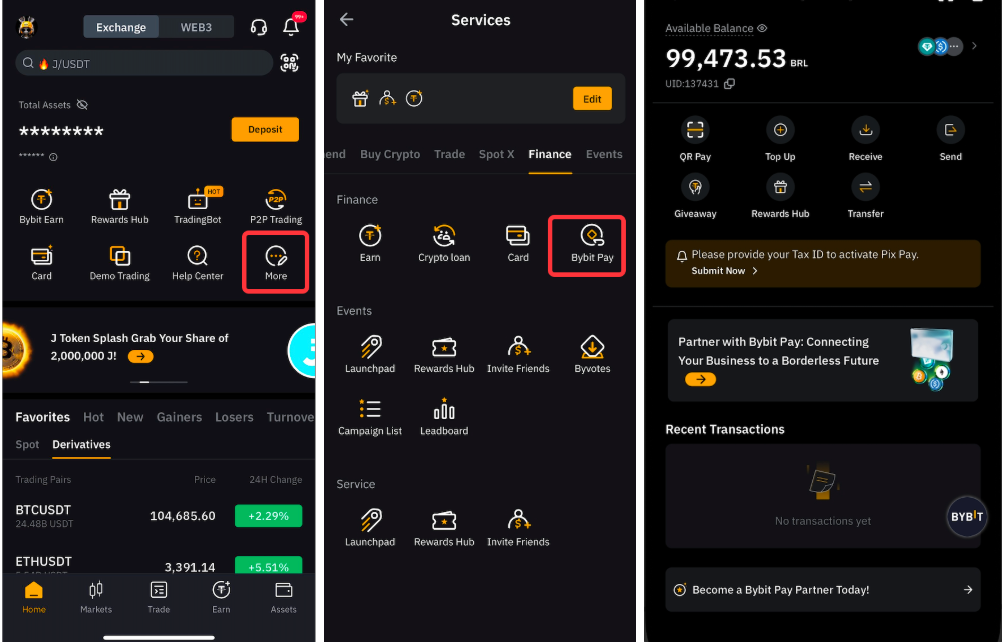
Launch the Bybit App, and tap on More.
Tap on Bybit Pay under the Finance section.
Open Bybit Pay on desktop
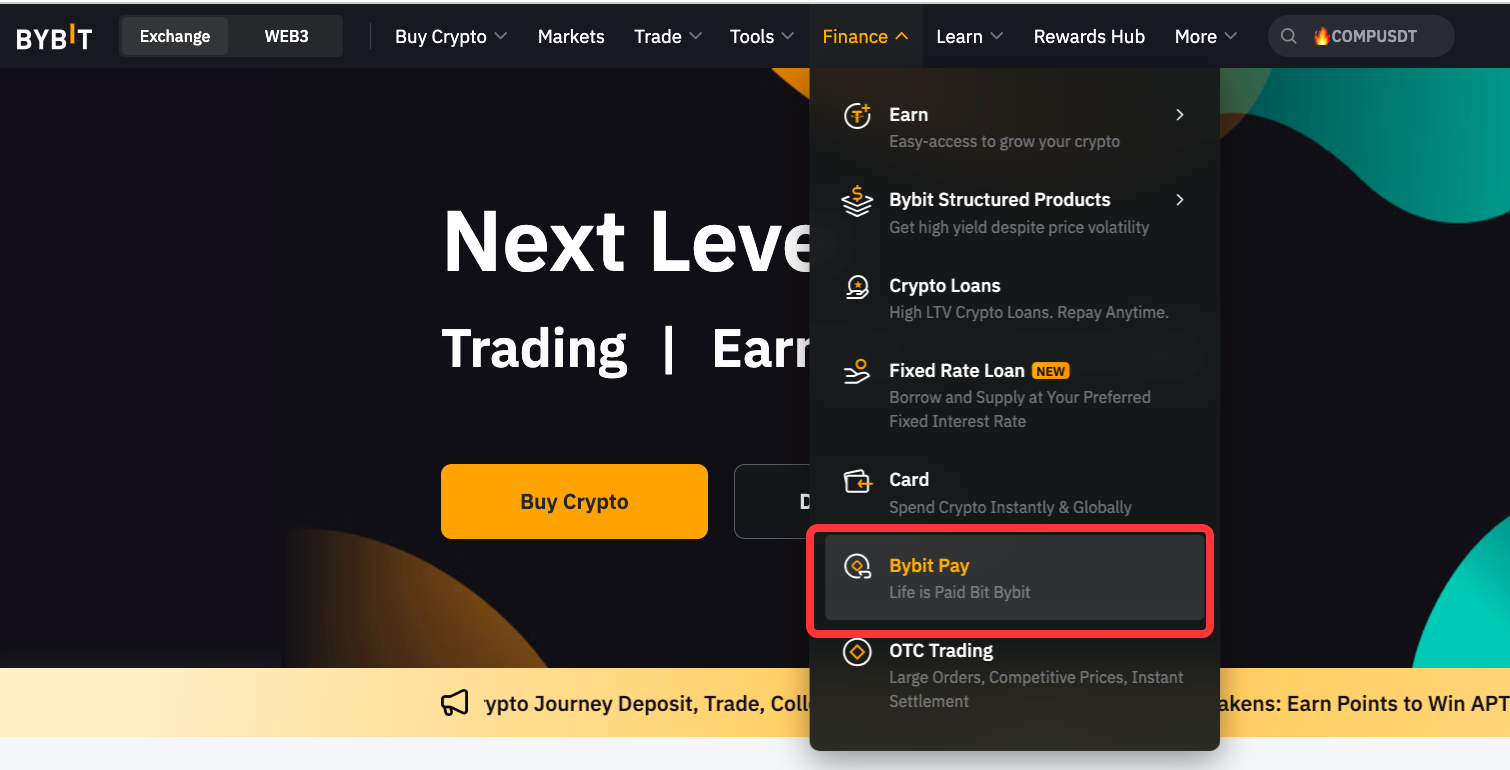
Visit https://www.bybit.com/en (or tap here).
Log in with your username and password.
Hover your cursor over the Finance section and choose Bybit Pay.
Activate Bybit Pay
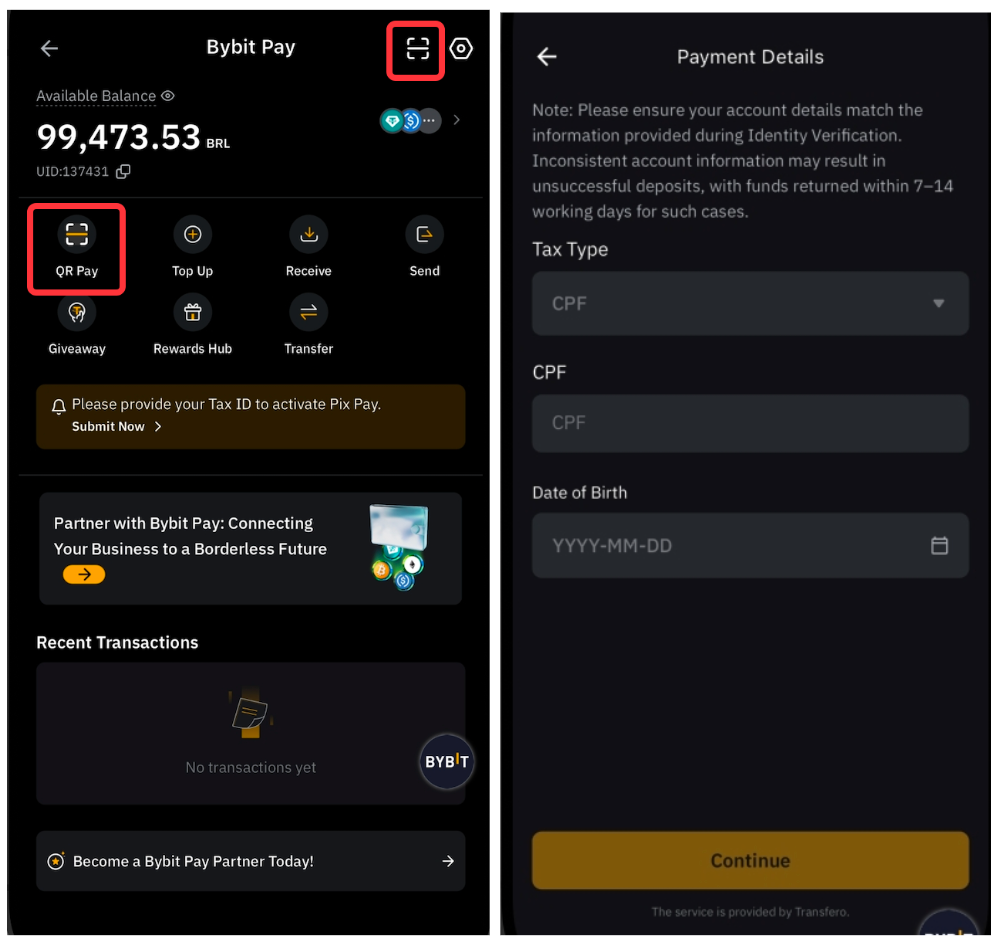
After accessing Bybit Pay, tap on QR Pay.
Scan a Pix QR code.
Check the terms and conditions presented on screen.
Fill in the tax type, your date of birth and any other required details in the form.
While filling in the form, make sure that the information you enter matches the information you’ve already provided during Bybit KYC identity verification.
Pay using Bybit Pay
Paying is straightforward — just tap on QR Pay.
Scan the Pix QR code.
Confirm your payment after verifying the payment details.
Note: As of now, only verified users in Brazil can make transactions using a Pix QR code.
Send crypto using Bybit Pay
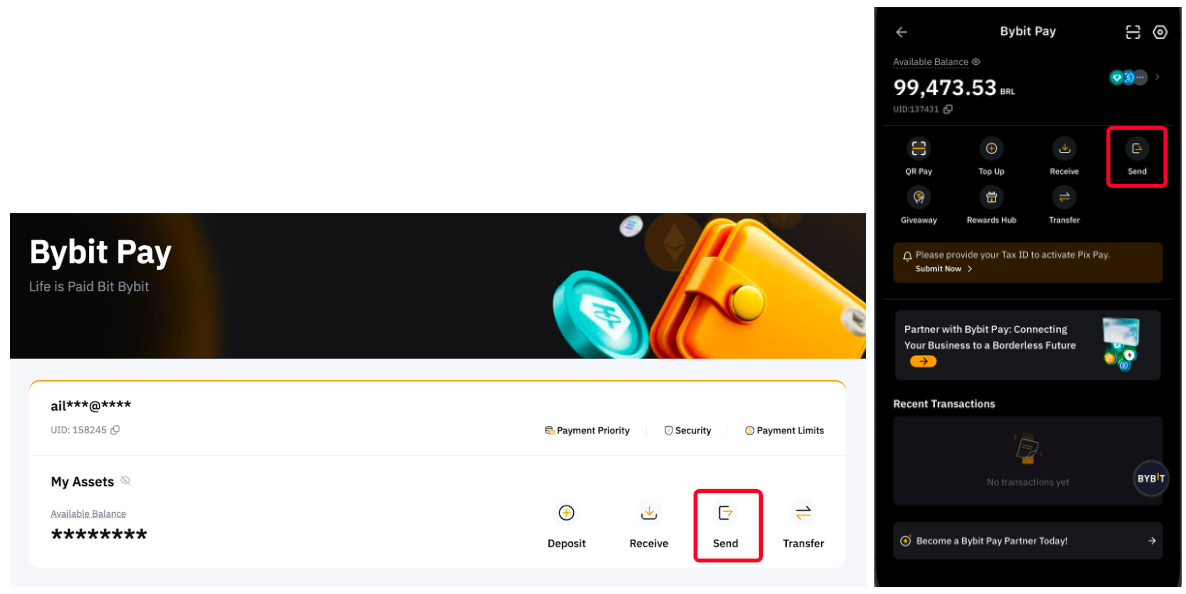
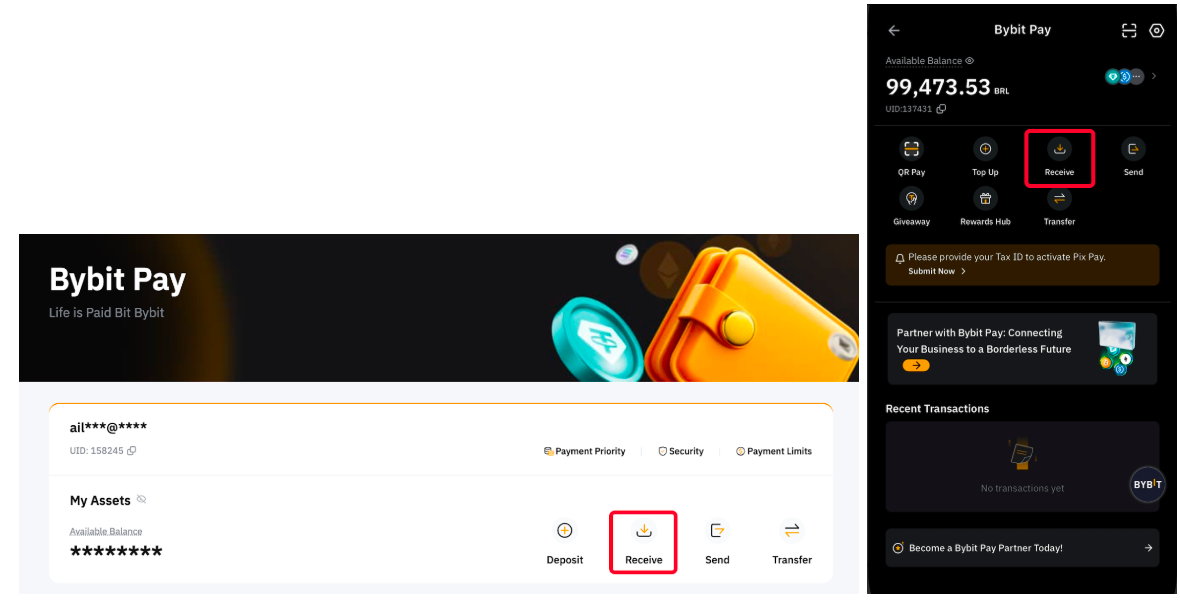
On desktop, enter the Bybit Pay section and click on the Send option. The process is the same on mobile. Enter the Bybit Pay section, and tap on Send.
Receive crypto using Bybit Pay
On desktop, enter the Bybit Pay section and click on the Receive option. On mobile, enter the Bybit Pay section and tap on the Receive option.
Fund a Bybit Pay account
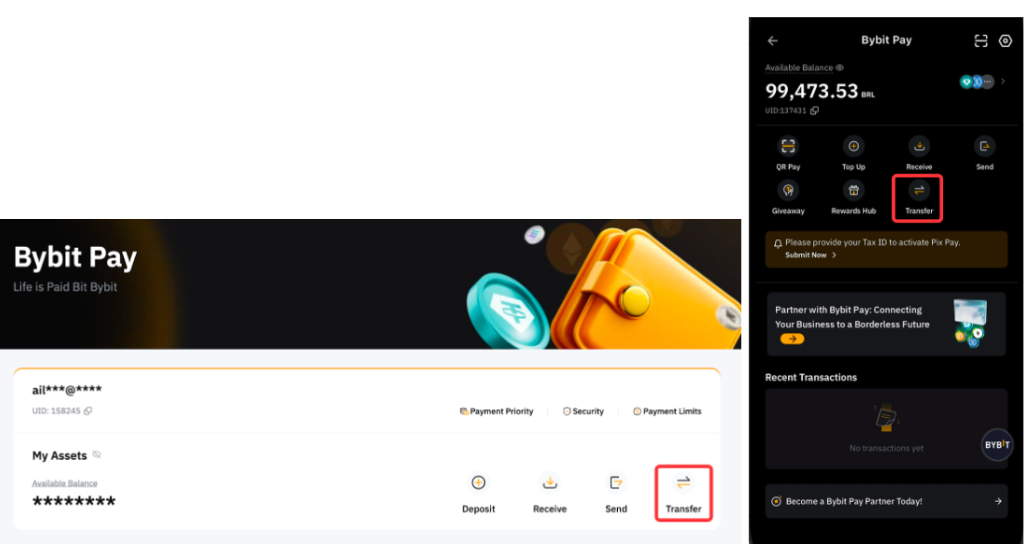
To fund your Bybit Pay account, transfer the supported currency from your Funding account to Bybit Pay by using the Transfer option.
Bybit Pay Auto-Savings feature is now live
Bybit Auto-Savings is a feature that allows you to stake your idle crypto assets through Bybit’s Flexible Savings product. By activating Auto-Savings, your idle assets in selected coins are automatically invested into Flexible Savings each day at 10AM UTC. Once staked, these assets generate yields while remaining fully flexible, allowing you to redeem them anytime.
The feature supports a variety of coins, with specific auto-savings limits. Users can refer here for the supported crypto assets and corresponding limits. When your assets reach the auto-saving limit, the automatic investments will pause. Users can still manually stake more up to the maximum limit in Flexible Savings.
Bybit Pay users with idle eligible assets in their accounts can easily opt to activate the auto-savings feature on Flexible Savings. This will allow you to optimize your spare crypto assets for better returns while maintaining liquidity. Your assets can be unstaked at any time, ensuring you benefit from daily earnings without compromising flexibility.
Once you subscribe, the system will take a snapshot of your current holdings in Bybit Flexible Savings. Between 10 PM-11 PM UTC, the system will transfer your available balance from your Funding Account to stake in Flexible Savings plans. The transferred amount will be subject to the maximum or minimum investment amount of Bybit Savings. If the minimum investment amount is met, the funds will be automatically staked in Flexible Savings plans, up to the maximum investment amount. If the limit is exceeded or not met, the subscription will fail for that day.
Where can you use Bybit Pay?
Since the Pix integration, Brazilian users can use Bybit Pay wherever Pix is accepted. This opens up a vast network of offline establishments in the country, since Pix is Brazil’s leading instant payment system provider.
In addition to offline establishments, Bybit Pay can also be used with a number of e-commerce providers for online shopping using cryptocurrencies. Bybit Pay will be available to users from other regions soon.
Start using Bybit Pay now
With the launch of Bybit Pay, Bybit is integrating crypto payments with traditional payment services providers — and vastly expanding the number of places where cryptocurrencies can be used.
Start your Bybit Pay journey now!
#LearnWithBybit