


How to trade TTM Technologies (TTMI) CFDs on Bybit

TTM Technologies is one of the largest printed circuit board (PCB) manufacturers in the world — and now you can trade it as a CFD on Bybit. Whether you're tracking momentum in the defense and aerospace supply chain or looking for short-term exposure to the electronics manufacturing sector, Bybit TradFi puts TTMI within reach.
This guide covers everything you need to trade TTM Technologies (TTMI) CFDs on Bybit, step by step.
Key takeaways:
Bybit TradFi lets you trade TTMI CFDs with up to 5x leverage, directly from your Bybit account.
You can go long or short on TTMI, giving you flexibility in both rising and falling markets.
Set a stop-loss and take-profit on every trade — leveraged CFDs can amplify losses as well as gains.
What is TTM Technologies?
TTM Technologies, Inc. (NASDAQ: TTMI) is one of the leading PCB manufacturers globally, supplying mission-critical circuit boards to the aerospace, defense, automotive, medical and networking industries. Its products form the backbone of sophisticated electronics systems, making TTMI sensitive to shifts in defense spending, semiconductor demand and global supply chain dynamics.
For traders, TTMI offers exposure to the broader electronics manufacturing sector, with price movements often tied to earnings results, government defense contracts and macroeconomic trends affecting hardware production.
What is the Bybit TradFi platform?
Bybit's TradFi platform is a robust multi-asset trading environment that enables traders to access global financial markets with a single account. Combining the advanced features of MetaTrader 5 (MT5) with Bybit's powerful infrastructure, the platform allows various assets to be traded seamlessly, with deep liquidity and competitive pricing.
Due to the full integration of MT5 into Bybit TradFi, you don't have to open an MT5 account or use third-party tools to trade stocks. Instead, everything is available within the same familiar ecosystem via Bybit's web platform or the Bybit App, connecting crypto traders seamlessly with the traditional finance market.
With Bybit TradFi, traders can access:
Over 300 global assets, including stocks such as TTM Technologies (TTMI), Qnity Electronics (Q), Modine Manufacturing (MOD) and many more, all using USDT collateral
Forex pairs, including majors, minors and exotics
Gold, oil and other commodities
Indices, such as the S&P 500 and Nasdaq
The platform features real-time price feeds, over 90 built-in indicators, flexible order types and support for expert advisors (EAs), making it suitable for both novice and experienced traders. Whether trading manually or through automation, Bybit TradFi offers an intuitive, hassle-free experience.
For a full list of available stocks and details, visit the official Bybit TradFi platform. Explore Learn Articles on TradFi for additional insights.
What are CFDs?
A contract for difference (CFD) is a financial instrument that lets you speculate on price movements without owning the underlying asset. When you trade TTMI CFDs on Bybit, you're agreeing to exchange the difference in TTMI's price between when you open and when you close your position.
Go long (buy) if you expect the price to rise. Go short (sell) if you expect it to fall. Because CFDs use leverage, a smaller amount of capital controls a larger position — which means potential gains and potential losses are both magnified. Understanding this before you trade is essential.
Before you start
Check the following before you begin trading on TradFi:
Completed Identity Verification — Standard level KYC is required. Head to your account settings to complete verification if you haven't done so.
TradFi account access — TradFi is a separate account that requires an application. If you haven't applied, you'll be prompted when you first visit TradFi. Approval is quick.
USDT in your Bybit account — You'll fund your TradFi Account with USDT, which appears as USDx — Bybit's collateral unit for TradFi trades.
How to trade TTM Technologies (TTMI) CFDs on Bybit
On the web
Step 1: Access TradFi
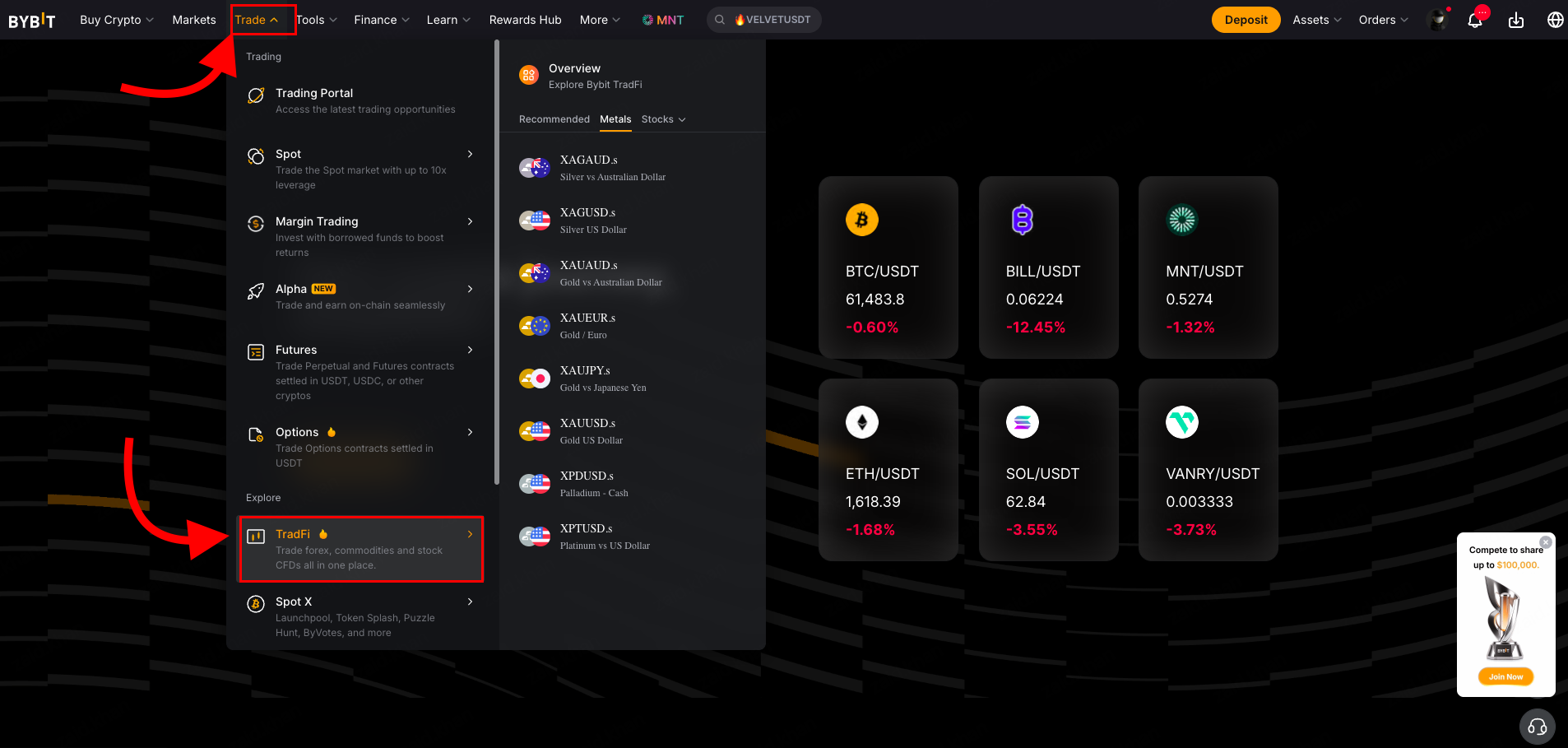
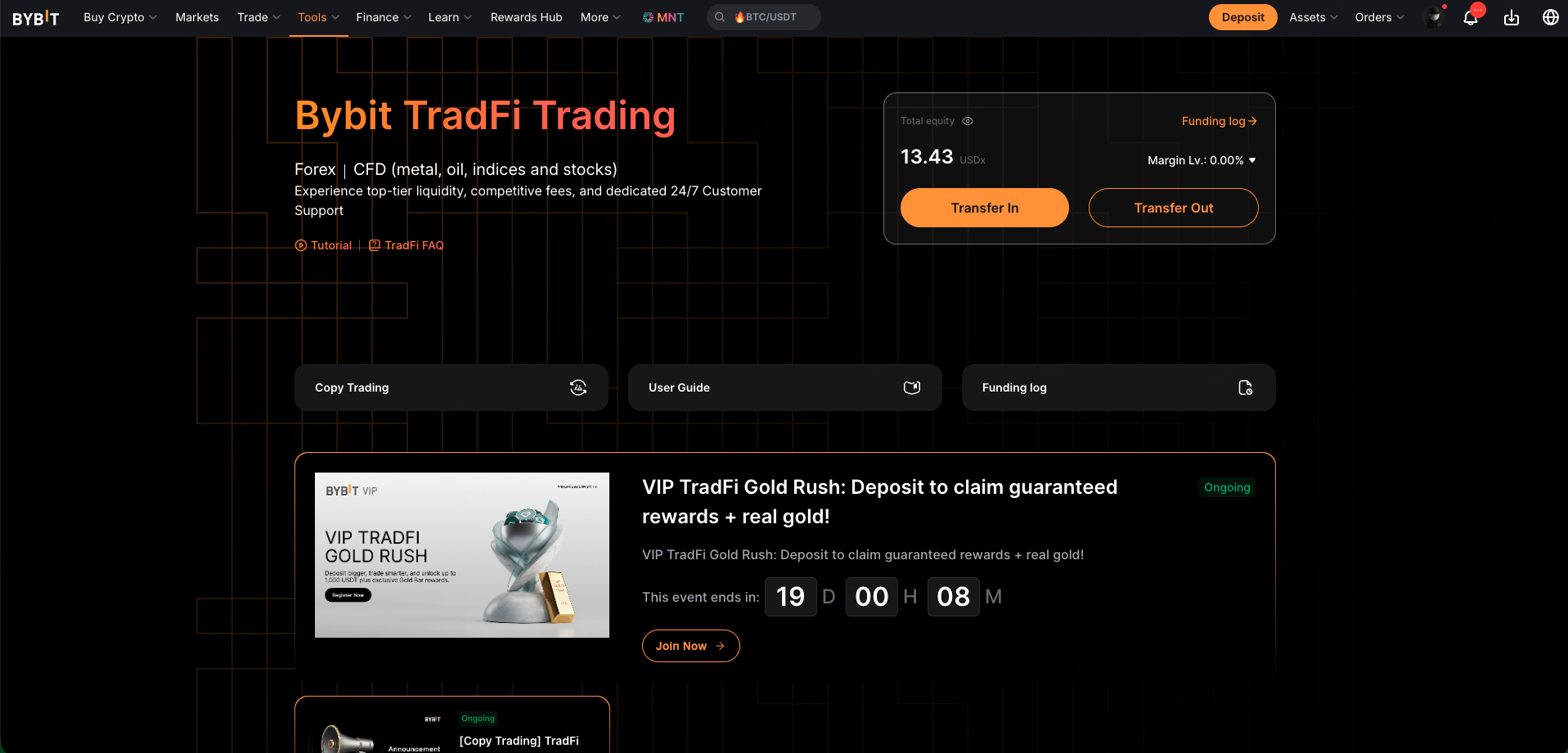
Log in to your Bybit account and go to the TradFi trading page. Alternatively, hover over Trade in the top navigation bar and select TradFi from the dropdown. If this is your first time, you may be asked to apply for TradFi access — complete the application before moving forward.
Step 2: Fund your account
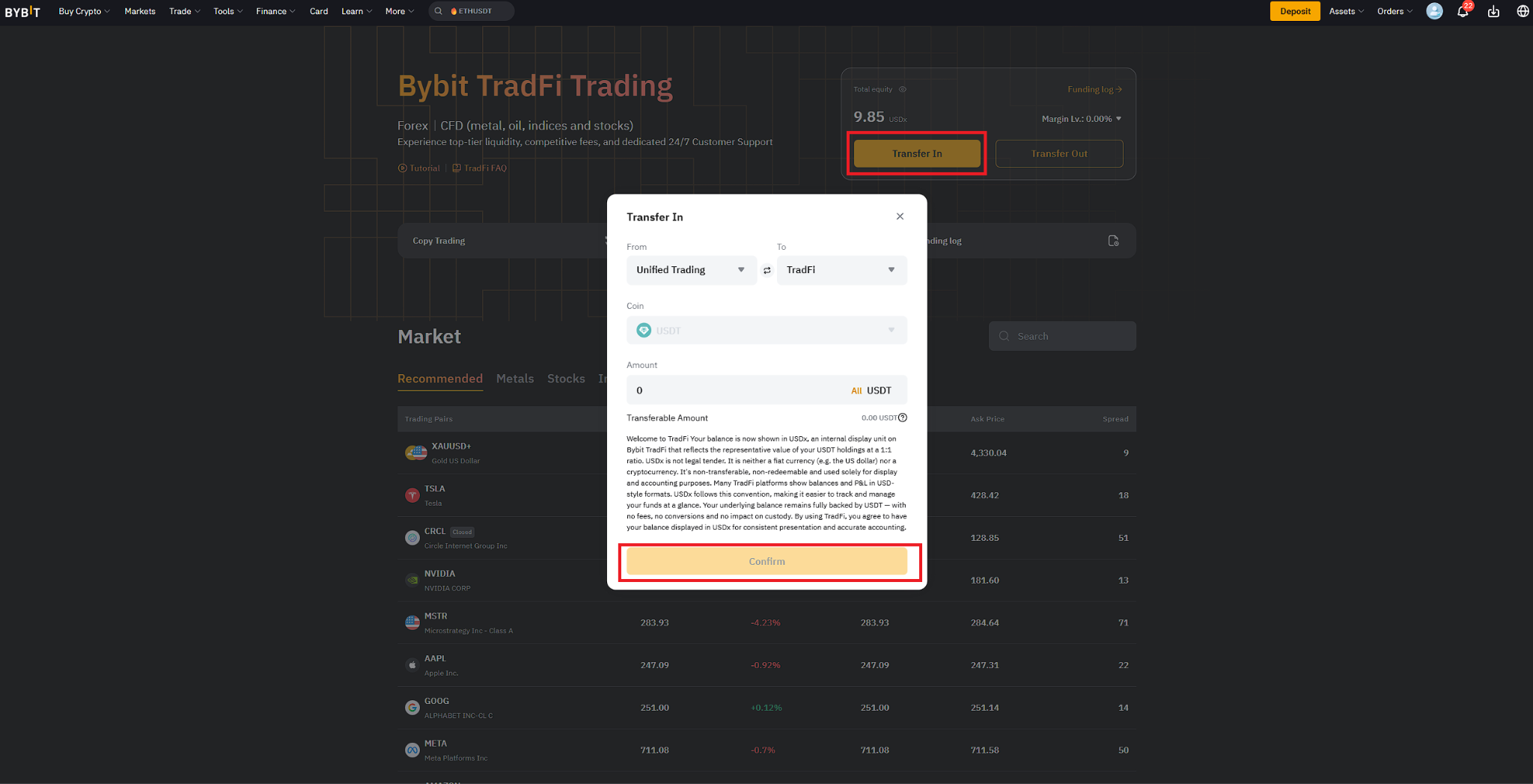
You'll need USDx in your TradFi Account before placing a trade. Select Transfer and move USDT from your Funding Account or Unified Trading Account into your TradFi Account. The transfer processes instantly, and your balance will appear as USDx in TradFi.
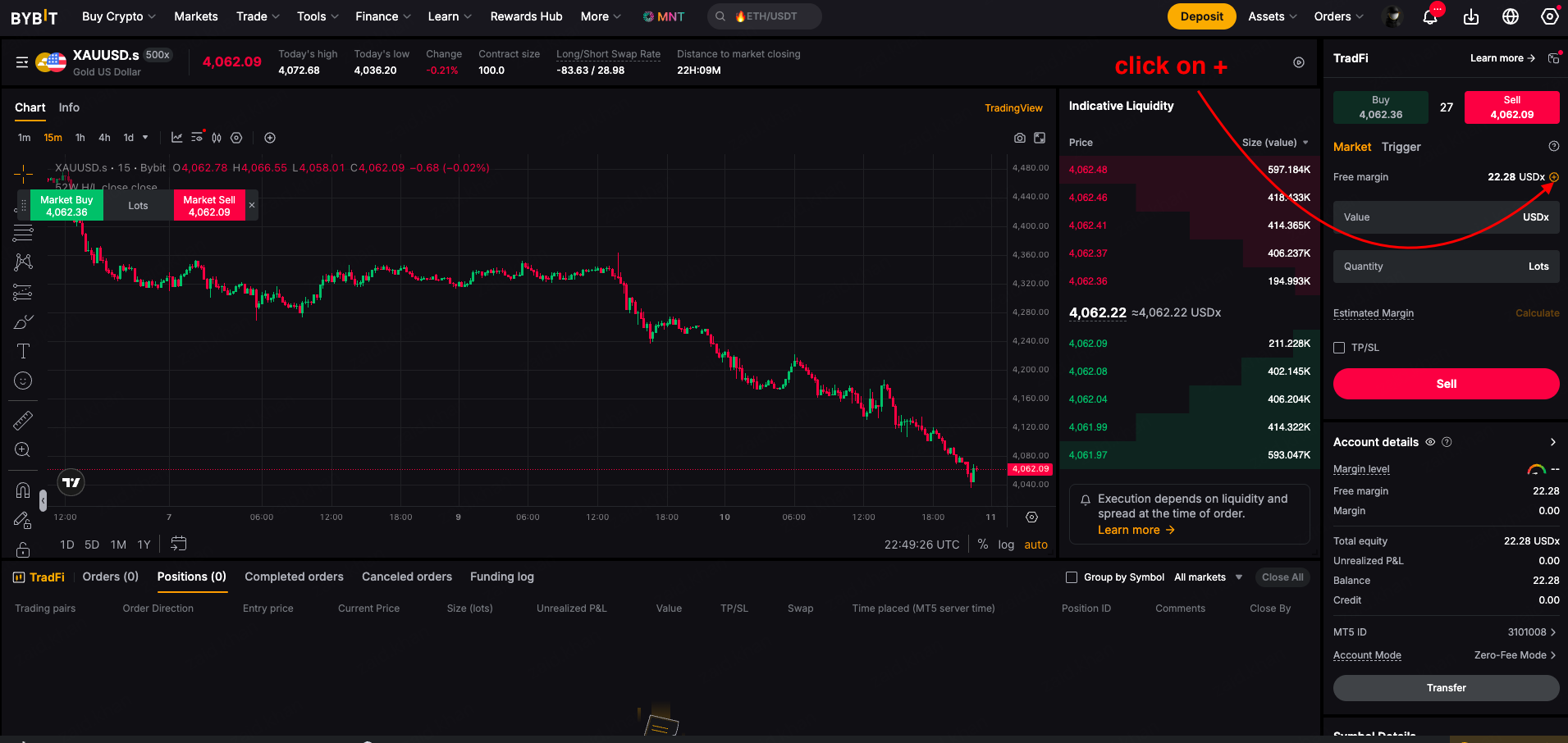
TradFi account transfer screen showing USDT transfer to TradFi Account with USDx balance
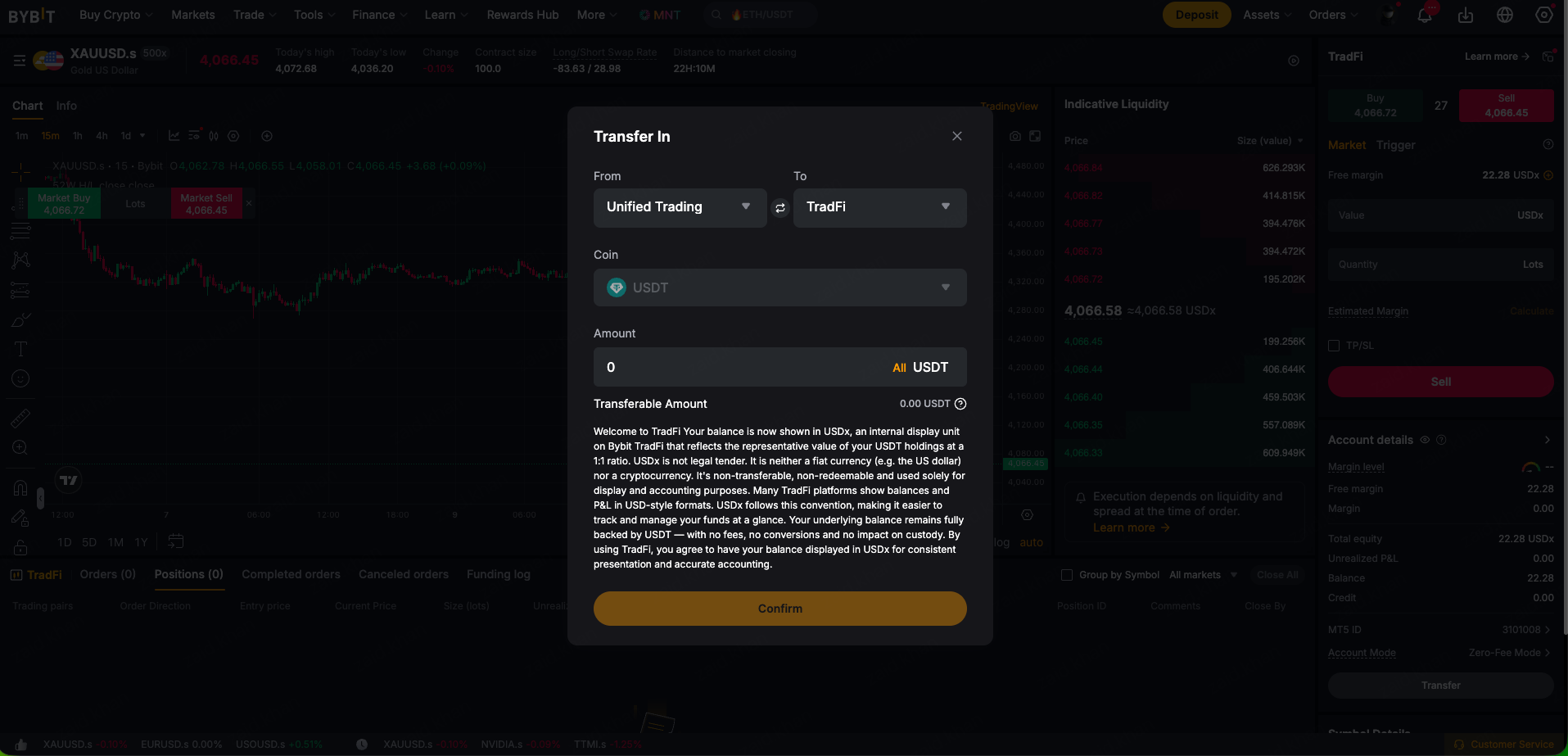
Alternative transfer In from TradFi trading page
Step 3: Choose an asset
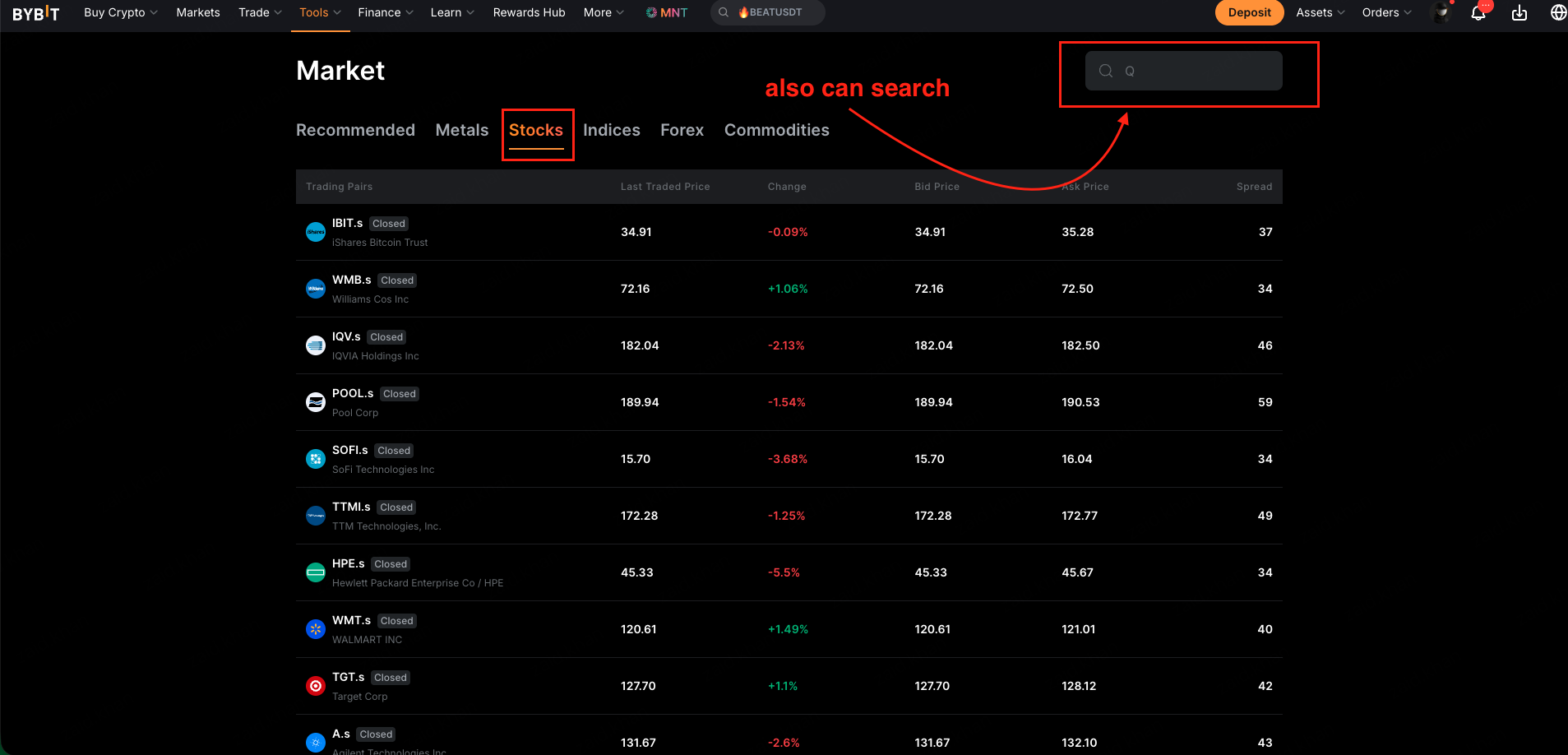
Go to the Markets tab and select Stocks from the asset categories. Find TTM Technologies (TTMI) in the list and click on it to open the trading view.
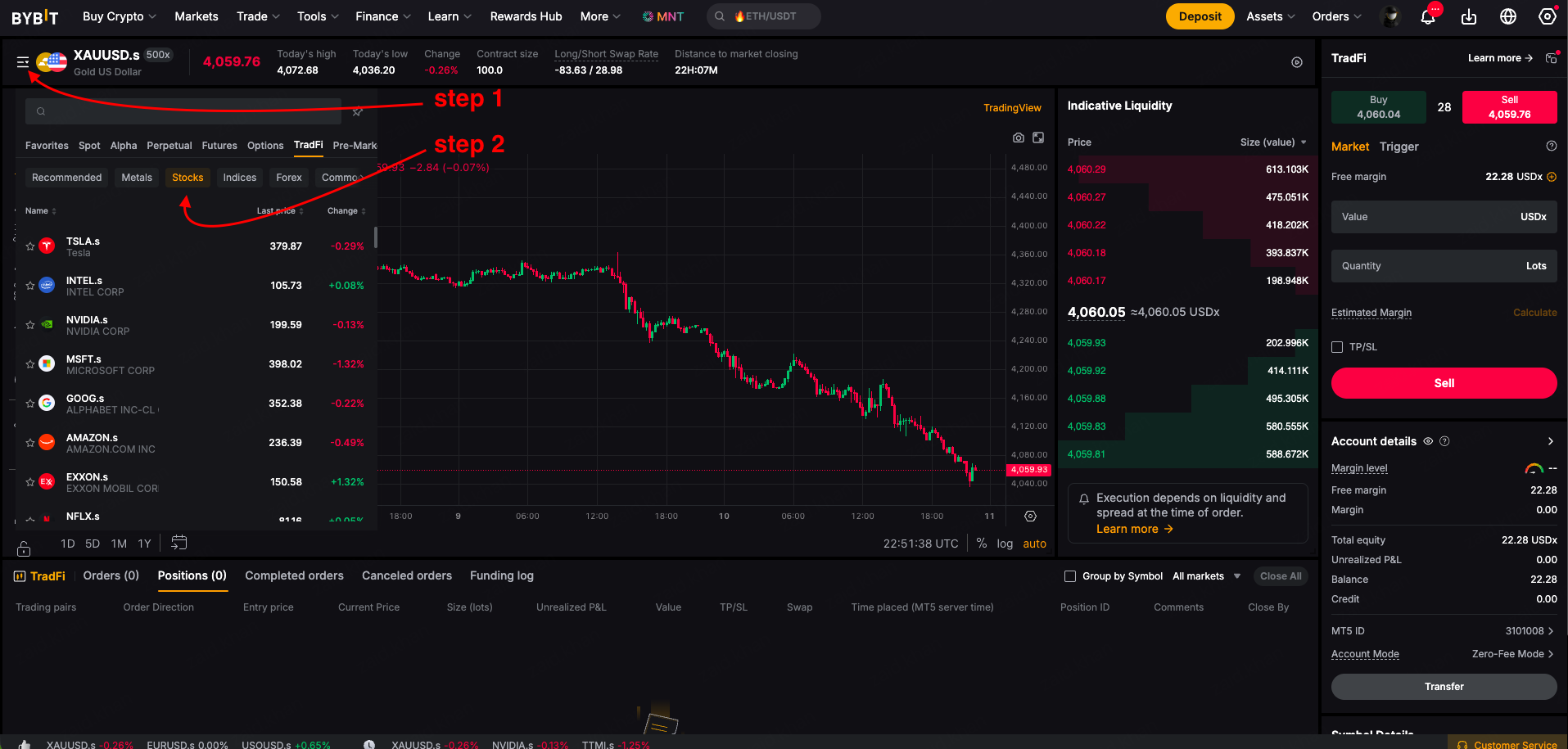
Alternative search from TradFi trading page
Step 4: Place your order
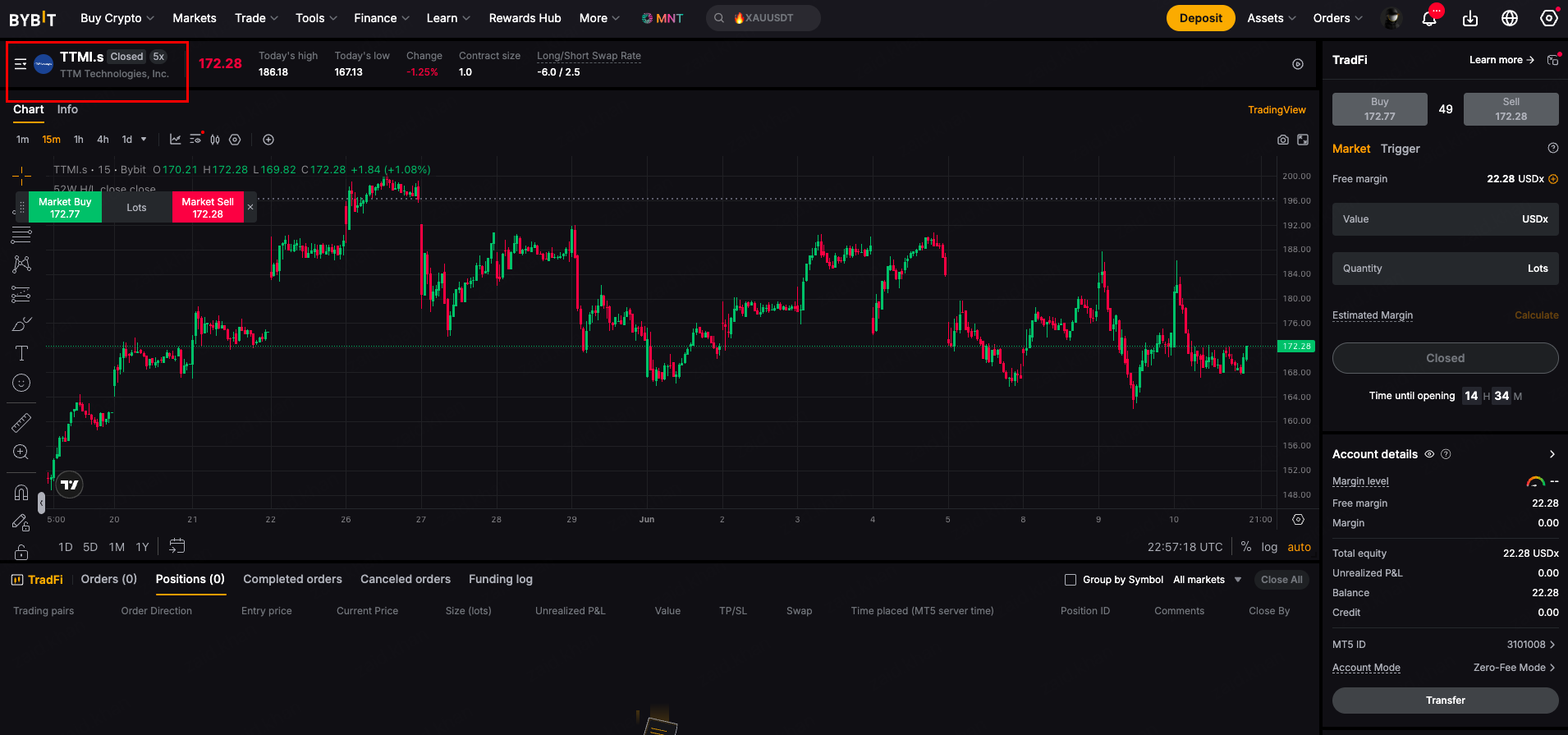
In the order placement window — or on the MetaTrader 5 terminal for advanced charting — choose your direction:
Buy (Long) — if you expect TTMI's price to rise
Sell (Short) — if you expect TTMI's price to fall
Enter your order quantity and select your leverage level. Stock CFDs on Bybit TradFi support up to 5x leverage. Before confirming, set a Stop-Loss to limit your downside and a Take-Profit to close the trade automatically at your target. Review and confirm your order.
Step 5: Manage your position
After your order goes live, open the Positions tab at the bottom of the TradFi dashboard. Here you can monitor your unrealized profit and loss in real time, modify your stop-loss or take-profit levels, and close your position when you're done.
TradFi Positions tab showing active CFD position with real-time P&L and close option
On the Bybit app
Download the Bybit app if you haven't already, then follow these steps.
Step 1: Access TradFi
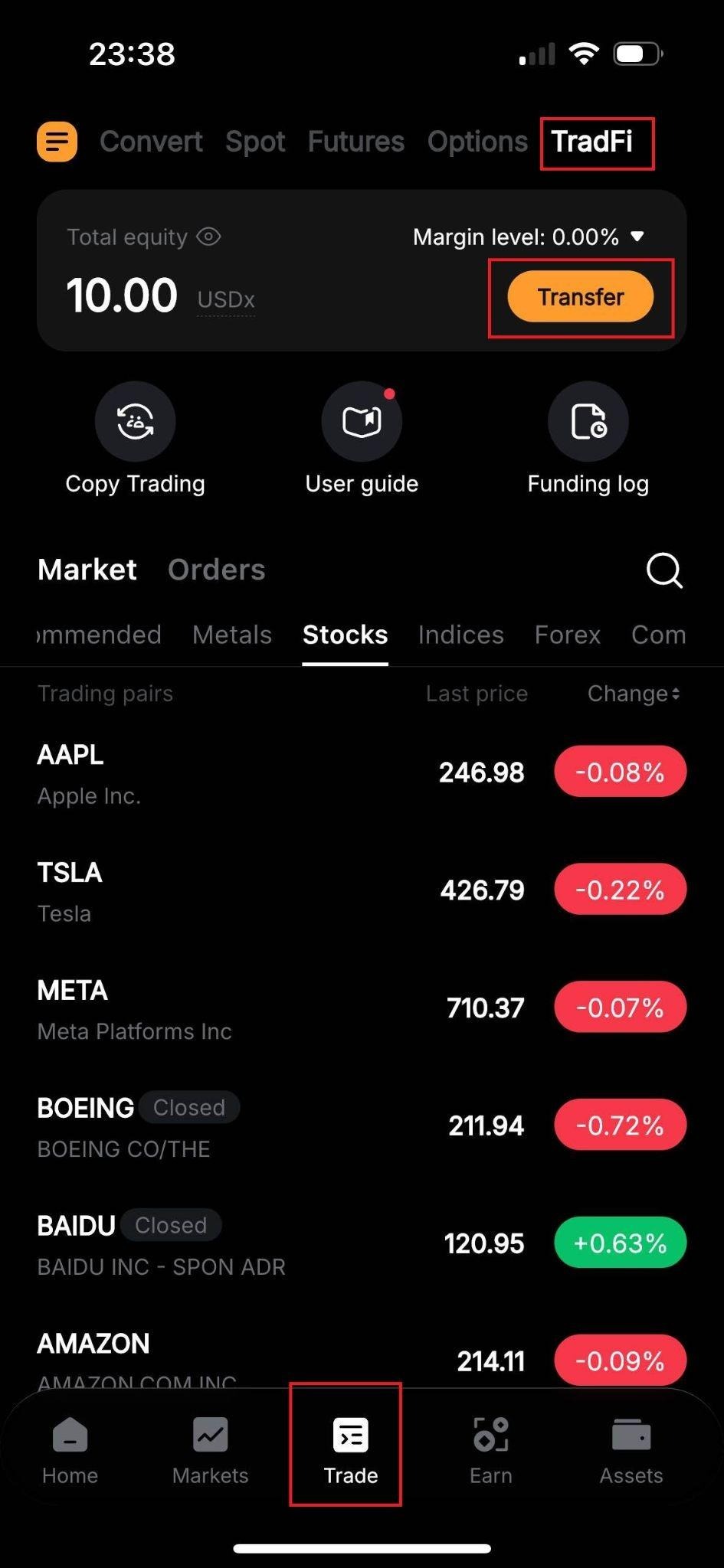
Log in to the Bybit app. Tap Trade in the bottom navigation bar and select TradFi. You can also go directly to the TradFi trading page from your mobile browser to get started.
Step 2: Fund your account
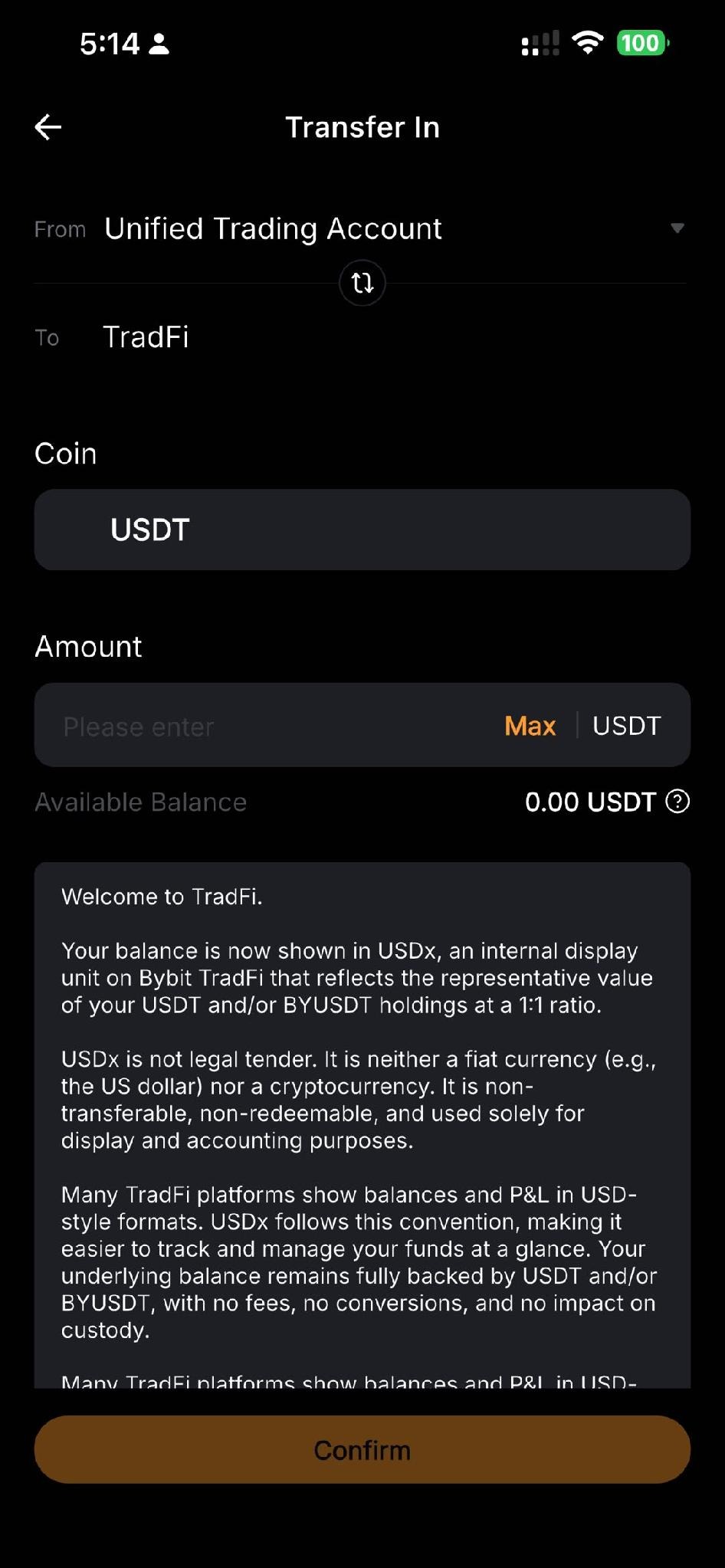
Tap Transfer to move USDT from your Funding Account or Unified Trading Account into your TradFi Account. Your balance will appear as USDx.
Step 3: Choose an asset
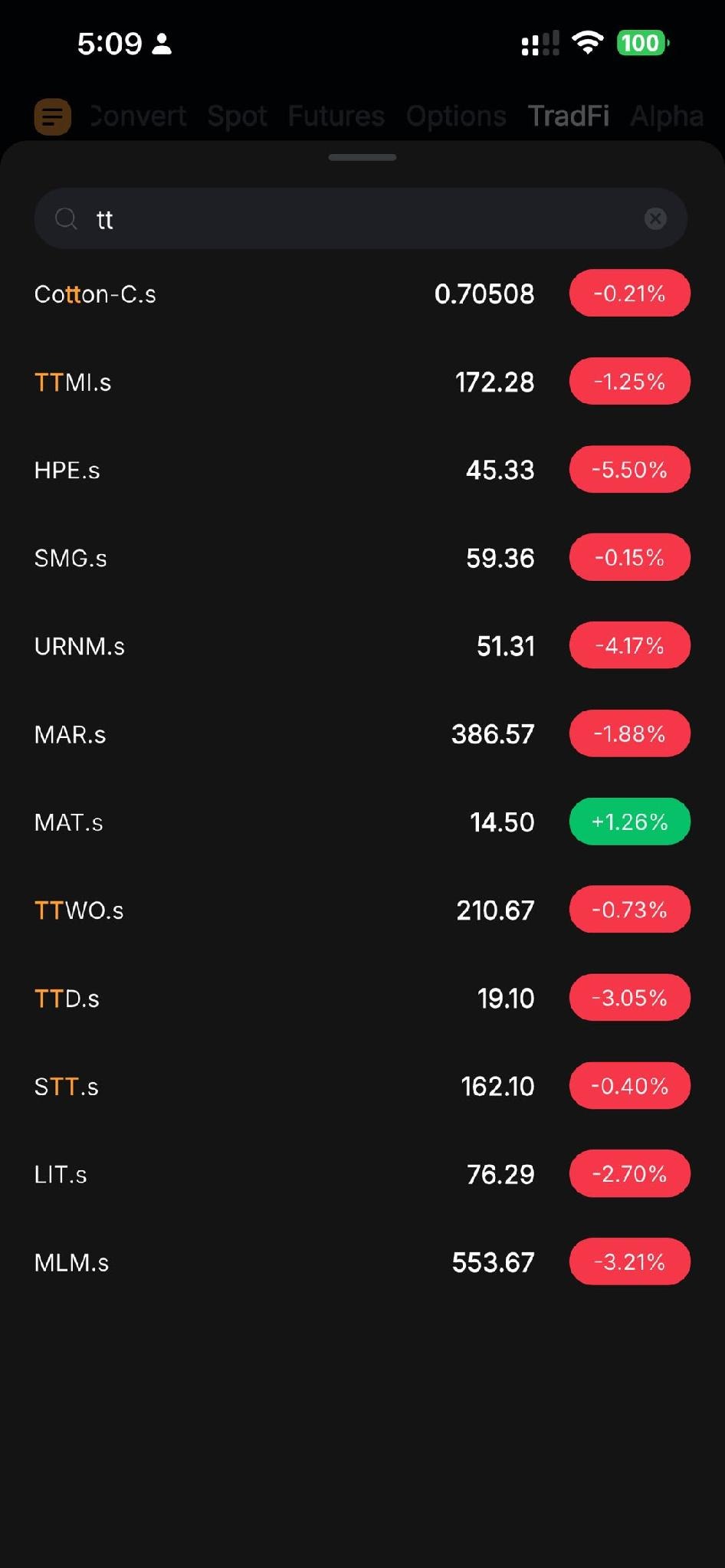
Tap the Stocks tab, browse the available CFDs and select TTM Technologies (TTMI) to open the trading screen.
Step 4: Place your order
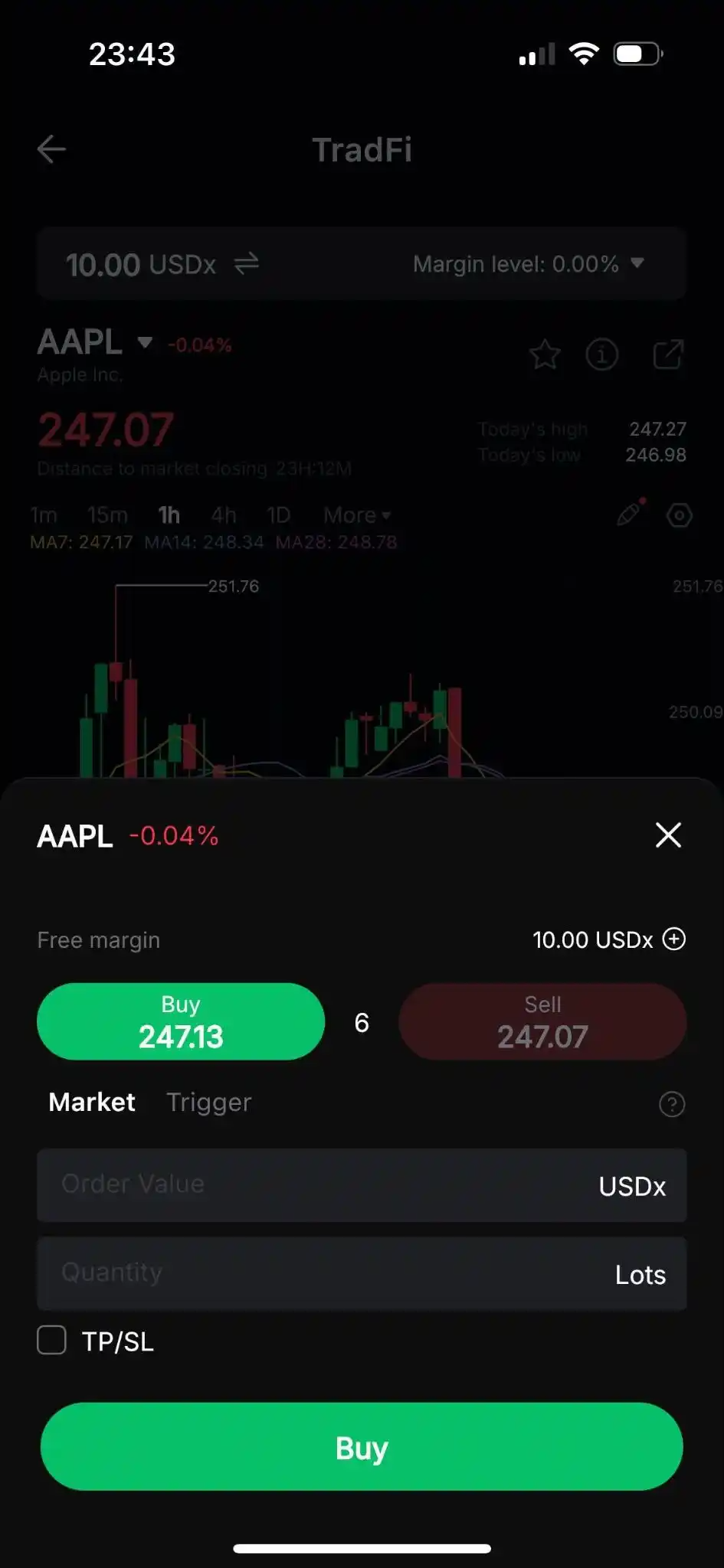
Next, tap on Buy to open a long position or Sell to open a short position.
In the order placement window, after choosing the Order Direction, set the Quantity, and (optionally) a Trigger and a TP/SL.
Once you’re ready, tap on Buy or Sell to place your order.
Step 5: Monitor and close the trade
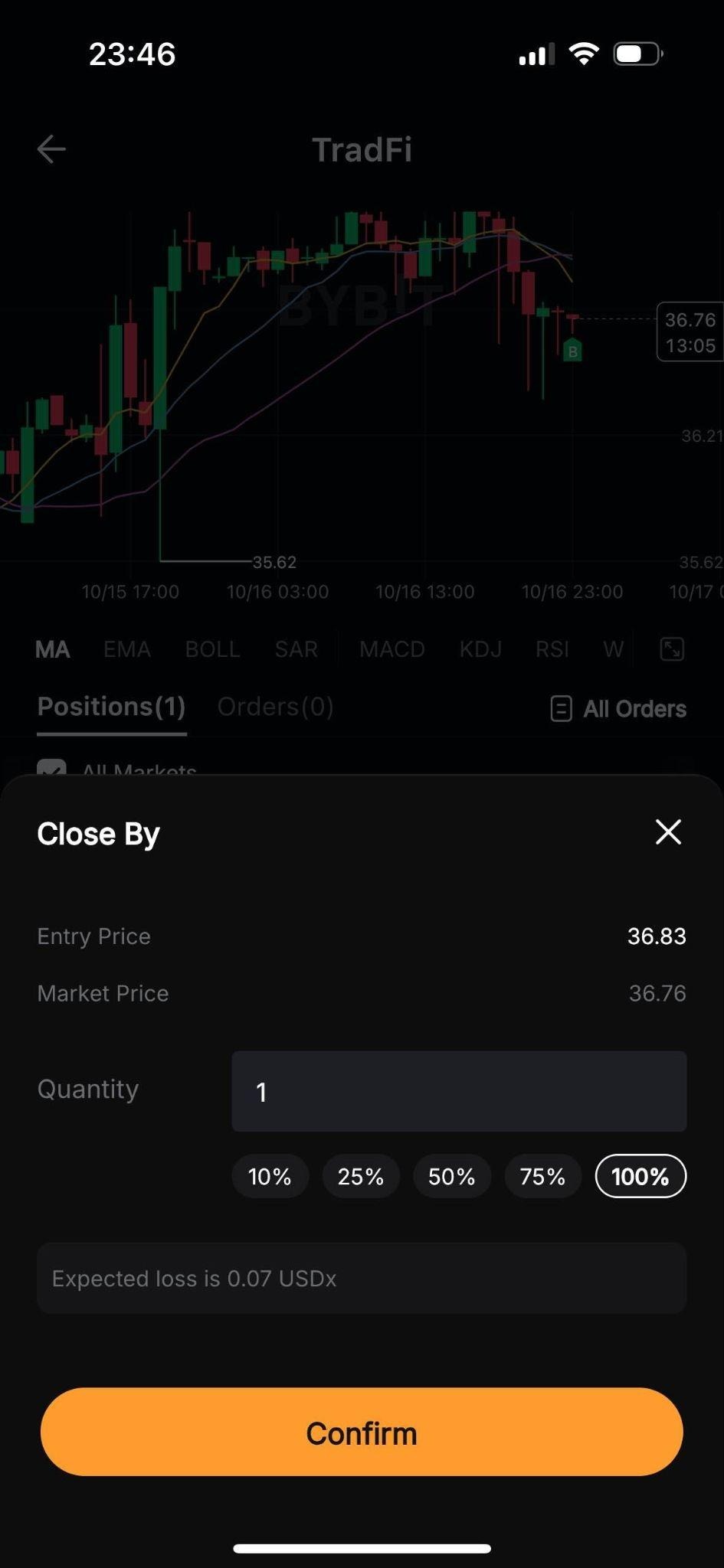
Near the bottom of the page, you can monitor your open positions under the Positions tab.
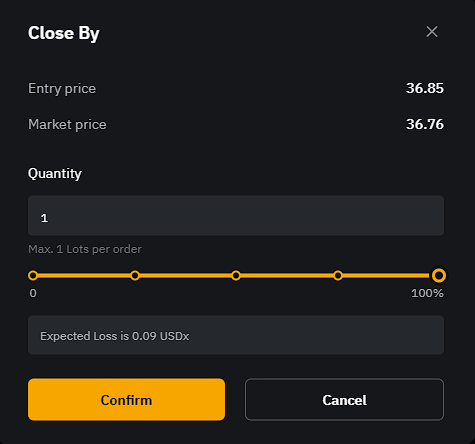
If you wish to close an open position, tap on Close By, select the quantity to close and tap on Confirm.
Fees
Bybit charges a commission of $0.02 per lot (minimum $0.20 per order) for US stock CFDs. Overnight swap fees may also apply if you hold a position past the daily settlement. For a full breakdown, see Bybit TradFi Fees Explained.
Tips for trading TTM Technologies (TTMI) CFDs
Monitor defense and aerospace news. A significant portion of TTM's revenue comes from defense contracts. Major policy shifts, defense budget announcements or large contract wins can move the stock meaningfully. Keep an eye on US defense spending news whenever you hold a TTMI position.
Follow earnings reports. TTMI can see sharp price moves around quarterly earnings. Check the earnings calendar before entering a position and consider tightening your stop-loss in the days leading up to a report.
Use leverage carefully. TTMI can experience short-term volatility. Higher leverage increases both the potential upside and the risk of a forced liquidation. If you're new to CFD trading, start at lower leverage levels before scaling up.
Set your risk parameters before entry. Decide your maximum acceptable loss before you open a position and set your stop-loss at the time of the order — not after the trade is already running.
Use MetaTrader 5 for in-depth analysis. Bybit TradFi integrates with MetaTrader 5, giving you access to advanced charting, technical indicators and automated trading strategies alongside your standard TradFi account.
The bottom line
TTM Technologies is a key player in global electronics manufacturing, and trading TTMI CFDs on Bybit gives you direct exposure to that sector with the flexibility to go long or short. Bybit TradFi makes it straightforward: fund your account, find the asset and place your trade — on desktop or through the Bybit app.
Leverage is a tool, and like all tools, it works best when used with care. Manage your risk on every trade.
Ready to trade? Log in to Bybit and head to the TradFi trading page to find TTMI under the Stocks category. For more guides, visit Learn Articles on TradFi.
CFD trading involves significant risk and may not be suitable for all investors. Leverage can work against you as well as for you. Past performance is not indicative of future results.
#LearnWithBybit