


How to send and receive payment using Bybit Pay

Bybit Pay is a next-generation payment solution that enables users to send and receive crypto or fiat with just a few taps via QR code or internal transfer. Whether you're settling bills, splitting payments with friends or running a global business, Bybit Pay simplifies cross-border transactions within a secure and intuitive environment.
In this article, we’ll walk you through Bybit Pay, show you how it works and provide you with a step-by-step guide to sending and receiving payments on Bybit Pay.
Key Takeaways:
Easily send and receive both crypto and fiat via mobile app or web.
Use QR codes or internal transfers for fast, borderless transactions.
Keep control of your funds with multi-currency wallet support and secure verification.
What is Bybit Pay?
Bybit Pay is a powerful payment service designed to connect your crypto wallet to real-world financial needs. Whether you're sending money to friends or making payments to merchants, Bybit Pay allows seamless transactions conducted in both crypto and fiat — all from within the Bybit platform.
Its mission is to bridge the gap between digital assets and traditional finance by enabling users to spend their crypto effortlessly, just like they do with cash. With support for currencies like BTC, ETH and USDT (and even fiat such as BRL), Bybit Pay turns your crypto into a practical tool for everyday payments.
Benefits of Bybit Pay
Bybit Pay makes it easier than ever to use your crypto. Whether you're paying online, transferring funds to a friend or scanning a QR code in-store, Bybit Pay supports seamless payments in both crypto and fiat funds.
Key benefits include:
Multi-currency support: Use BTC, ETH, USDT, BRL and more
Instant payments: Send and receive funds within seconds
Flexible access: Available via mobile app and web
Merchant-friendly: Ideal for individuals and businesses accepting crypto
Secure & verified: Blockchain-backed transactions with multi-factor verification
Bybit Pay simplifies spending both locally and globally.
How does Bybit Pay work?
Bybit Pay operates through two main methods: QR code payments and internal transfers. Users can scan a QR code to pay merchants or friends, or send funds directly using a phone number, email or Bybit UID. It supports both crypto and fiat, with seamless access via the Bybit app or website.
Bybit Pay vs. Bybit Card: While the Bybit Card functions like a debit card for in-store purchases, Bybit Pay enables direct wallet-to-wallet transfers and merchant payments, without any need for physical hardware. It’s faster, flexible and perfect for global digital transactions.
How to send crypto and fiat with Bybit Pay
Bybit Pay makes it easy to send crypto or fiat to other users or merchants. You can pay by scanning a QR code, or via internal transfer using a phone number, email or UID.
On the app
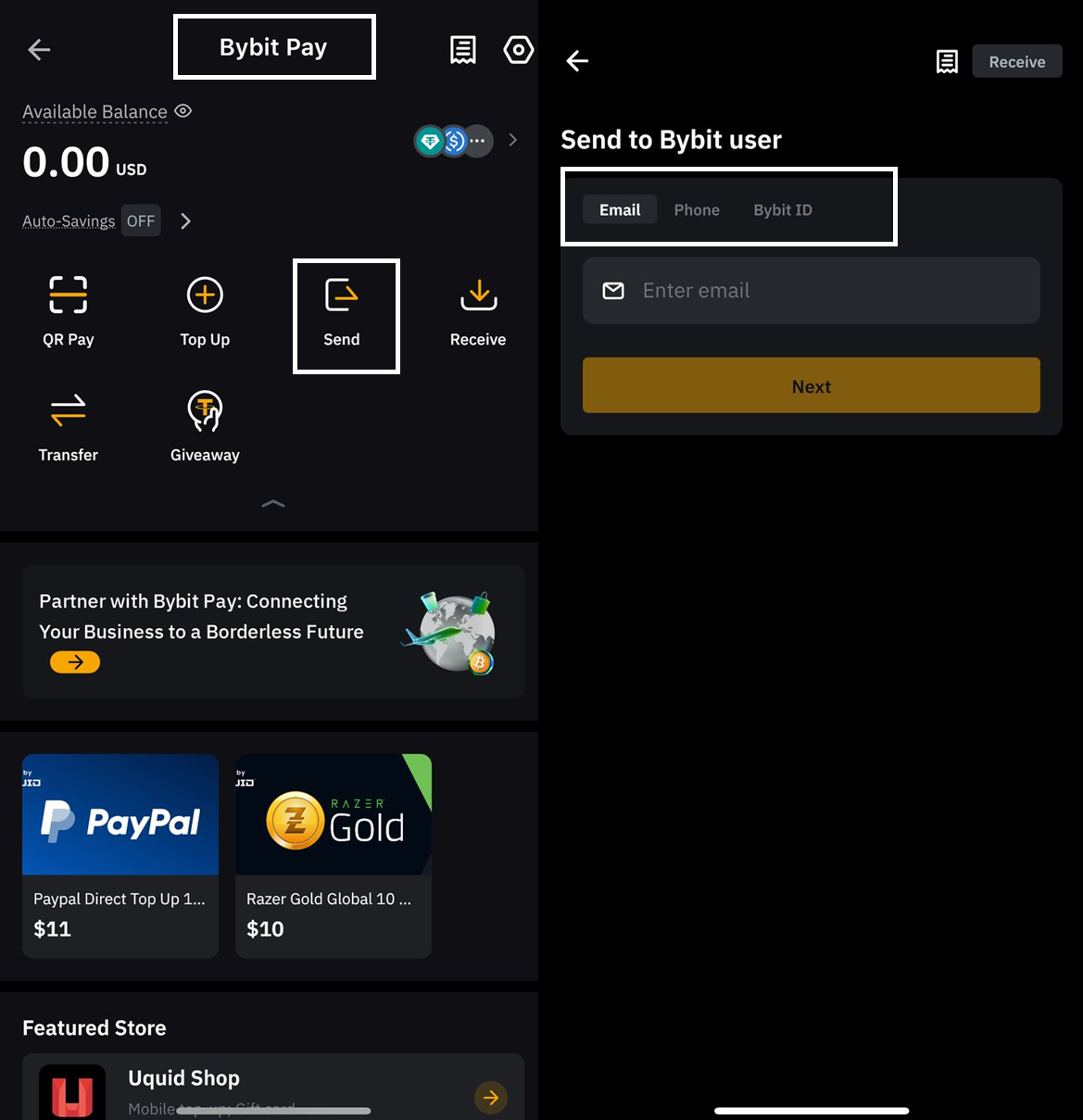
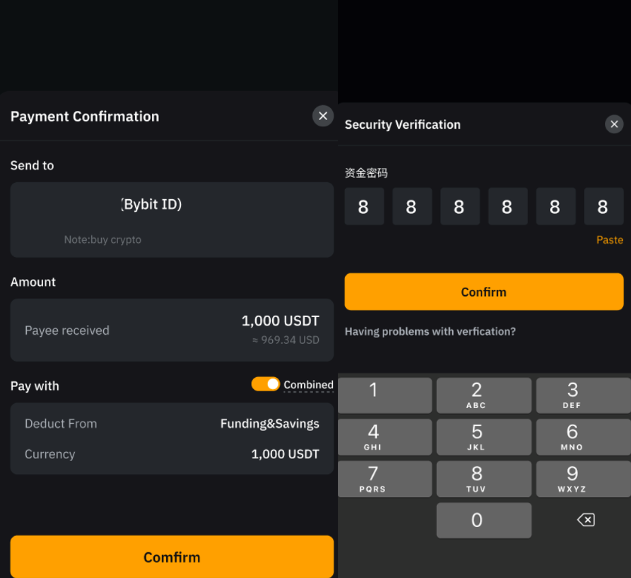
1. Open the Bybit app and tap on More → Bybit Pay → Send, or use the scanner icon to scan a QR code.
2. Choose your payment method, and enter the recipient’s email, phone number or Bybit UID.
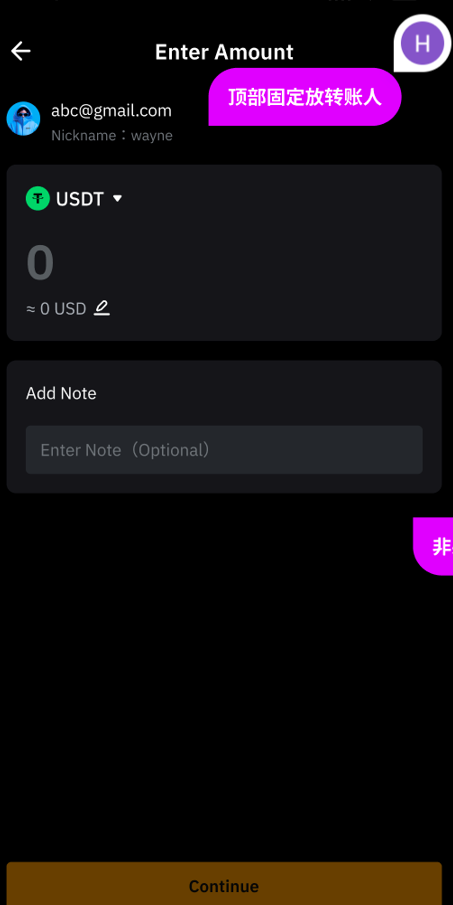
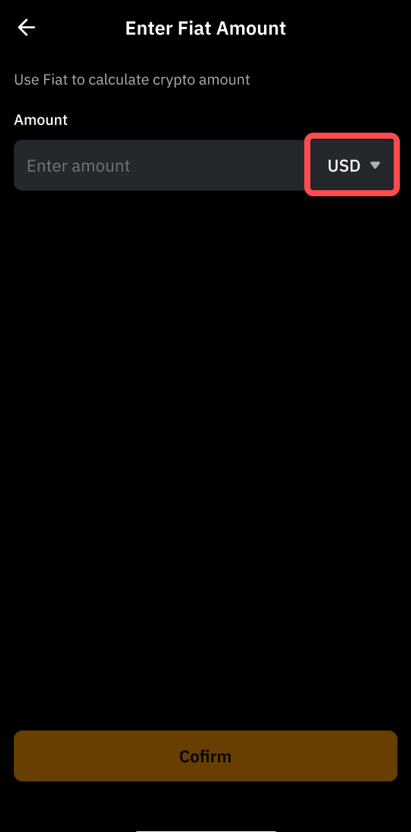
3. Enter the amount you wish to send. Tap on the pencil icon to convert from fiat to crypto, if needed. Add a note (optional), avoiding special characters.
4. Choose to pay using your Funding Account, or toggle Combined accounts (Funding + Savings), supported only for USDT.
5. Review the details, and confirm your payment after completing two-factor authentication (2FA).
On the web
From the top menu, go to Finance → Bybit Pay → Send.
Fill in recipient details (email/phone/UID).
Enter the amount and (optional) transfer note.
Confirm the account source (Funding or Combined), and complete verification.
Once your funds are sent, your payment history is viewable at the bottom of the Bybit Pay screen or by tapping on the paper icon.
Bybit Pay makes sending crypto as easy as sending a message.
How to receive crypto and fiat on Bybit Pay
Receiving payments on Bybit Pay is simple and flexible. Users can receive crypto or fiat via either internal transfer or QR code, depending upon the sender’s preference.
Receive via internal transfer
To receive funds via internal transfer:
Share your email address, phone number or Bybit UID with the sender.
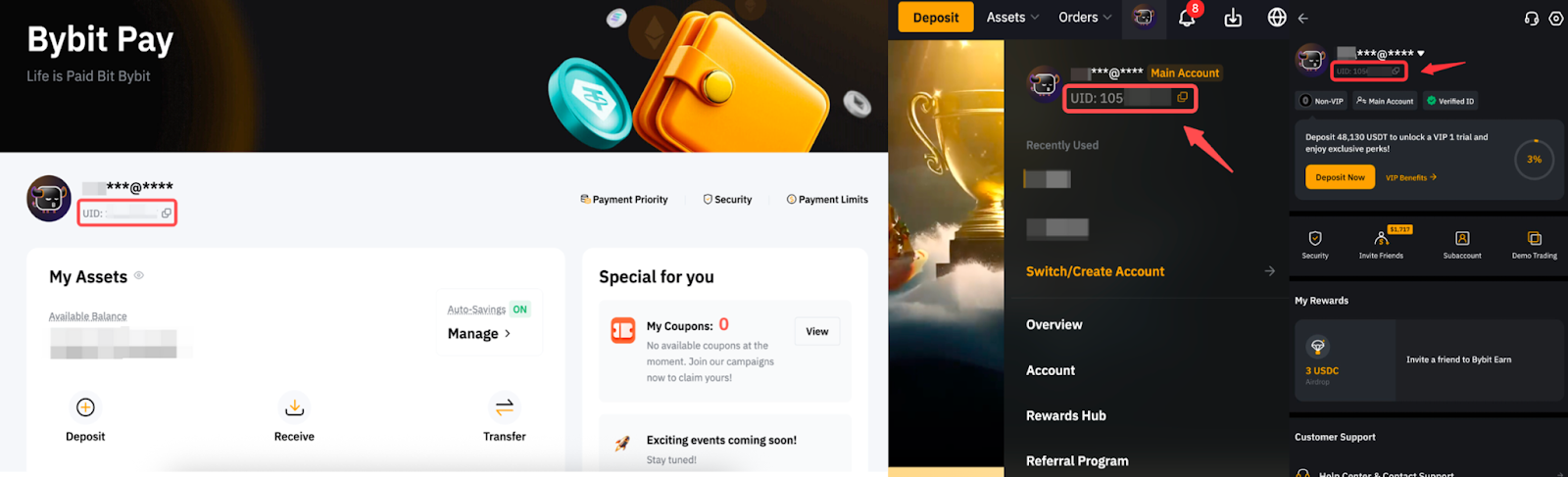
Your UID is available on your Profile or Bybit Pay page.
The sender can use any of these details to transfer funds directly from their Bybit Pay interface.
Receive via QR code (app)
Bybit Pay makes receiving crypto fast, flexible and borderless. The following is a step-by-step guide for requesting a payment using a personalized QR code — right from the Bybit app.
Step 1: Access the receive feature
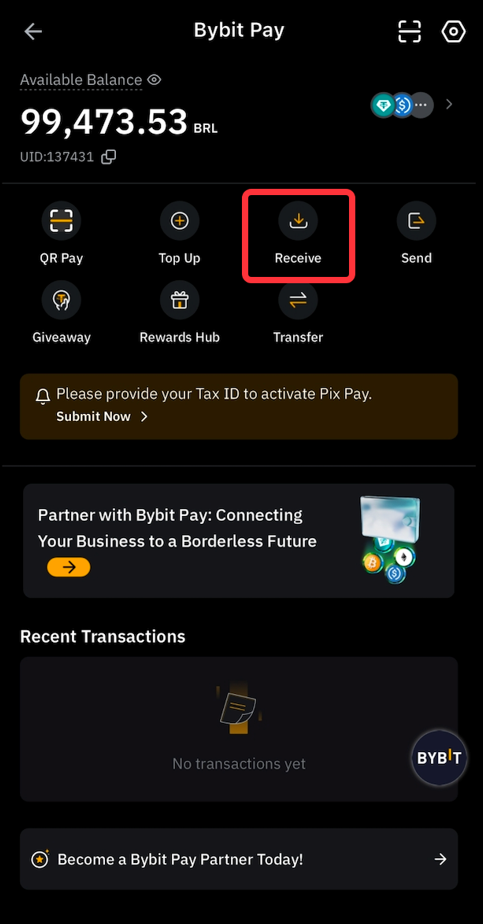
From the Bybit homepage, tap on More at the bottom menu, then select Bybit Pay → Receive. This opens your personalized payment interface.
Go to More → Bybit Pay → Receive to open your unique QR code.
Step 2: Customize your QR
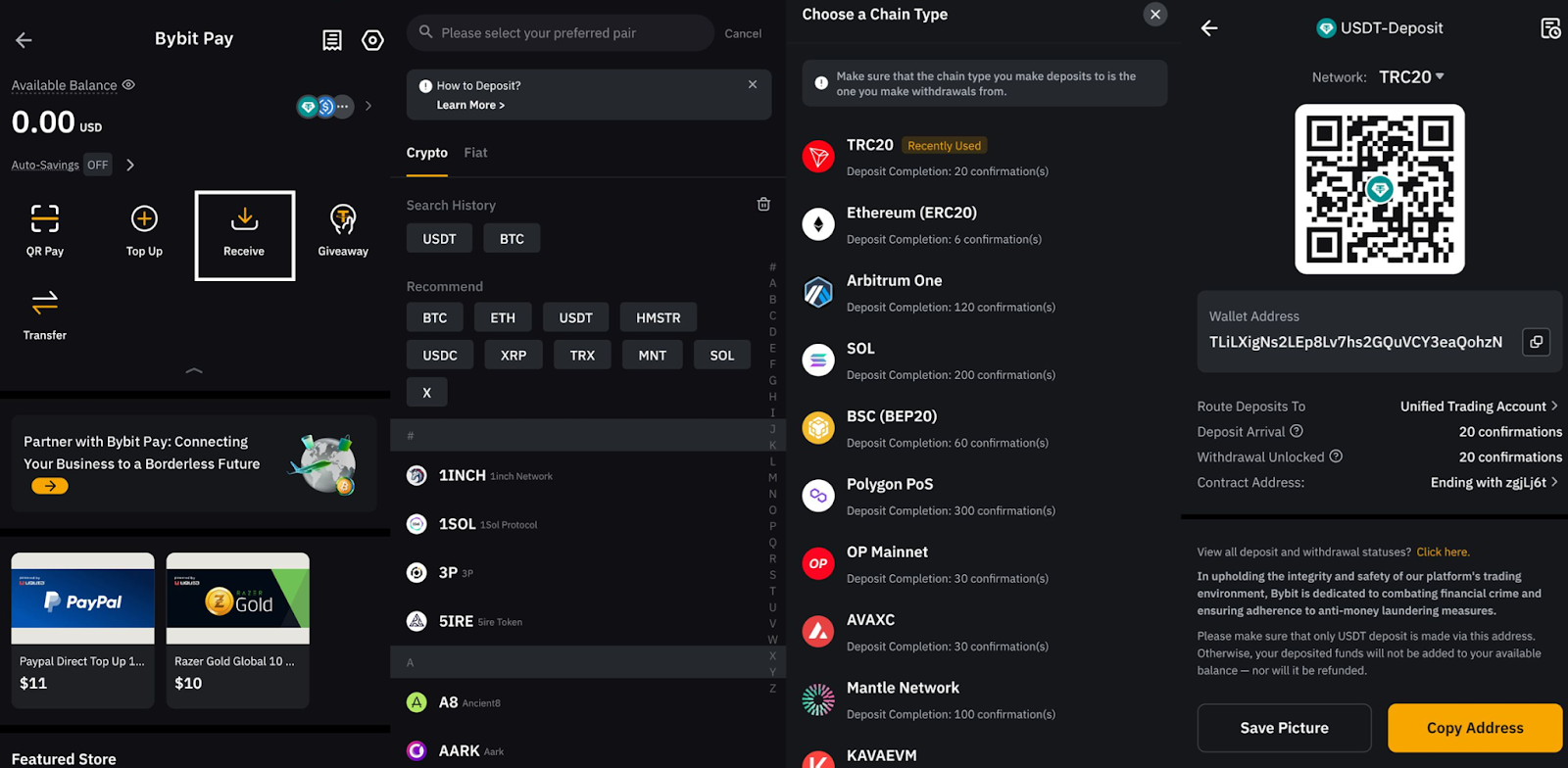
Choose the cryptocurrency you want to receive
Set the exact amount (in crypto or fiat)
Optionally, add a note for context
You can tap on the pencil icon to enter a fiat amount, and the amount will automatically convert to crypto.
Step 3: Your QR code updates in real time in order to reflect the specified details. Simply show it on-screen or use the Copy Address or Save Picture options to share.
Step 4: After the sender has completed the transfer, go to Bybit Pay → Transaction History to confirm receipt and track incoming funds.
Start using Bybit Pay now
Bybit Pay bridges crypto and traditional finance, offering seamless, secure and instant payments — all from one place. Whether you're sending or receiving crypto, or spending it globally, it’s never been easier to do.
Visit Bybit Pay today to experience secure, borderless crypto and fiat payments — right from your app or browser.
#LearnWithBybit