


How to convert crypto assets using Bybit Convert (no fees)

Crypto traders often need to convert assets to take advantage of market opportunities, diversify portfolios or manage risk exposures. A quick, easy and cost-effective way to convert crypto assets is crucial to staying agile and responsive to the ever-changing market conditions.
Cryptocurrency trading platforms have significantly simplified the process of exchanging one digital asset for another. Bybit Convert is one such feature, offered by the popular cryptocurrency exchange. It allows users to convert their assets between different cryptocurrencies seamlessly and without fees.
This article will discuss its unique features, answer some frequently asked questions and provide an in-depth guide to using Bybit Convert to swap your crypto assets.
Key Takeaways:
Bybit Convert is a new, easy-to-use feature on the Bybit exchange that enables users to convert their crypto assets without incurring fees or slippage.
The feature differs from P2P trading, as it doesn’t involve direct transactions between individuals, but rather leverages Bybit's order books and market makers to facilitate conversions.
Bybit Convert is accessible to all users, including those who wish to convert small amounts of crypto dust (trace amounts of crypto remaining in a user's wallet after trading) into more liquid assets.
What is Bybit Convert?
Bybit Convert is an exciting new feature that allows users to seamlessly convert different cryptocurrency assets. It facilitates quick and slippage-free conversions for users looking to diversify their portfolios or trade various digital assets without having to go through the tedious process of placing multiple orders.
Using Bybit Convert, you can easily swap between different coins without leaving the platform or using a third-party service. Bybit Convert supports virtually all major cryptocurrencies, including BTC, ETH, EOS, XRP, USDT and more. The service is fast, convenient and secure — and as an added perk, it’s totally free.
Integration of OTC Trading page to Bybit Convert
Users who have been using OTC Trading for high-volume transactions can now use the Bybit Convert feature to conduct your trades as the OTC Trading page is now merged with Bybit Convert. This means you can now access the same high-liquidity, large-sum trading experience directly through Convert, without switching pages.
What this means for users
Single conversion hub: The Bybit Convert page is now your all-in-one destination for crypto-to-crypto swaps, from converting small amounts of crypto dust to executing multi-million-dollar high-volume transactions.
Automated best pricing: When you place a large order, the system automatically sources quotes from both the regular exchange order book and institutional-grade OTC liquidity pools. This gives high-volume traders access to high-quality, low-slippage pricing directly within Convert.
Expanded limits for major assets: With this upgrade, you can now convert much larger amounts in a single transaction. The maximum conversion limits for USDT, USDC, Ethereum, Bitcoin and MNT have increased from the previous range of $2,000–$10,000 to a new upper range of $2 million–$10 million, giving high-volume users far more flexibility.
Better pricing for high-volume conversions: Large trades get better pricing on Bybit Convert. When a conversion hits a high-volume threshold (e.g., 100,000 USDT or more) the system automatically routes the order through OTC liquidity. This helps secure a smoother execution and a more favorable rate compared to smaller conversions.
This integration streamlines the trading experience, making it easy for experienced traders to manage their large-volume conversions with the same speed and convenience as a standard swap.
How is Bybit Convert different than P2P?
Bybit Convert and P2P (peer-to-peer) trading are two different mechanisms for exchanging or converting cryptocurrencies on the Bybit platform.
Here are the main differences between the two.
Trading method
Bybit Convert allows users to instantly exchange or convert one cryptocurrency to another by leveraging the exchange's order books. Bybit matches the user's request with an appropriate order, enabling a quick and seamless conversion without slippage.
Meanwhile, P2P trading entails users directly exchanging fiat currency for cryptocurrency by placing buy or sell orders and finding willing counterparties within the platform. The exchange essentially serves as a marketplace for buyers and sellers to meet and trade without the intervention of a centralized order book.
Pricing
When you exchange assets with Bybit Convert, the exchange rates for conversions are based on the best quote prices from several market makers, according to the current index price for the assets involved. Bybit Convert provides competitive rates, ensuring that users get the best possible price for their transactions.
On the other hand, prices in P2P trading are set by individual users. They can offer their preferred prices for buying or selling cryptocurrencies, and other users can choose to accept, negotiate or reject those rates.
Speed
As the conversion process on Bybit Convert is automated, and leverages the exchange's order book, transactions are usually completed instantly.
For P2P transactions, the transaction speed depends on how quickly you can find a counterparty willing to trade at your desired price, the negotiation process and the time taken to verify the transaction on the blockchain.
Ease of use
Converting cryptocurrencies with Bybit Convert is user-friendly and relatively straightforward You only need to specify the cryptocurrency you want to convert and the desired amount, and the exchange completes the transaction without any further input.
P2P trading can be somewhat more complicated, as it requires you to find suitable counterparties, negotiate prices and manage transactions manually.
How to use Bybit Convert
Bybit’s Convert function may be used through your Funding Account or Unified Trading Account (UTA). The Instant conversion mode is supported for both account types, while the Limit conversion is only supported for the Funding account.
Therefore, you must move your funds to these accounts before you start the conversion process, and if you’d like to use the Limit conversion, ensure that you move the funds specifically to your Funding Account and not to your UTA.
Transaction limits for conversion vary, depending on the crypto. Once you choose a coin to convert, the minimum and maximum limits will be displayed below the field for the destination asset. However, you can find a complete list of all supported assets for conversion and their transaction limits here.
Here are the easy-to-follow steps to use Bybit Convert.
Using desktop
To use the Bybit Convert function on your desktop computer, first visit the official Bybit website and log in to your account. After that, follow the steps below.
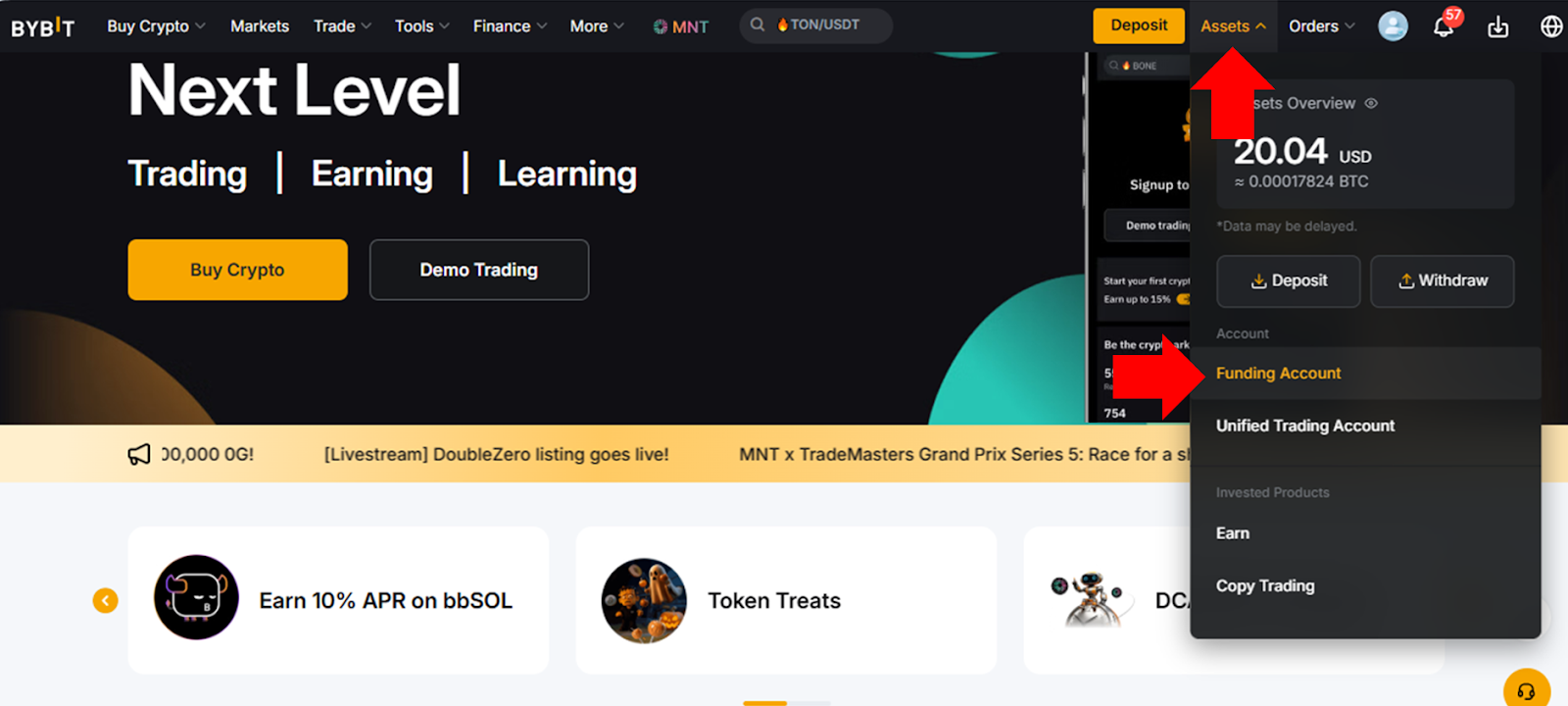
Step 1: Hover your cursor over Assets in the top right of the Bybit homepage (you will only see the menu item if you’re logged in to your account), and click on the account type you’d like to use for Convert — either Funding Account or Unified Trading Account.
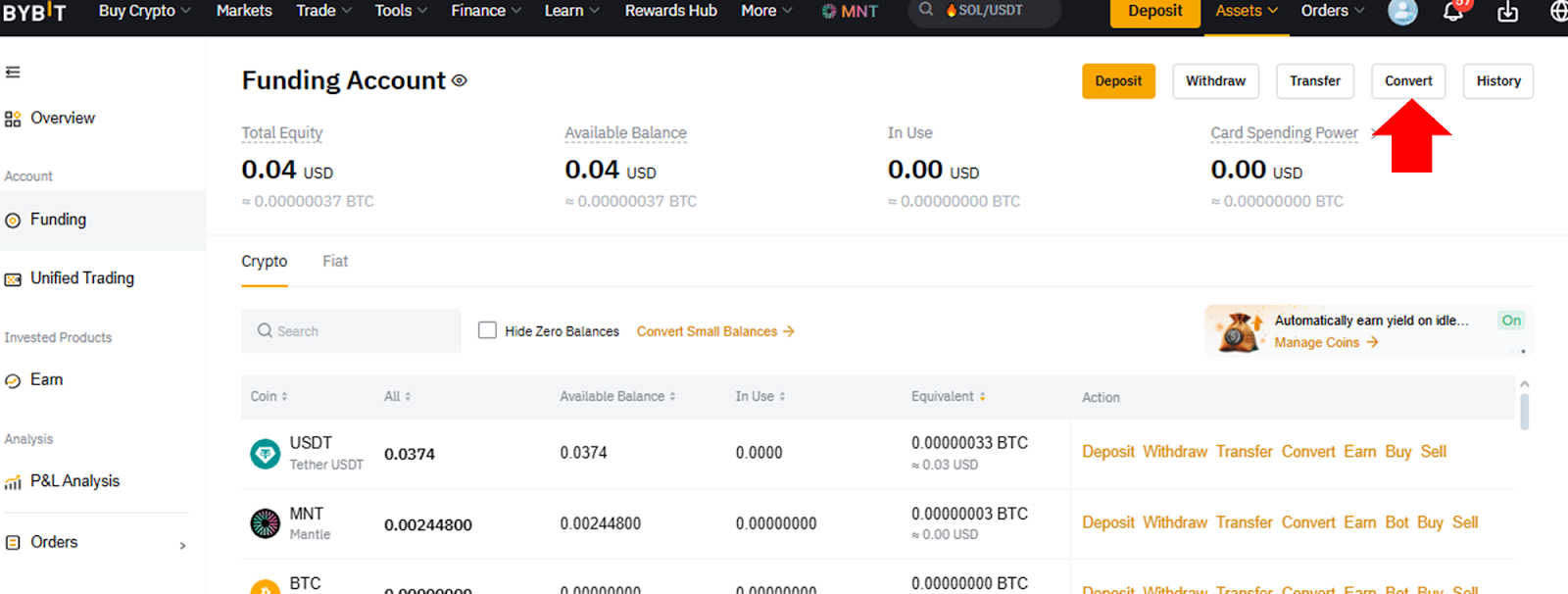
Step 2: On your account page, click on Convert to be taken to the Convert page.
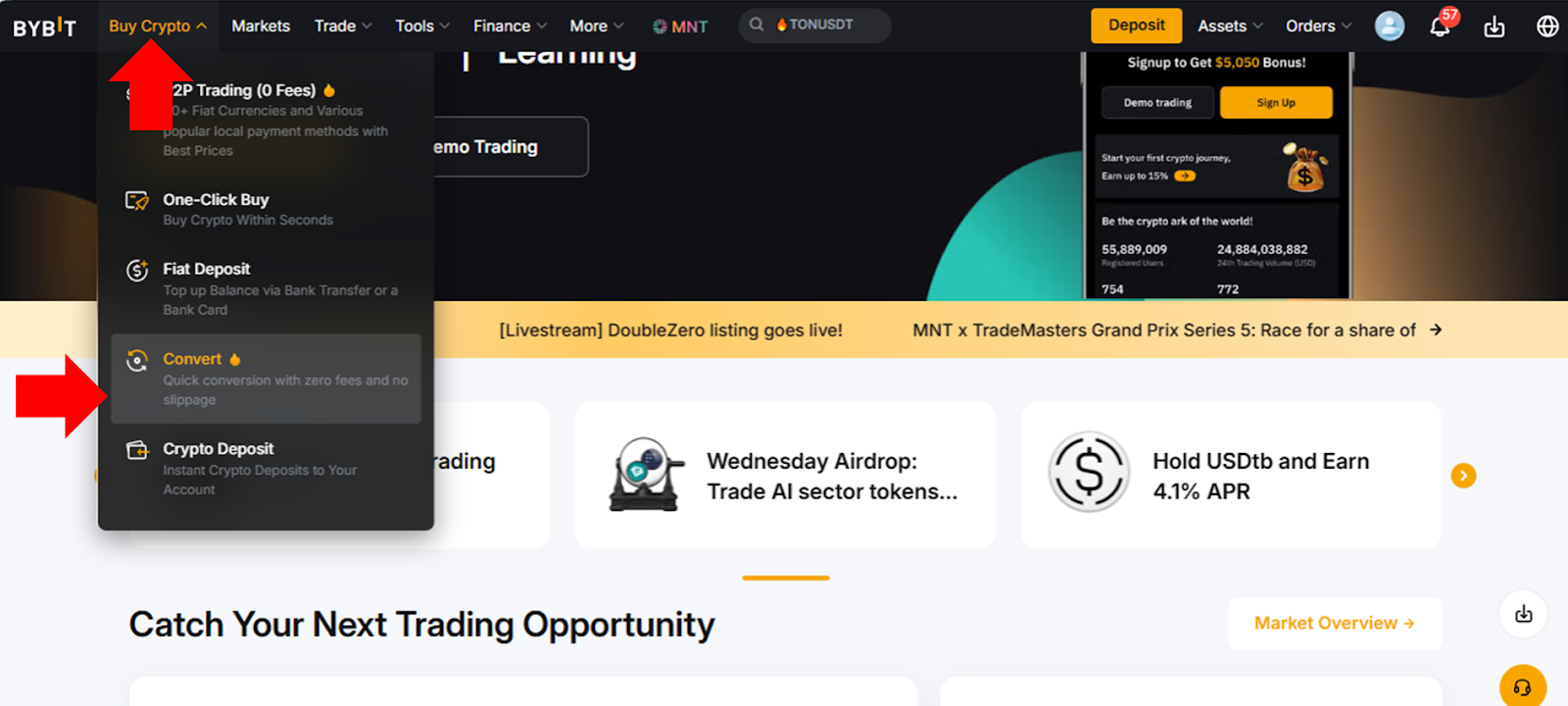
Alternatively, you can access the Convert page from Bybit’s homepage by hovering your cursor over Buy Crypto in the top menu and clicking on Convert.
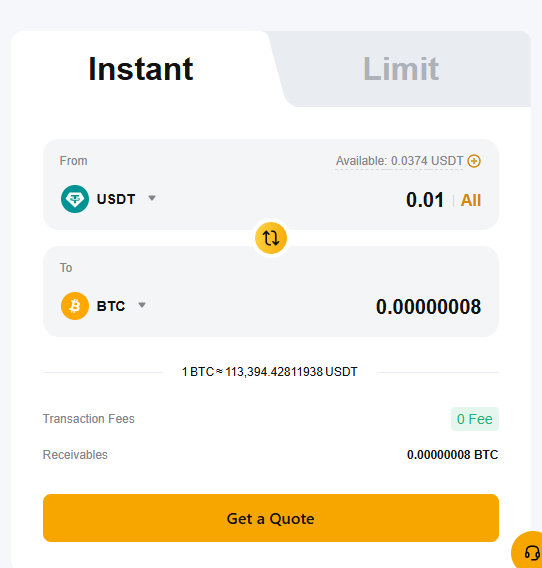
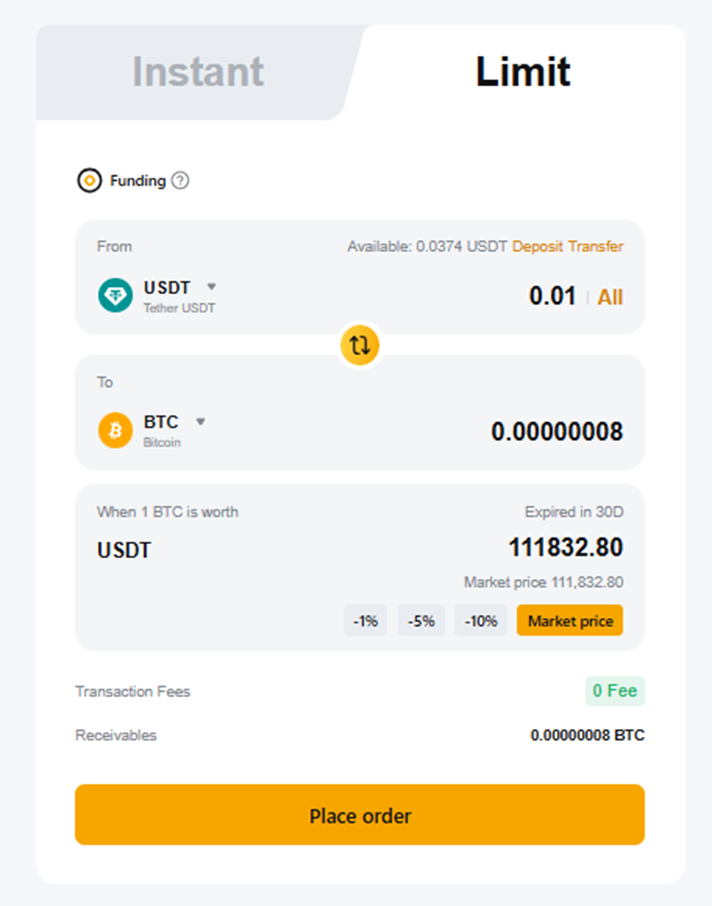
Step 3: On the Convert page, you’ll see a form on the right to provide your order details. In this form:
Choose the tab for Instant or Limit, depending upon which conversion mode you’d like to use.
In the From field, select your crypto asset to convert from and the amount you’d like to convert.
In the To field, select the asset to which you’d like to convert. The corresponding price for the receiving asset will be automatically calculated and displayed.
For Instant orders, click on Get a Quote.
For Limit orders, additionally specify the target price, or click on Market Price to use the current market price as your target for conversion. You may also choose 1%, 5% or 10% off the current price as your target. After that, click on Place Order.
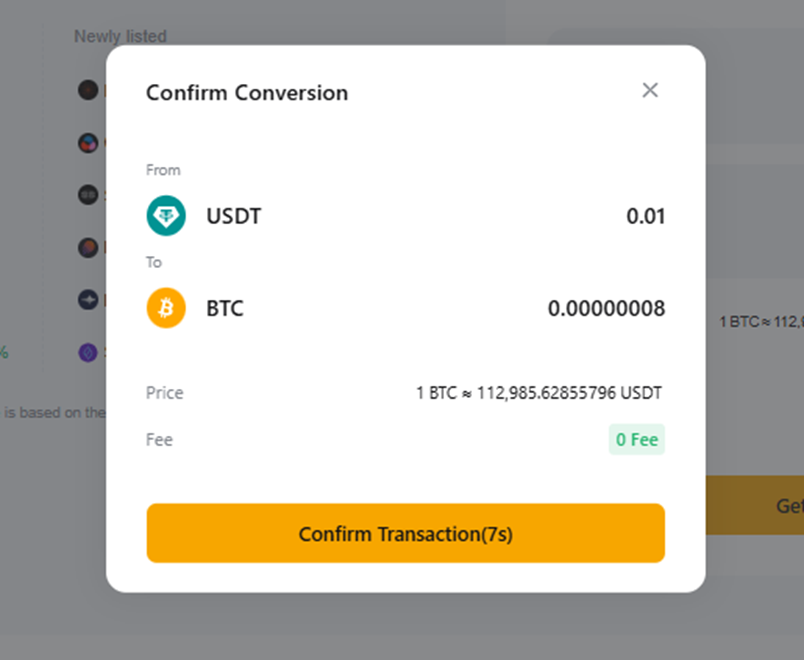
Step 4: In the final confirmation dialog, click on Confirm Transaction. If you’ve placed an Instant order, your assets will be converted immediately. If you’ve placed a Limit order, the conversion will happen when the target Limit price is reached. If the target price isn’t reached within 30 days of your order, your order will be automatically cancelled. In a Limit order, until the price hits the target level, your funds will remain locked.
Using Bybit App
Follow the steps below to use Bybit Convert on the Bybit App mobile application.
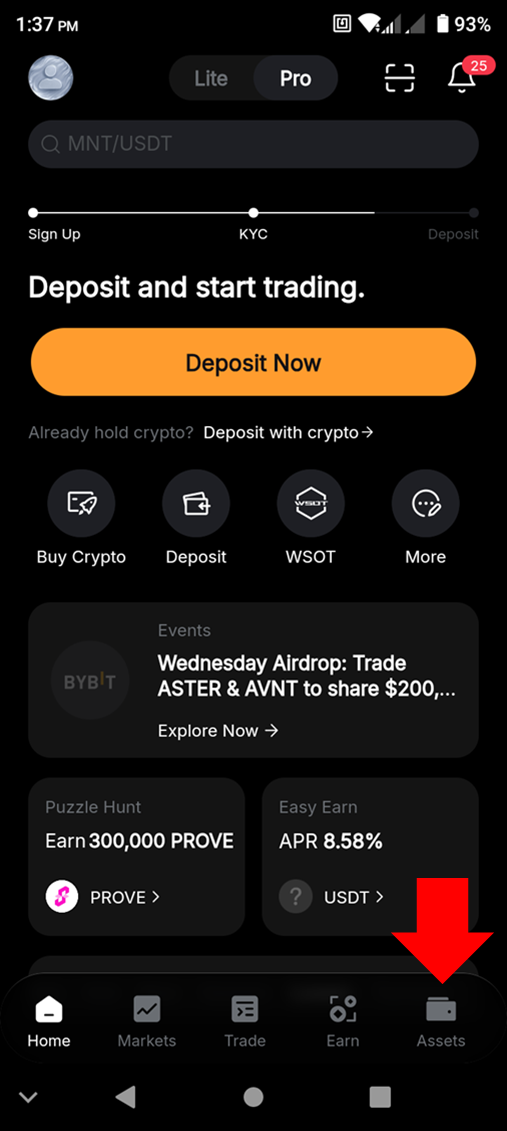
Step 1: Open the app and tap on the Assets menu item on the bottom right of the screen.
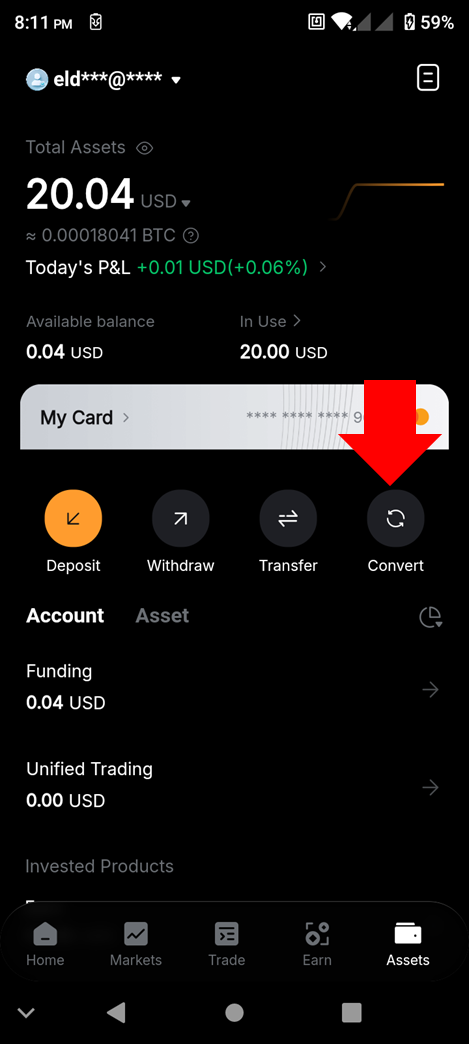
Step 2: Tap on Convert.
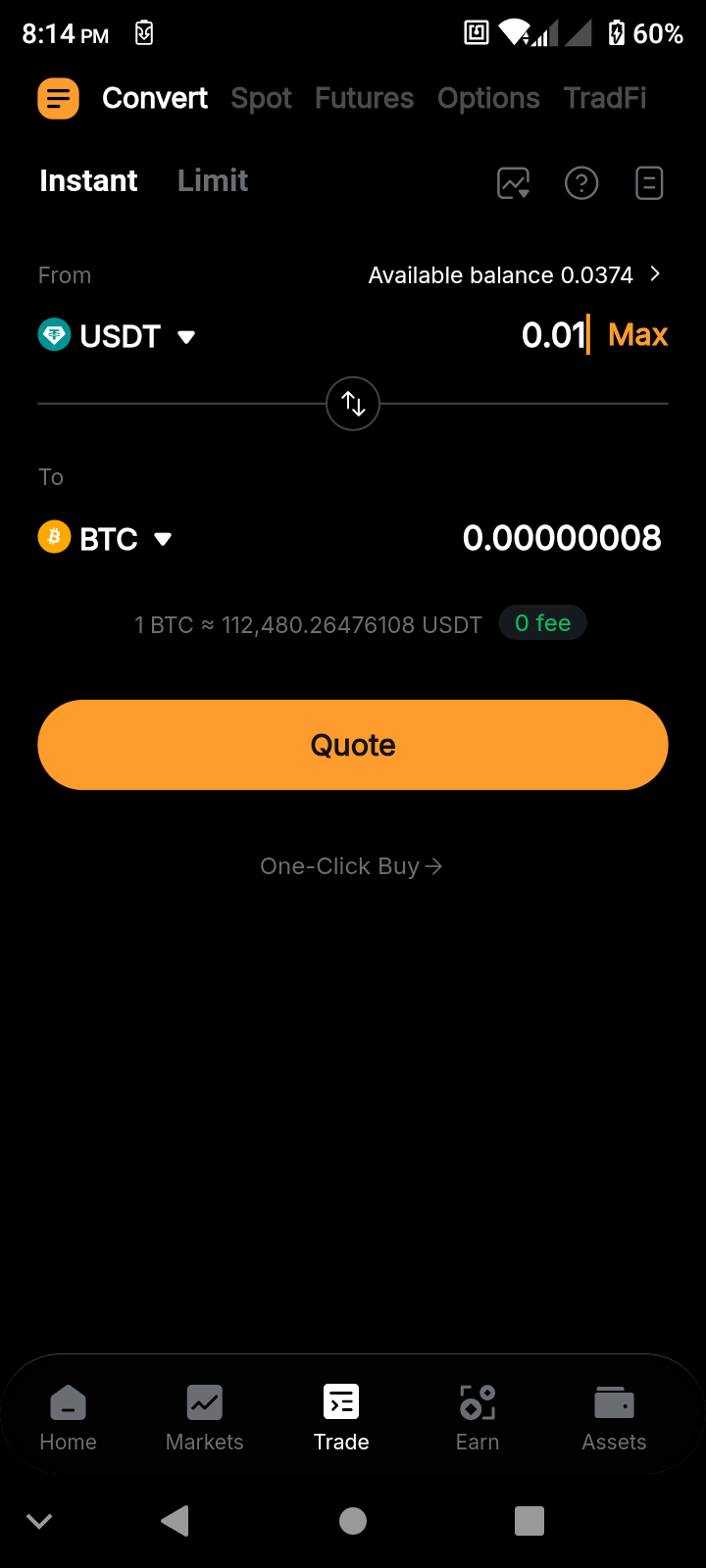
Step 3: In the Convert screen:
Tap on Instant or Limit, depending on which conversion mode you’d like to use.
In the From field, select your crypto asset to convert from and the amount you’d like to convert.
In the To field, select the asset you’d like to convert to. The corresponding price for the receiving asset will be automatically calculated and displayed.
For Instant orders, tap on Quote.
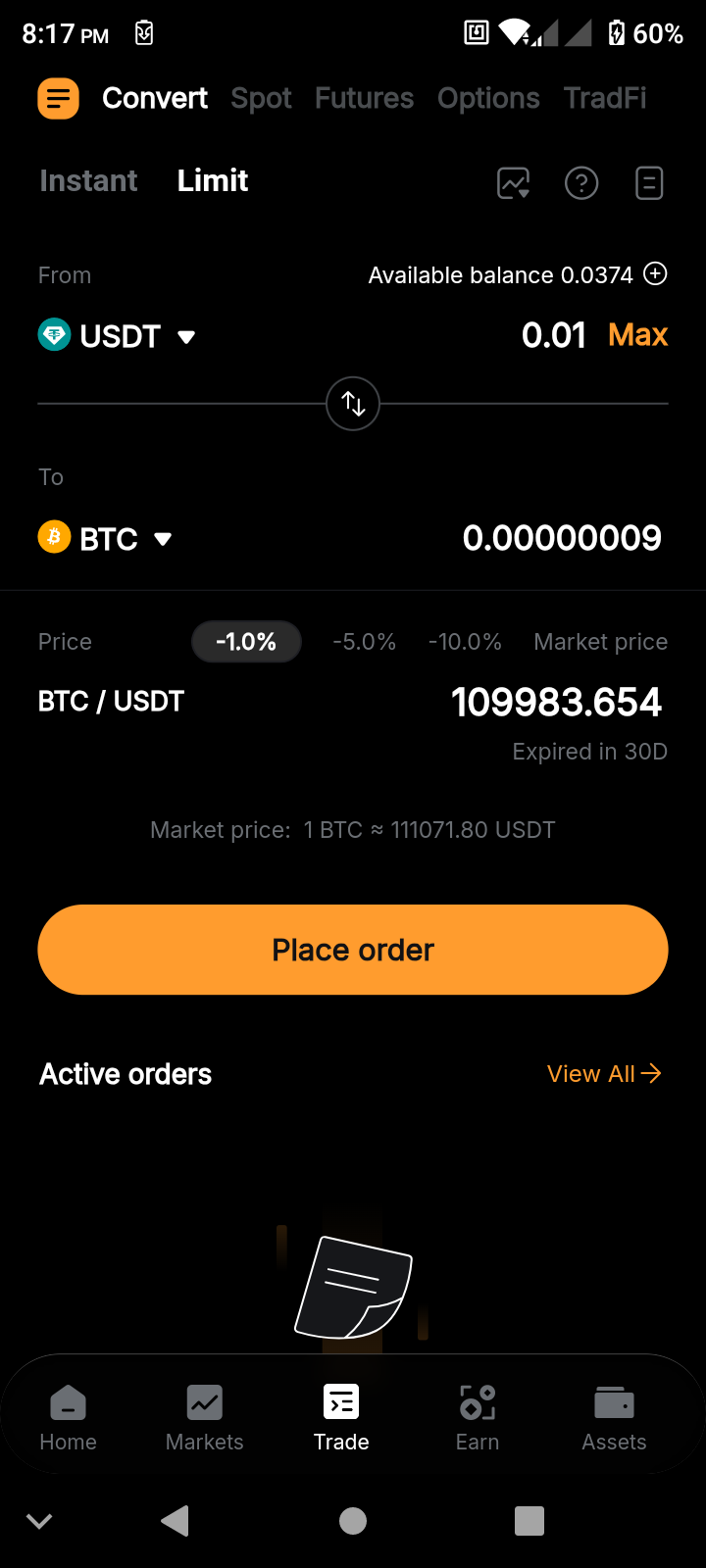
For Limit orders, additionally specify the target price or tap on Market Price to use the current market price as your target for conversion. You may also choose 1%, 5% and 10% off the current price as your targets. After that, tap on Place Order.
Step 4: Provide your final confirmation by tapping on Confirm. If you’ve placed an Instant order, your assets will be converted immediately. If you’ve placed a Limit order, the conversion will take place when the target Limit price is reached. If the target price isn’t reached within 30 days of your order, your order will automatically be canceled. With a Limit order, your funds will remain locked until the price hits the target level.
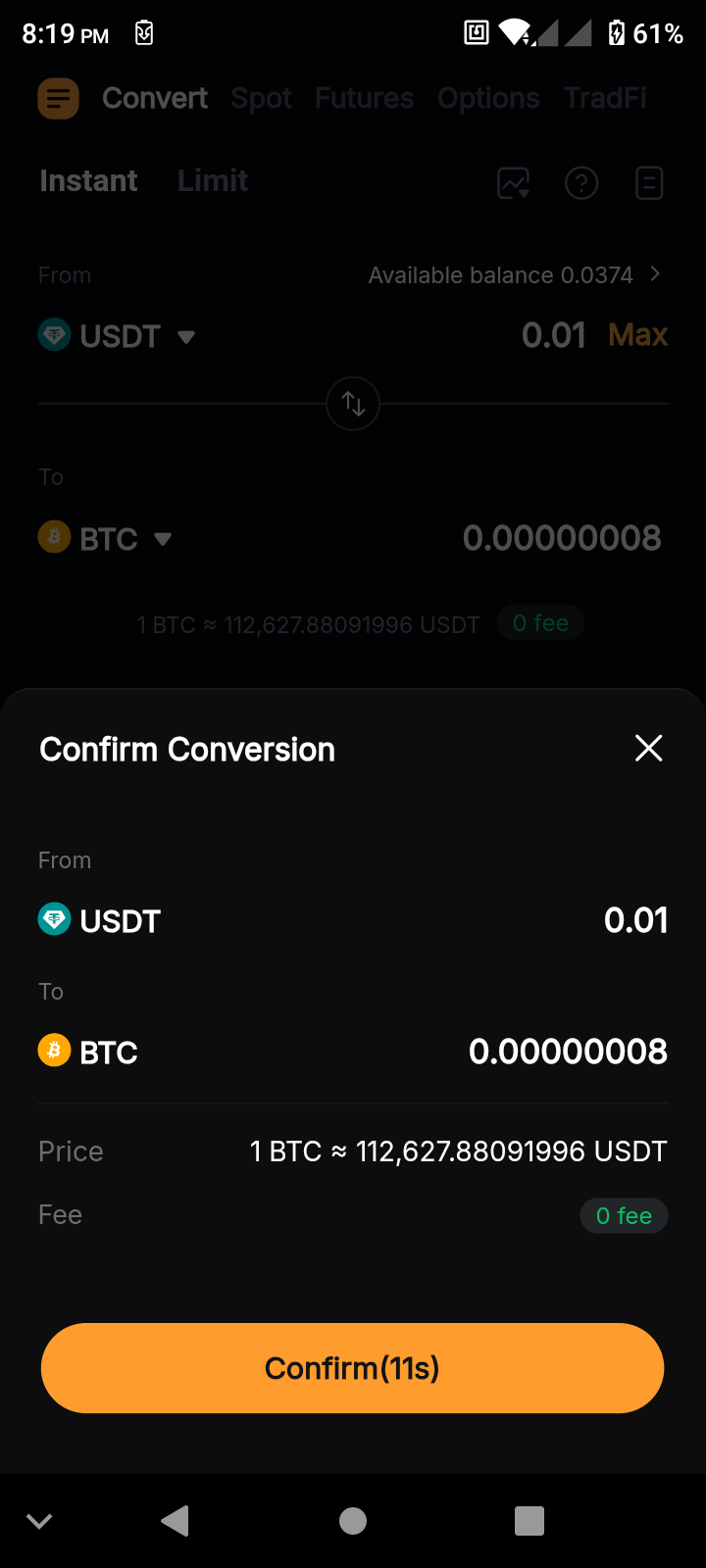
When using the Bybit Convert function, please note that the exchange rate is a real-time rate based on the best available quotes from multiple market makers. This rate may differ from the Bybit Spot market price.
Is Bybit Convert free?
Yes, Bybit Convert is a free service that doesn’t charge any fees for asset conversions.
Who can use Bybit Convert?
Bybit Convert is available to all Bybit users, including those who wish to exploit market opportunities, diversify portfolios or convert small amounts of crypto dust (tiny amounts of crypto left in a user's wallet after trading) into more liquid assets. The service aims to provide a hassle-free and cost-effective solution for users looking to efficiently manage their crypto holdings.
Does slippage affect conversion?
Slippage doesn’t impact the final conversion rate, even in periods of high market volatility. Bybit Convert uses the exchange's order books to find the best conversion rate, and the conversion executes the instant you initiate it, eliminating time lag that could change prices.
Can I convert my crypto dust using Bybit Convert?
Yes, Bybit Convert allows users to convert their crypto dust worth 0.001 BTC or less into MNT via UTA. This feature is particularly beneficial for those who have insignificant amounts of multiple cryptocurrencies, and wish to consolidate them into a single, more tradeable asset.
Closing thoughts
Bybit Convert is one of the easiest and most straightforward ways to swap different crypto assets in your Funding Account or UTA in just a few clicks. For Instant orders, it guarantees immediate execution, and both Instant and Limit conversions involve zero trading fees.
#LearnWithBybit