


How to deposit USD

Bybit users can take advantage of its fiat deposit service to transfer funds in US dollars (USD) to their accounts. The service, which leverages the SWIFT (Society for Worldwide Interbank Financial Telecommunication) international transfer system, features low transaction fees. It’s open to individual users in most countries, with the exception of jurisdictions where Bybit’s services are restricted. USD deposits can serve as an excellent way to on-ramp your fiat funds to Bybit for further use in its crypto trading markets and products.
In this article, we show you how you can make a USD fiat deposit on Bybit, and detail all the associated key requirements, fees, limits and compliance considerations.
Key Takeaways:
Bybit individual users in any country serviced by its exchange can use its fiat deposit service to transfer funds in USD to their accounts.
Bybit supports two main methods for USD fiat deposits — SWIFT transfers, and SWIFT transfers for non-US banks only. Additionally, users in El Salvador can also use the QuickPay digital payment service provider.
USD fiat deposits are available for individual, non-business Bybit users who have completed at least the Standard level of Identity Verification. Depending upon your location and account details, you may be asked for additional identification documents, due to compliance reasons.
Available USD deposit methods
Bybit offers individual users in most countries the opportunity to transfer USD funds to their accounts using the fiat deposit service. As the world’s most actively traded fiat currency, USD is highly popular with traders and investors around the globe. Many individuals involved in cryptocurrency trading also hold USD funds. Thanks to Bybit’s USD fiat deposit service, users with funds can easily and securely transfer them to Bybit’s exchange without any need for complex conversions.
There are two primary USD deposit methods supported by Bybit:
SWIFT (StraitsX)
Bank Card
Depending upon your region, account type and regulatory requirements, you may be offered only one of the two main SWIFT alternatives.
Supported regions and KYC requirements
Subject to relevant know your customer (KYC) identification requirements, USD fiat deposits are normally available to all individual users, internationally, with the exception of jurisdictions where Bybit doesn’t provide its services in general. For an up-to-date list of countries in which Bybit services are restricted, please check out this resource.
To be eligible for USD fiat deposits, you must have completed at least the Standard level of Identity Verification for your account. Please note that if you have verified your identity with a national ID document, you may still be asked for additional verification using your passport.
In addition, only individual accounts are eligible for this service. Business users — even those who have completed Business KYC — cannot use USD fiat deposits.
Fees, limits and estimated processing times
There are no fees charged by Bybit for the SWIFT fiat deposit method. However, for the SWIFT (non-US bank only) method, Bybit charges a transaction fee of 0.25%, with a minimum charge of $25 In both cases, deposits take around 3–5 days to complete. Please note that there may be additional fees charged by the banks and processing intermediaries for these transfers.
The minimum transaction amount for both deposit methods is $500, while the maximum limit is $1,000,000.
Step-by-step: How to deposit USD (via the App)
The Bybit App mobile application supports USD fiat deposits. If you don’t have the App, you can easily download it from Google Play Store, App Store or the dedicated Bybit App webpage and install it on your mobile device.
To deposit USD via the Bybit App, just follow the steps below.
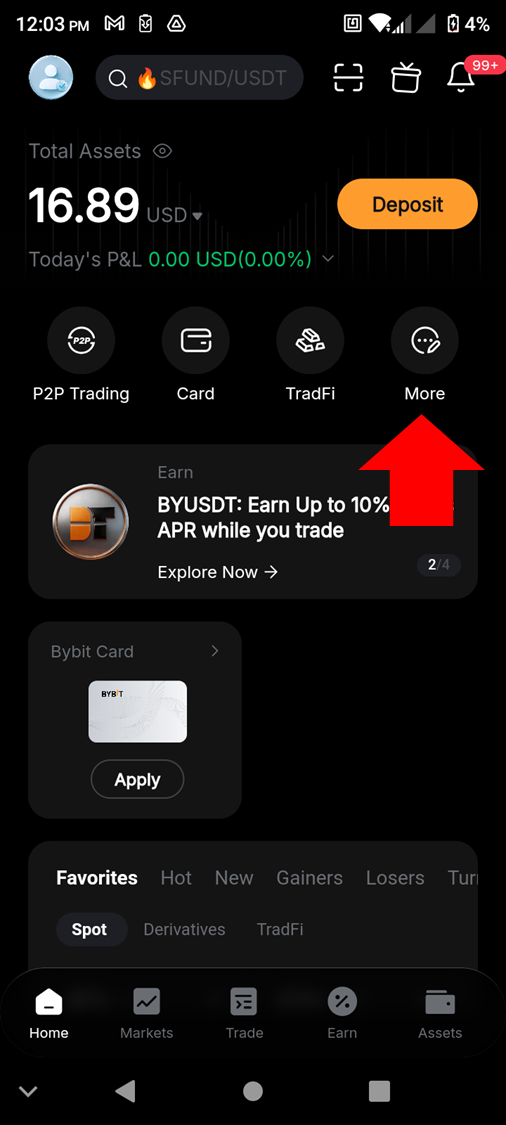
Step 1: Open the Bybit App, and from the home screen, tap on More to access the full list of services.
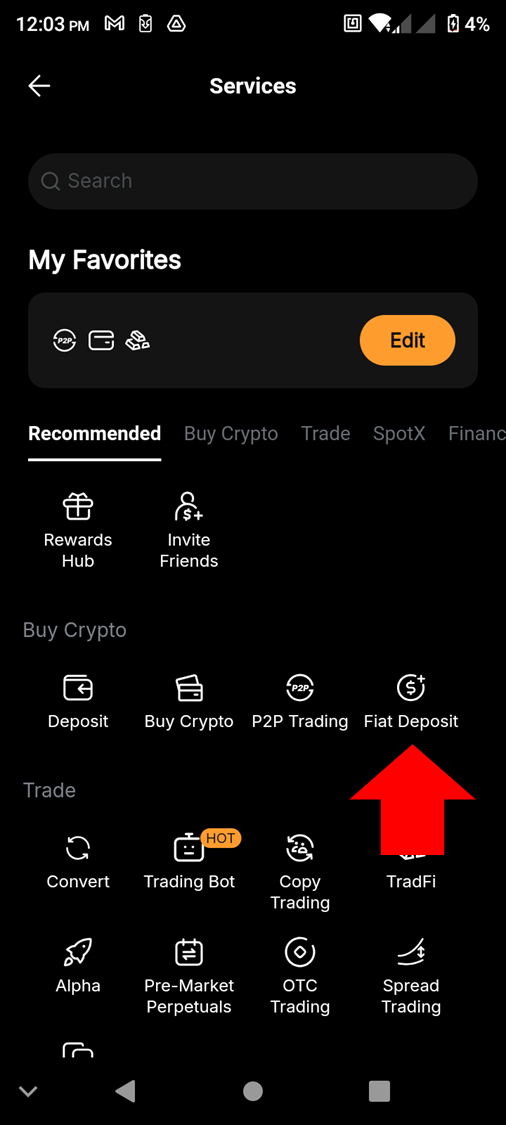
Step 2: Tap on Fiat Deposit.
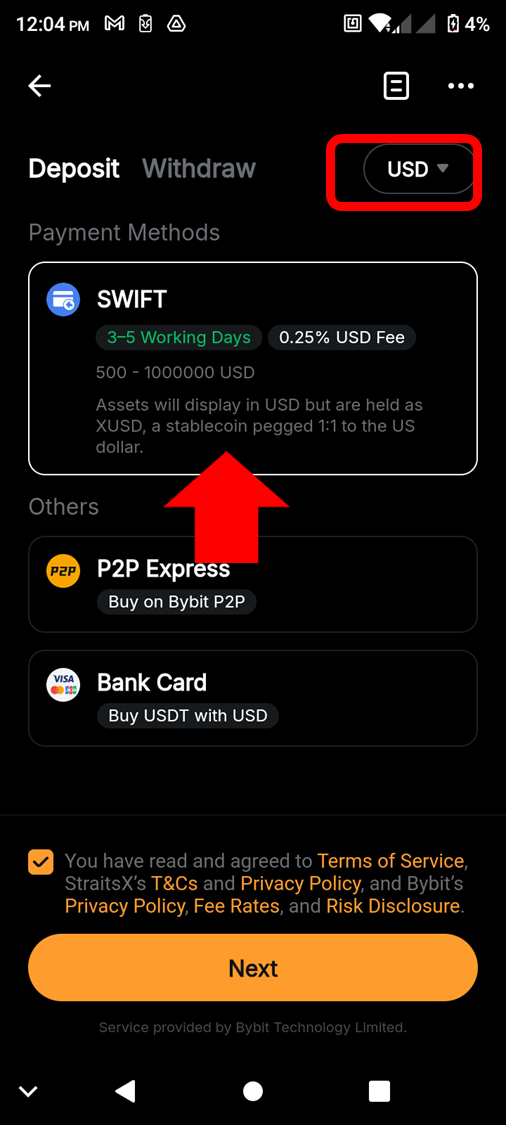
Step 3: On the Deposit screen, select USD as the currency in the top right. Choose a bank transfer method from the list shown, tick the box at the bottom to acknowledge the terms of the service and tap on the Next button.
Step 4: You’ll be asked to complete the KYC procedure for your account (if you haven’t already done so). In some cases, even if you’ve already completed Identity Verification with a national ID, you may be asked to verify with additional documents (for example, your passport). After successfully completing the identification procedure, you’ll be able to complete your transfer.
Step-by-step: How to deposit USD (via the web)
Follow the steps below to make a USD fiat deposit via Bybit’s desktop/web interface.
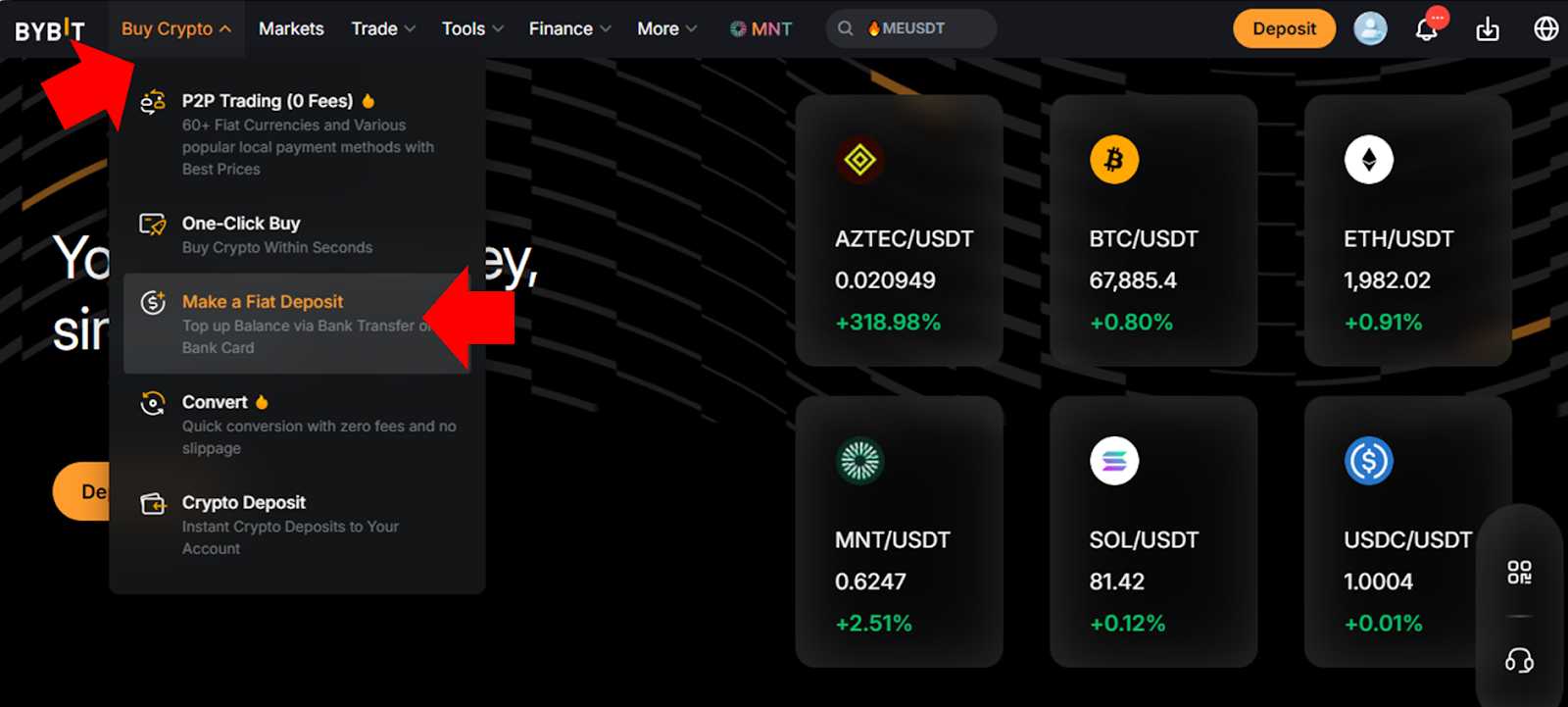
Step 1: Visit the Bybit homepage, log in to your account, hover the cursor over Buy Crypto in the top menu of the homepage and click on Make a Fiat Deposit.
Step 2: On the Fiat Deposit page, select USD as your transfer currency. Specify the amount you’d like to deposit, choose from the available payment methods and click on Continue.
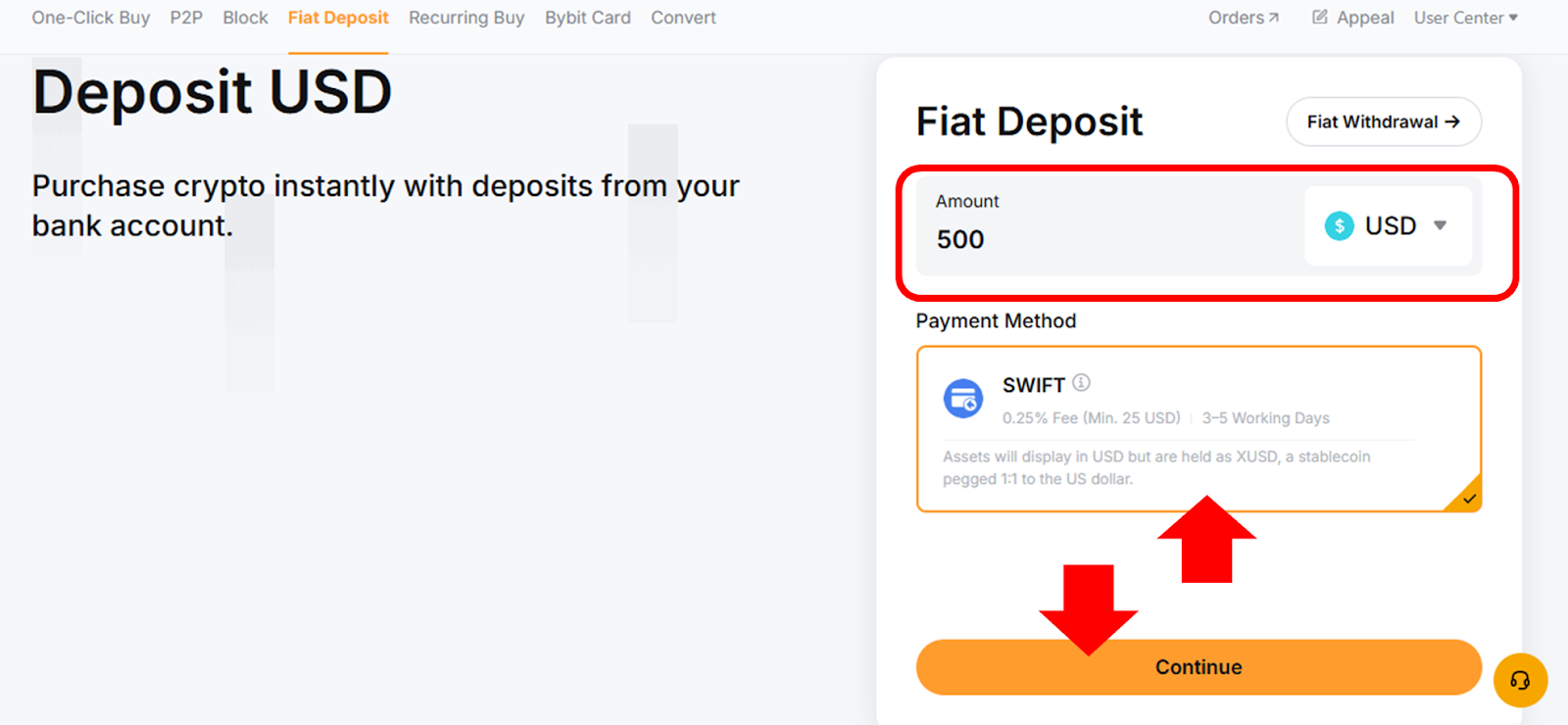
Step 3: You’ll be asked to complete the KYC procedure for your account (if you haven’t already done so). In some cases, even if you have completed Identity Verification with a national ID, you may be asked to verify with additional documents (for example, your passport). After successfully completing the identification procedure, you’ll be able to complete your transfer.
Important rules (name matching, reference codes, bank details)
For the SWIFT (non-US banks only) method, the required information must include your name, mobile number or email address, billing address and date of birth. For the SWIFT option, you’ll additionally need to provide your nationality, gender, residential address and basic transaction information. Please note that your name and other details must match the information you used to register with on Bybit.
El Salvador users who are utilizing QuickPay for USD deposits must supply their national identity document number.
Compliance and risk considerations
Any USD fiat deposits you make must comply with your relevant local regulatory requirements, in addition to Bybit’s standards. This includes providing the necessary information that must match your Bybit account details. In addition to the required information listed in the section above, you may be asked to provide additional identification or banking details before your deposit is approved by Bybit.
#LearnWithBybit