


How to use contract insurance: A step-by-step guide to Bybit Perp Protect

Perpetual contracts offer indefinite market exposure, but that comes with continuous risk. A sharp move against your position can trigger a margin call or liquidation before you have time to react. Contract insurance, available on Bybit through the Perp Protect feature, provides a structured safety net that stays active regardless of what happens to your Perpetual position.
Key Takeaways:
Contract insurance can be activated directly from Bybit’s trading interface without leaving your position view.
Coverage details and estimated cost are displayed before transaction confirmation.
Protection is tied to your position at the time of purchase, and does not adjust automatically if your position size changes.
What is contract insurance on Bybit?
Contract insurance on Bybit is realized through Perp Protect, an automated risk management tool that hedges both long and short Perpetual positions by acquiring options contracts based on an intelligent algorithm.
For a long position, Perp Protect acquires a put option. For a short position, it acquires a call option. Each option matches the quantity of your Perpetual position, and has a predetermined strike price and expiration date. At compensation time, the option's expiration, you may receive a payout if the trigger condition is met.
Perp Protect is available only to Unified Trading Account (UTA) users in Cross Margin mode. Supported pairs include BTCUSDT, ETHUSDT, XRPUSDT, SOLUSDT, DOGUSDT and MNTUSDT for USDT Perpetuals, as well as for their USDC equivalents.
How to access contract insurance on the trading interface
Perp Protect is accessible directly from your active positions — no separate navigation is required.
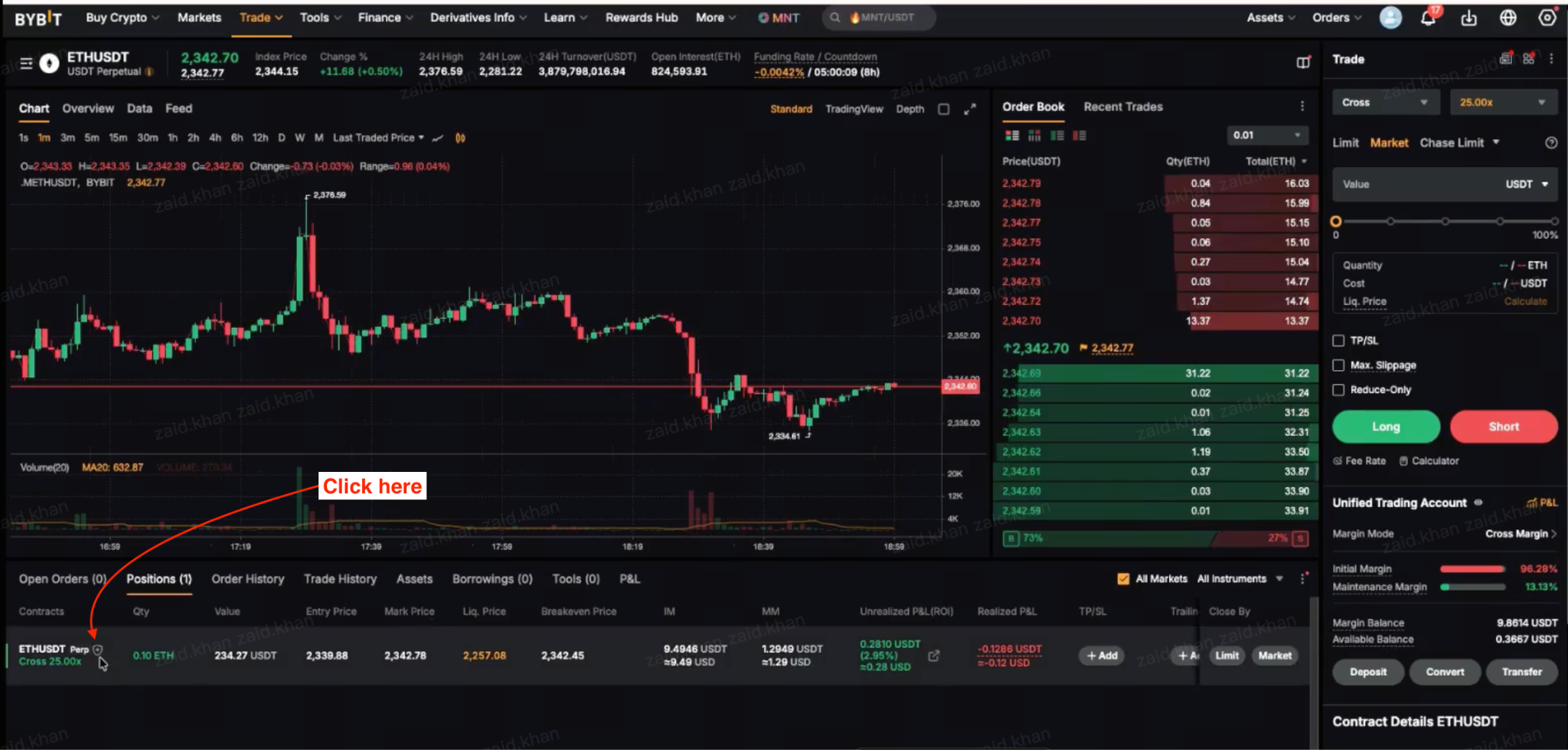
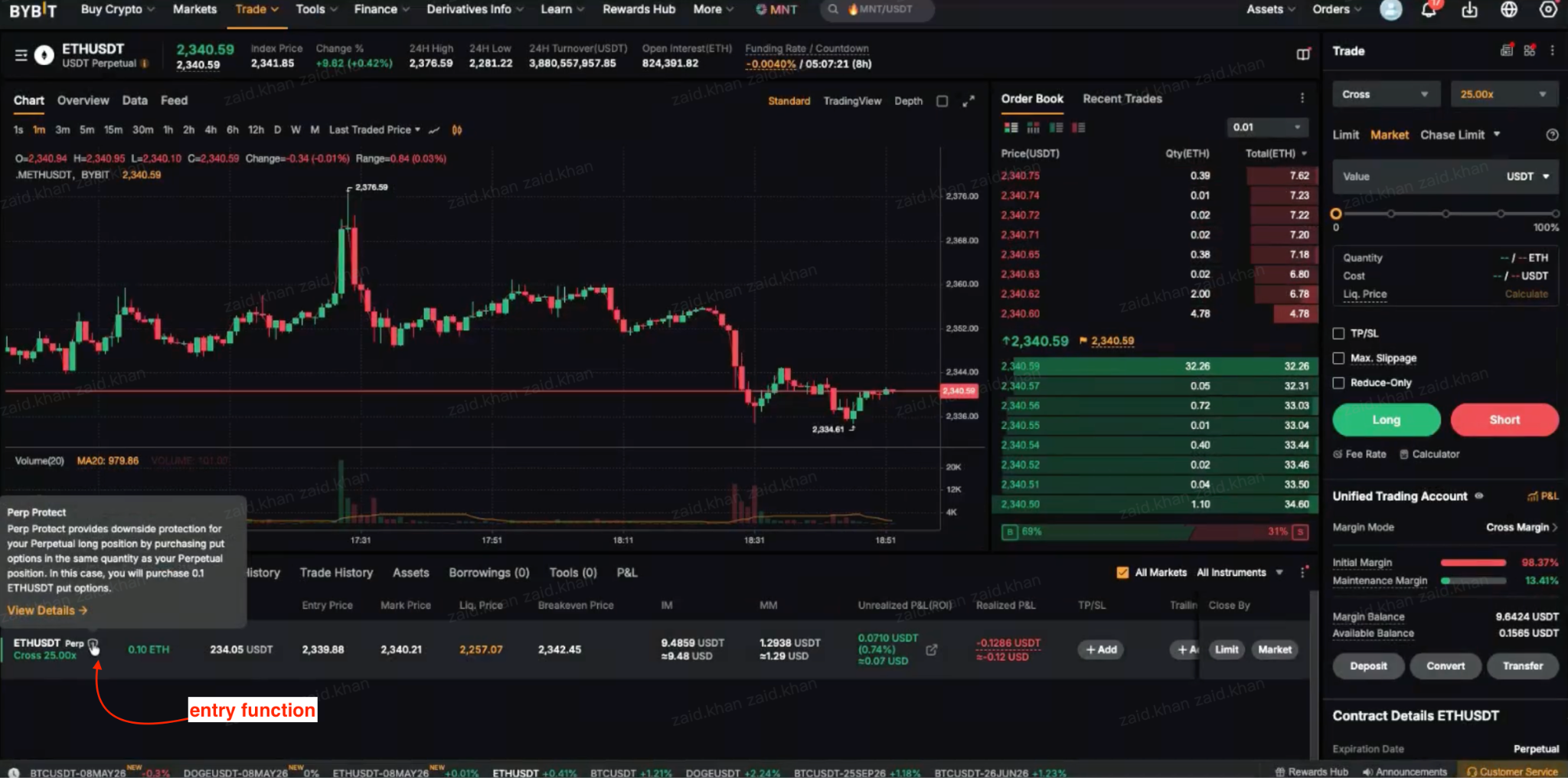
On the website, go to the Positions tab at the bottom of the trading interface. Locate your active Perpetual contract and click on the shield icon next to it. On the app, tap on the Positions tab, and then on the shield icon next to your position.
Note that Perp Protect is not a risk-free product. The liquidation process for your Perpetual position still follows standard procedures.
Step-by-step guide to purchasing contract insurance
Step 1: Open Perp Protect from your position
Go to the Positions tab and click or tap on the shield icon under your active Perpetual contract to open the Perp Protect configuration panel.
Step 2: Review the system recommendation
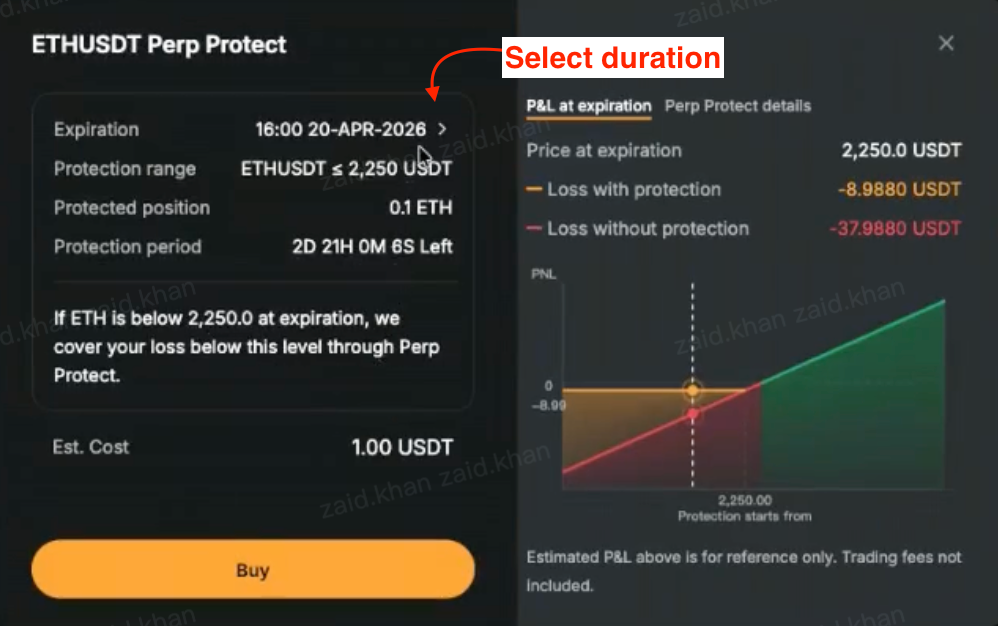
The system evaluates your leverage, initial margin and current market price, then generates a recommendation. This includes a suggested protection range and expiration date. The estimated cost is displayed at the bottom of the panel before you commit.
Step 3: Adjust your settings if needed
Tap on Protection range to open the expiration and strike price selection modal. Choose from available expiration dates and protection range options.
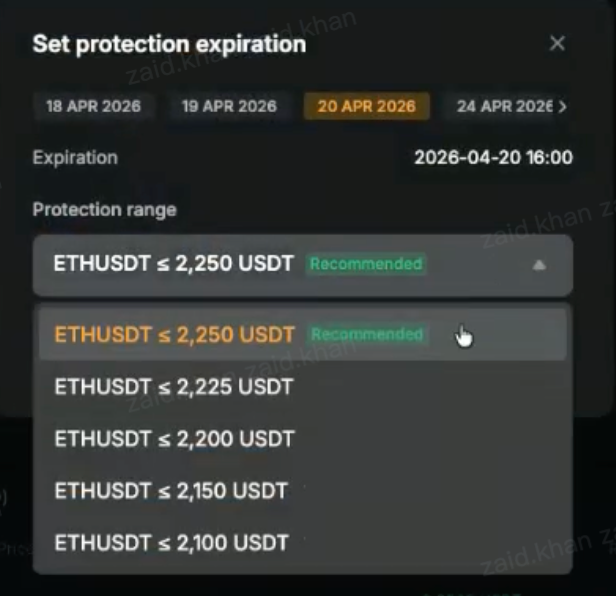
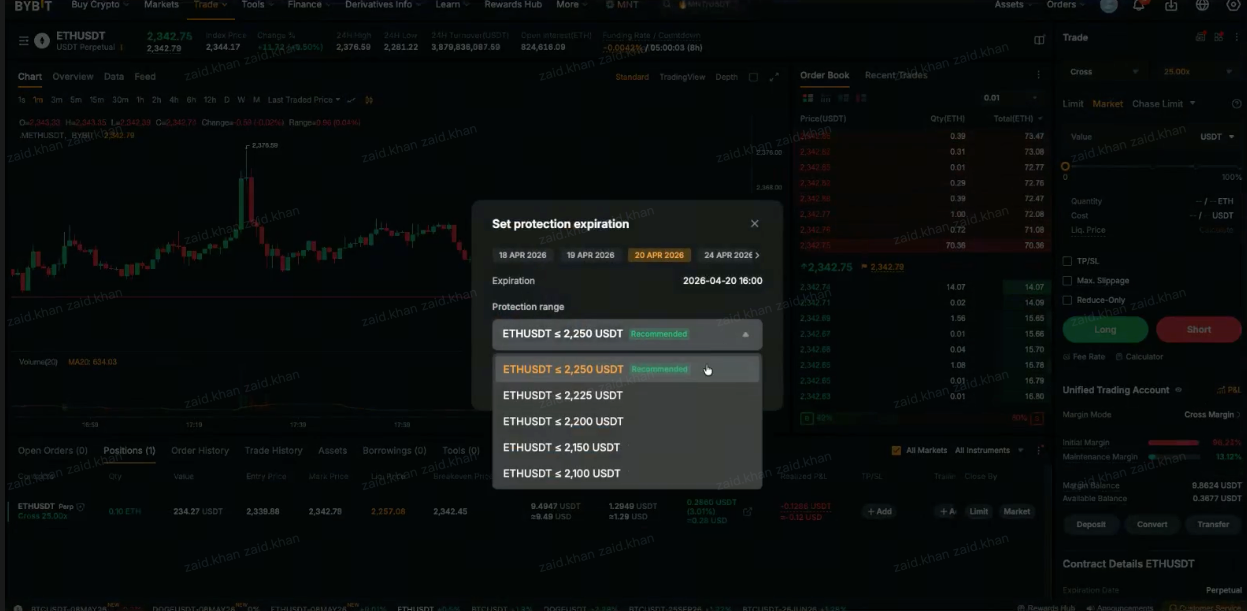
The system marks one option as Recommended. Select your preferred settings, and tap on Confirm.
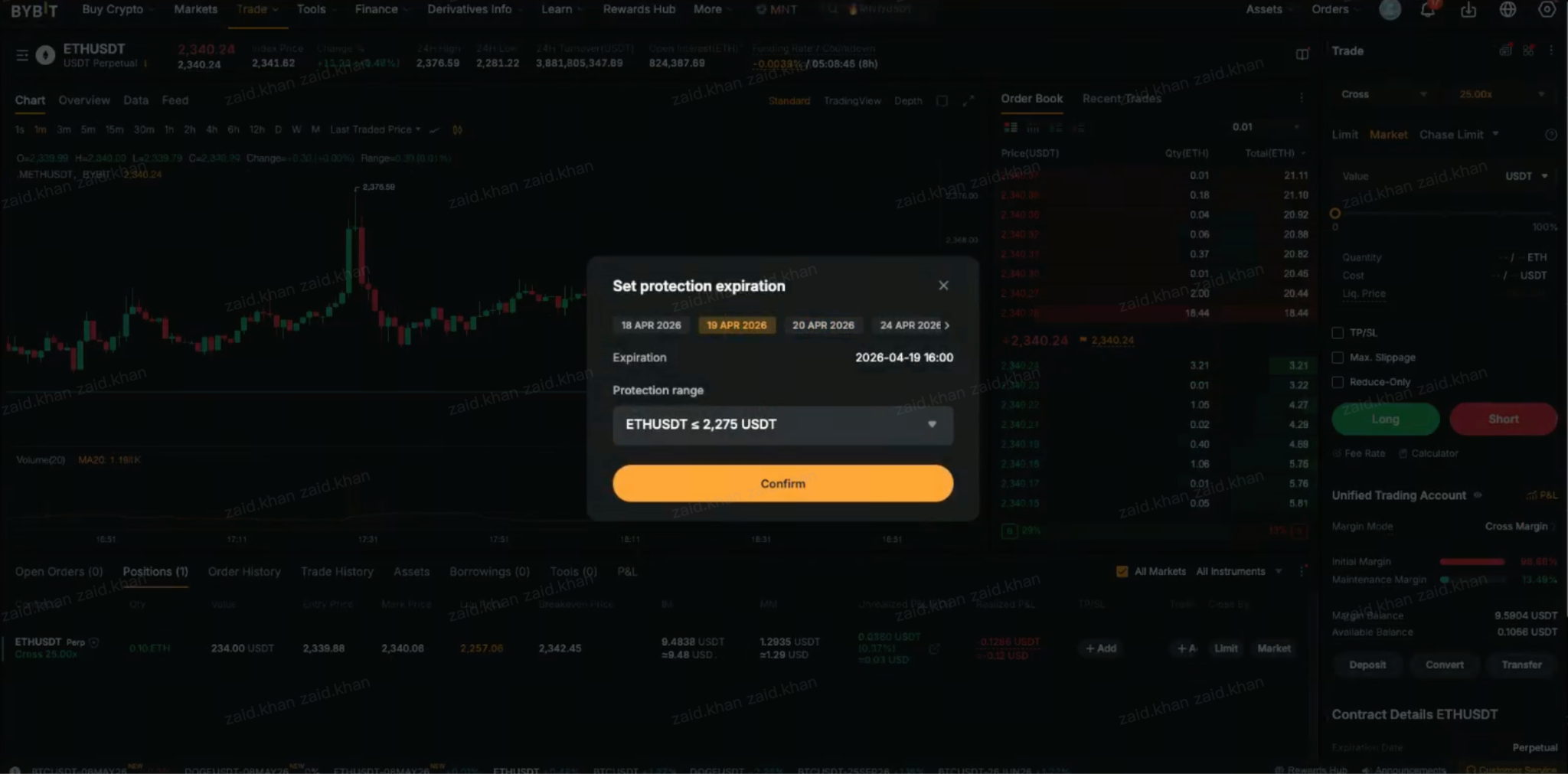
Step 4: Read the Important Notice and tap on Buy
An Important Notice pop-up will appear confirming four points:
The final price is subject to market fluctuations.
Compensation applies only if the settlement price reaches the protection level at expiration.
Closing your position during the protection period does not cancel the protection.
The protection fee is nonrefundable.
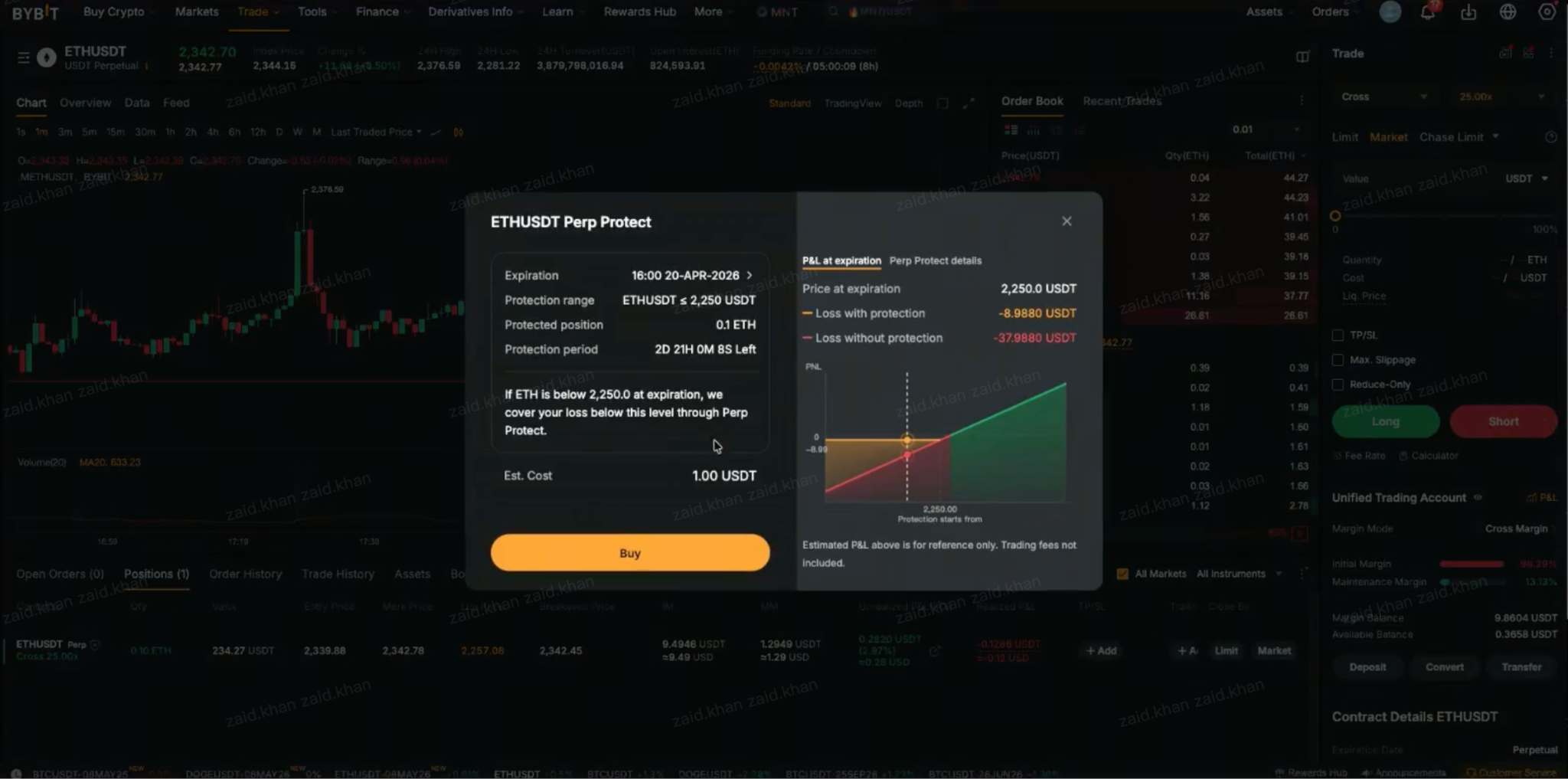
Tap on Got It, then on Buy.
Step 5: Confirm your order
A final order summary screen will appear showing the protection range, expiration, protected position size and estimated cost.
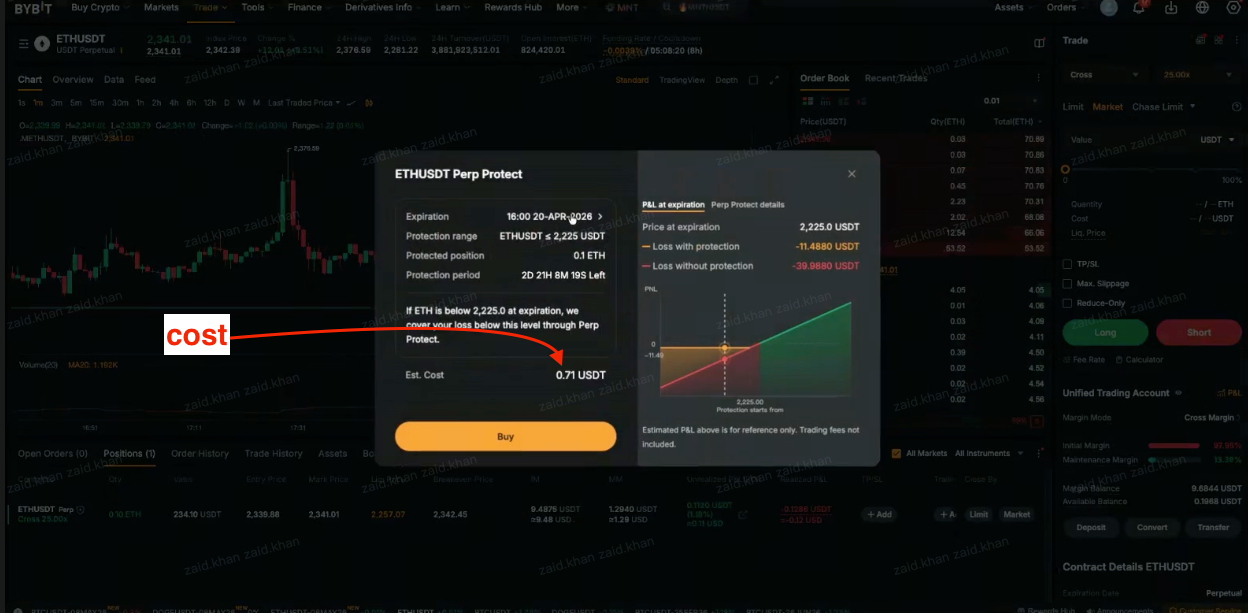
Tap on Confirm to complete your purchase.
Once you’ve purchased your contract insurance, a green shield icon will appear next to your Perpetual position in the Positions tab, confirming that Perp Protect is active. You can tap on the shield at any time to view the full details of your Perp Protect order.
How to set coverage amount and duration
Two settings define your coverage: the protection range and the expiration date.
The protection range is the strike price level at which compensation is triggered. A tighter range — closer to the current market price — costs more but activates at a smaller adverse move. Meanwhile, a wider range costs less but requires a larger move before compensation is paid.
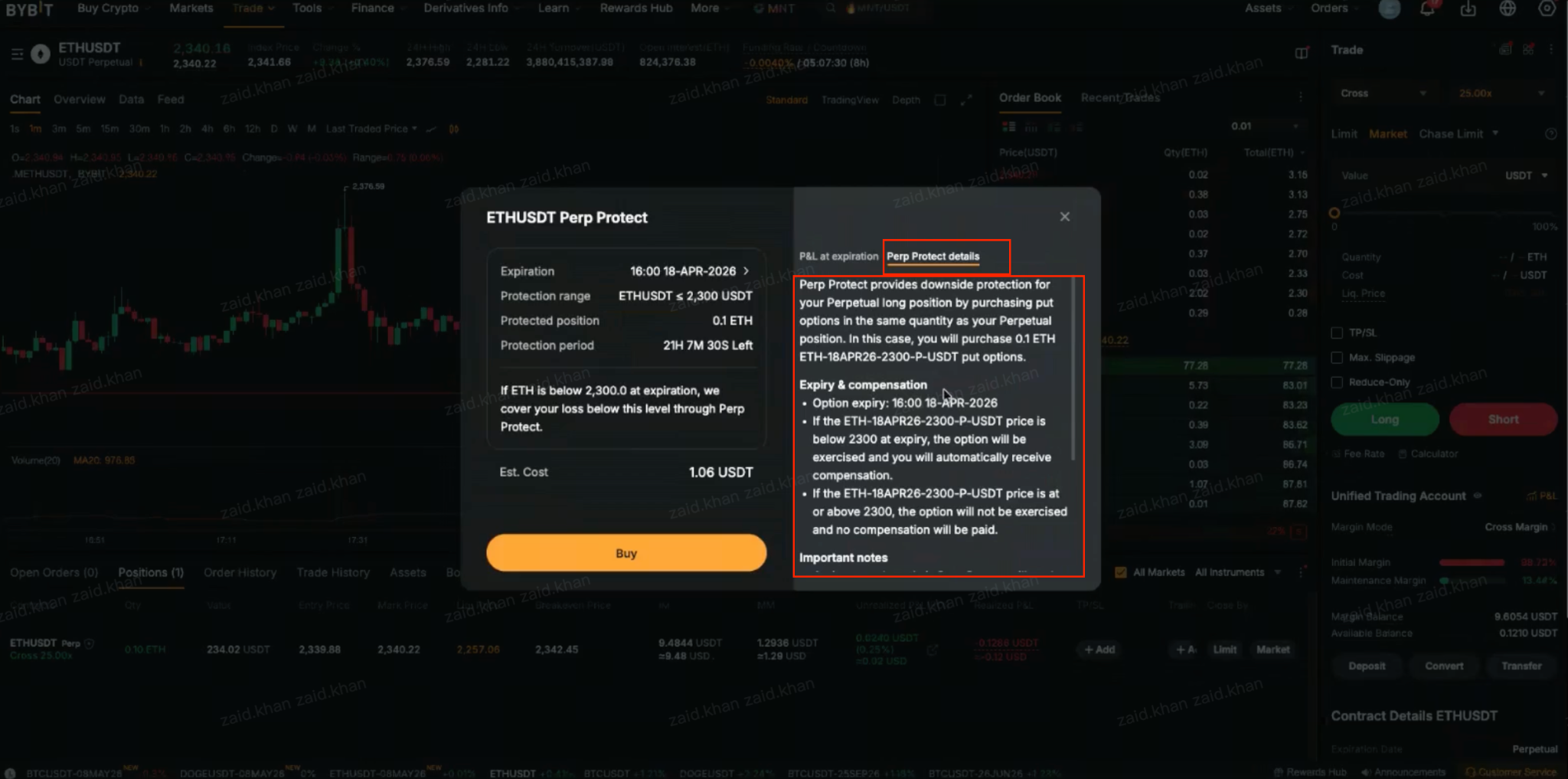
The expiration date determines how long your coverage lasts. All expirations occur at 12PM UTC on the selected date. Coverage is fixed at purchase. If your position size changes afterward, the original coverage remains unchanged.
How to monitor your insured position
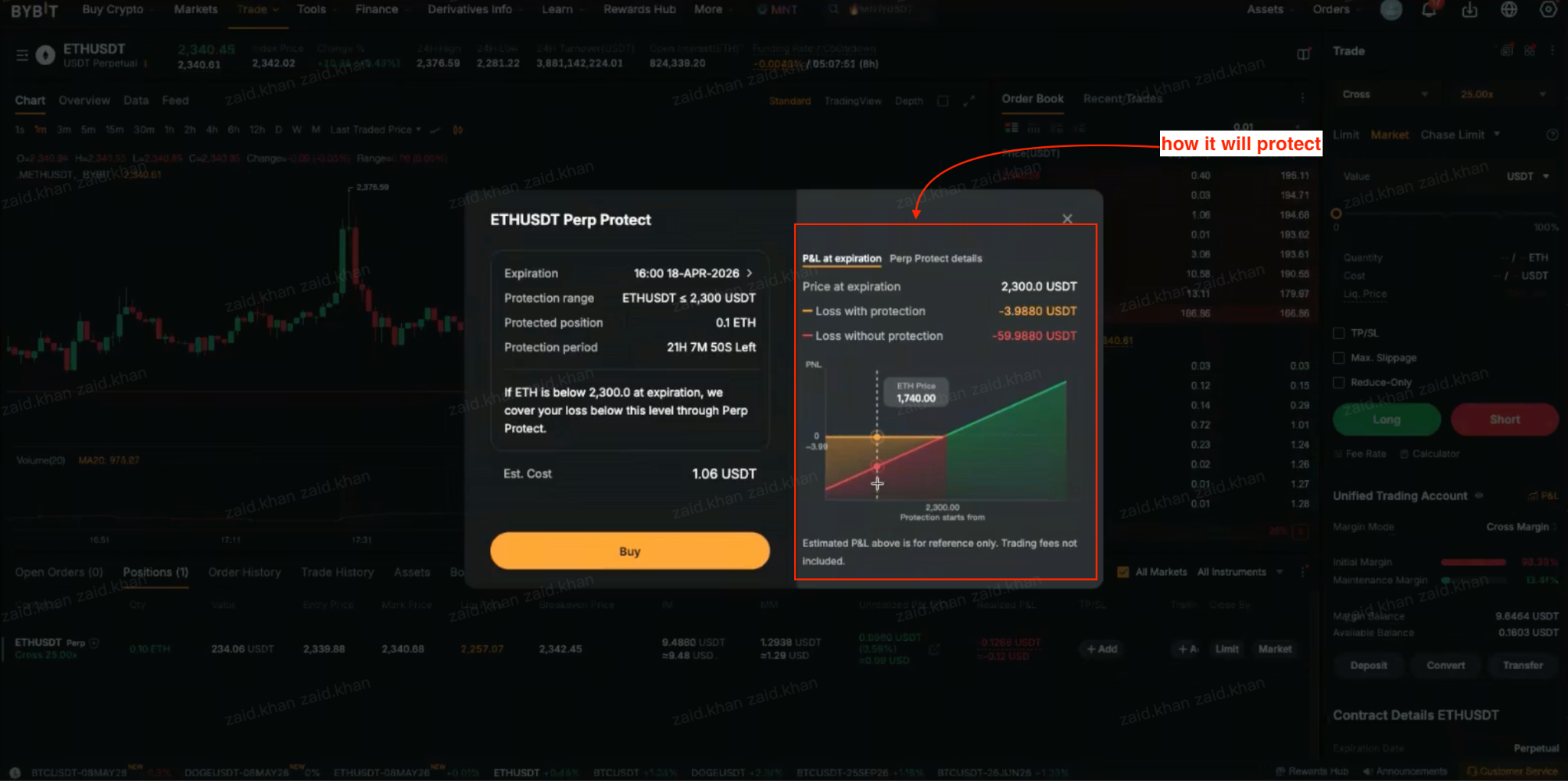
Tap on the green shield icon next to your position to view the protection range, expiration, time remaining and protected position size. The P&L at expiration tab shows a real-time chart comparing estimated profit or loss with and without Perp Protect at various price levels. On the App, you can also navigate directly to the Perp Protect options contract from the Options section.
What happens when the market moves against your position?
If the market moves sharply against your position during the protection period, two things occur simultaneously.
First of all, your Perpetual position follows standard margin and liquidation rules. If your available balance is insufficient to cover a margin call, the fee is deducted from your position margin, moving your liquidation price closer to the mark price. Perp Protect does not intervene in this process.
Secondly, your options contract remains active and independent. Even if your Perpetual position is liquidated, the put or call option remains valid until compensation time. You may still receive a payout at expiration if the trigger condition is met.
How and when payouts are triggered
The settlement price at compensation time determines whether you receive a payout. It's calculated based on the average index price during the 30 minutes prior to compensation time.
For a long position, compensation is triggered when the settlement price falls below the strike price:
Payout = Max {0, (strike price − settlement price)} × position size − options premium
For a short position, compensation is triggered when the settlement price rises above the strike price:
Payout = Max {0, (settlement price − strike price)} × position size − options premium
If the trigger condition is not met, no compensation is paid. Your maximum loss from the insurance itself is the premium paid at purchase. Payouts are automatically credited to your UTA.
Advantages of using contract insurance on Bybit
Unlike a stop loss, which closes your Perpetual position when a price level is hit, Perp Protect keeps your position running throughout the protection period. If the market recovers before expiration, your position benefits from that recovery. If it doesn’t, you receive compensation to offset the loss.
The intelligent recommendation system removes the need to navigate the Options Chain manually. The cost is visible upfront, trigger conditions are clearly defined and payouts are automatic.
Tips for maximizing protection while minimizing cost
Match your protection period to your holding time. A two-day position doesn’t need a week’s worth of coverage. Extra duration increases your premium without adding value.
Start with the recommended range. Deviating toward tighter ranges significantly raises cost. Review the P&L at expiration chart before changing the default range.
Maintain sufficient margin. Perp Protect does not prevent liquidation. Keeping enough margin in your UTA gives protection more time to remain relevant.
Activate at entry, not under pressure. The earlier you activate, the longer your coverage window. Waiting until a position is already stressed reduces the available protection period.
Check the estimated cost before confirming. The actual premium at execution may differ slightly from the estimate shown during setup.
The bottom line
Perp Protect gives Perpetual contract traders a structured way to limit downside without closing their positions. Pay a defined premium, secure a fixed coverage window and receive an automatic payout if the trigger condition is met at expiration. Although Perp Protect won’t prevent a liquidation, and doesn’t adjust if your position changes, it does provide a meaningful safety net that remains active through the specified protection period, making it a practical tool for managing risk for Perpetual contracts.
#LearnWithBybit