


How to buy crypto with your credit or debit card on Bybit

In the cryptocurrency market, speed is often the difference between capitalizing on a trend and missing an opportunity. While traditional bank transfers are reliable, they can sometimes take days to process, leaving traders waiting on the sidelines while prices fluctuate. For users seeking a more immediate entry point, credit and debit cards offer one of the fastest and most efficient ways to convert fiat currency into digital assets.
This article serves as the ultimate beginner-friendly walk-through for buying crypto with a bank card on Bybit. We’ll explore the One-Click Buy feature, focusing on how you can use Visa, Mastercard and digital wallets like Google Pay and Apple Pay to fund your account. Whether you’re making your first purchase or looking for a faster payment method, this guide will help you complete your transaction securely in minutes.
Key Takeaways:
Bybit supports instant crypto purchases using Visa and Mastercard, as well as Google Pay and Apple Pay, through the One-Click Buy feature.
Transaction fees vary by region and card type, generally ranging from 1.1% for EU cards to 3.05% for non-EU Visa cards.
Users must complete at least Individual Identity Verification Lv. 1 to access bank card payment services on the platform.
How buying crypto with a bank card works on Bybit
The process of buying cryptocurrency with a bank card on Bybit is facilitated through the One-Click Buy feature. This service is designed to be intuitive and familiar to anyone who has ever shopped online. You simply select the amount of fiat currency you wish to spend, enter your card details and authorize the payment.
It’s crucial to understand how this approach differs from other purchasing methods, such as P2P Trading. In a P2P transaction, you’re dealing directly with another human merchant. You must transfer fiat currency off-platform via a bank or e-wallet app, and wait for the seller to confirm receipt and release the assets from escrow. And while P2P offers great flexibility, buying via One-Click Buy is automated, direct and usually results in immediate settlement without the need to interact with a counterparty.
Buying crypto via a bank card also differs from a standard Fiat Deposit, which places cash into your Funding Account that you can use later to buy crypto. In contrast, purchasing with a credit or debit card converts your fiat currency directly into cryptocurrency — such as USDT, BTC or ETH — in a single transaction.
Bybit processes these payments through a secure infrastructure that acts as a gateway between your bank and your crypto wallet. The platform supports 3D Secure (3DS) technology, which adds an extra layer of authentication to prevent fraud and ensure only you can authorize transactions on your card.
What you need before buying crypto with a card
Before initiating a purchase, you must meet several prerequisites to ensure a smooth transaction. First and foremost, you need a valid Bybit account registered with either an email address or a mobile phone number.
The most critical requirement is Identity Verification (KYC). To access bank card payment services, you must complete at least Individual Identity Verification Lv. 1. It’s important to note that, currently, Business Verification is not supported for bank card payments. Please note that if you haven’t yet verified your identity, you’ll be prompted to do so before you can add a card.
Regarding the cards themselves, Bybit primarily supports Visa and Mastercard networks globally. For users in Asia, JCB payments are also supported. However, you should be aware that corporate cards are not supported on the platform.
On the banking side, you must ensure that your card is enabled for international and online transactions. Furthermore, your card must support 3DS verification. This protocol sends a one-time passcode (OTP) to your phone or banking app to confirm your identity during the purchase. If 3DS isn’t active, the transaction will likely fail.
Finally, ensure that you’re in a supported region. While Bybit offers broad global coverage, services may be restricted in certain jurisdictions. If you’re unsure, check the supported countries list in the Help Center.
How to buy crypto with your credit or debit card on Bybit
Buying crypto via One-Click Buy is a streamlined process. The following step-by-step guide will walk you through the user interface flow to successfully complete your purchase.
Step 1: Open One-Click Buy
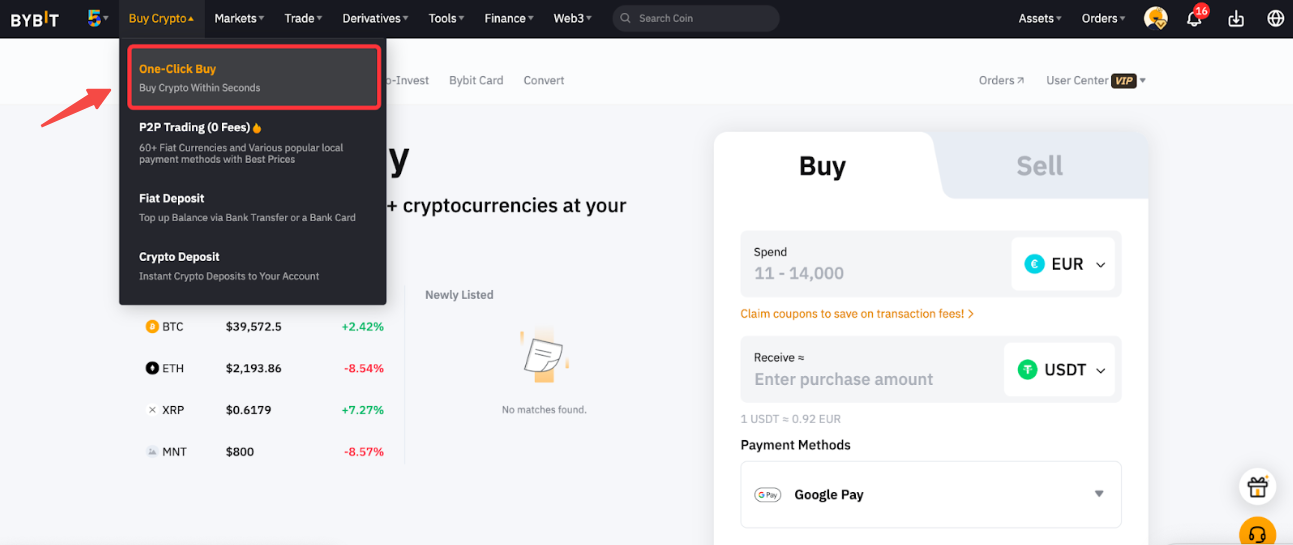
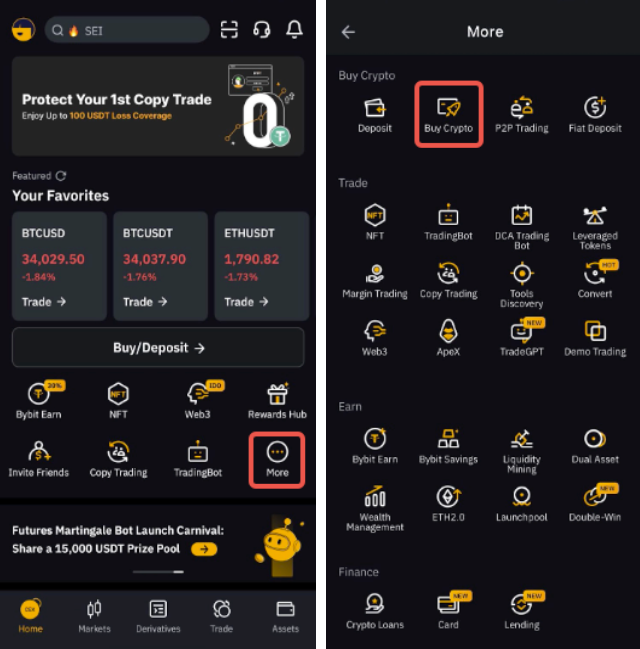
To get started, log in to your Bybit account (if you don't already have one, you can register here). On the website, navigate to the top-left corner of the navigation bar, hover over Buy Crypto and select One-Click Buy. If you’re using the Bybit App, tap on More on the homepage, and then select Buy Crypto.
Step 2: Input order details
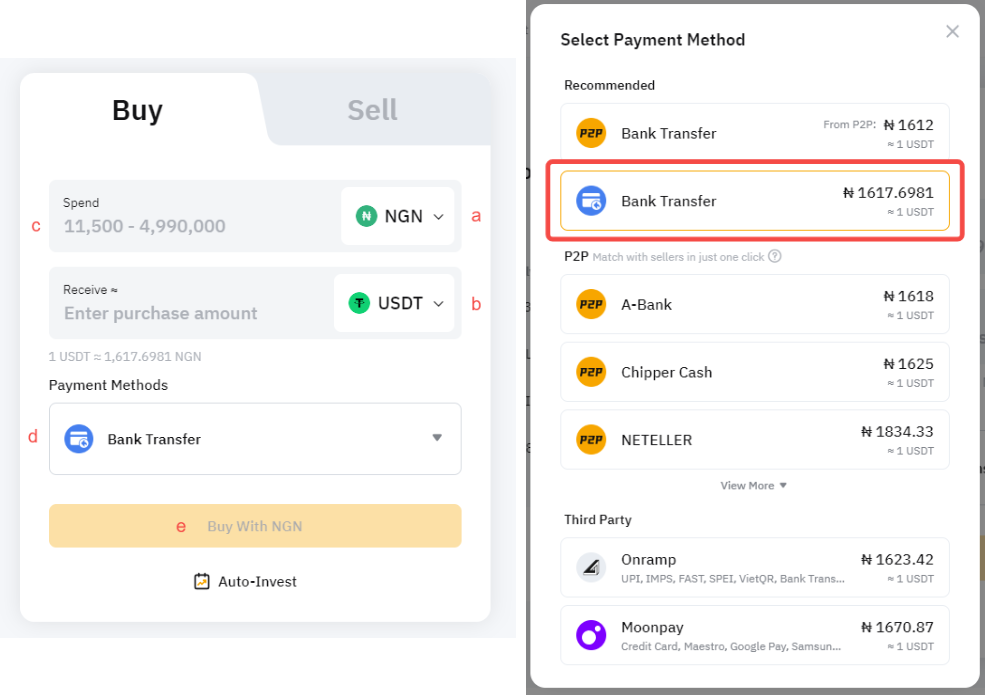
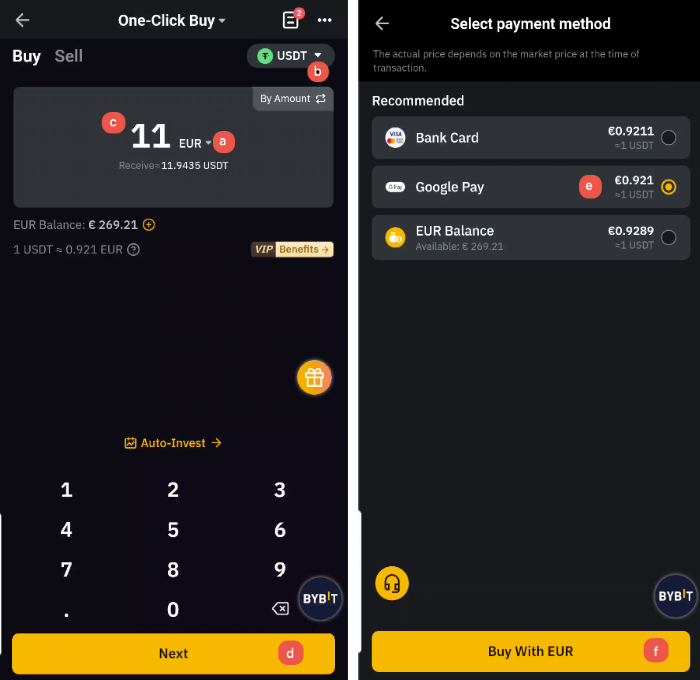
On the order page, you’ll see fields to select your currencies. First, choose the fiat currency you want to pay with (e.g., USD, EUR, GBP). Next, select the cryptocurrency you would like to receive (e.g., USDT, BTC), and enter the purchase amount. The system will automatically display the estimated amount of crypto you’ll receive based on the current rate.
Step 3: Select your payment method
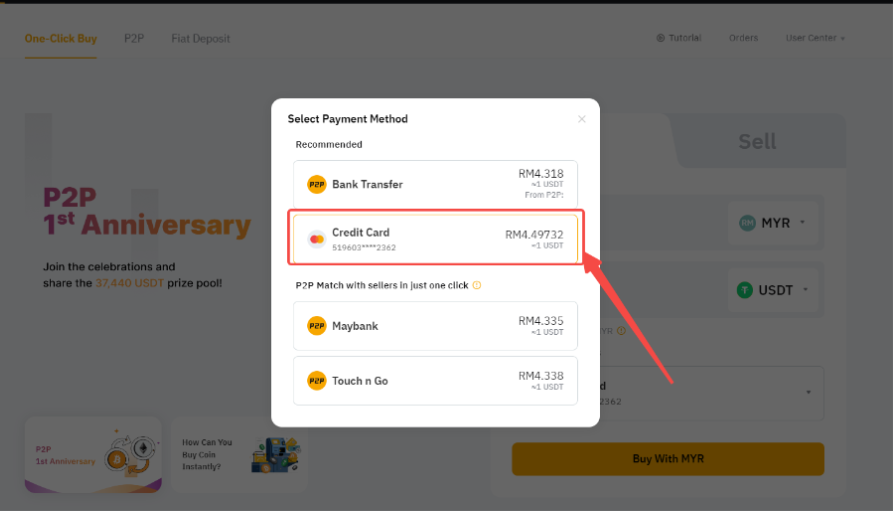
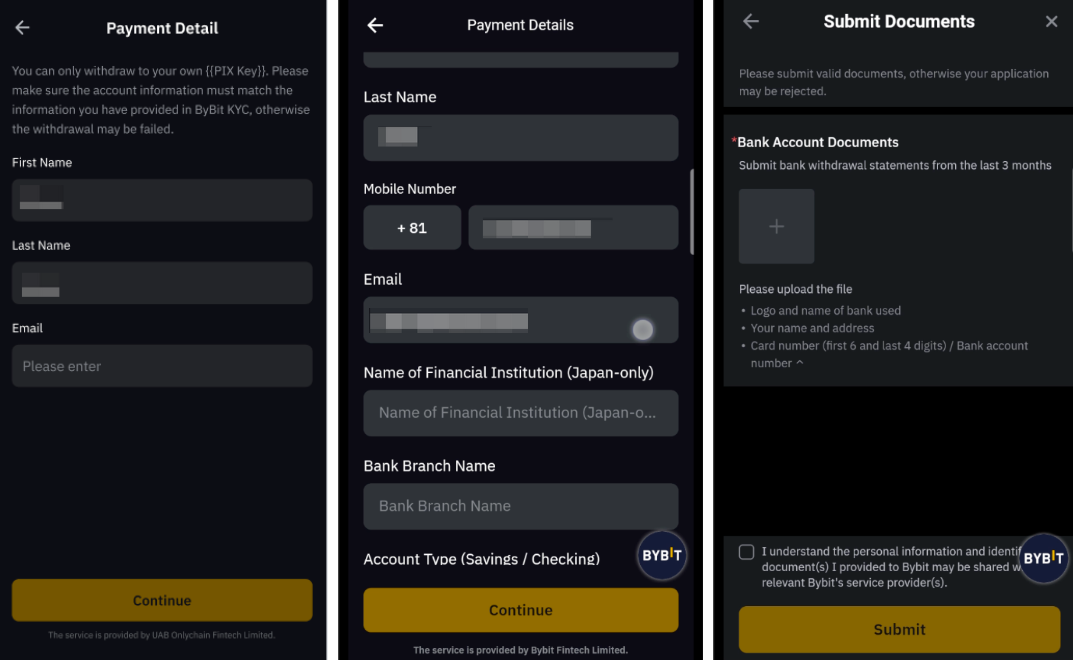
Select Bank Card as your payment method. If you’ve already previously added a card, it will appear here for you to select. If this is your first time, click on Add Card.
Step 4: Link a new card
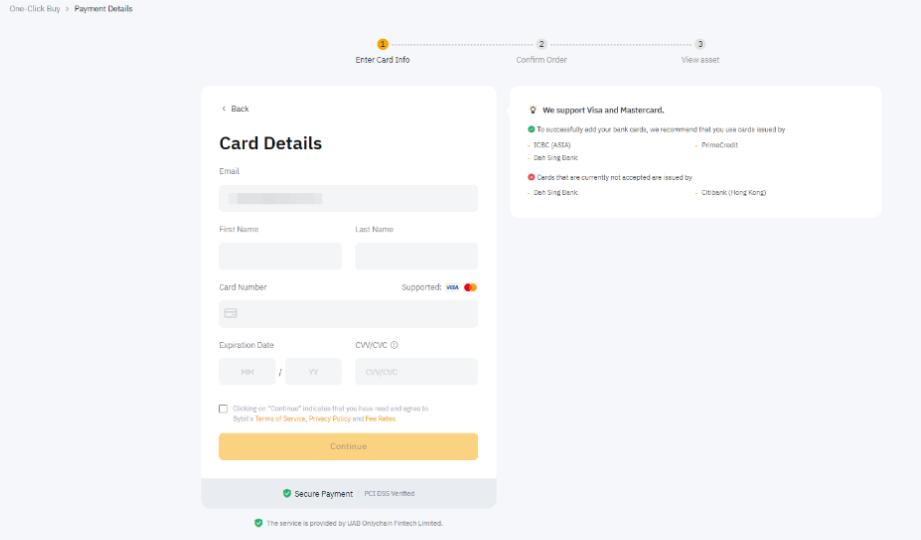
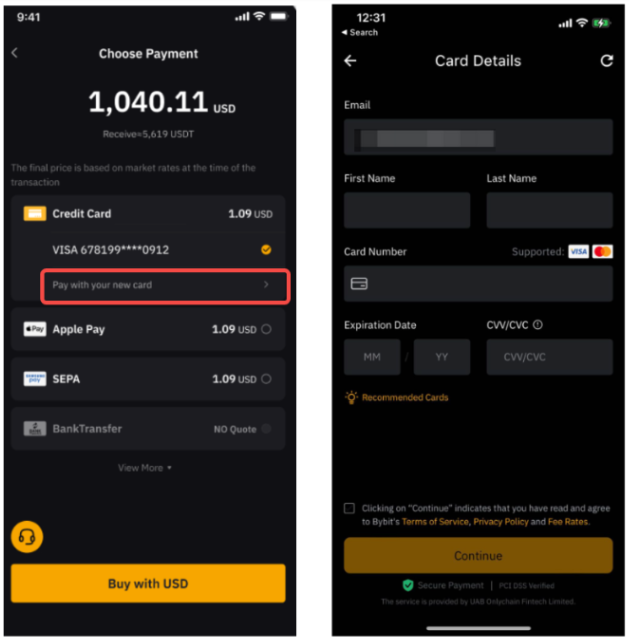
When adding a new card, you’ll need to input your card details securely. Enter your email address, the cardholder's first and last name, the card number, the expiration date and the CVV code.
Please note that there is a crucial rule regarding your name: the bank account name associated with your card must match your KYC-verified name on Bybit. Third-party payments are not permitted. If names do not match, sellers can refuse the transaction, and you risk asset freezing or account suspension.
You will also be required to provide a billing address. This address must match the registered address on file with your card issuer. When entering this information, please ensure that you use standard characters compliant with the ISO/IEC 8859-1 format. Using special non-Latin characters or extended symbols may cause the system to reject the address.
Step 5: Review order details
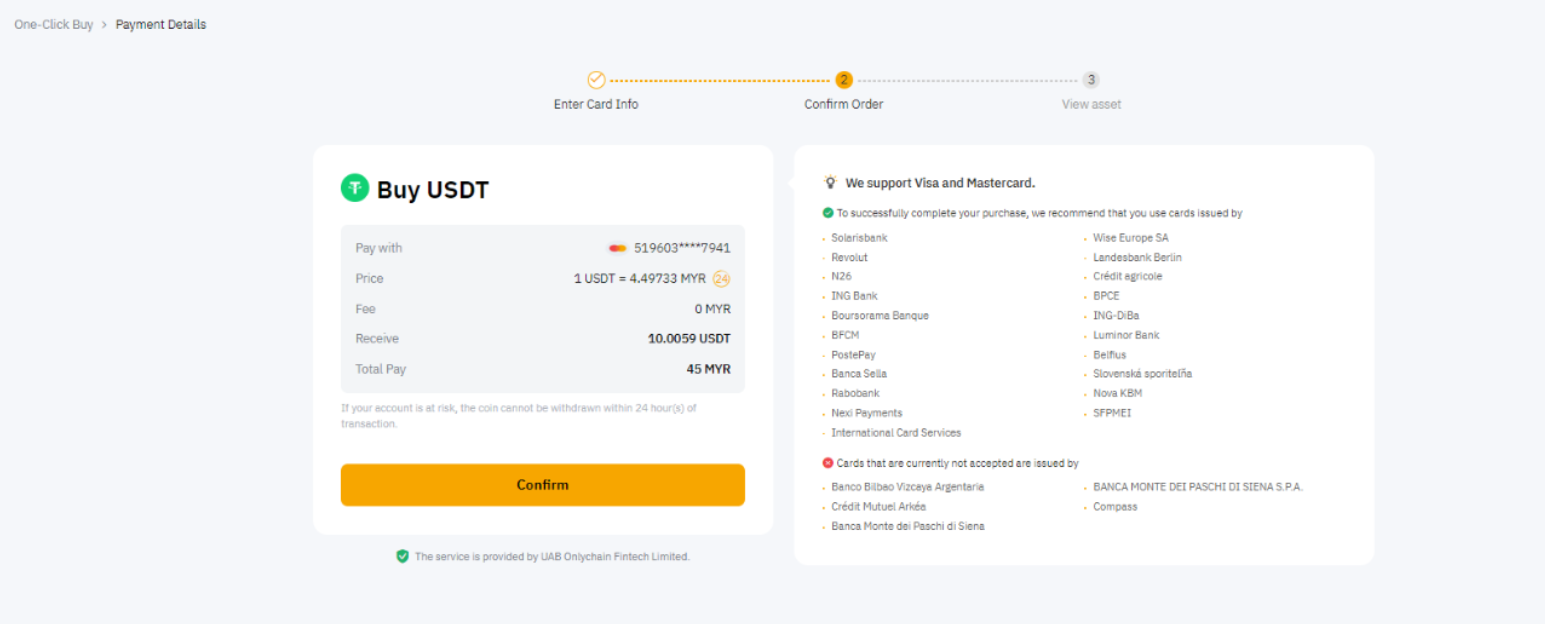
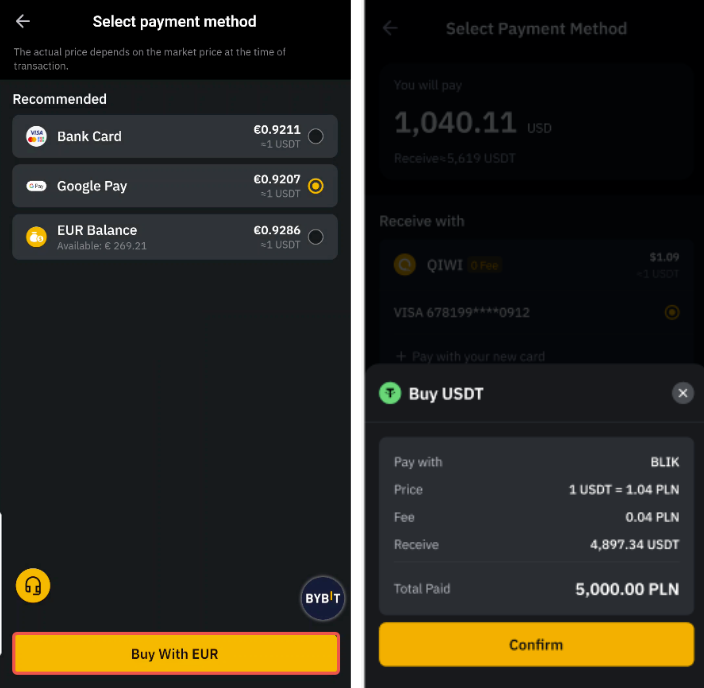
Once the card is added, carefully review your order details. The transaction page will show a reference price and the estimated crypto amount. Please note that the price quote refreshes every 30 seconds in order to reflect real-time market conditions. Click on Confirm to proceed.
Step 6: Pass 3D Secure verification
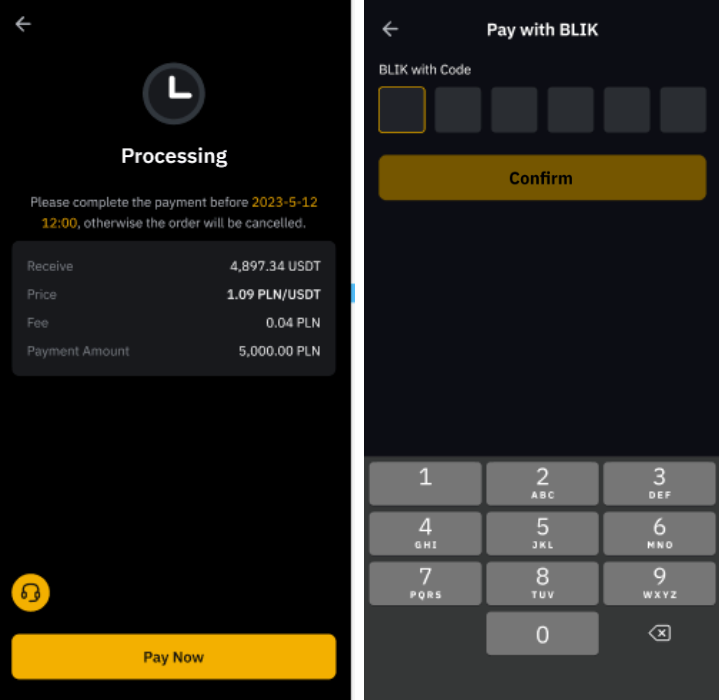
After confirming, you may be redirected to your bank's secure page or mobile app to complete 3D Secure verification. You’ll typically need to enter a one-time passcode (OTP) sent via SMS, or approve the transaction within your banking app.
Once the payment is authorized, the transaction processing usually takes from only a few seconds to minutes. Upon success, the purchased assets will be credited directly to your Funding Account. You can link up to five credit/debit cards to your account.
How to buy crypto with Google Pay and Apple Pay
For users who prefer the convenience of mobile payments, Bybit supports both Google Pay and Apple Pay. These methods are available for more than 36 fiat currencies, and offer a seamless experience for anyone already using digital wallets.
To use Apple Pay, ensure you’re using a device running iOS 16.2 or above. You must access Bybit via the Safari browser, or use the Bybit App, version 4.40.0 or higher.
Step 1: Head to the One-Click Buy menu
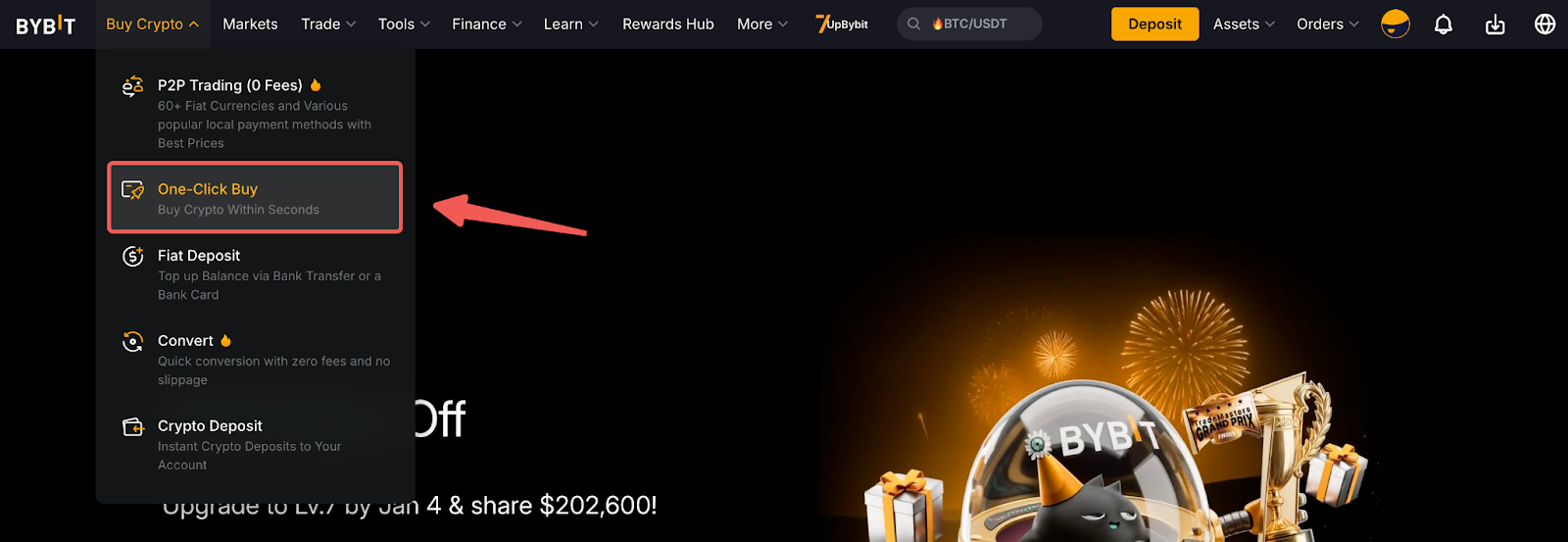
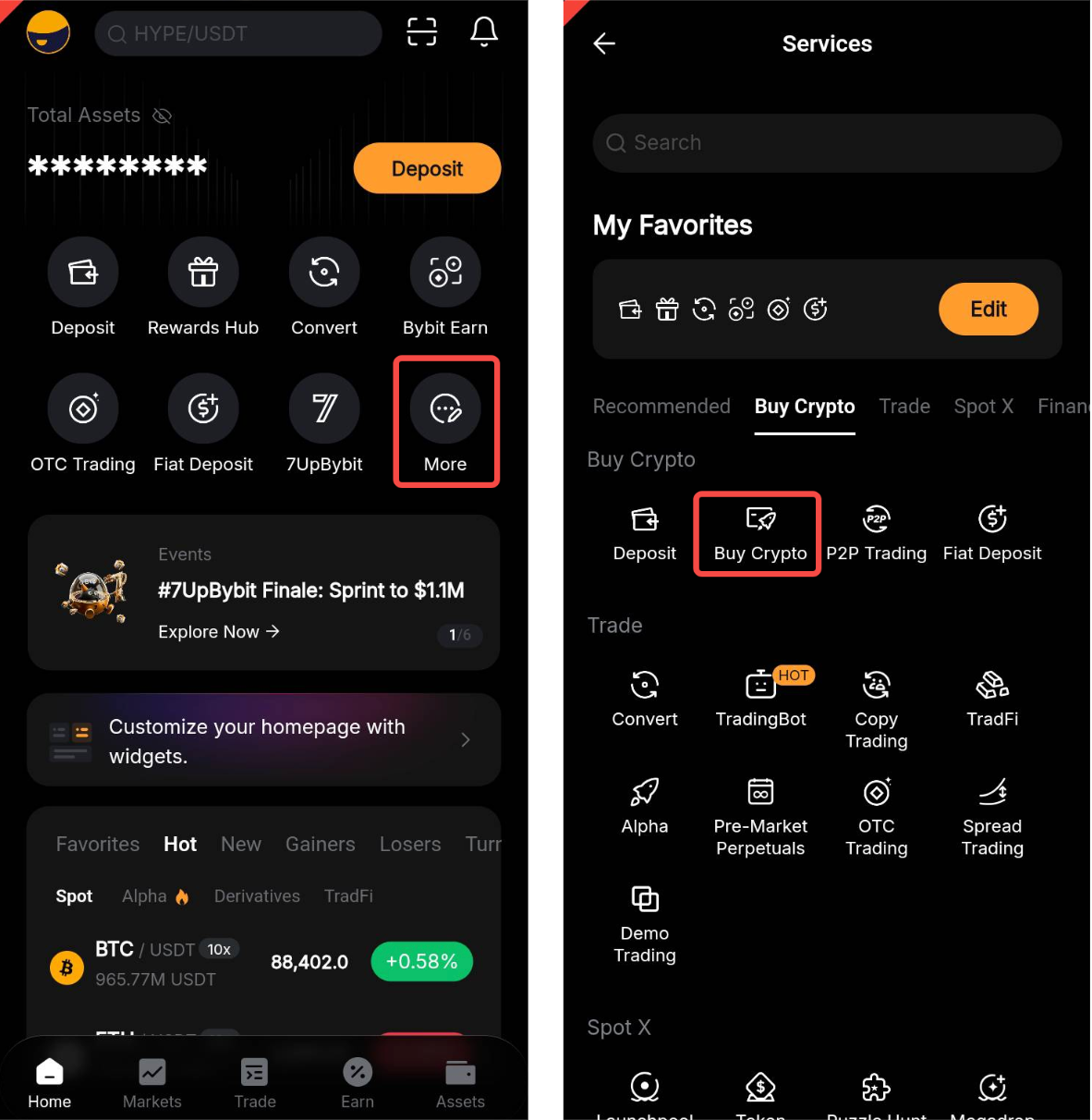
Go to Buy Crypto and select One-Click Buy on the website or in the Bybit App.
Step 2: Select Google Pay or Apple Pay
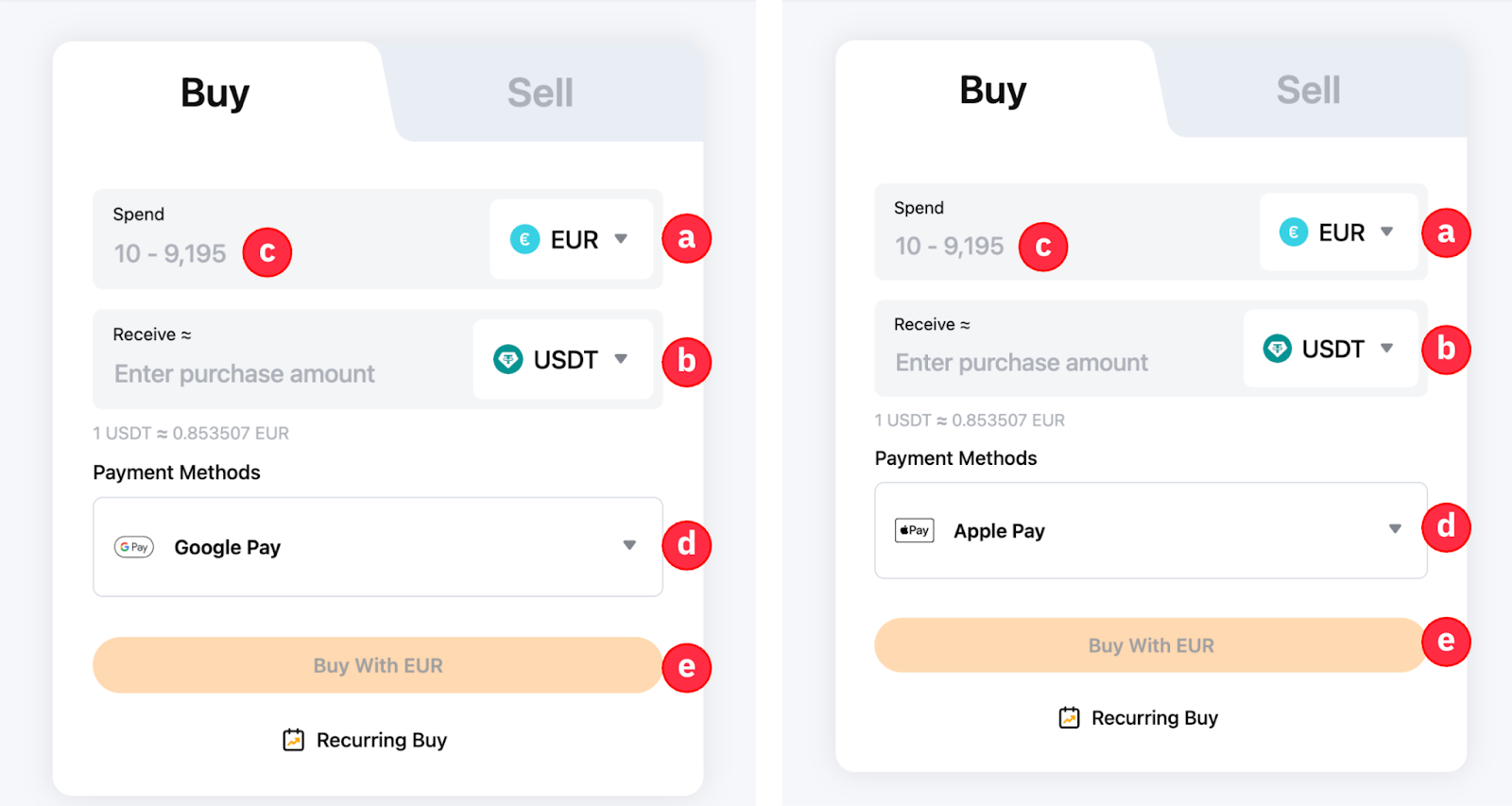
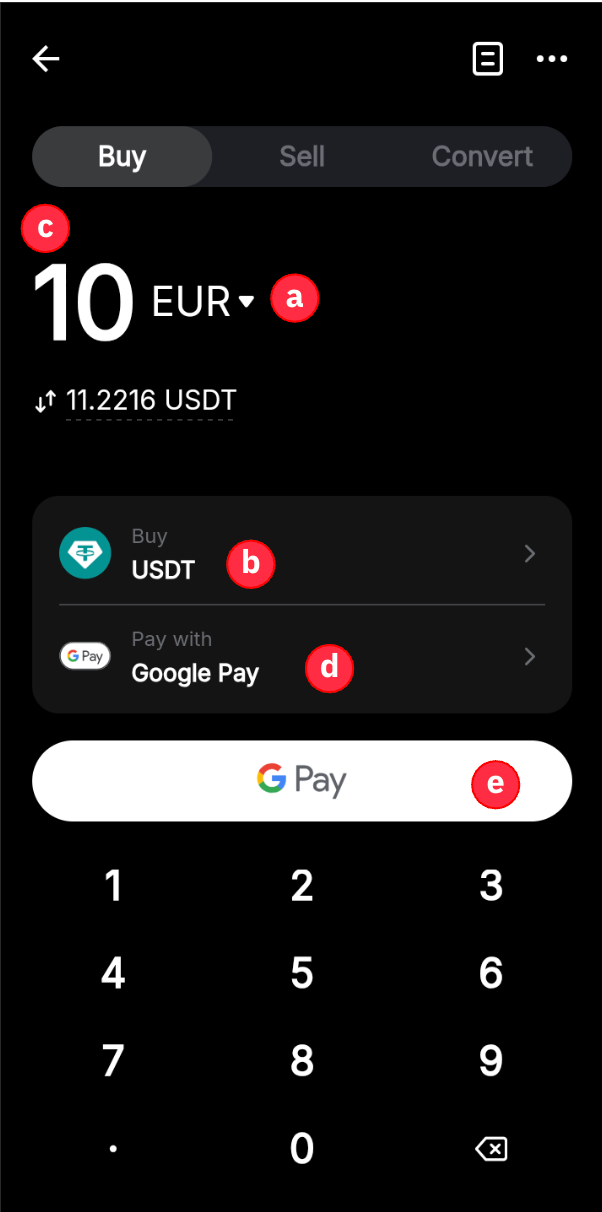
Select your desired fiat currency and the cryptocurrency you wish to purchase, and enter the amount you wish to purchase. Under payment methods, choose Google Pay or Apple Pay, depending upon your device.
Step 3: Link and confirm
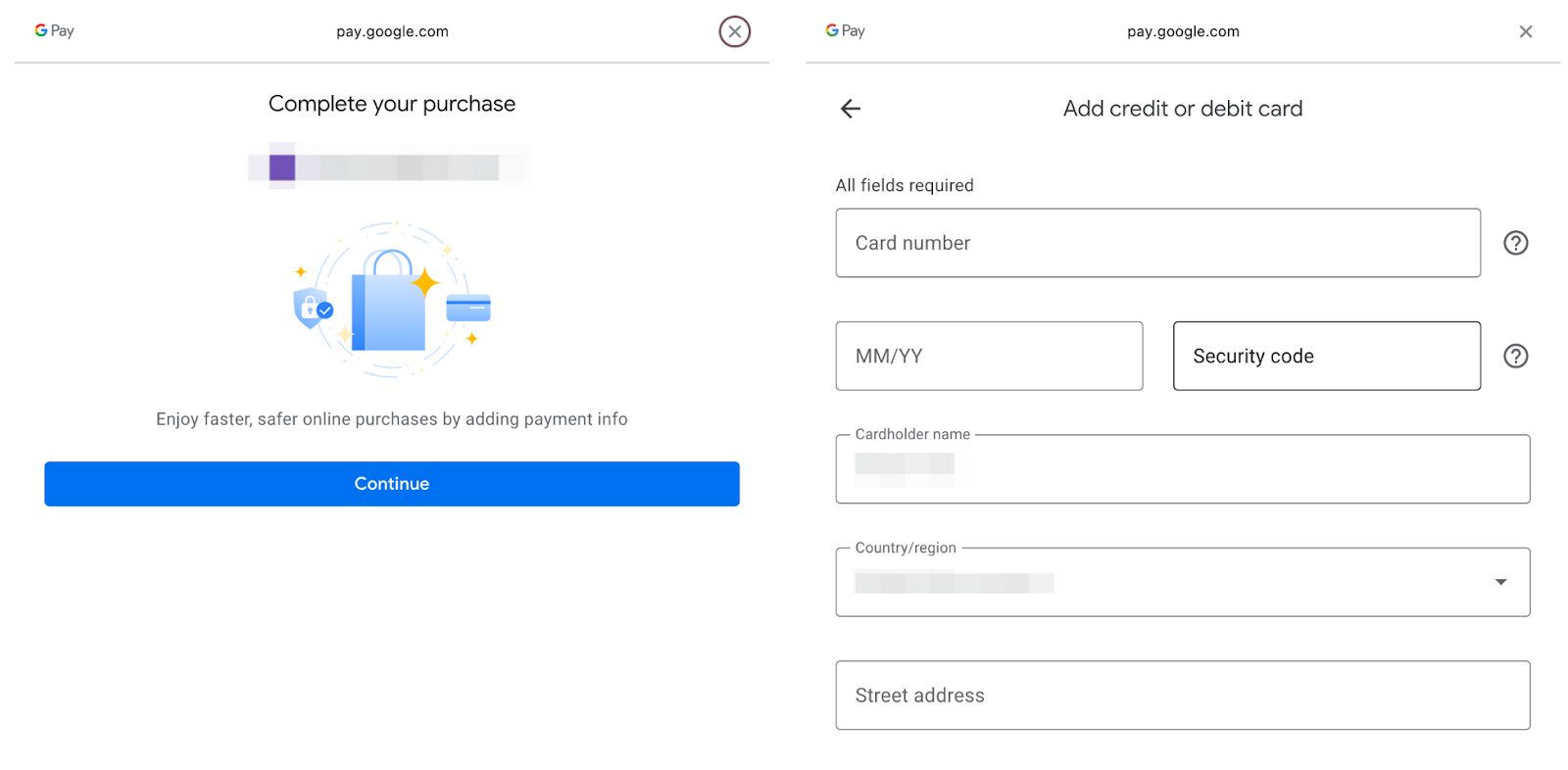
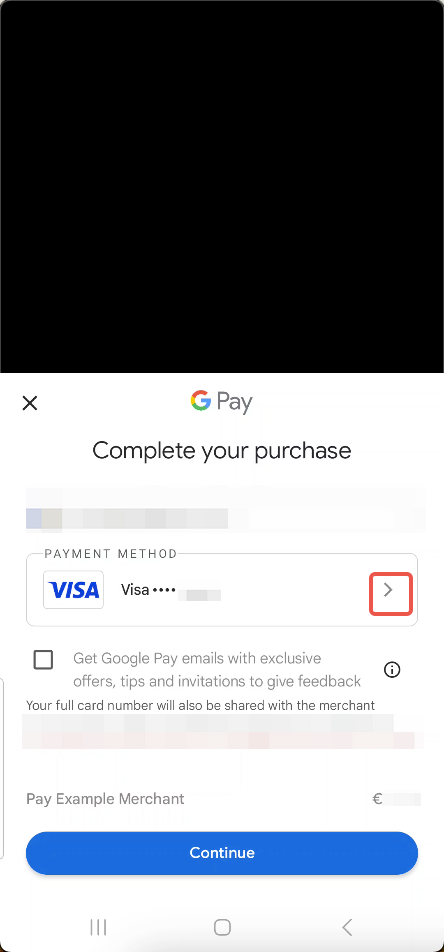
If this is your first time purchasing crypto with a card, you may be prompted to link your account. For Google Pay, ensure you select your correct Country/Region before entering details, as this determines the required format for your information. You may also be asked to confirm a billing address, which will be stored for future transactions.
Step 4: Enter CVV/CVC
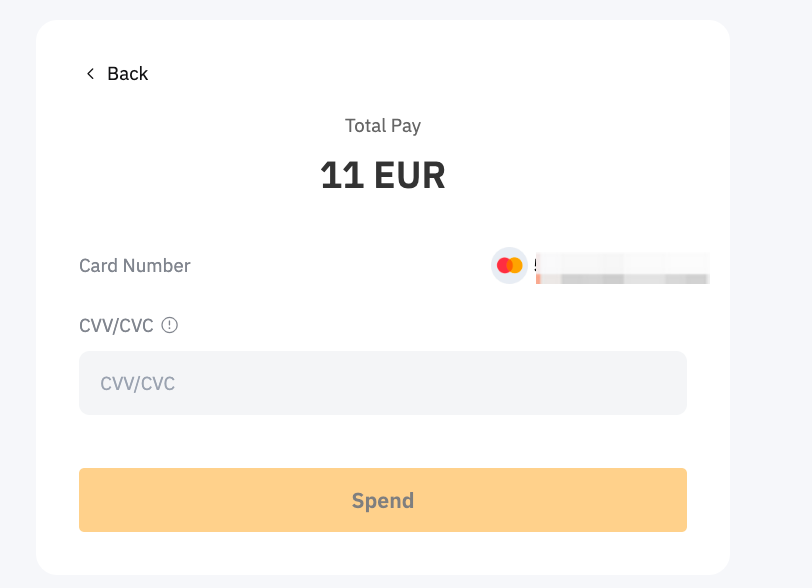
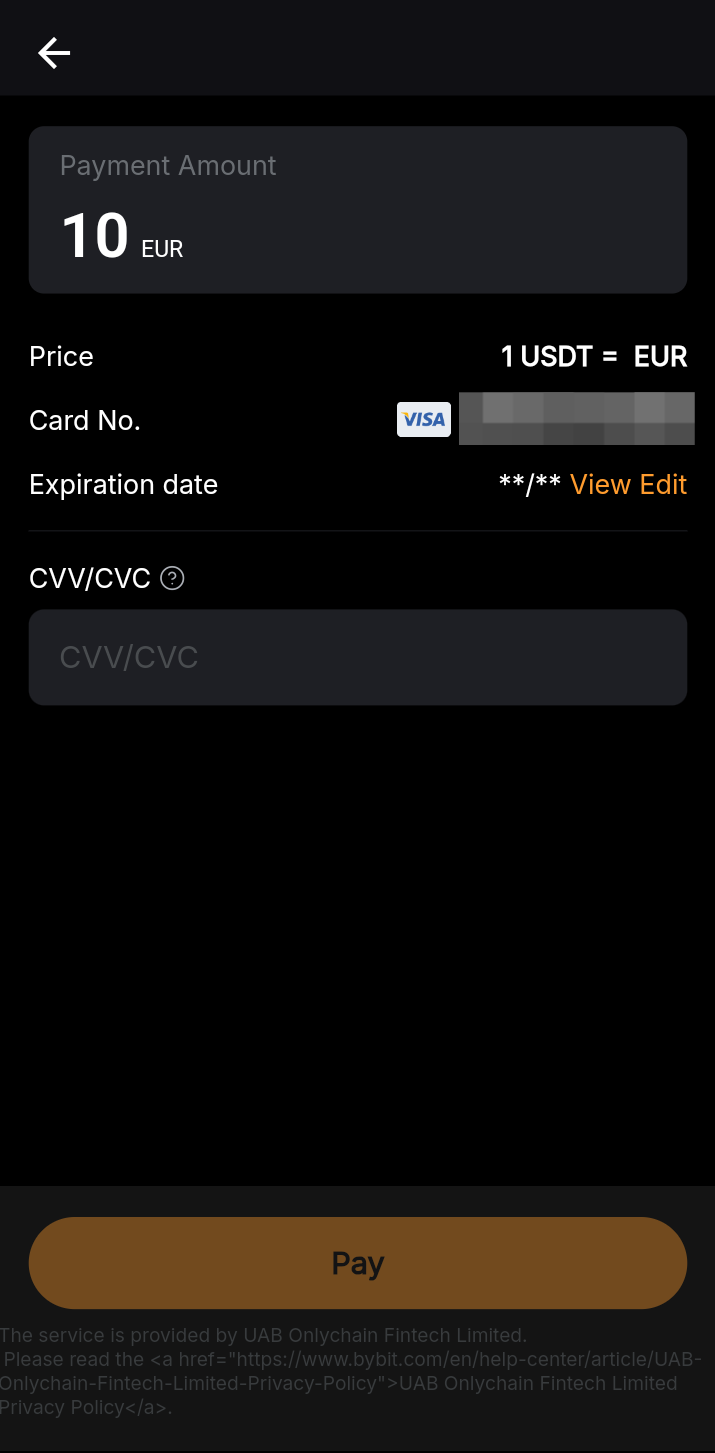
For security purposes, you’ll be required to enter the security code (CVV/CVC) for the selected card in your digital wallet. After entering the code, click on Verify and then Spend to authorize the payment.
Step 5: Complete the transaction
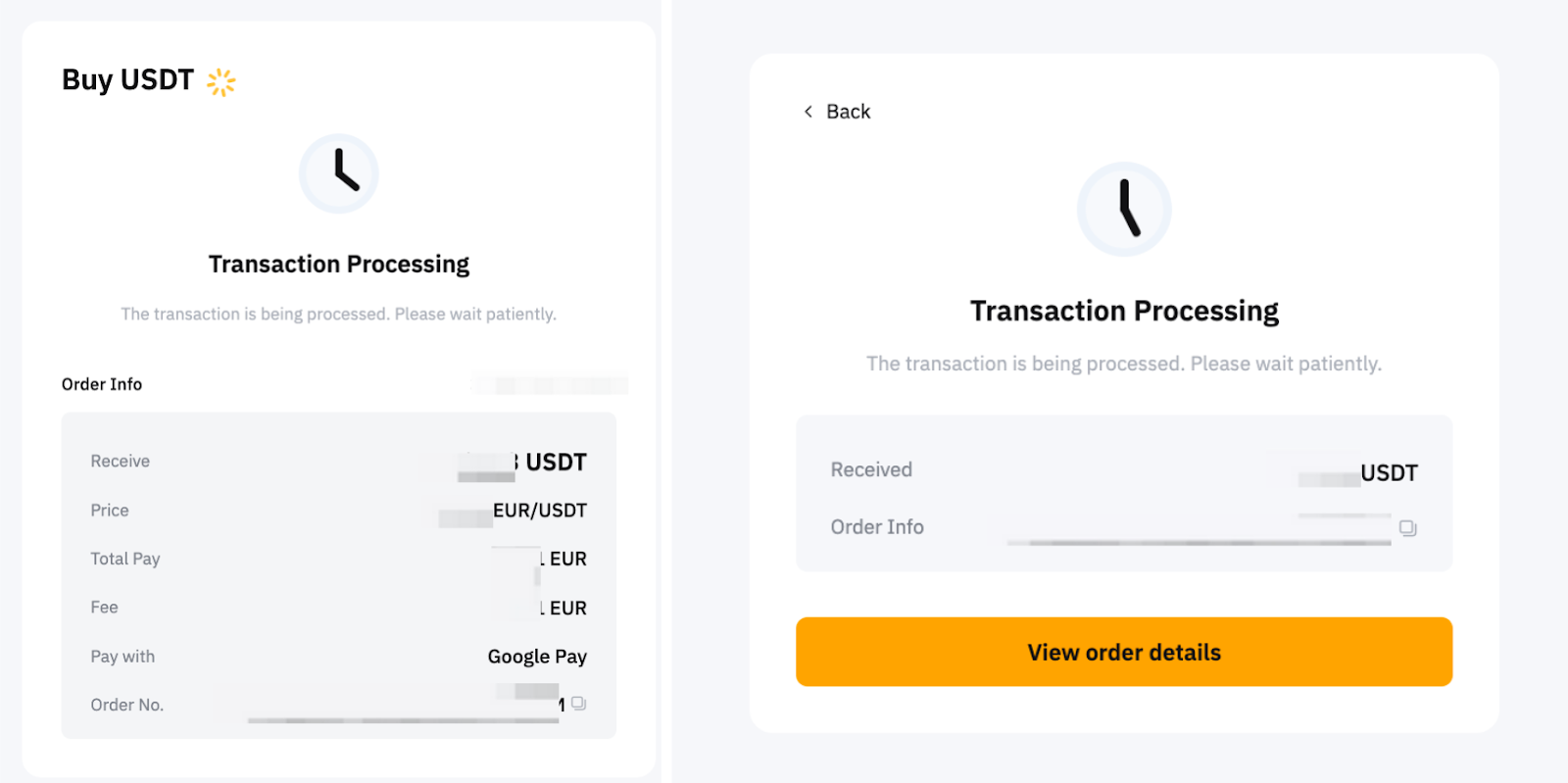
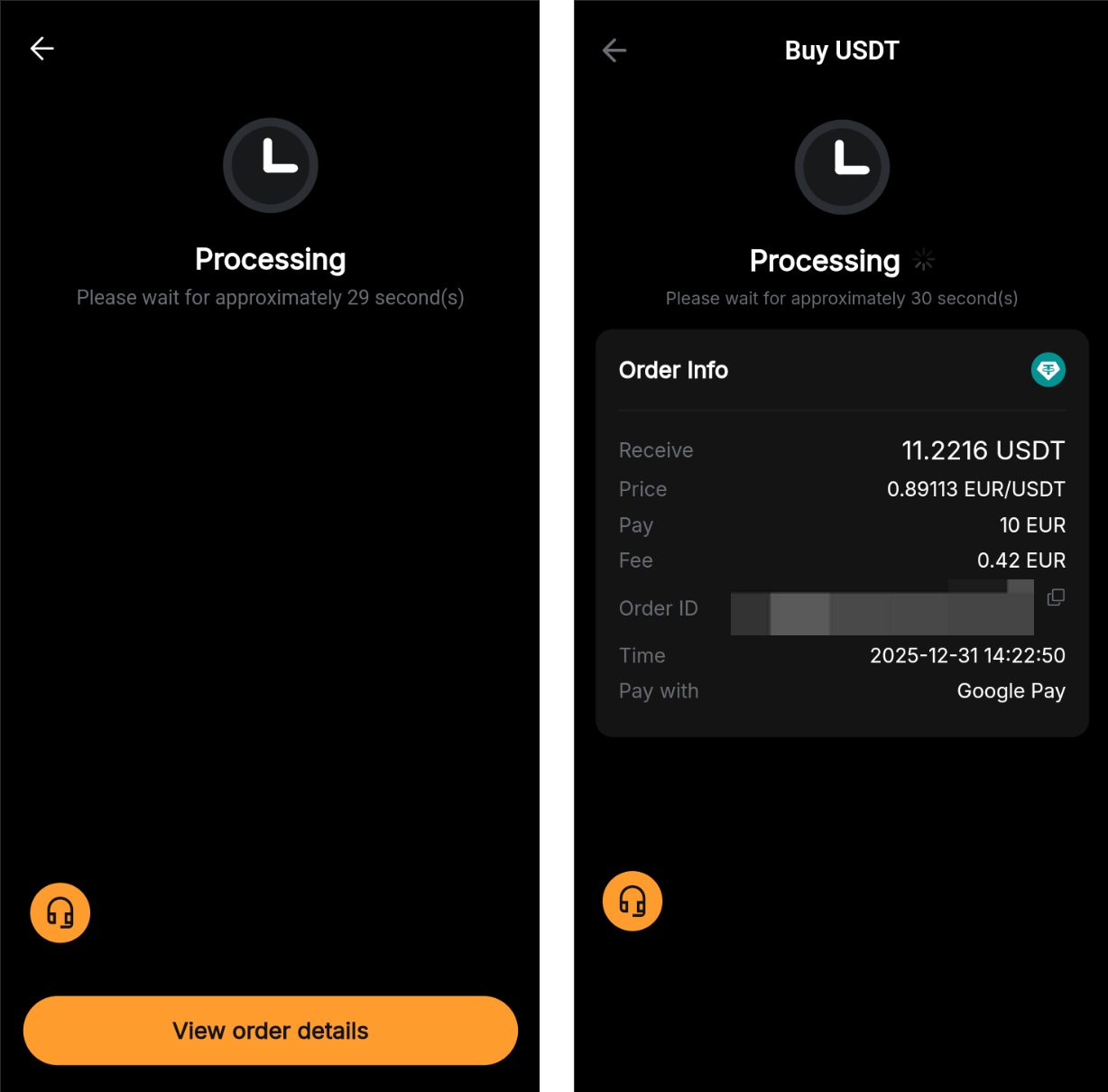
Once the transaction is authorized, it follows the same processing flow as a standard card payment. Assets are usually credited to your account either immediately or within 24 hours.
Fees and limits to be aware of before buying
While buying crypto with a card is convenient, it’s important to be aware of the associated transaction fees and limits. Bybit's fees for card payments vary, depending upon the region in which your card was issued and the specific card scheme (e.g., Visa or Mastercard).
Current fee rates are as follows:
EU (Visa/Mastercard): 1.1%
Non-EU (Visa): 3.05%
Non-EU (Mastercard): 2.7%
Asia (JCB): 5%
Google Pay/Apple Pay: 1.8% + EUR 0.24 fixed cost (applicable to all regions)
The transaction fee is calculated using the following formula:
Transaction fee = filled order quantity × fee rate
Please note that it’s advisable to check the final fee displayed on the order confirmation page before proceeding.
In terms of transaction limits, there’s generally a minimum requirement of $10 (or equivalent) per transaction. The maximum limit is typically $10,000 per transaction for Visa, Mastercard, Apple Pay and Google Pay.
However, your total purchasing power is influenced by your Identity Verification level:
Standard Verification: The limit per order is less than $10,000, and the daily cumulative limit is usually $20,000.
Advanced/Pro Verification: The limit per order is up to $10,000, and the daily cumulative limit increases to $50,000.
If you plan to move large volumes of assets, upgrading your KYC level is the most effective way to increase these caps.
Frequently asked questions (FAQ)
1. How many bank cards can I simultaneously link to my account?
You can link up to five bank cards to your Bybit account. However, there’s one important nuance to this rule: this count includes any unlinked cards from the past 180 days. If you remove a card and then add it back, the system treats it as a "new" card for this count. Therefore, frequent adding and removing of cards should be avoided in order to prevent hitting this limit.
2. Why was I asked to provide or update my billing address?
Providing a billing address is a necessary step to verify your identity and prevent fraud. The system uses an address verification service (AVS) to cross-check the address you enter against your card issuer's records.
To ensure this process works smoothly, your address must comply with the ISO/IEC 8859-1 character format. This means you should be sure to avoid using special symbols or non-Latin letters, as these can cause the verification to fail.
3. How long does it take for crypto to be credited after a card purchase?
In most cases, the crypto is credited to your account immediately or within minutes of the transaction being completed. The official time frame states "within 24 hours," but most transactions take less than ten minutes.
If an order expires due to a timeout, but the payment was successfully deducted from your bank, the refund process is automatically initiated. Refunds typically take between seven to 14 working days to be returned to your bank account.
4. What happens if my card payment fails?
Card payments can fail for several reasons:
Transaction not permitted/do not honor: This is a rejection by the card issuer. You must contact your bank to authorize transactions to Bybit.
Insufficient funds: Ensure your account balance covers the purchase amount, plus fees.
Invalid info: Double-check that the cardholder name, CVV and expiration date are correct.
Billing address doesn’t match: Ensure that the billing address you’ve entered is the same as the billing address on file with the card issuer.
Card type is not supported: Make sure that Bybit supports the card you’re using.
Daily limit reached: You may have hit the daily spending limit set by your bank. If so, you’ll need to request an increase from the bank.
If issues persist, it’s recommended you contact your card issuer first. If the error is on the Bybit platform, please submit a support request and include your Order ID.
What to do after buying crypto with a card
Once your transaction is successful, your purchased assets will land in your Funding Account. From this point on, you can use your crypto across the Bybit ecosystem.
If you wish to trade other cryptocurrencies on the spot, you can head to Bybit Spot. If you’re interested in leveraged trading, you can transfer your assets to your Derivatives or Unified Trading Account to use these assets as margin for perpetuals and options trading. And if you’re looking to generate passive income, you can put your assets to work via Bybit Earn products in order to generate yield over time.
To move funds between these different accounts, simply use the Transfer button in the assets overview page. This internal transfer is instant and free of charge.
Closing thoughts
Credit and debit cards act as a vital bridge between traditional finance and the crypto market. With the One-Click Buy feature on Bybit, you can bypass the delays of bank transfers and access the crypto market instantly. Whether you choose a direct card payment or the convenience of Google Pay and Apple Pay, the process is secure, efficient and user-friendly.
#LearnWithBybit