


Managing risk with AI Subaccounts: A practical guide

An AI Subaccount lets an AI assistant trade on Bybit on your behalf. Once connected, the agent acts autonomously within whatever boundaries you’ve set — and those boundaries are the actual safety net between a well-behaved AI assistant and a costly mistake.
This guide walks you through every AI Subaccount permission. It also offers practical starting points for setting them up — whether you’re connecting an AI assistant for the first time or refining a setup that you already trust.
Key Takeaways:
Every AI Subaccount permission limits what an AI assistant can do with your funds. Treat each one as a deliberate decision, not a default to leave untouched.
Fund isolation (through the cap limit, transfer controls and leverage limits) is your primary defense against unexpected AI behavior.
Monitoring your Subaccount's activity regularly turns a one-time setup into an ongoing risk management practice.
Why risk management matters for AI trading
Manual and AI-driven trading carry different risk profiles. When you trade yourself, you decide in the moment whether conditions, balance and risk tolerance align. An AI agent doesn’t pause to second-guess itself — it executes based on the instructions and permissions it’s been given. This shifts your risk control upstream into the permissions you configure before the AI assistant ever places an order.
Bybit is explicit about this: AI Subaccounts are operated autonomously by AI agents, and Bybit does not control, monitor or guarantee any actions taken or outcomes generated by the AI. All trading risks and losses are borne solely by the user. The permissions detailed below are the practical tools for managing that responsibility.
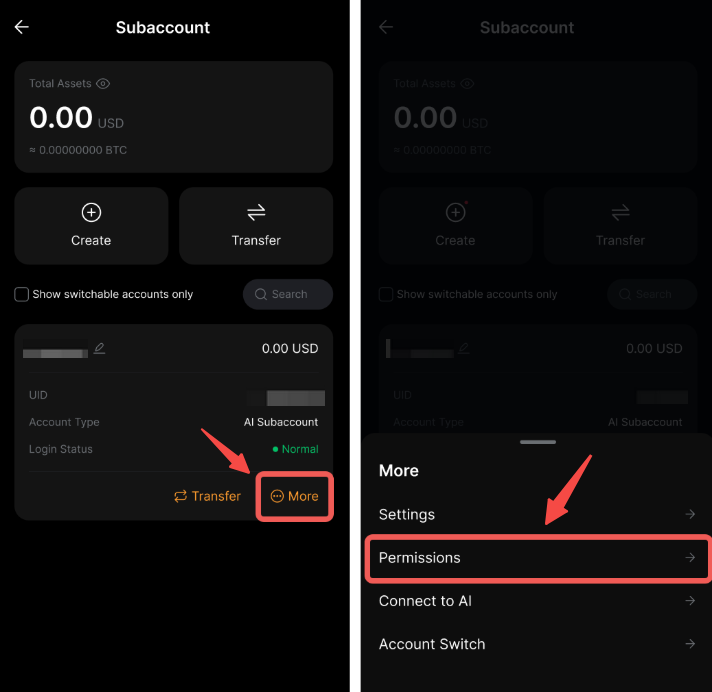
1. Fund isolation: Your first line of defense
The cap limit sets a ceiling on the maximum funds the AI Subaccount can hold, regardless of your main account balance. The default limit is $5,000, adjustable based on your risk tolerance. Setting this limit conservatively at the outset is the single most effective decision you can make. Even in a worst-case scenario, exposure is contained to an amount you’ve already decided you can tolerate.
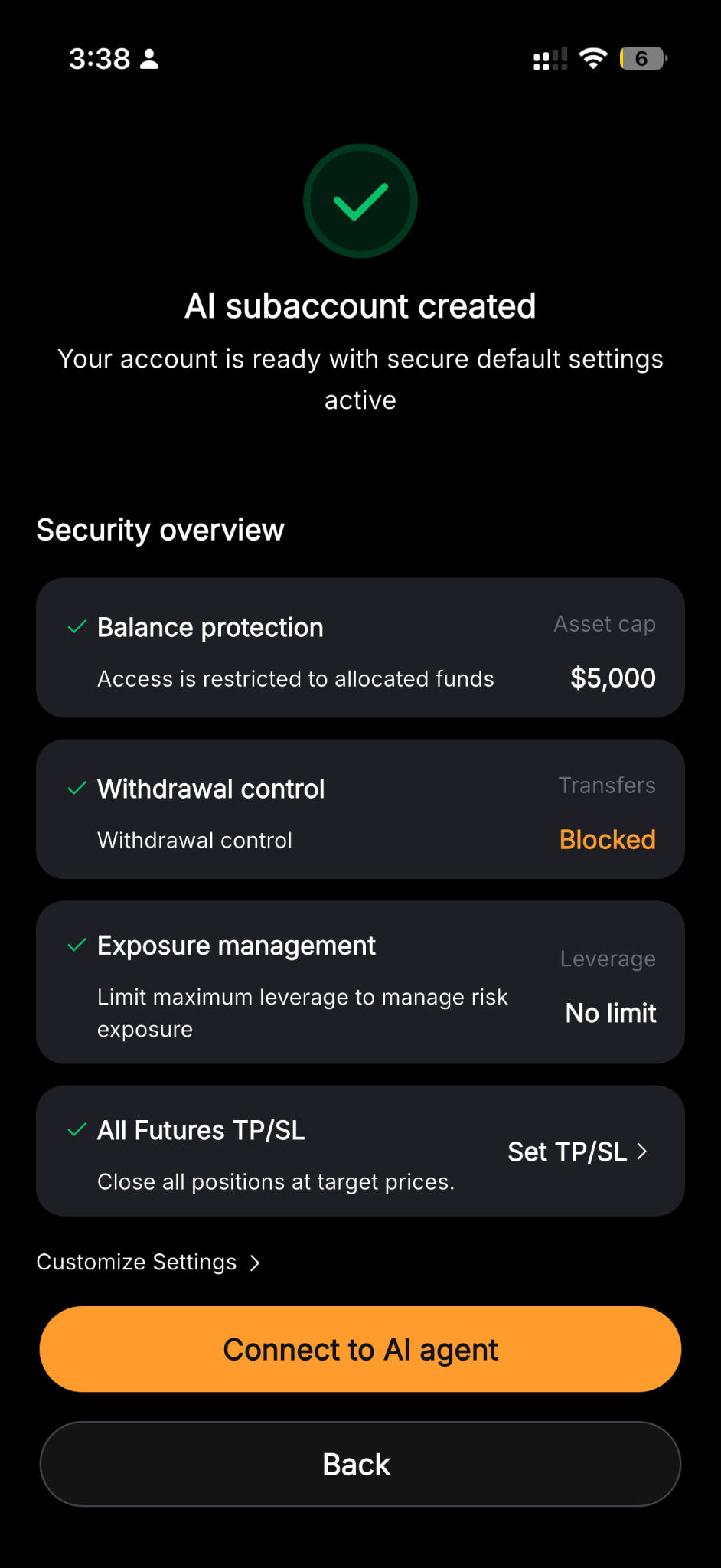
Keeping AI funds separate from your Main Account means that a misconfigured strategy or unexpected behavior cannot touch funds outside what you’ve allocated. As your confidence grows, you can raise the cap incrementally based on your observed track record.
2. Control what the AI can move
Four permissions control how funds move in and out of the Subaccount, as follows:
Transfer In: Lets the AI request funds from your Main Account.
Transfer out: Lets the AI transfer funds back to your Main Account. The permission is disabled by default — and, for most users, worth leaving that way.
UTA to Funding: Lets the AI move funds from your Unified Trading Account (UTA) into your Funding Account.
Funding To UTA: Lets the AI transfer funds from your Funding account to your UTA.
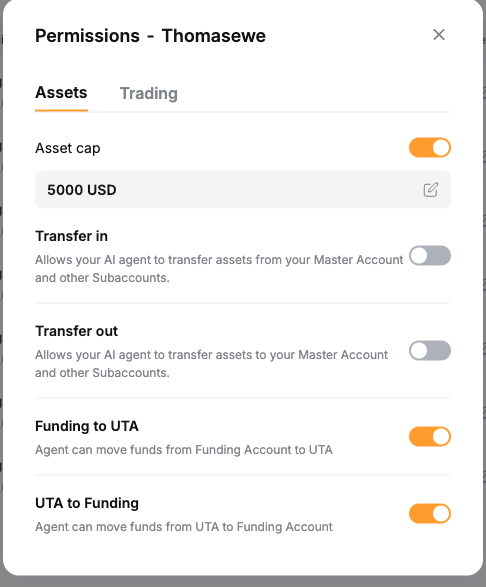
The safest setup enables Transfer In, while leaving Transfer out disabled. This way, you can fund your Subaccount without granting any path for money to move outside of your control. The move permissions are strategy-dependent. Therefore, enable them only if your strategy genuinely requires shifting funds. Beginning traders should start with the minimum required permissions. Experienced users with a track record may enable more permissions.
3. Set leverage limits
Maximum margin leverage and max contract leverage each cap the leverage the AI can use for margin and contract trading. Both are uncapped by default — and thus worth reconsidering, since lower leverage increases the adverse price movement a position can absorb before a margin call or liquidation, which matters more when you’re not watching each position in real time.
A reasonable starting point for most AI-driven strategies is 2x–3x, particularly while building confidence in the way the assistant manages positions.
4. Use TP/SL to define your exit boundaries
Bybit's AI Subaccount permissions include an upcoming control labeled All Futures TP/SL. This control sets the maximum take-profit and stop-loss across all open futures positions (that is, a backstop on acceptable gain or loss). As this is a soon-to-be-released feature, its exact behavior may change before launch.
However, until it is available, exit boundaries can be set through direct instructions: specify the take profit and stop loss for every futures position opened, rather than leaving exit logic to the AI's discretion. For example, instruct it to set a 5% stop loss on all open futures positions, thus closing automatically if a position moves 5% against your entry price.
5. Monitor your AI Subaccount
Permissions set boundaries, while monitoring tells you whether the AI is operating within them. Check your Subaccount's profit-and-loss and trade history from the Subaccount management page. This is the most direct way to verify that the AI assistant’s behavior matches what you’ve instructed it to do.
Several signs suggest that reconfiguration may be needed:
Trade frequency or size that doesn’t match expectations
Leverage consistently near the maximum allowed
Small losses compounding faster than anticipated
If the AI assistant’s behavior genuinely concerns you, pausing or revoking access is always available. Reducing the cap to zero, disabling transfer permissions or removing the API key connection will stop activity immediately.
Recommended permission setup: Beginner vs. experienced
Permission | Beginner setup | Experienced user setup |
|---|---|---|
Cap limit | Low (e.g., $500–$1,000) | Higher, based on demonstrated track record |
Transfer In | Enabled | Enabled |
Transfer out | Disabled | Enabled only if needed for rebalancing |
UTA to Funding/funding | Disabled or minimal | Enabled if the strategy requires it |
Max margin leverage | Low (e.g., 2x–3x) | Moderate, set deliberately (rather than left uncapped) |
Max contract leverage | Low (e.g., 2x–3x) | Moderate, set deliberately (rather than left uncapped) |
Troubleshooting and best practices
Start small: Low cap, low leverage and limited permissions — these are the right defaults for any new connection, regardless of how confident the strategy sounds in theory.
Review trade history weekly: A consistent cadence catches drift in AI behavior before it compounds.
Revoke permissions immediately if unexpected behavior occurs: Permissions can always be reenabled once you’ve understood what’s happened.
The bottom line
An AI Subaccount doesn’t remove the need for risk management — it relocates it. Instead of deciding whether to take each trade, you decide in advance what an AI assistant is allowed to do with your funds. The cap limit, transfer controls, leverage limits and exit instructions covered in this guide are the practical levers for making that decision deliberately, rather than by default.
Start conservative, monitor consistently and adjust permissions as your confidence in the AI assistant is actually earned.
Ready to put smarter risk management to work? Visit the Bybit AI Sub-Account Campaign page to explore the full range of AI-powered strategies built to protect and grow your portfolio.
#LearnWithBybit